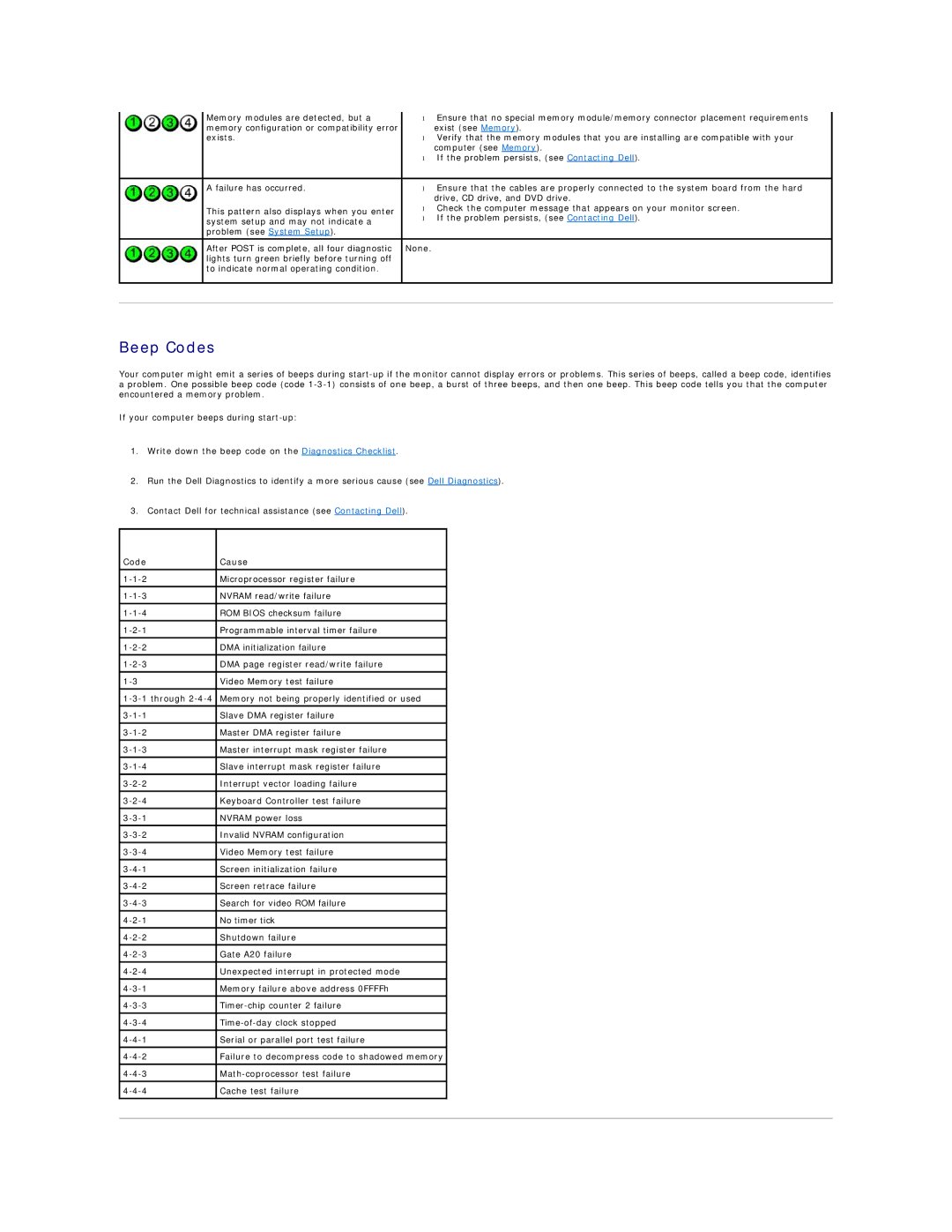
| Memory modules are detected, but a | • Ensure that no special memory module/memory connector placement requirements |
| memory configuration or compatibility error | exist (see Memory). |
| exists. | • Verify that the memory modules that you are installing are compatible with your |
|
| computer (see Memory). |
|
| • If the problem persists, (see Contacting Dell). |
|
|
|
| A failure has occurred. | • Ensure that the cables are properly connected to the system board from the hard |
|
| drive, CD drive, and DVD drive. |
| This pattern also displays when you enter | • Check the computer message that appears on your monitor screen. |
| • If the problem persists, (see Contacting Dell). | |
| system setup and may not indicate a | |
|
| |
| problem (see System Setup). |
|
|
|
|
| After POST is complete, all four diagnostic | None. |
| lights turn green briefly before turning off |
|
| to indicate normal operating condition. |
|
|
|
|
|
|
|
Beep Codes
Your computer might emit a series of beeps during
If your computer beeps during
1.Write down the beep code on the Diagnostics Checklist.
2.Run the Dell Diagnostics to identify a more serious cause (see Dell Diagnostics).
3.Contact Dell for technical assistance (see Contacting Dell).
Code | Cause |
|
|
|
|
Microprocessor register failure |
| |
|
|
|
NVRAM read/write failure |
| |
|
|
|
ROM BIOS checksum failure |
| |
Programmable interval timer failure |
| |
|
|
|
DMA initialization failure |
| |
|
|
|
DMA page register read/write failure |
| |
|
|
|
Video Memory test failure |
| |
|
|
|
Memory not being properly identified or used |
| |
|
|
|
Slave DMA register failure |
| |
|
|
|
Master DMA register failure |
| |
|
|
|
Master interrupt mask register failure |
| |
Slave interrupt mask register failure |
| |
|
|
|
Interrupt vector loading failure |
| |
|
|
|
Keyboard Controller test failure |
| |
|
|
|
NVRAM power loss |
| |
|
|
|
Invalid NVRAM configuration |
| |
|
|
|
Video Memory test failure |
| |
|
|
|
Screen initialization failure |
| |
|
|
|
Screen retrace failure |
| |
Search for video ROM failure |
| |
|
|
|
No timer tick |
| |
|
|
|
Shutdown failure |
| |
|
|
|
Gate A20 failure |
| |
|
|
|
Unexpected interrupt in protected mode |
| |
|
|
|
Memory failure above address 0FFFFh |
| |
|
|
|
| ||
|
|
|
| ||
Serial or parallel port test failure |
| |
|
|
|
Failure to decompress code to shadowed memory |
| |
|
|
|
| ||
|
|
|
Cache test failure |
| |
|
|
|
|
|
|