Dell OptiPlex 320 Users Guide
LegacySelect Technology Control
Advanced Features
Manageability
Security
System Password
Password Protection
Option Settings
Assigning a System Password
Administrator Password
Deleting or Changing an Existing System Password
Assigning an Administrator Password
Disabling a Forgotten Password and Setting a New Password
System Setup
Entering System Setup
System Setup Screens
System
System Setup Options
PS/2
Unlocked
Boot Sequence
Changing Boot Sequence for the Current Boot
Booting to a USB Device
Changing Boot Sequence for Future Boots
Memory Key
Clearing Forgotten Passwords
Jumper Setting Description
Floppy Drive
Power Management
Clearing Cmos Settings
Hyper-Threading
Click Hardware and click Device Manager
Sleep Mode Wake-Up Methods Windows XP
Battery
Back to Contents
Recommended Tools
Before You Begin
Turning Off Your Computer
Before Working Inside Your Computer
Page
Computer, Keyboard, and Monitor
Cleaning Your Computer
Mouse
CDs and DVDs
Back to Contents
Connecting Two to Three Monitors Using Surround View
Connecting Multiple Monitors
Changing the Display Settings
Desktop Computer
About Your Desktop Computer
Front View
Back View
Back-Panel Connectors
Inside Your Computer
System Board Components
PCI and PCI Express Cards
Installing an Expansion Card
Removing an Expansion Card
Back to Contents
Removing the Processor
Processor
Installing the Processor
Back to Contents
Connecting Drive Cables
General Installation Guidelines
Drive Interface Connectors
IDE Drive Connector Serial ATA Connector
Connecting and Disconnecting Drive Cables
Power Cable Connectors
CD/DVD Drive
IDE Drive Addressing
Installing a CD/DVD Drive
Removing a Floppy Drive
Floppy Drive
Installing a Floppy Drive
Removing a Hard Drive
Hard Drive
Installing a Hard Drive
Back to Contents
Panel
Removing the I/O Panel
Replacing the I/O Panel
Replacing the Power Supply
Power Supply
Pin Number Signal name AWG Wire
DC Power Connectors
Pin Number Signal Name 22-AWG Wire
Pin Number Signal Name 18-AWG Wire
Back to Contents
Removing the Computer Cover
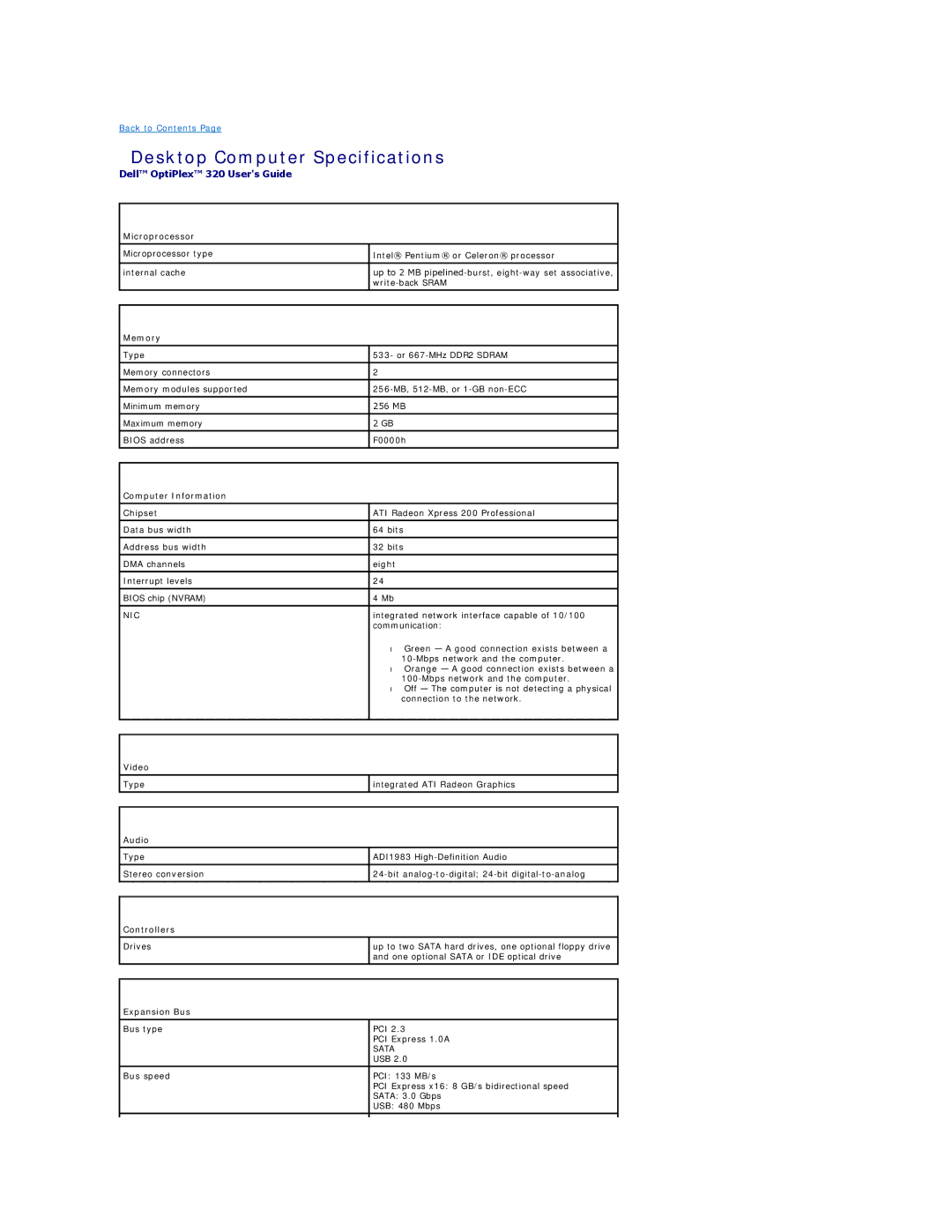
Desktop Computer Specifications
Drives
Connectors
Key Combinations
Controls and Lights
Power
Physical
Environmental
FCC Class B
FCC Notice U.S. Only
Finding Information
What Are You Looking For? Find It Here
Support.dell.com
Dell Support Website support.dell.com
Select Drivers & Downloads and click Go
Click Start→ Help and Support
Panel
Power Supply
Pspwrgood
DC Power Connectors P3 and P5
DC Power Connectors P8 and P9
Removing the Computer Cover
Mini Tower Computer Specifications
Cards Full-height cards supported
Power
Transferring Information to a New Computer
Microsoft Windows XP Features
Setting Up a Home and Office Network
User Accounts and Fast User Switching
Click Checklist for creating a network
Replacing the Computer Cover
Desktop Computer
What Is a Driver?
Reinstalling Drivers and the Operating System
Reinstalling Drivers and Utilities
Drivers
Using Microsoft Windows XP System Restore
Creating a Restore Point
Using the Optional Drivers and Utilities CD
Undoing the Last System Restore
Reinstalling Microsoft Windows XP
Enabling System Restore
Restoring the Computer to an Earlier Operating State
Reinstalling Windows XP
Booting From the Operating System CD
Windows XP Setup
Next
Battery Problems
Solving Problems
Drive Problems
CD and DVD drive problems
Lockups and Software Problems
Keyboard Problems
Hard drive problems
Problems writing to a CD/DVD-RW drive
Computer does not start up
Other software problems
Computer stops responding
Program stops responding
Mouse Problems
Memory Problems
Power Problems
Network Problems
Restoring Default Settings
Printer Problems
Serial or Parallel Device Problems
Sound and Speaker Problems
No sound from speakers
Video and Monitor Problems
No sound from headphones
If the screen is blank
If the screen is difficult to read
Check the diagnostic lights See Diagnostic Lights
Removing the System Board
System Board
Replacing the System Board
System Board Screws
Back to Contents
Models Dcsm and Dcne September 2006 P/N JK524 Rev. A01
Dell Diagnostics
Troubleshooting Tools and Utilities
When to Use the Dell Diagnostics
Starting the Dell Diagnostics From Your Hard Drive
Power Light Problem Description Suggested Resolution
Dell Diagnostics Main Menu
System Lights
Option Function
Light Pattern Problem Description Suggested Resolution
Diagnostic Lights
Code Cause
Beep Codes
Click the Change or Remove Program icon
Error Messages
Operating system not found
Read fault Requested sector not found Reset failed
Click Performance and Maintenance and click System
Resolving Software and Hardware Incompatibilities
Microsoft Windows XP
Warranty