User’s Guide
Page
User’s Guide
Copyright Information
Contents
Control panel
HP supplies and accessories
Resource Description Location
Getting started
Finding other resources for the product
See Administer the printer
Understanding the printer parts
Front view
Control panel
Back view
To install tray
Installing accessories
Installing tray
Installing the auto-duplex unit
To install an auto-duplex unit
Installing the HP Jetdirect print server
To install the HP Jetdirect print server
To obtain more information
Document Description
Installing memory modules
To install a Dimm
To verify that the Dimm is installed correctly
Enabling accessories in the printer driver
To enable accessories on Windows computers
Selecting print media
Using the printer
Tips for selecting and using print media
Cards and envelopes
Transparencies
Understanding specifications for supported media
Photo paper
Custom-size media
20 3 Using the printer
Supported media types and weights
Tray Type Weight Capacity
Setting minimum margins
Media Left margin Right margin Top margin Bottom margin
Loading media
To load tray 1 or tray
Tray
To change default settings for all future jobs Windows
Changing print settings
Canceling a print job
To change settings Mac OS
For Mac OS
Printing with the front or rear manual feed slot
For Windows
Printing on both sides duplexing
Guidelines for printing on both sides of a
To perform duplexing Windows
To perform automatic duplexing Mac OS
To print on special media Windows
Click Custom Paper Size in the Settings pull-down menu
Printing on special and custom-size media
To print on special media Mac OS
Managing the printer
Configuring and managing
Printer
Overview of printer management tasks
Use this tool To obtain the following information
Administer the printer
Monitor the printer
Use this tool To do the following
Embedded Web server EWS
Configure network options
Overview of printer management tools
EWS pages
HP Web Jetadmin software
To open the EWS
To open the Toolbox
Tabs Contents
Toolbox Windows
Toolbox tabs
HP Instant Support
Security and privacy
MyPrintMileage
To gain access to HP Instant Support
To gain access to myPrintMileage
Embedded Web server
Understanding and printing the configuration
Upgrading the firmware in the printer
To print a configuration
Type copy /b path\filename portname at the command prompt
Direct connection
Configuring the printer Windows
Installing printer software and sharing the printer
To connect the printer before the installing software
To share the printer on a locally shared network
To install the software on a network
Network connection
Select Network Printer or Network Printer Server
To install the printing software on client computers
To install the printer driver using Add Printer
To share the printer on a locally shared network
Configuring the printer Mac OS
To install the software for network or direct connection
Direct connection
To share among computers with the same operating system
To share among computers with different operating systems
To uninstall the software for Macintosh computers
Uninstalling the printer software
To uninstall the software for Windows computers
Double-clickAdd/Remove Programs
Understanding control-panel messages
Error messages
Control panel
Types of control-panel messages
Control-panel messages
Message Description
When the ink cartridge expires, replace with a new HP
Understanding control-panel menus
Information menu
Paper Handling menu
Message Value or Submenu Description
52 5 Control panel
Configure Device menu
Resetting the printer
Default = Letter
Printing menu
Print Quality menu
Maintenance menu
Diagnostics menu
Paper Path Test menu
Changing networking parameters from the control panel
EIO menu
Changing networking parameters from the control panel
Novell NetWare frame type parameters
To disable network protocols
Disabling network protocols optional
To reset the HP Jetdirect print server
Changing printer settings from the control panel
Resetting the HP Jetdirect print server
To access the menus and settings
Replacing the ink cartridges
Troubleshooting
Maintaining
To replace an ink cartridge
To check printhead health
From the configuration
Maintaining the printheads
From the embedded Web server
From the control panel
To clean printheads automatically
To align the printheads
To replace the printheads
To clean the printhead contacts manually
Maintaining the printheads
To calibrate the linefeed
Calibrating the color
Calibrating the linefeed
To reset the printer
Troubleshooting tips and resources
General troubleshooting tips
Printer shuts down unexpectedly
Resetting the control panel language
Resolving printing problems
All printer lights are blinking
Printer does not accept printhead
Blank page printed
Placement of the text or graphics is wrong
Printer takes a long time to print
Poor print quality and unexpected printouts
Meaningless characters print
Ink is smearing
Ink is not filling the text or graphics completely
Clean the inside of the auto-duplex unit
Enable the printers output ramp
Check the ink cartridges
Wrong colors are printing
Output is faded or dull colored
Colors are printing as black and white
Printout shows bleeding colors
Lines or dots are missing from text or graphics
Check graphics placement
Colors do not line up properly
Check printheads
Resolving paper-feed problems
Resolving printer management problems
Embedded Web server EWS cannot be opened
Problems installing software
Troubleshooting installation issues
Problems printing alignment
Problems connecting to a wired network
Problems connecting to a network
General network troubleshooting
To clear a jam
Clearing jams
To avoid jams
Clearing jams
System requirements for ordering printing supplies
HP supplies and accessories
Ordering printing supplies online
To order printing supplies
Memory modules
Accessories
Accessories and cables
Network interfaces
HP Media
Supplies
Ink supplies
HP Premium Photo Paper
HP Multipurpose Paper
HP Premium Plus Photo Paper
HP Photo Paper
Business communication paper
Obtaining HP telephone support
Support and warranty
Obtaining electronic support
Before you call
Telephone support numbers
Country/Region Telephone number
Obtaining HP telephone support
Country/Region Telephone number
For support information, call your HP service provider
Hewlett-Packard limited warranty statement
Extent of limited warranty
Local law
Limitations of warranty
Limitations of liability
Enww
HP Inkjet Supplies Expiration
How do you return a product?
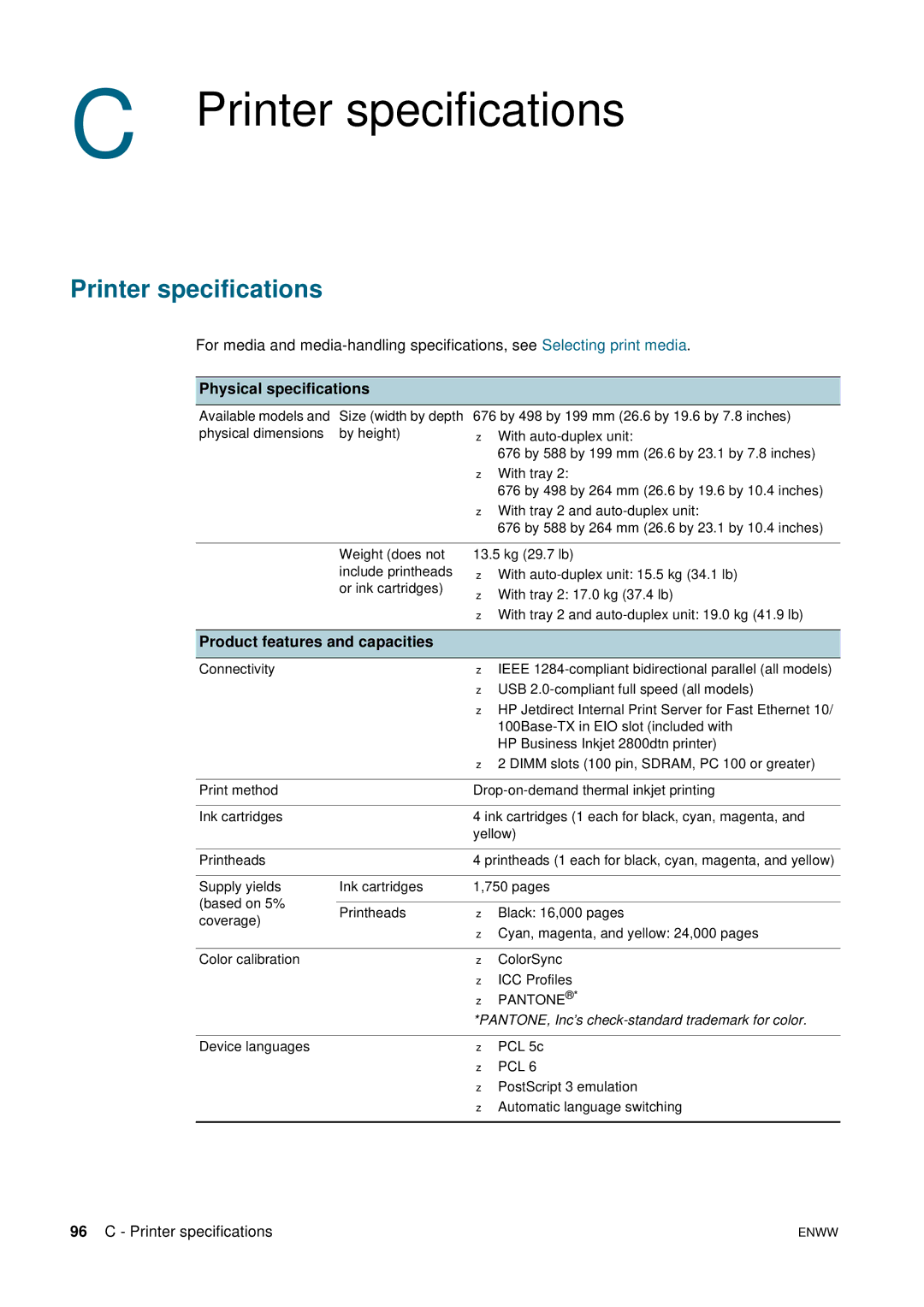
Physical specifications
Printer specifications
Printer specifications
Product features and capacities
Processor and memory specifications
Operating system and network protocol specifications
TCP/IP
Functional specifications
Features
Environmental specifications
Electrical specifications
EMI statement Korea
Regulatory information
FCC statement
Shielded cables
LED classification
Power cord statement
Vcci statement Japan Regulatory model number
Declaration of conformity
Declaration of Conformity
Reduction and elimination
Power consumption
Environmental sustainability program
Recycling
Material safety data sheets End-of-life returns
Hazardous materials
Product packaging
Index
Index
Font support 97 supported 96 laser-quality speed
Index
Snmp
Unix
Page
Copyright Hewlett-Packard Development Company, L.P