Océ Operation Guide
Regarding Trademarks
Symbols
IBM program license agreement
Limited Warranty
License
Limitation of Remedies
Iii
Contents
Glossary Glossary-1 Index Index-1
Appendix B Host Computer Interface
For More Information
Introduction
Guide to the Operation Guide
Important! Please read first
Power Supply/Grounding the Printer
Installation Precautions
Other Precautions
Environment
Precautions for Use
Page
Chapter Names of Parts
Cleaning knob
Main switch
Cleaning brush
Power cord connector Option unit connector
Chapter Handling Paper
Paper Specifications
General Guidelines
Paper Availability
Selecting the Right Paper
Paper Grain
Moisture Content
Other Paper Properties
Transparency Overhead Projection Film
Special Paper
Adhesive-Backed Labels
Paper type to be used Media type to be selected
Paper Type
Inch specifications
How to Load Paper
Metric specifications
Loading Paper into the Paper Cassette
Loading Paper into the MP Multi- Purpose Tray
Setting Envelopes
Understanding the Operator Panel
Using the Operator Panel
Interface Indicator
Operation Indicators
Indicator Description
Message Display
Paper Type Indicator
Paper Size Indicator
Message Display Paper Size
Message Display Paper Type
Key Function
Keys
Parallel
Network
Menu Selection System
Using the Operator Panel
USB
On the next
KIR Mode Off EcoPrint Mode Off EcoPrint Mode On
Paper Handling
Life Counters Others Total Print New Toner Installed
Printing the Menu Map
Using the Menu Selection System
Printing Status
MPS
Quick Copy Harold
MPS
?Harold
Quick Copy ?Arlen
Private/Stored
Private/Stored Harold
Private/Stored ?Arlen
Arlen ?Agenda
List Code JOB
Agenda Delete
List Code JOB ?
Cera Mita KM-Net Job Manager
Print VMB Data Tray001Richard
Print VMB Data Tray001
Print VMB Data
List of VMB
Quick Copy
MPS Configuration
Temp. Code JOB Size 0500MB
Maximum Space Assigned to Temporary Code Jobs
Perm. Code JOB Size
Perm. Code JOB Size 0500MB
050
VMB Size 0500MB
Interface ?Parallel
Changing the Interface Parameters
Parallel I/F ?Nibble high
Interface ?Serial
Interface ?Network
Baud Rate
Changing Network Interface Parameters
? Off
Dhcp Off IP Address Subnet Mask Gateway 000.000.000.000
Printing a Network Interface Status
Changing the Emulation
Alt. Emulation ?PCL
Emulation
Print Kpdl Errs Off
?Off
Pen Width
Setting the Default Font
Pen1 Width Dots
KC-GL Page Set ? Spsz
I000
Font Select Internal
?I000
Courier Regular
Setting the character code set
Setting the Character Pitch for Courier/Letter Gothic
Size Points
Pitch 10.00 cpi
Using Page Set Menus
Zoom CS→CS
Source size indicator Target size indicator
Selecting the Reduced Print
→CS
Zoom
CS →C S98%
Orientation Portrait
CR Action CR only
LF Action LF only
CR Action
? CR only
KIR Mode
Setting the Print Quality
EcoPrint Mode Off
Print Quality
Resolution Fast 1200 mode
EcoPrint Mode
Resolution ? Fast Mode
Operating an Option Hard Disk
Read Data DataH001
Hard Disk
Read Data
Write Data
List Partitions ?
List Partitions
Delete Data DataH001
Delete Data
Operating the RAM Disk
Read Data ? DataH001
Operating a Memory Card
Read Fonts
Memory Card
Read Fonts ?
Read Fonts Processing
Formatting
Format
Paper Handling
MP Tray Type Plain
Setting the MP Tray Type
MP Tray Type ? Plain
Cassette Paper Size Display
Unit
Cassette1 size
Unit ? mm
Cassette 1 Type Plain
Feed Select ? Cassette1
Cassette 1 Type ? Plain
Feed Select Cassette1
Duplex Mode ?None
Duplex Mode None
Stack Select Top tray FaceDn
Stack Select ?Top tray FaceDn
Type Adjust Custom
Stitch Adjust
A4/Letter 000
Override A4/LT Off
Paper Weight Normal
Type Adjust ? Custom
Paper Weight ? Normal
Duplex Path Enable
Other Modes
MSG Language English
Others
MSG Language ? English
Form Feed Time Out 030sec
Sleep timer 01 5 min
Sleep timer
Sleep timer 015 min
Sleep Mode
Printer Reset ?
Printer Reset
Self test Please wait Ready
Resource Prot Off
Auto Continue Mode ? Off
Auto Continue Mode Off
Auto Continue Mode On
Buzzer
Finishing Error
Auto Continue Timer 0Sec
Duplex
Duplex ? Off
Staple
Service
Staple ? Off
Punch
Press Key repeatedly until Print
Symptom Check Items Corrective Action
Troubleshooting
General Guide
Print Quality Problems
Check the charger unit installation
Check the EcoPrint setting
Check the print density
Check the paper ramp
Indicators
Indicators and Messages
Maintenance Messages
Indicator Condition Description
Path error Incorrect slot
Adapter Duplex disabled
Please reinstall
Install MK
Error Messages
Correct reading of the memory card
Paper jam message
Correcting a Paper Jam
Description Reference
Online help messages
Jam at the MP Tray
Jam in Paper Cassette
Jam inside the MP transport
Push the lever gray colored to raise the duplex unit
Jam in Left Cover
Paper Jam at the Option Document Finisher
Toner Container Replacement Interval
Toner Container Replacement
Chapter
Replenishing Toner
Maintenance
Pull it several times, and then push it back
Replacing of toner and cleaning of the internal parts
Fonts
PCL Scalable and Bitmap Fonts
Kpdl Fonts
Fonts
Available Options
Appendix a
PF-75 Paper Feeder
PF-70 Paper Feeder
IB-20/21E/22 Network Interface Card
IB-20/IB-21E/IB-22 Network Interface Cards
PF-70/75 Paper Feeders
Installing Option Units
Network Interface
DF-71/73/75 Document Finishers
Memory Card
Hard Disk
Removing the Main Circuit Board
YES no
Removing the Main Circuit Board from the Printer
Testing the Expansion Memory
Installing DIMMs
Removing Dimm
DIMMs to be used
Appendix B Host Computer Interface
Interface Signals
Parallel Interface
Parallel Interface Communication Modes
USB Interface
Specifications
RS-232C Protocol
Serial Interface Option
RS-232C Interface
Connecting the Printer to the Computer
Prescribe Frpo D0 command
RS-232C Cable Connection
Obtain a Suitable RS-232C Cable
Windows XP, proceed as follows
Setting the RS-232C Parameters
System
Windows 95/98/ME
\MODE COM196,N,8,1,P C\MODE LPT1=COM1
DOS
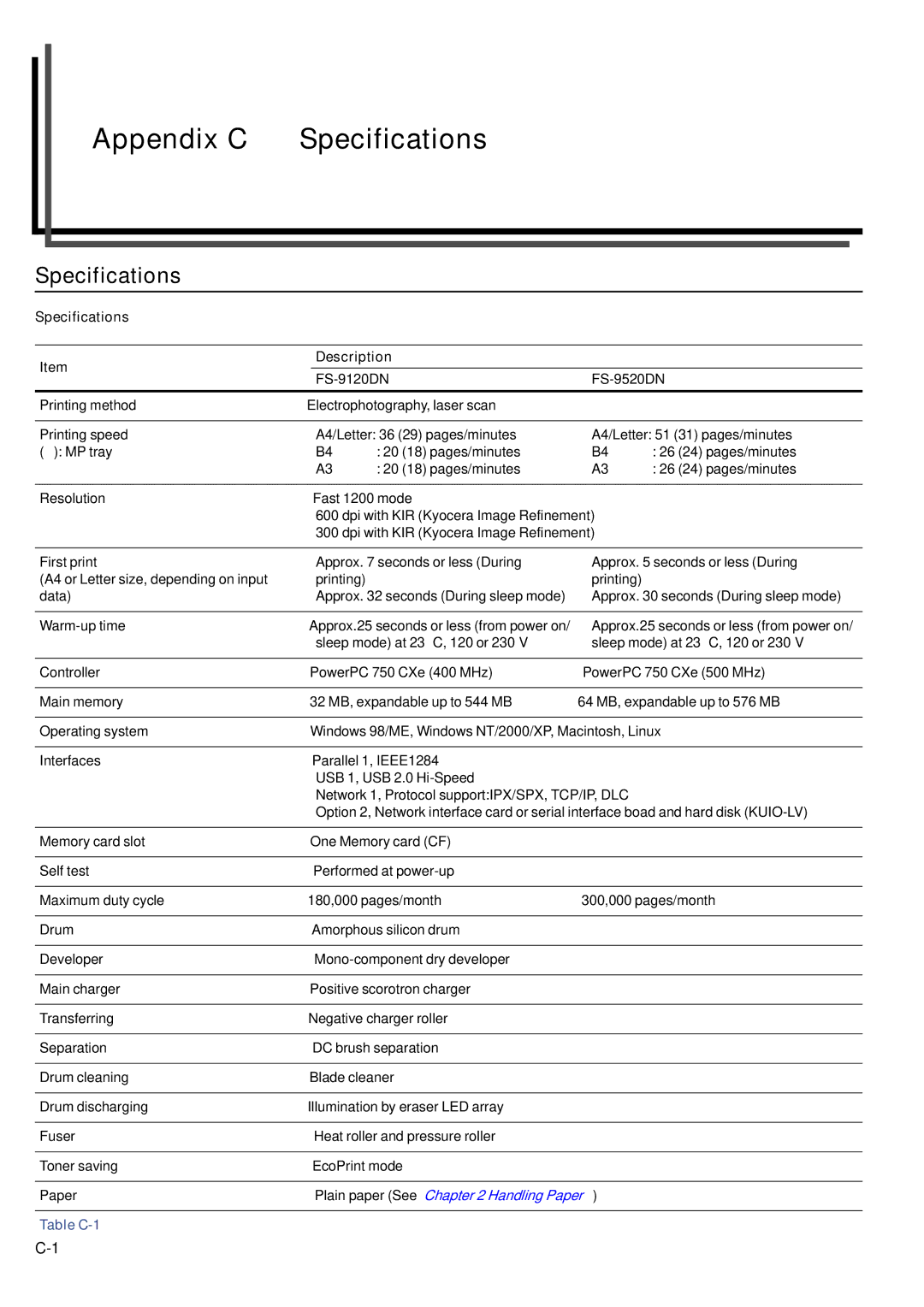
Specifications Description FS-9120DN FS-9520DN
Appendix C Specifications
Description FS-9120DN FS-9520DN
Appendix C Specifications
Glossary
Printer driver
Sleep mode
RAM disk
Simple Network Management Protocol Snmp
Dimm A-5
Index
Index