G670
Specification
Safety Precautions
Medical Devices
Public Place
Boarding an Aircraft
Potentially Explosive Atmosphere
User Guide
Exposure to Radio Waves
Using Your Phone Properly
Precaution Using Thermometer
Body temperature guide
Normal body temperature of each body part
Measured part Body temperature
Lens Washing
Normal body temperature by age
Ages Body temperature
Memo
Table of Contents
Menu functions
Messages SMS/EMS
FUN & Tools
Troubleshooting Troubleshooting
Appendix
Components
Handset Description
Internal LCD Main LCD
Main LCD Screen
Roaming Indicates that roaming service is Available
Sublcd Menu
SUB-LCD Menu Options
Flash on
Name Key Function
Function Keys
Function keys
Press this key if you wish to adjust
Quick Start
Installing the Battery
Charging the Battery
Getting started
Turning Your Phone on
Turning Your Phone OFF
Making a Call
Ending a Call
Answering a Call
Adjusting the Earpiece Volume
Browsing the Main Menu
Inputting Characters and Numbers
Basic Functions
T9 Guideline
Speed Dialing
Missed Calls
Making AN International Call
Making AN Emergency Call
Phone Book Shortcut
Last Number DIALLED/RECEIVED/MISSED
Call Waiting
Menu
During a Call Options During a Call
Multi-tap English
T9 Number and T9 Symbol
T9 English
Memo
STK
Menu Type
Messages
Before getting started
Detailed functions of settings
Detailed functions of Used Space
Inbox, Outbox, Archive messages
Outbox
Archive
Inbox and Outbox menu
File size limit for EMS files
Creating/Sending/Storing a message Creating a message
Archive menu
Text style
T9 options
Sending the message
File extension names available for EMS items for Load
Storing messages
Storing messages in the SIM card
Storing messages in the handset
Receiving a message
Storing messages with attached files
Limit in Create
Maximum words allowed per text-only message English
Chinese
MMS Settings
Menu structure
Writing and sending multimedia messages
MMS download
Press the key
Adjust the object properties of inserted images and sounds
Receiving Messages
Read Message and its functions
Storing message objects
Deleting a message
Moving a message
Editing a message
Voicemail
Settings
Cell broadcasts Read info
Language
Set Info
Dialled Calls
Call Logs
Received Calls
Missed Calls
Clear Logs
Call Info Call costs
Call timers
Reset call time
Dialled calls
Received calls
Last connection
Gprs Info Current connection
All connections
Ringing Settings Ring type
Ringing Volume
Sound
Melody type
Message Alert
Key Tone
Flip Open Tone
Sound Effect
Key Tone Setting
Operating Method Bell/Vibration/Volume
Message Tone Setting
Flip Open Tone
Sound Effect
Screen Setting
Settings
Display Visual Setting
Screen Option
PW OnOff Screen
Display string
Font color
Greeting
Backlight
Date & Time Set Time
Set Date
Set Time Zone
Reset Settings
Language
You can save only two numbers
Information Own Number
Software Version
Answering machine
Auto Power Alarm
Settings
Response Message
Recording
Response Time
User message
Recorded message
Voice LED
Shortcut
All Calls
NET Services
Divert Calls
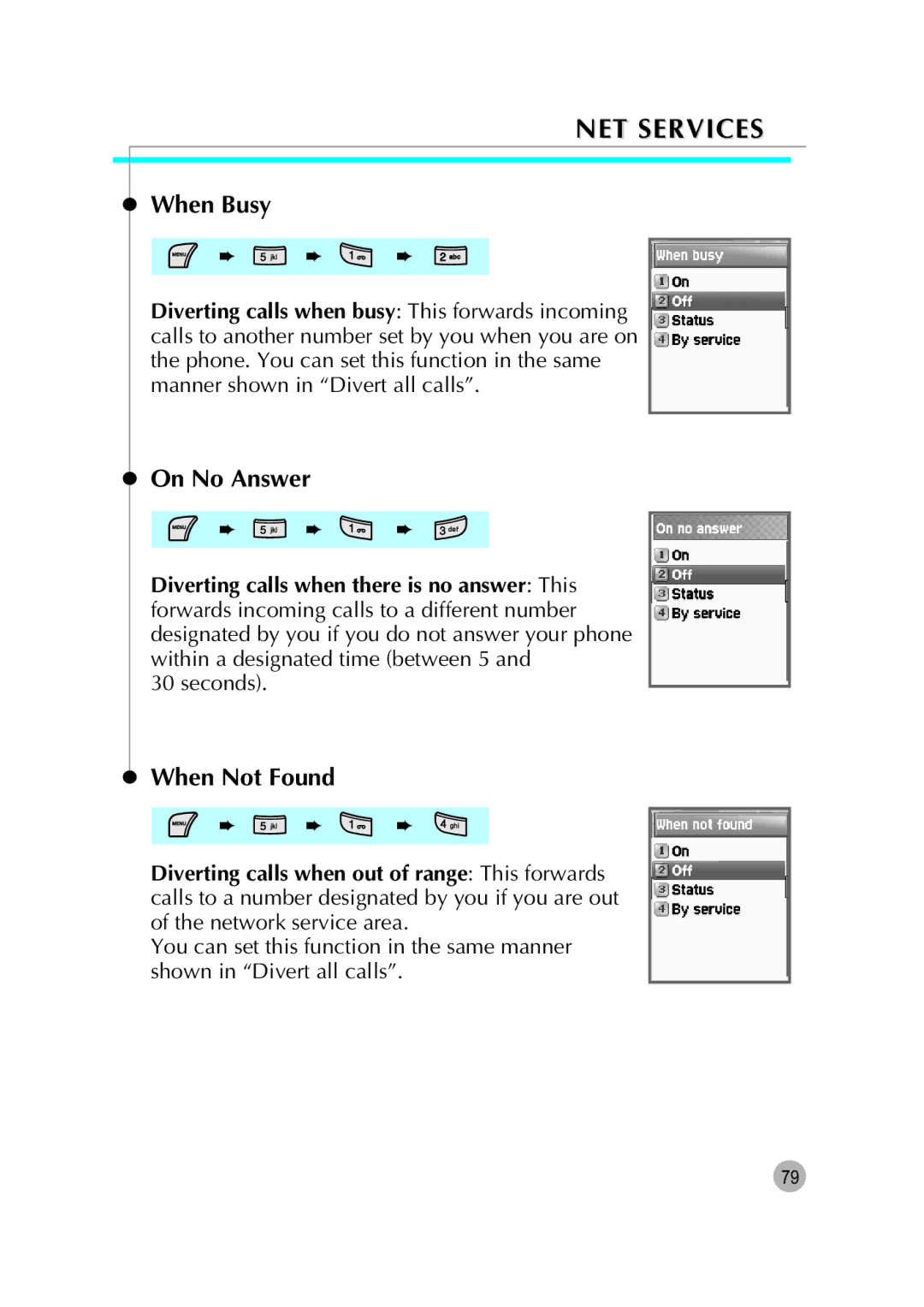
On No Answer
When Busy
When Not Found
Cancel All
Call Settings
Answer Type
Flip open
Call Waiting
Caller Number
Any key
Auto answer
Network Settings Preferred N/W
Automatic Redial
Add new N/W
Selection
Automatic
Manual
Change password
Security Settings
SIM lock
Handset lock
Outgoing
Barring
Incoming
NET Services
Fixed dialing
Clear all
Fixed dial
Fixed dial list
Select
CUG settings
List CUGs
Organizer
Alarm
Adding and deleting alarms
You may register up to five alarms
Scheduler
Erasing and adding events
Organizer
Seeing all the events registered on the calendar
Moving to a specific date
Memo
Example 6 X 5 / 2 + 2 =
Calculator
Converter
Stop Watch
How to Play
FUN & Tools
Game Photo Puzzle
Controls Key Menu Screen / In Game Execution
Downloaded
Image
100
Animation
102
Voice record
Thermometer Check Temperature
For more information, please see the precaution section
Wap
History
Daily History
Push messages
Home Resume
Bookmarks
Connection
Gprs settings
Data settings
Cache mode
Security cert
Push security
Empty Temp File
Version info
On-line menu
Viewing Java Application list
Running java application
Deleting java application
Viewing information of the java applications
Downloading java application
Java Network Settings
Default Preview Screen
Snapshot
Single shot/Multi shot/Movie shot
Preview Menu
Archive
Camcoder
Multi-shot
Photo Album/Movie Album
Photo Studio
Tool Type key is used
Pop-up Menu
Setting
Memory info
121
Menu/select ‘Edit’
Phonebook
Group search
Name Search
Photo search
Select each number with left & right navigation key
Add New Name
Speed Dial
Settings Save nos. to
Used space
Group ring tones
Delete all
Using a registered menu
MY Menu
Register in My Menu
Deleting registered menus
Appendix
ALL about Performance and Safety
Troubleshooting
When the Insert SIM Card message appears
When the Handset locked enter password message appears
When the Enter PIN1 message appears
When audio quality is poor
When the other party cannot hear you speaking
When battery lifetime is shorter than usual
When your cell phone does not turn on
When you are unable to select a certain function
When you are unable to charge the battery
When you are unable to input data into the Phone Book
Battery USE
Precautions and tips while using the battery
Operating Environment
Safety Information
Road Safety
Malfunction of Nearby Electronic Devices
Emergency Calls

 ➨
 ➨
 ➨
 ➨
 ➨
 ➨