Getting to Know
Ports Caring For The Touchscreen Cleaning The 8515
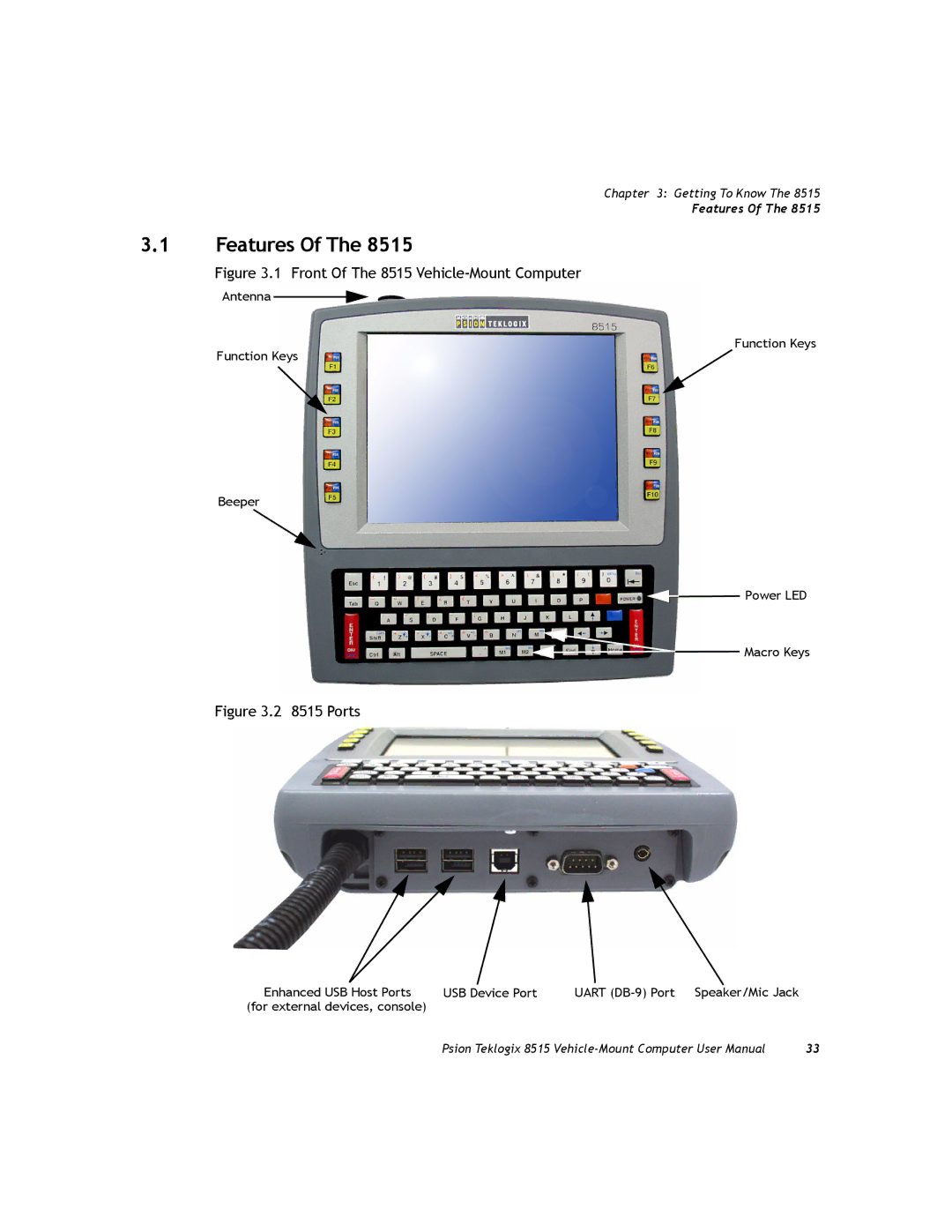
Front Of The 8515 Vehicle-Mount Computer
Features
Stylus
Internal Backup Battery
Keyboard
Modifier Keys
For details
Keys
Function Keys
Function Keys And Macro Keys
Macro Keys
Keypad Backlight
Display
Calibrating The Touchscreen
That this option may be restricted to supervisory use only
Onscreen Indicators
8515 Indicators
Power Indicator LED
Rfid
Scan LED Indicators
Audio Indicators
Scanning
Scanning Techniques
Operating One Dimensional 1D Laser Scanners
Troubleshooting
Monitoring The Network Connection
Again
Connecting An 8515 To a Windows Vista PC
Connecting An 8515 To a Windows 2000 Or XP PC
General Maintenance
Ports
Caring For The Touchscreen
Cleaning
Windows Embedded CE
Page
Navigating Using The Keyboard
Navigating Using a Touchscreen And Stylus
Navigating In Windows Embedded CE 5.0 And Applications
Level must be set to Supervisor see Security Level on
Keyboard Navigation Operation Key or Key Combination
Working With Files, Folders And Programs
Flash Disk StartUp
Startup Desktop
Taskbar
Desktop Icons
Taskbar and Start Menu dialog box is displayed
Start Menu
Security settings
Desktop
Security Level
Security Level Menu
Password Control Panel applet. Refer to Password on
Programs
Require maintenance
Shortcuts List
Shortcuts
10 Task Manager
Choose System Tray from the Shortcuts Start Menu
6 Run
Settings
Menu is not available
Starts Bootloader rather than Windows Embedded CE
Shutdown
Currently available
Using a Dialog Box
If you’re using a keyboard, follow the directions below
Configuration
Page
Page
Page
Control Panel
Remote Desktop Connection
Pocket PC Compatibility
Control Panel
Control Panel Icons
Certificates
Owner
Snmp
Display Appearance
Display Properties
Display Background
Display Properties dialog box, open the Backlight tab
Display Backlight
Key Repeat
Keyboard Properties
Backlight
Settings you’ve chosen
One Shots Tab
One Shots
Keyboard Properties dialog box, open the Macros tab
Following a key press
‘Discard’ button
12 Unicode Mapping Tab
Unicode Mapping
To assign
Scancode Remapping
Adding a Remap
Choose Virtual Key, Function or Macro
Lock Sequence


 Power LED


 Macro Keys