AM-400
Aviso
Page
GREEN-AND-YELLOW Earth BLUENeutral BROWNLive
Only
Poland Only
Russian Only Внимание
Printer type Laser
Introduction
Copy speed
Maximum copy size Document glass A4 Auto document feeder A4
Scanner type CIS Contact Image Sensor Resolution
Resolution Horizontal 8 lines/mm Vertical
Transmission time
Communication method
Operating temperature
Power requirements
Power consumption
Dimensions
Important safety information
Trademark information
Table of Contents
Cleaning the Scanning Glasses and Rollers
Selecting Print Settings
Problems and Solutions
Messages and Signals
Look at the Operation Panel
Contrast key
Alarm indicator
Redial key
Stop key
Speed key
Number keys
Start key
Unpacking Checklist
Installation
Points to keep in mind when setting up
About condensation
Attaching the trays
Installation
If you need to move the machine
Releasing the scanner
Comments
Connecting the power cord
Germany
Connecting the telephone line cord
Select the dial mode
Setting the dial mode Russia and Poland only
Press
Press repeatedly to exit
Extension phone optional
Switzerland, Austria
France
Installing the Toner Cartridge and Drum Cartridge
Remove the new drum cartridge from its packaging
Close the front cover ➊ and then the side cover ➋
Resetting the drum counter
Manually resetting the toner counter
Loading Printing Paper
Replace the output tray
Press Copy Or Scan and then
Select the paper size
Minimum system requirements
Installing the Software
CD-ROM window
Installation
Installing the Software
Installation
Completing installation of the software on Windows→ XP
Installation
Installing the Software
Sharpdesk online guide Removing the software
Using the Machine as a Shared Printer on a Network
Configuring settings on the server
Windows→ XP
Installation
Windows→ Me
Windows→
Installation
Installing the printer driver on the clients
Select Browse for a printer and click Next
Click Finish
Following window will appear. Click Browse
Using the Machine as a Shared Printer on a Network
Installation
Press Enter
Entering Your Name and Fax Number
After entering the first letter. To clear a mistake, press Z
Enter a two-digit number for the day 01 to Example the 5th
Setting the Date and Time
Enter the year four digits
Example
Press Enter to start the clock
Desired volume setting
General Machine Settings
Ringer
Press a number key to select
Make sure that the date and time
Alarm volume
Press Scan and then Menu
Auto clear
Copy or Scan and then Menu
Key tone off
Selecting the display language
To select copy mode
Copying
Making a Copy
Making a Copy
Using the auto document feeder
Maximum original size when using the document glass
Selecting Temporary Copy Settings
If Memory is Full appears
Enlarge/reduce
Number of Copies
Are Text and PHOTO. To change the setting, press
Quality
Contrast
Sort collating sets of copies
Duplex Scan
Originals
Default copy quality setting
Permanent Copy Settings
Select the default quality setting
Press Menu Then Z
Copy resolution
Select the resolution setting
300 DPI 600 DPI
Default contrast level
Default copy contrast setting
Until the display at right appears Press Press Z
To increase
Minimum document size Minimum size
Using the Auto Document Feeder
Maximum document size
Up to 20 sheets at once
Adjust the document guides to the width of your document
Other restrictions
Loading the Document
Copying onto Envelopes and Cards
Copying onto Envelopes and Cards
Using the auto document feeder
Press a
Sending a Fax
Sending Faxes
Sending a Fax
Speed Dialling Press
See Selecting Temporary Fax Settings on
If you are using the document glass
If the memory becomes full
Using the Redial key
Storing a Number for Speed Dialling
Super G3
Stored #01 OK?
Editing and deleting auto-dial numbers
Display of fax mode appears if needed
Press Enter Make the desired changes to the name
Resolution
Selecting Temporary Fax Settings
To select Duplex Scan, press
Line Monitor
Other Fax Transmission Settings
Checking and cancelling stored fax jobs
Appears and then press Enter
Press Times
Automatic redialling when the line is busy
Press FAX Then press Menu
Recall times for automatic redialling when the line is busy
Press Twice
Press the numeric keys to enter
Automatic redialling after a line error
Number from 01 to 15 04 to 15
Desired interval in minutes any 2-digit
Poland
Example 1 minute Press repeatedly to exit
Default resolution for faxing
Press Select the resolution setting
Fine
Default Line Monitor setting
Using an Extension Phone to Send a Fax
Press To select Monitor on or
To select Monitor OFF
Press to select SEND. Replace the extension phone
When you hear the fax tone, press On the machine
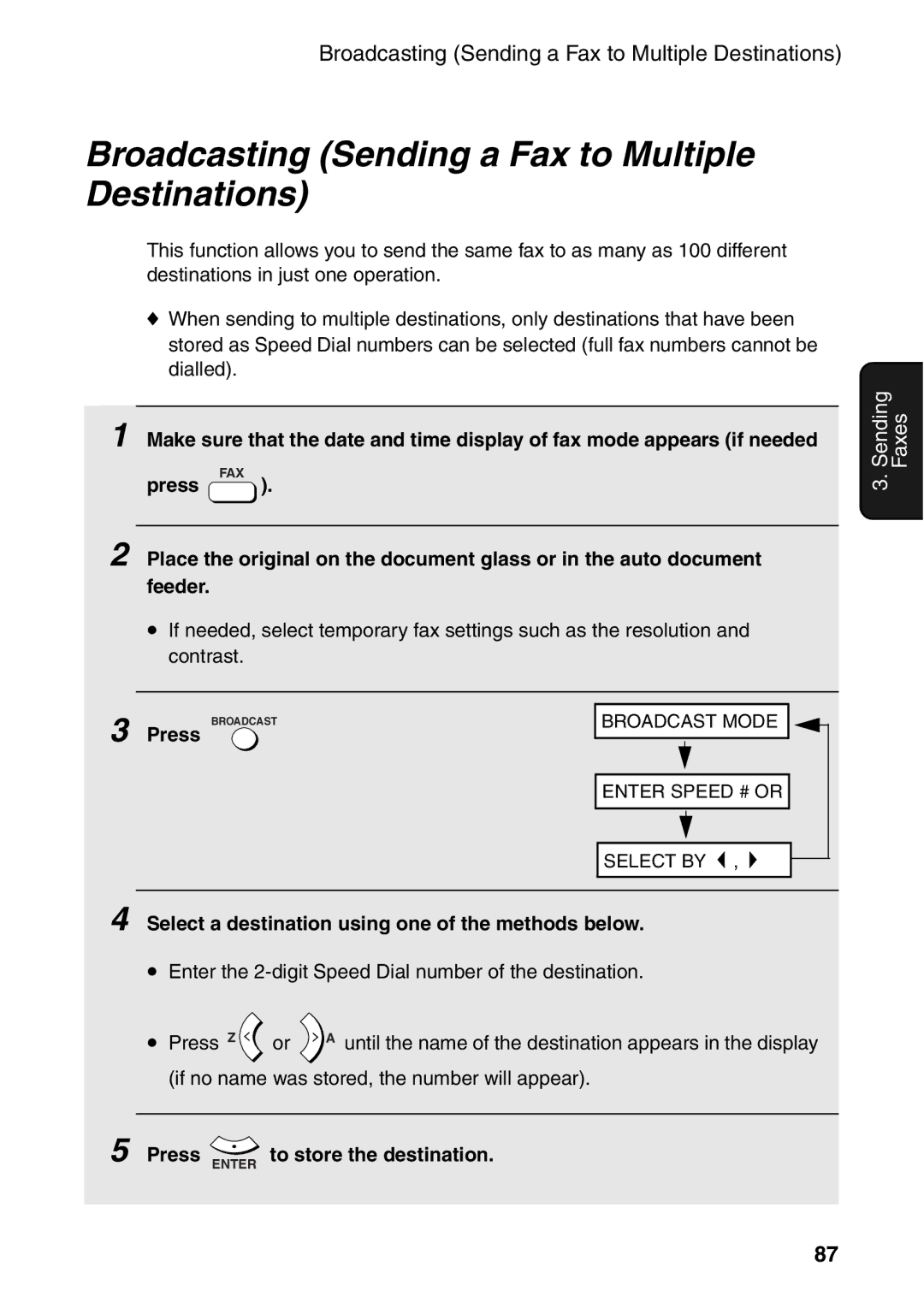
Select a destination using one of the methods below
Broadcasting Sending a Fax to Multiple Destinations
Press Enter To store the destination
When you are ready to begin transmission, press
Broadcasting using a Group Key
Display of fax mode appears if needed Press FAX Then press
Storing numbers in a Group
Press To select SET
Press To select Clear
Deleting a Group
Timer Transmission
Enter the time at which you want the fax to be sent
Specify the destination using one of the methods below
Cancelling a timer job
FAX only mode
Selecting the Reception Mode
EXT. TEL mode
Select the reception mode
Changing the number of rings
Using FAX only Mode
Using EXT. TEL Mode
If you hear a fax tone, press on the machine
Press to select RECEIVE. Replace the extension phone
Press Auto to select automatic
Reception Ratio
Reduction, or 100% to select full
Size printing Press repeatedly to exit
Substitute Reception to Memory
Special Fax Functions
Polling Requesting a Fax Transmission
100
101
Being Polled Memory Polling
102
Clearing a memory polling document
Printing
Cancelling a print job
Printing a Document From an Application
103
Selecting Print Settings
104
Printing Preferences from the Printers and Faxes folder
Setup tab
105
Select the Paper Size and Paper Source
106
Advanced tab
107
108
Printing on Envelopes and Cards
109
Scanning
Scanning From a Twain Application
110
111
Scanning From a Twain Application
112
113
114
Scanning From a WIA Application Windows XP/Me only
Place the original on the document glass
Start your WIA-compliant application on your computer
Click the File menu and select From Scanner or Camera
115
116
Scanning From the Scanner Wizard Windows XP/Me only
117
Scanners and Cameras
118
Scanning From the Operation Panel
119
Selecting Button Manager to handle scanner events
Windows→ XP/Me
Cameras
120
121
Control Panel, double-clickScanners and Cameras
Send to this application, select Sharp Button Manager
To select scan mode
Scanning a document from the operation panel
122
123
Configuring Button Manager settings
124
125
When FAX is selected as the application
126
When OCR is selected as the application
127
When Filing is selected as the application
Activity List
Printing Lists
128
Press Menu and then Z
Timer List
Setup List
Telephone Number List
Group List
Transaction Report
130
Headings in the Transaction Report
Transaction Report print condition
131
Press a number from To select the condition for printing
132
Auto print-out of Activity List
Press To turn on auto print, or
To turn it off
Cleaning the Scanning Glasses and Rollers
Maintenance
Cleaning the scanning glass in the auto document feeder
133
134
Cleaning the document glass
Cleaning the print rollers
Cleaning the housing
135
136
Replacing the Toner Cartridge
Replacing the Drum Cartridge
Continue from on page 19 to install the new toner cartridge
Viewing the total number of pages printed
137
138
Replacing the drum cartridge
139
Problems and Solutions
Troubleshooting
Line error
Problem Solution
141
Dialling and fax transmission problems
142
Fax reception problems
143
Copying problems
144
General problems
Messages and Signals
Display messages
145
FAX RX in Memory
146
147
Audible signals
Clearing Paper Jams
Clearing a jammed document
148
149
150
Clearing jammed printing paper
151
152
Index
153
Index
Page
Luokan 1 Laserlaite Klass 1 Laserapparat Output Power
Sharp House, Thorp Road, Newton Heath, Manchester, M40 5BE
Langenwiesenstrasse 7, 8108 Dällikon, Switzerland Phone 01
Via Lampedusa 13, 20141 Milano, Italia Telefono +39

 ).
). ,
,