Documentation
Trademarks
Important information
Product support on the Internet
Location of the telephone
Contents
Enhanced phone functions
Displaying and assigning call charges
Testing the phone
Using team functions
Special functions in the LAN
Not for HiPath 500
About this manual
Service
General information
Speakerphone quality and display legibility
Intended use
Telephone type
Properties of your OpenStage 15 T
Getting to know your OpenStage phone
User interface of your OpenStage 15 T
OpenStage Key Module
Audio keys
Keys
Mailbox key and Menu key
Navigation keys
Meaning of LED displays on function keys
Programmable function keys
Keypad
Idle menu
Idle mode
Display
Voicemail
Mailbox
Messages
Busy
Caller list
Program/Service
Program/Service menu
Answering a call via the handset
Basic functions
Answering a call
Ending a call
Suggestions for using speakerphone mode
Mode
Switching to speakerphone mode
Switching to the handset
Deactivating
Activating
Off-hook dialing
Making calls
On-hook dialing
Dialing with DDS keys
Displaying and dialing saved station numbers
Redialing a number
Ending a call
Turning the microphone on and off
Reject calls
Calling a second party consultation
Switching to the held party alternating
Return to the first party
Combine the calling parties into a three-party con- ference
Transferring a call
Deactivating call forwarding
Using variable call forwarding
Call forwarding
Deactivating call forwarding no reply
Using call forwarding no reply Cfnr
Step by step
Accepting a callback
Using callback
Storing a callback
Ending retrieval
Viewing and deleting a stored callback
Deleting a displayed entry
Answering calls
Enhanced phone functions
Enabling and disabling handsfree answerback
Using the speakerphone
Opening the door with a code at the door
Speaking to visitors via the entrance telephone
Deactivating the door opener
Activating the door opener
En-bloc sending/correcting numbers
Canceling en-bloc sending
Dialing entered/displayed numbers
Correcting numbers entered
Retrieving the caller list
Using the caller list
Displaying the call time
Dialing a station number from the caller list
Entry you wish to dial appears on the screen
Dialing a number from the internal directory
Using the Ldap directory not for HiPath
If too many names are found
Result is displayed
If no name is found
Configure a speed-dial key
Making calls using system speed-dial numbers
Dialing with speed-dial keys
Suffix-dialing
If you make a mistake
Talking to your colleague with a speaker call
Assigning a station number not for U.S
Automatic connection setup hotline
Dialing aid on the S0 bus
Associated dialing/dialing aid
Dialing aid at the a/b T/R port
Dialing aid from your telephone for another tele- phone
During a call
Using call waiting second call
Ending the first call and answering the waiting call
Ending the second call and resuming the first one
Saving a number
Preventing and allowing call waiting automatic camp-on
Turning the call waiting tone on and off
Retrieving a parked call
Parking a call
If the second party does not answer
Conducting a conference
Adding up to five parties to a conference
Viewing the conference parties
Removing the Isdn central office party from the conference
Leaving a conference
Ending a conference
HiPath
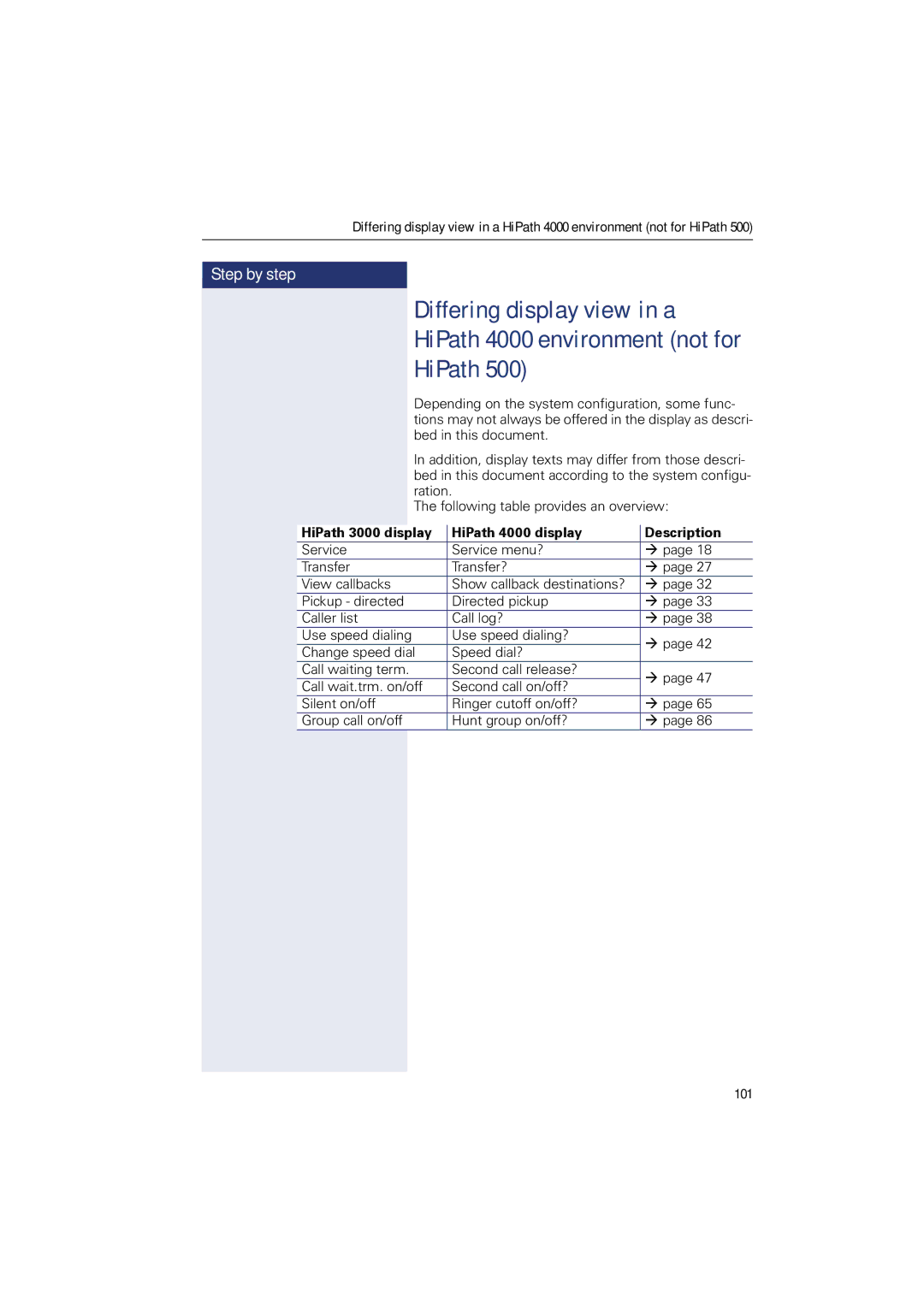
Differing display view in a
Responding to error messages
Fixing problems
Contact partner in the case of pro- blems
Possible causes
Caring for your telephone
Troubleshooting
Labeling keys
Deleting
Index
106
107
108
UCD
Overview of functions and codes
110
111
112
Siemens Enterprise Communications