Dell OptiPlex User’s Guide
W . d e l l . c o m s u p p o r t . d e l l . c o m
September JN460
Contents
General Drive Installation Guidelines
Connecting and Disconnecting Drive Cables
DC Power Connectors P3, P5, P8, and P9
Desktop Computer
DC Power Connector P5 and P6 160 Contents
General Drive Installation Guidelines 127
Connecting and Disconnecting Drive Cables 129
127
About Your Small Form Factor Computer 165
Small Form Factor Computer Specifications 175
163
166
199
Connecting and Disconnecting Drive Cables 196
197
202
About Your Ultra Small Form Factor Computer 227
Ultra Small Form Factor Computer Specifications 241
Connecting and Disconnecting Drive Cables 248
228
255
Installing a Device When Your Computer Is Turned Off 255
About Smart Cards and Fingerprint Readers 276 Contents
258
277
Deleting or Changing an Existing System Password 278
Deleting or Changing an Existing Administrator Password 280
278
295
Configuring Power Management Settings 295
294
296
316
Addressing Memory Configurations 314
313
Mini-Tower, Desktop, and Small Form Factor Computers 317
Troubleshooting Power Problems 339
Problems writing to an optical drive 333
Mail, Modem, and Internet Problems 334
329
Using Dell PC Restore and Dell Factory Image Restore 361
Using Microsoft Windows System Restore 359
Undoing the Last System Restore 360
Windows Vista Dell Factory Image Restore 362
366
Returning Items for Warranty Repair or Credit 367
365
367
Desktop System Software DSS
How to set up my computer
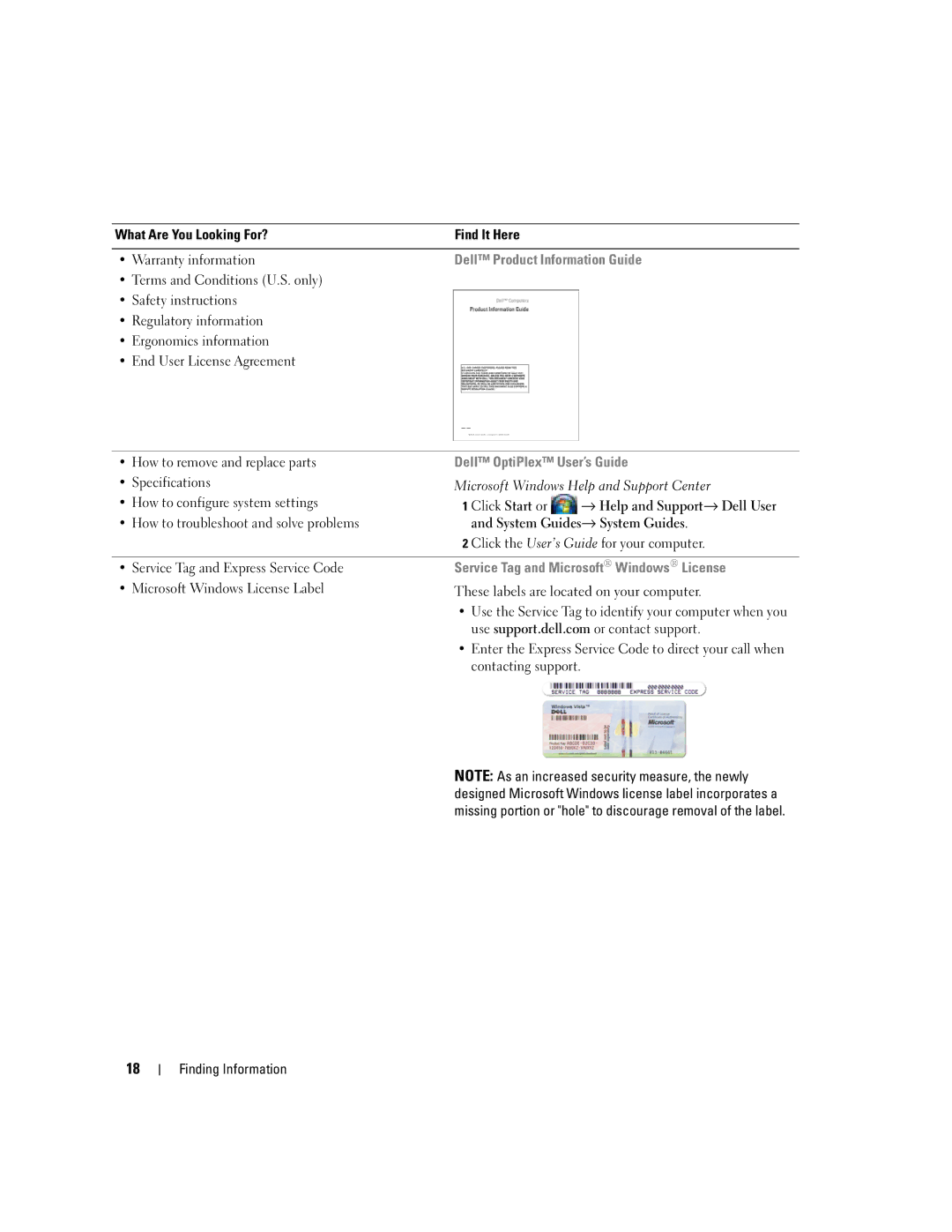
Finding Information
Support.dell.com
What Are You Looking For? Find It Here Warranty information
Dell Product Information Guide
Segment, and enter your Service Tag
Order status, warranty, and repair information
Updates
For your configuration How to use Windows XP
Not ship with your computer
System you ordered
Before Working Inside Your Computer
Before You Begin
Recommended Tools
Turning Off Your Computer
Before You Begin
Front View
Mini Tower Computer
About Your Mini Tower Computer
Mini Tower Computer
21 for more information
Blinking green The computer is in a power-saving mode
Power problem may exist see Power Problems on
No light The computer is turned off
Back View
Back Panel Connectors
Address. For more information, see System Setup Options on
Green a good connection exists between a 10-Mbps network
Removing the Computer Cover
Cap
That came with your computer
Security cable slot Cover release latch Padlock ring
Chassis Intrusion Switch
Inside Your Computer
Removing the Chassis Intrusion Switch
Replacing the Chassis Intrusion Switch
Resetting the Chassis Intrusion Detector
System Board Components
SATA3
Mini Tower Computer
Mini Tower Computer Specifications
Connector data width
Connectors
Connector size
Maximum PCI Express Connectors
One3.5-inch floppy drive or media reader
Drives
Two Sata Serial ATA hard drives
Two Sata optical drives
Heat dissipation
AC power source Wattage
Controls and Lights
Rating Voltage
Width
Weight
Physical Height
Depth
Mini Tower Specifications
Installing a PCI or PCI Express Card
Cards
Cards
Cards
Cards
Cards
Removing a PCI or PCI Express Card
Card-edge connector Card connector
Card retention latch Alignment guide
PS/2 Serial Port Adapter
Card retention latch
Card fully seated Card not fully seated Bracket within slot
Cards
Card retention latch Alignment guide
Installing eSATA
Cards
General Drive Installation Guidelines
Drives
Power Cable Connectors
Sata Connector
Hard Drive
Data cable Hard drive system board Power cable Connector
Hard drive Release tabs
Snap the bracket onto the new drive
Drives
Drives
Hard drive Hard drive bracket Pins
Drives
Floppy Drive
Floppy drive Drive release latch
Floppy drive Shoulder screws Shoulder screw slots
Media Card Reader
Media card reader Drive release latch
Media card Shoulder screws Shoulder screw slots Reader
Optical Drive
Optical drive Drive release latch
Optical drive Shoulder screws Shoulder screw slots
Power cable Data cable Sata optical drive connector
Processor
Removing the Processor
Processor
Installing the Processor
Processor
Processor
Panel
Removing the I/O Panel
Panel
Replacing the I/O Panel
Power Supply
Replacing the Power Supply
Power Supply
Release button Power supply Screws AC power connector
DC Power Connectors
DC Power Connector P1
Pin Number Signal name AWG Wire
DC Power Connector P2
DC Power Connectors P3, P5, P8, and P9
Pin Number Signal Name
DC Power Connector P7
DC Power Connector P10
Installing a Speaker
Speakers
Speakers
Removing a Speaker
Your Computer on page 21 for more information
Desktop Computer
About Your Desktop Computer
Desktop Computer
Blinking or solid amber See Power Problems on
Power Management for Windows XP and Windows Vista on
Position
Removing the Computer Cover
Inside Your Computer
Chassis Intrusion Switch
Replacing the Chassis Intrusion Switch
Removing the Heat Sink Assembly
System Board Components
Desktop Computer
Desktop Computer Specifications
Desktop Computer Specifications
Board
PCI without riser-card cage Connectors
Maximum PCI Express without riser-card Cage Connectors
Card or a DVI graphics card for dual-monitor support
Expansion Bus Connector size
Maximum ESATA Desktop Computer Specifications
Maximum
One Sata optical drive
100
One3.5-inch floppy drive or media card reader
Port adapter
Power source Wattage
101
Power Heat dissipation
102
Rating
PCI Cards
103
Expansion Cards
Expansion Cards
105
Expansion Cards
107
Expansion Cards
109
Expansion Cards
111
112
113
Press in on the tab to raise the card-retention latch 114
115
PS/2 Serial Port Adapter
117
Expansion Cards
119
Riser-card cage Handle Riser cards
121
Expansion Cards
ESATA
123
Expansion Cards
125
Replace the riser
127
128
Drive Inserts
129
130
131
Drive release latch Optical drive
133
134
135
Drive insert
137
Information Guide Drives
Drive release latch Media card reader
139
Drive insert
141
Hard Drive
143
Hard drive Release tabs Plastic hard drive bracket
145
Drives
147
Data cable Hard drive system board Connector
149
Installing the Processor
151
Processor
153
Replacing the I/O Panel
155
Release button Power supply Screws AC power connector
157
Pin Signal name 18-AWG Number Wire
158
159
DC Power Connector P5 and P6
DC Power Connector P3
DC Power Connector P4
160
161
162
163
164
165
Small Form Factor Computer
About Your Small Form Factor Computer
Small Form Factor Computer
166
167
Removing the Computer Cover
169
170
171
172
173
174
Small Form Factor Computer Specifications
Small Form Factor Computer Specifications
175
Connector
Maximum PCI Express Connector
176
177
Port adapter Video
178
179
180
181
Expansion Cards
183
184
PCI Express and DVI Cards
185
186
187
Expansion Cards
189
Expansion Cards
191
PS2/SERIAL2
193
Expansion Cards
General Installation Guidelines
195
Serial ATA Sata Connector
197
Securing tabs Hard drive
199
Release tabs Hard drive Hard drive bracket
201
Replacing a Hard Drive Fan
203
Optical Drive
205
Floppy Drive
207
Installing a Floppy Drive
209
Media card reader data cable
Replacing a Media Card Reader
211
Drives
213
Installing the Processor
215
Processor
217
Replacing the I/O Panel
219
Mounting screw
Pin Signal Name Number
221
222
DC Power Connectors P3
Pin Signal 18-AWG Number Name Wire
223
DC Power Connector P5
DC Power Connector P6
224
225
226
227
Ultra Small Form Factor Computer
About Your Ultra Small Form Factor Computer
3 4
228
Blinking or solid yellow See Power Problems on
Side View
Management for Windows XP and Windows Vista on
229
Network controller is turned off in system setup
Connecting Two Monitors
231
232
233
Removing the Chassis Intrusion Switch
235
236
Cable Cover Optional
237
Connecting the AC Power Adapter
Information Guide
Dell Badge
239
240
Ultra Small Form Factor Computer Specifications
241
Ultra Small Form Factor Computer Specifications
242
243
AC power source
244
Physical
245
246
Your computer supports One Sata serial ATA hard drive
247
248
249
Drives
251
Drives
253
Drives
255
Installing a Device When Your Computer Is Turned Off
Module Bay
Module Bay
Bottom of computer Security screw
257
Latch release
Securing a Device in the Module Bay
259
260
261
Top of heat sink Heat sink Retention base Release tab
263
Processor
265
266
267
Removing a Speaker
LegacySelect Technology Control
Advanced Features
Advanced Features
Manageability
270
Error Message Description
Active Management Technology
Advanced Functionality
271
Alert Standard Format
Dell OpenManage Applications
Alert Description
Dell Client Manager DCM
273
Chassis Intrusion Detection
Option Settings
Physical Security
Padlock Ring and Security Cable Slot
Enabling the TPM Feature
Trusted Platform Module TPM
275
About Smart Cards and Fingerprint Readers
Security Management Software
Computer Tracking Software
276
Password Protection
System Password
277
Type the password and press Enter
Administrator Password
279
Entering System Setup
System Setup
Disabling a Forgotten Password and Setting a New Password
Overview
System Setup Screens
System Setup Options
281
Internal default
282
No Boot setting
283
284
Performance
285
Computrace server
286
Suspend
Event Log
Boot Sequence
287
Booting to a USB Device
Memory Key
Jumper Settings
Mini Tower and Desktop Small Form Factor Advanced Features
289
Clearing Forgotten Passwords
Ultra Small Form Factor Computer Jumper Setting Description
Clearing Cmos Settings
291
Power Management for Windows XP and Windows Vista
Hyperthreading and Multi-Core Technology
Options in Windows XP
293
Options in Windows Vista
About RAID Configurations
295
Verifying That RAID Is Working
RAID Level
Segment Hard drive
RAID Level 1 Configuration
Configuring Your Computer for RAID
297
Creating a RAID Level 0 Configuration
Creating a RAID Level 1 Configuration
299
Creating a RAID Level 1 Configuration
Migrating to a RAID Level 0 Configuration
Migrating to a RAID Level 1 Configuration
301
Advanced Features
Battery
Battery
Replacing the Battery
303
Battery
305
306
Replacing the System Board
307
Replacing the System Board
Mini Tower System Board Screws
308
Desktop System Board Screws
309
Small Form Factor System Board Screws
310
Ultra Small Form Factor System Board Screws
311
312
Memory
DDR2 Memory Overview
313
Addressing Memory Configurations
Installing Memory
Cutouts Memory module
Memory connector closest to Securing clips Processor
315
Crossbar
Removing Memory
Ultra Small Form Factor Computers
Replacing the Computer Cover
Mini-Tower, Desktop, and Small Form Factor Computers
317
318
Installing Your Computer in an Enclosure
Installing Your Computer in an Enclosure
319
320
321
Installing Your Computer in an Enclosure
Cleaning an Optical Mouse
Cleaning Your Computer
Cleaning a Non-Optical Mouse
Computer, Keyboard, and Monitor
Floppy Drive
CDs and DVDs
Transferring Information to a New Computer
Microsoft Windows Features
Microsoft Windows XP Features
Microsoft Windows XP
Microsoft Windows XP Features
Microsoft Windows Vista
Click Finished and restart the new computer
327
Network Setup
Setting Up a Home and Office Network
Connecting to a Network Adapter
Network device Network adapter connector on computer
329
330
Card Problems
Troubleshooting
Battery Problems
Solving Problems
Drive Problems
332
Hard drive problems
Optical drive problems
Problems writing to an optical drive
333
Click Properties→ Tools→ Check Now
Mail, Modem, and Internet Problems
334
Windows XP Click Start→ All Programs→ Modem Helper
335
Keyboard Problems
Lockups and Software Problems
Program is designed for an earlier Windows operating system
Other software problems
Program crashes repeatedly
Solid blue screen appears
Memory Problems
Mouse Problems
338
Troubleshooting Power Problems
Network Problems
Power Problems
339
Power Supply Self-Test
340
Printer Problems
341
No sound from speakers
Scanner Problems
Sound and Speaker Problems
342
Screen is blank Screen is difficult to read
Video and Monitor Problems
No sound from headphones
343
Power Lights
3D image quality is poor
Power Light Problem Description Suggested Resolution
System Lights
345
Power Light Problem Description
346
Diagnostic Lights
Light Pattern Problem Description
347
Light Pattern Problem Description Suggested Resolution
348
349
Beep Codes
350
Code Cause
System Messages
351
Message Possible Cause Corrective Action
352
Message Possible Cause
353
Dell Diagnostics
When to Use the Dell Diagnostics
Product Information Guide
Solving Problems
355
Option Function
Tab Function
What Is a Driver?
Drivers
Identifying Drivers
Reinstalling Drivers and Utilities
357
358
Restoring Your Operating System
Using Microsoft Windows System Restore
You can restore your operating system in the following ways
To start the Hardware Troubleshooter
Starting System Restore
Using Dell PC Restore and Dell Factory Image Restore
Using PC Restore
361
Removing PC Restore
Image Restore
Click Exit if the Install Windows message appears
Using the Operating System Media
Click Finish to reboot the computer
363
Solving Problems
Obtaining Assistance
Online Services
Getting Help
365
AutoTech Service
Automated Order-Status Service
Support Service
Problems With Your Order
Before You Call
367
368
Guide
369
Contacting Dell
Warranty
Warranty
371
372
373
FCC Notices U.S. Only
FCC Class B
FCC Notices US Only
374
Glossary
375
376
377
378
379
380
381
382
383
Video resolution See resolution
384
385
386

 → Help and Support→ Dell User and System Guides→ System Guides.