W . d e l l . c o m s u p p o r t . d e l l . c o m
Abbreviations and Acronyms
Contents
One Monitor With a DVI Connector
Changing the Display Settings
Power Management Options
Power Options Properties
CD and DVD drive problems
Mail, Modem, and Internet Problems
Keyboard Problems
Media Card Reader Problems
Sound and Speaker Problems
No sound from headphones Video and Monitor Problems
Dell Diagnostics Main Menu
Reinstalling Drivers and Utilities
Power Supply DC Connector Pin Assignments
Memory Installation Guidelines 108
Installing a Second Hard Drive 125
102
Replacing the Power Supply
Installing the Processor Fan
Installing the System Board
Removing the Processor Fan
Clearing Forgotten Passwords 176
Technical Support and Customer Service 183
Automated Order-Status Service 185 Contents
167
Glossary
What Are You Looking For? Find it Here Warranty information
Finding Information
Service Code
Use the Service Tag to identify your
Enter the Express Service Code to direct
Your call when contacting support
Reinstall the DSS utility. DSS
Provides critical updates for your
Your computer and operating System and installs the updates
What Are You Looking For? Find it Here
Help and Support
Click Help and Support
Service Tag Located on top of the chassis towards the rear
Setting Up and Using Your Computer
Front View of the Computer
CD or DVD drive
Ieee 1394 connector
Headphone connector
Power button
Power light
Back View of the Computer
Back Panel Connectors
Connector
Light
Microphone
USB
VGA video
Installing Your Computer in an Enclosure
Setting Up and Using Your Computer
Setting Up a Printer
Connecting a USB Printer
Printer Cable
Windows XP
Control Panel Printers and Faxes Add a printer to start
Windows Vista
Playing CDs and DVDs
Adjusting the Volume
DVD player includes the following basic buttons
Adjusting the Picture
How to Copy a CD or DVD
Copying CDs and DVDs
Using Blank CDs and DVDs
Windows Vista
Media Type Read Write Rewritable
Helpful Tips
DVD-Writable Drives
Using a Media Card Reader Optional
Connecting Two Monitors
Connecting Two Monitors With VGA Connectors
Connecting a TV
May not be present on your computer
Power Management
Changing the Display Settings
Power Management Options in Microsoft Windows XP
Standby Mode
Hibernate Mode
Power Options Properties
Power Schemes Tab
Hibernate tab
Power Management Options in Windows Vista
Advanced Tab
Hibernate Tab
Standby Mode
Power Plan Properties
Power Management Modes
Click Change Advanced Power Settings
Advanced Tab
About RAID Configurations For Windows Vista only
Enabling Cool ’n’ Quiet Technology
RAID Level 1 Configuration
Configuring Your Hard Drives for RAID
Setting Your Computer to RAID-Enabled Mode
Using the Nvidia MediaShield ROM Utility
Using Nvidia MediaShield
Rebuilding a RAID Configuration
Transferring Information to a New Computer
Click Next
All Programs Accessories System
Tools Windows Easy Transfer
Setting Up a Home and Office Network
Connecting to a Network Adapter
Network Setup Wizard
Connecting to the Internet
Click Checklist for creating a network
Setting Up Your Internet Connection
Click Connect to the Internet
If you have a CD, click Use the CD I got from an ISP
Panel
Removing the I/O Panel
151
Installing the I/O Panel
153
Processor Fan
Removing the Processor Fan
155
Fan Fan cover guide Fan cover grips
Installing the Processor Fan
157
Fan Fan cover Heat sink
Chassis Fan
159
Removing the Chassis Fan
Replacing the Chassis Fan
161
System Board
Removing the System Board
System Board Screws
163
Installing the System Board
Replacing the Computer Cover
Move the computer to the upright position
165
166
Specifications
167
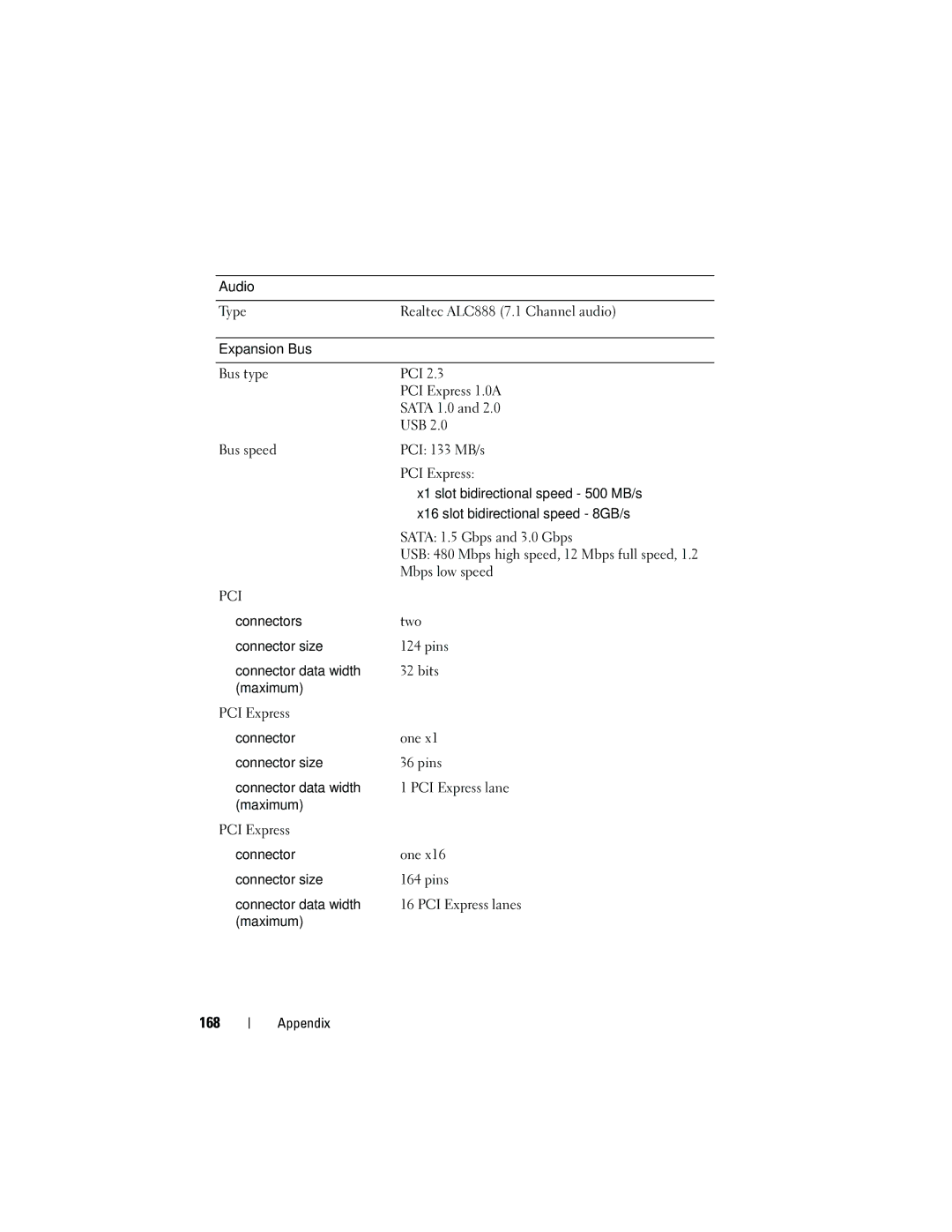
168
Audio
Expansion Bus
169
Drives
Power
Power supply wattage rating
170
Controls and Lights
171
Physical
Environmental
System Setup
Entering System Setup
Overview
172
System Setup Options
System Setup Screen
Displays Bios Info and the Service Tag
173
174
Boot Sequence
175
Clearing Forgotten Passwords
Clearing Cmos Settings
177
Flashing the Bios
File Download window appears
Cleaning Your Computer
Computer, Keyboard, and Monitor
Mouse
179
Dell Technical Support Policy U.S. Only
CDs and DVDs
180
Definition of Dell-Installed Software and Peripherals
FCC Notice U.S. Only
Definition of Third-Party Software and Peripherals
FCC Class B
182
Dcma
Technical Support and Customer Service
Getting Help
Obtaining Assistance
183
DellConnect Online Services
Problems With Your Order
AutoTech Service
Automated Order-Status Service
Product Information
Returning Items for Warranty Repair or Credit
Before You Call
186
Diagnostics Checklist
187
Contacting Dell
189
Glossary
190
191
Product ID
192
Device driver See driver
193
194
195
196
197
Module bay See media bay
198
NIC See network adapter
199
200