March
Users Guide
Contents
Mailing
Copying
Faxing
Scanning
Securing the printer 149
Saving money and the environment 143
Maintaining the printer 151
Managing the printer 161
Index 253
Troubleshooting 176
235
Safety information
Safety information
Page
Finding information about the printer
Learning about the printer
Learning about the printer
What are you looking for? Find it here
Other countries and regions-See the printed
Selecting a location for the printer
Printer configurations
Understanding the basic functions of the scanner
Using the printer control panel
Using the ADF and scanner glass
Using the ADF
Using the scanner glass
Sleep button light Printer status
Indicator light Printer status
Use
Learning about the printer
Installing internal options
Additional printer setup
Accessing the controller board
Available internal options
Page
Access the controller board
Installing an optional card
Order of installation
Installing hardware options
Installing optional trays
Page
Page
Attaching cables
Installing the printer
Setting up the printer software
Adding available options in the print driver
For Windows users
Networking
Preparing to set up the printer on an Ethernet network
Preparing to set up the printer on a wireless network
Settings Network/Ports Active NIC Auto
Connecting the printer using the Wireless Setup Wizard
Select a wireless connection setup
From the printer control panel, navigate to
Using the Personal Identification Number PIN method
Using the Push Button Configuration PBC method
Additional printer setup
Follow the instructions on the printer display
Settings Reports Menu Settings
Click Settings Network/Ports Wireless
Settings Reports Network Setup
Printing a network setup
Configuring Universal paper settings
Setting the paper size and type
Settings Paper Menu Paper Size/Type
Loading paper and specialty media
Page
Page
Page
Page
Loading the multipurpose feeder
Page
Page
Page
Linking and unlinking trays
Click Settings Paper Menu
Linking and unlinking trays
Using the printer control panel
Using the Embedded Web Server
Creating a custom name for a paper type
Assigning a custom paper type
Settings Paper Menu Custom Types
Paper guidelines
Paper characteristics
Paper and specialty media guide
Fiber content
Using recycled paper and other office papers
Selecting paper
Selecting preprinted forms and letterhead
Unacceptable paper examples
182 x 257 mm 17 x 10.1 Letter 215.9 x 279.4 mm X 11
Supported paper sizes, types, and weights
Supported paper sizes
Paper and specialty media guide
Paper type 250 ‑ or Multipurpose feeder Duplex mode
Supported paper types and weights
Tips on using letterhead
Using specialty media
Tips on using transparencies
Tips on using envelopes
Page
Storing paper
Printing
Adjusting toner darkness
Printing a document
Printing a document
Adjust the toner darkness, and then press
Settings Print Settings Quality Menu Toner Darkness
Settings Security
Storing print jobs in the printer
Printing confidential and other held jobs
Modifying confidential print settings
Canceling a print job from the printer control panel
Canceling a print job
Canceling a print job from the computer
Printing information pages
For Macintosh users
Copying
Copying using the ADF
Making copies
Making a quick copy
Copy Content Type Photo
Copying using the scanner glass
Copying photos
Copying on specialty media
Copying on letterhead
Copying to a different size
Customizing copy settings
Making copies using paper from a selected tray
Making a copy lighter or darker
Reducing or enlarging copies
Adjusting copy quality
Collated Not collated
Collating copies
Placing separator sheets between copies
Copying multiple pages onto a single sheet
Placing information on copies
Placing an overlay message on each
Copying From the printer control panel, navigate to
Canceling a copy job from the printer control panel
Canceling a copy job
Understanding the copy options
Copies
Copy to
Content Type
Scale
Darkness
Advanced Duplex
Content Source
Overlay
Separator Sheets
Setting up the e-mail function
Setting up the printer to e-mail
Configuring e‑mail settings
Click Settings E-mail/FTP Settings E-mail Settings
Creating an e-mail shortcut using the Embedded Web Server
Canceling an e-mail
Sending an e‑mail using a shortcut number
Creating an e-mail shortcut
Faxing
Setting up the printer to fax
Faxing
Using the printer control panel for fax setup
Initial fax setup
Using the Embedded Web Server for fax setup
Click Settings Fax Settings Analog Fax Setup
Tips for this setup
Setup 1 Printer is connected to a dedicated fax line
Choosing a fax connection
Scenario 1 Standard telephone line
Connected to the same telephone wall jack
Connected to different wall jacks
To connect
Scenario 2 Digital Subscriber Line DSL
Scenario 3 VoIP telephone service
Setup 1 Printer is connected directly to a cable modem
Faxing
Part name Part number Lexmark adapter plug 40X8519
Page
Connecting the printer to a wall jack in Germany
Setting the outgoing fax or station name and number
Connecting to a distinctive ring service
Configuring the printer to observe daylight saving time
Setting the date and time
Sending a fax using the printer control panel
Sending a fax
Sending a fax at a scheduled time
Sending a fax using the computer
Sending a fax using a shortcut number
Click Settings Manage Shortcuts Fax Shortcut Setup
Customizing fax settings
Changing the fax resolution
Making a fax lighter or darker
Click Settings Reports Click Fax Job Log or Fax Call Log
Viewing a fax log
Blocking junk faxes
Canceling a fax job after scanning the original documents
Canceling an outgoing fax
Holding and forwarding faxes
Holding faxes
Click Settings Fax Settings
Resolution
Understanding the fax options
Forwarding a fax
Binding
Orientation
Scanning
Creating an FTP shortcut using the Embedded Web Server
Scanning to an FTP address
Creating shortcuts
Scanning to an FTP address
Scanning to an FTP address using a shortcut number
Scanning to a computer
Click Scan Profile Create Scan Profile
Scanning to a computer
Understanding the printer m enus
Paper Menu Reports Network/Ports Security Settings
Menus list
Understanding the printer menus
Paper Size/Type menu
Default Source menu
Paper menu
MP Feeder Type
MP Feeder Size
Manual Paper Type
Manual Paper Size
Manual Envelope Size
Manual Envelope Type
Paper Texture menu
Configure MP menu
Substitute Size menu
Bond Texture
Labels Texture
Envelope Texture
Rough Envelope Texture
Paper Weight menu
Paper Loading menu
Understanding the printer menus 100
Custom Types menu
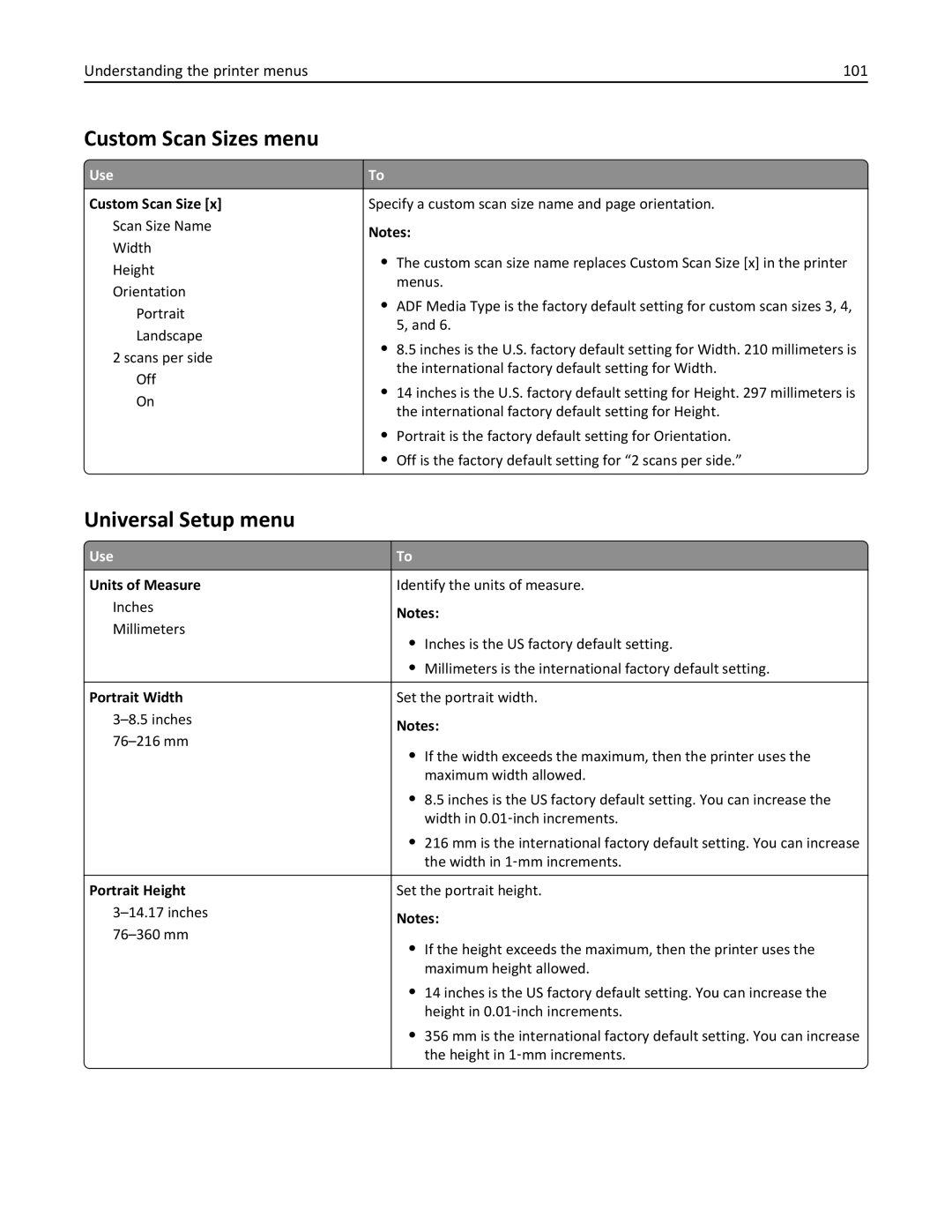
Understanding the printer menus 101
Universal Setup menu
Custom Scan Sizes menu
Understanding the printer menus 102
Reports menu
Reports menu
Active NIC menu
Network/Ports menu
Standard Network or Network x menu
Understanding the printer menus 103
Network Card menu
To access the menu, navigate to either of the following
Understanding the printer menus 104
UseTo
Understanding the printer menus 105
TCP/IP menu
Understanding the printer menus 106
IPv6 menu
Understanding the printer menus 107
Wireless menu
AppleTalk menu
Smtp Setup menu
To access the menu, navigate to any of the following
Understanding the printer menus 109
Security menu
Security Audit Log menu
Understanding the printer menus 110
Set Date and Time menu
Understanding the printer menus 111
Settings menu
General Settings menu
Understanding the printer menus 112
Understanding the printer menus 113
Alarms
Timeouts
Understanding the printer menus 114
Error Recovery
Print Recovery
Understanding the printer menus 115
Copy Settings menu
Understanding the printer menus 116
Understanding the printer menus 117
Understanding the printer menus 118
Fax Mode Analog Fax Setup menu
Fax Settings menu
General Fax Settings
Understanding the printer menus 119
Understanding the printer menus 120
Fax Send Settings
Understanding the printer menus 121
Understanding the printer menus 122
Enable Color Fax Scans
Understanding the printer menus 123
Fax Receive Settings
Understanding the printer menus 124
Fax Log Settings
Understanding the printer menus 125
Speaker Settings
Answer On
‑mail Server Setup
‑mail Settings menu
Understanding the printer menus 126
Format
Text/Photo Default
Text Default
Understanding the printer menus 127
Orientation
Understanding the printer menus 128
Photo Default
‑mail images sent as
Use Multi ‑page Tiff
Use cc/bcc
FTP Settings menu
Understanding the printer menus 129
Understanding the printer menus 130
FTP Bit Depth
Understanding the printer menus 131
Understanding the printer menus 132
Setup menu
Print Settings
Finishing menu
Understanding the printer menus 133
Duplex Binding
Understanding the printer menus 134
Copies
Blank Pages
Understanding the printer menus 135
Quality menu
Understanding the printer menus 136
Utilities menu
Understanding the printer menus 137
XPS menu
PCL Emul menu
Understanding the printer menus 138
Tray Renumber
Understanding the printer menus 139
Understanding the printer menus 140
Html menu
Font Size
Scale
Image menu
Help menu
Understanding the printer menus 141
Menu item Description
Understanding the printer menus 142
Saving money and the environment
Using recycled paper
Saving paper and toner
Conserving supplies
Saving energy
Using Eco‑mode
Reducing printer noise
Check your first draft for accuracy
Settings General Settings Timeouts
Adjusting Sleep mode
Settings Settings General Settings Timeouts Sleep Mode
Saving money and the environment 145
Adjusting the brightness of the printer display
Using Hibernate mode
Using Schedule Power Modes
Click Settings General Settings
Recycling Lexmark products
Recycling
Recycling Lexmark packaging
Returning Lexmark cartridges for reuse or recycling
Page
Securing the printer
Back Exit Config Menu
Statement of Volatility
Erasing volatile memory
Lexmark security Web
Finding printer security information
Cleaning the printer
Cleaning printer parts
Maintaining the printer
Maintaining the printer 151
Close the scanner cover
Cleaning the scanner glass
Maintaining the printer 152
Estimated number of remaining pages
Checking the status of parts and supplies
Maintaining the printer 153
Status/Supplies View Supplies
Ordering a maintenance kit
Using genuine Lexmark parts and supplies
Ordering supplies
Ordering a toner cartridge
Storing supplies
Maintenance kit Part number
Ordering an ADF separator pad
Maintaining the printer 155
Maintaining the printer 156
Replacing supplies
Replacing the toner cartridge
Replacing the imaging unit
Page
Page
Before moving the printer
Moving the printer
Moving the printer to another location
Shipping the printer
Accessing the remote control panel
Finding advanced networking and administrator information
Setting up e‑mail alerts
Managing the printer
Viewing reports
Click Settings Print Settings Supply Notifications
Managing the printer 162
Notification Description
Replaced to continue printing
Restoring factory default settings
Notification Description Non Continuable Stop1,2
Avoiding jams
Clearing jams
Load paper properly
Clearing jams 164
Use recommended paper
Understanding jam messages and locations
Clearing jams 166
Jam access area Printer control panel message What to do
‑page jam, open front door y.xx
Page
Page
Models, select Next Clear the jam, press OK
‑page jam, open rear door y.xx
‑page jam, clear standard bin y.xx
Pull the tray completely out of the printer
‑page jam, remove tray 1 to clear duplex y.xx
‑page jam, open tray x y.xx
‑page jam, clear manual feeder y.xx
Models, select Next Clear the jam, press OK
Clearing jams 175
‑page jam, open automatic feeder top cover y.xx
Understanding the printer messages
Troubleshooting
Change paper source to paper size load orientation
Troubleshooting 177
Close front door
Complex page, some data may not have printed
Error reading USB hub. Remove hub
Error reading USB drive. Remove USB
Fax partition inoperative. Contact system administrator
Fax Station Name not set up. Contact system administrator
Imaging unit low 84.xy
Fax Station Number not set up. Contact system administrator
Imaging unit nearly low 84.xy
Imaging unit very low, x estimated pages remain 84.xy
Insufficient memory to support Resource Save feature
Insufficient memory, some held jobs will not be restored
Insufficient memory for Flash Memory Defragment operation
Insufficient memory, some Held Jobs were deleted
Load manual feeder with custom type name paper orientation
Troubleshooting 181
Load manual feeder with paper size paper orientation
Load paper source with custom string paper orientation
Troubleshooting 182
Maintenance kit low 80.xy
Load paper source with custom type name paper orientation
Load paper source with paper size paper orientation
Maintenance kit very low, x estimated pages remain 80.xy
Maintenance kit nearly low 80.xy
Network x software error
Memory full, cannot print faxes
Non‑Lexmark supply type, see User’s Guide 33.xy
No analog phone line connected to modem, fax is disabled
Not enough free space in flash memory for resources
Printer had to restart. Last job may be incomplete
Reinstall missing or unresponsive imaging unit 31.xy
Reinstall missing or unresponsive cartridge 31.xy
Remove paper from standard output bin
Replace all originals if restarting job
Replace cartridge, printer region mismatch 42.xy
Troubleshooting 186
Replace defective imaging unit 31.xy
Replace imaging unit, 0 estimated pages remain 84.xy
Troubleshooting 187
Scanner disabled by admin
Replace jammed originals if restarting job
Replace unsupported imaging unit 32.xy
Smtp server not set up. Contact system administrator
Serial option x error
Standard network software error
Scanner jam, remove all originals from the scanner 2yy.xx
Too many flash options installed
Standard USB port disabled
Supply needed to complete job
Too many trays attached
Weblink server not set up. Contact system administrator
Solving printer problems
Basic printer problems
Troubleshooting 190
Troubleshooting 191
Troubleshooting 192
Hardware and internal option problems
Printer display is blank
Cannot detect internal option
Troubleshooting 193
Tray problems
Action Yes Step Problem is solved Go to step
Step Problem is solved. Go to step
Troubleshooting 194
Paper feed problems
Action Yes Step Go to step Problem is solved
Jammed pages are not reprinted
Printing problems
Solving print problems
Paper jam message remains after jam is cleared
Incorrect characters print
Large jobs do not collate
Troubleshooting 196
Click File Print Advanced Print As Image OK OK
Troubleshooting 197
Print jobs do not print
Print job takes longer than expected
Troubleshooting 198
Printing slows down
Settings General Settings Print Recovery Page Protect Off
Settings General Settings Timeouts Print Timeout
Troubleshooting 200
Tray linking does not work
Unexpected page breaks occur
Troubleshooting 201
Print quality problems
Characters have jagged or uneven edges
Clipped pages or images
Compressed images appear on prints
Troubleshooting 202
Gray background on prints
Troubleshooting 203
Horizontal voids appear on prints
Troubleshooting 204
Incorrect margins on prints
Troubleshooting 205
Print irregularities
Troubleshooting 206
Paper curl
Troubleshooting 207
Print is too dark
Troubleshooting 208
Print is too light
Troubleshooting 209
Printer is printing blank pages
Troubleshooting 210
Printer is printing solid black pages
Troubleshooting 211
Repeating defects appear on prints
Troubleshooting 212
Skewed print
Troubleshooting 213
Shadow images appear on prints
Streaked horizontal lines appear on prints
Troubleshooting 214
Streaked vertical lines appear on prints
Troubleshooting 215
Toner fog or background shading appears on prints
Troubleshooting 216
Toner rubs off
Troubleshooting 217
Toner specks appear on prints
Transparency print quality is poor
Vertical voids appear on prints
Troubleshooting 218
Uneven print density
Copier does not respond
Solving copy problems
Poor copy quality
Troubleshooting 220
Scanner unit does not close
Partial document or photo copies
Troubleshooting 221
Troubleshooting 222
Solving fax problems
Fax function is not set up
Caller ID is not shown
Troubleshooting 223
Settings General Settings Run initial setup
Cannot send or receive a fax
Troubleshooting 224
Troubleshooting 225
Troubleshooting 226
Can receive but not send faxes
Troubleshooting 227
Troubleshooting 228
Solving scanner problems
Click Settings Fax Settings Analog Fax Setup
Received fax has poor print quality
Scanner does not respond
Scan job was not successful
Troubleshooting 230
Scanning takes too long or freezes the computer
Stamp or Overwrite
Poor scanned image quality
Troubleshooting 231
Partial document or photo scans
Troubleshooting 232
Embedded Web Server does not open
Mail
Contacting customer support
Tech Library
Live chat
Troubleshooting 234
Lexmark International, Inc All rights reserved
Product information
Edition notice
236
Licensing notices
Trademarks
237
Noise emission levels
India E-Waste notice
Temperature information
Product disposal
238
Laser notice
Static sensitivity notice
Laser advisory label
239
Product power consumption
Power consumption
Mode Description Power consumption Watts
240
Avis de conformité aux normes de l’industrie du Canada
Industry Canada compliance statement
242
European Community EC directives conformity
Regulatory notices for telecommunication terminal equipment
243
244
Japanese telecom notice
Utilisation de ce produit en Suisse
Using this product in Switzerland
Verwendung dieses Produkts in der Schweiz
Uso del prodotto in Svizzera
Modular component notice
Regulatory notices for wireless products
Exposure to radio frequency radiation
Industry Canada Canada
247
Taiwan NCC RF notice statement
Industry Canada Canada
248
ΤΗΣ Οδηγιασ 1999/5/ΕΚ
249
Patent acknowledgment
Limited warranty
Lexmark International, Inc., Lexington, KY
250
251
Limited warranty service
Extent of limited warranty
252
Limitation of liability
Additional rights
250‑sheet tray installing 19 550‑sheet tray installing
Symbols
Index
Numerics
Page
Page
Page
Page
Page
Page