E51 User Guide
Page
Page
Contents
Messaging
Connect to the net call service
Set up your e-mail with the mailbox guide
Receive a video sharing invitation
Free time
Automatic retrieval settings
Nokia Office Tools
View and save multimedia attachments
Connectivity
View information about a media clip
Settings 113
Security and data management 102
Shortcuts 123
Troubleshooting 130 Battery information 133
Care and maintenance 135 Additional safety information 136
Glossary 125 Nokia original enhancements 129
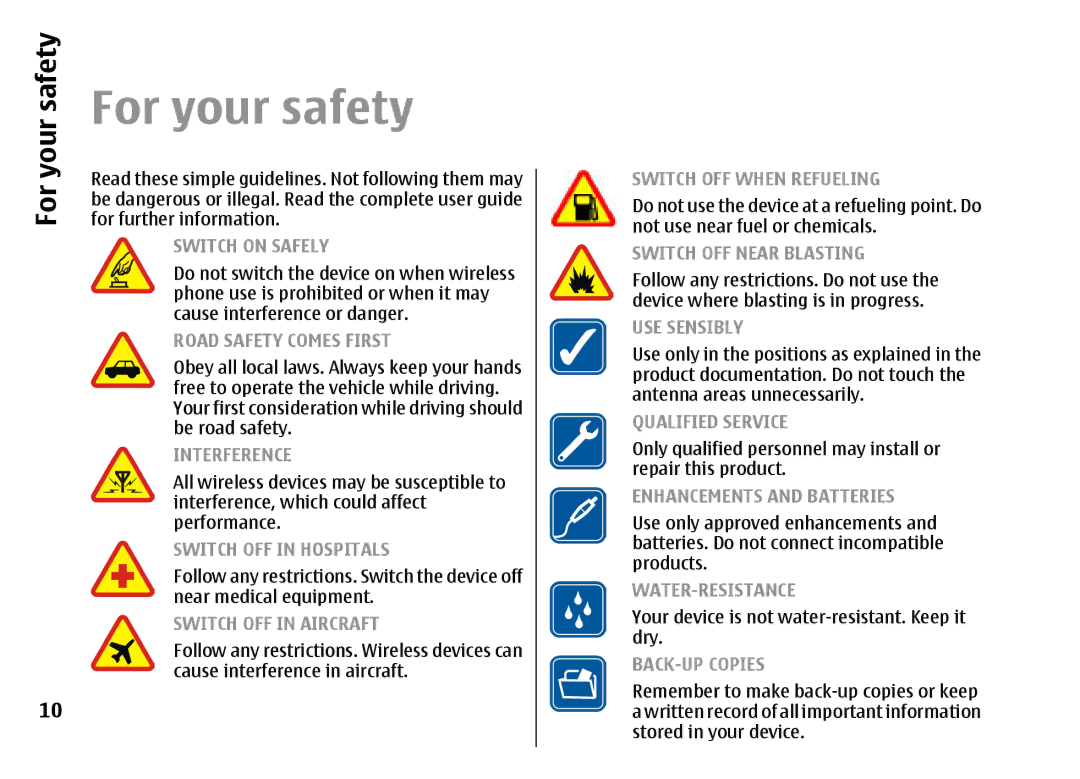
Only qualified personnel may install or repair this product
For your safety
For your safety
Your device is not water-resistant. Keep it dry
About your device
Network services
Safety
For
Enhancements, batteries, and chargers
Your
Get started
Insert the SIM card and battery
Get started
Charging indicator starts scrolling
Charge the battery
Slide the back cover back to place
Keys and parts
First start-up
Press and hold the power key
Connect the headset Attach the wrist strap
Home key Contacts key Mail key Calendar key
Lock the keys
Display indicators
Lock keypad. To
Page
Nokia support and contact information
Welcome
Settings wizard
Your Nokia E51
Your Nokia E51
Standby
Standby modes
Active standby
E51
Menu
Common actions in several applications
Options Shortcut settings
Transfer content between Devices
Select Menu Tools Switch
Transfer
Synchronise, retrieve, and send data
Personalisation
View transfer log
Profiles
Change the display theme
Select ringing tones
Customise profiles
Select Menu Tools Themes
Ringing tones
Download a theme
Change audio themes
Select Menu Media 3-D ringing tones
Home key
Volume control
One-touch keys
Contacts key
Calendar key
Multitasking
Memory
Mail key
Insert the memory card
Memory card
MicroSD
Use a memory card
Traditional text input
Write text
Eject the memory card
Change the writing
Antennas
Predictive text input
Language
Instructions in your device
Further information
Extended user guide
Tutorial
Voice calls
Business communications
Telephone
Business
Make a conference call
Video calls
Business communications
Fax calls
Share a video
Net calls
Receive a video sharing invitation
Create a net call profile
Connect to the net call service
Select Internet tel. Options New profile
Call divert
Net call service settings
Speed dialling
Make net calls
Call barring
Select Menu Tools Settings Phone Call barring
Bar net calls
Send Dtmf tones
Voice aid
Voice mail
Launch an application
Voice commands
Make a call
Select Menu Tools Voice comm
Change profiles
Voice command settings
Log
Call and data registers
Log
Log settings
Contacts
Copy contacts between SIM and device memory
Add ringing tones for contacts
Manage contact groups
New group
Manage received business cards
Send business cards
SIM directory
Create calendar entries
Calendar
Select Menu Calendar
Calendar views
Create a meeting entry
To-do entries
Create a to-do entry
Calendar settings
Connection security
Web
Browse the web
Clear the cache
Web settings
Bookmarks
Feeds and blogs
Messaging
Messaging
Messaging folders
Select Menu Messaging
Speech
Organise messages
Message reader
Edit the voice properties
Mailbox guide
Set up your e-mail with
Mail messages
Select Menu Messaging Mailbox
Connect to a remote mailbox
Read and reply to e-mail
Delete messages
Text messages
Write and send e-mail
Subfolders in your remote e- mail
Text messages on the SIM card
Sending options for text messages
View picture messages
Multimedia messages
Forward picture messages
Create presentations
MMS creation mode setting is set to Restricted
Settings Multimedia message MMS creation Mode Free
Options Add recipient to select
Forward a multimedia message
View presentations
View and save multimedia attachments
Edit the message, if desired, and select Options
To save the contents of these messages, select Options Save
Service messages
Send service commands
Send a sound clip
Text message settings
Messaging settings
Cell broadcast
Multimedia message settings
User settings
Mail account settings
Connection settings
Retrieval settings
Service message settings
Cell broadcast settings
Other settings
Automatic retrieval settings
Active notes
Settings for Active notes
Nokia Office Tools
Create and edit notes
Search for information
Search
Calculator
Search results
Nokia Team suite
File manager
Quickoffice
Work with files
Work with teams
Nokia Team Suite settings
Action bar settings
Edit teams
Convert measurements
Converter
Zip manager
Set base currency and exchange rate
Print files
Printing
Printing options
Clock settings
Printer settings
Alarm clock
Clock
Write and send notes
Select Menu Office Notes
Capture an image
Free time
Camera
Record a video clip
Work with media files
Camera settings
Gallery
Folders
Play video clips and stream links
RealPlayer
Manage image files
Free
Send audio files and video clips
RealPlayer settings
Music player
View information about a media clip
Track lists
Preset frequency settings
Recorder
Music categories
Record a sound clip
Recorder settings
Instant messaging
Play a recording
Start a conversation
Define IM settings
IM groups
Options Blocking options
IM application settings
Block users
Select Options Unblock
Manage flash files
Flash player
Visual radio
Listen to the radio
Push to talk
View visual content
Visual Radio settings
Saved stations
Make a PTT call
PTT settings
Log in to PTT service
Created PTT calls
Create a PTT channel
About GPS and satellite signals
Manage PTT contacts
Exit PTT
Select Menu Tools Settings General Positioning
Positioning settings
About satellite signals
Satellite status
Select Menu Tools Maps
Nokia Maps
Download maps
Nokia Map Loader
Browse maps
Satellite information
Satellite info
Navigation
Find a place
Plan a route
Routing
Guides
GPS data
Use GPS data
Edit landmarks
Landmarks
Create a landmark
Landmark categories
Receive landmarks
Nokia PC Suite
Connectivity
Fast downloading
Data cable
Select Menu Connectivity Bluetooth
Bluetooth
About Bluetooth
Infrared
Send and receive data with Bluetooth
Pair devices
Select Options New paired device . The device
Select Menu Connectivity Bluetooth Remote SIM mode On
SIM access profile
Use the SIM access profile
Security tips
See Wlan availability
Wireless LAN
Wlan connections
Wlan wizard
Scan off When Start Web browsing
Internet access points
Use the wizard in the active standby mode
Select Search for WLAN. To
Select Menu Tools Settings Connection Access points
Data bearer Select Packet data
Set up an access point for Wlan manually
Advanced access point Settings for Wlan
Connection manager
Modem
Search for Wlan
101
Memory card security
Security and data management
Lock the device
Security and data
Security and data management
Fixed dialling
Certificate manager
103
View certificate details
Certificate trust settings
Security modules
Data
View and edit security modules
Remote configuration
Back up data
105
Application manager
Allow configuration Select Yes to allow
Select Menu Installations App. mgr
Security
Java security settings
Install applications
Installation settings
Management
108
Activation keys
Use activation keys
Select Menu Tools Actv. keys
109
Data synchronisation
Security
Management
Download
Select catalogs, folders, and items
Software updates
Download! settings
111
112
Personalisation settings
Settings
General settings
Settings
Language settings
Standby mode settings
Tone settings
Notification light
Security settings
Date and time settings
Enhancement settings
Common enhancement settings
Restore original settings
Telephone settings
Call settings
Access points
Connection settings
Network settings
Select Menu Tools Settings Phone Network
Advanced Wlan settings
Packet data Gprs settings
Wlan settings
118
WEP key settings
Wlan security settings
WEP security settings
802.1x security settings
Session initiation protocol SIP settings
WPA security settings
Wireless LAN plugins
EAP plug-ins
Edit registration servers
Edit SIP profiles
Edit SIP proxy servers
121
Restrict packet data
Net call settings
Configuration settings
122
General shortcuts
Settings Phone Call
Shortcuts
Shortcuts
124
Glossary
Glossary
Glossary
126
127
128
WPA WPA2
Nokia original enhancements
Battery
Nokia original
Troubleshooting
Troubleshooting
Connectivity Bluetooth Bluetooth Off
Show
How do I check the signal quality of my Wlan connection?
131
Wlan availability
How do I save battery power?
Data Packet data connection When needed
Why do I have problems connecting the device
To my PC?
Battery information
Battery information
Authenticate hologram
Nokia battery
Authentication
What if your battery is not authentic?
Care and maintenance
Care
Operating environment
Additional safety information
Small children
Medical devices
Potentially explosive environments
Additional safety information
Vehicles
Hearing aids
Emergency calls
138
139
MANUFACTURER’S Limited Warranty
Warranty period
What is not covered?
How to get warranty service
141
Other important
143
Limitation of Nokias liability
Statutory obligations
Nokia Corporation Keilalahdentie FIN-02150 Espoo Finland
Index
Symbols/Numerics
Index
145
146
147
148
149
150