Look Inside For
Norway
United States
Netherlands
Algeria
United States Government Restricted Rights
Page
Contents
Understanding the Software
Removing and Reinstalling Software
Cleaning the Ink Cartridge Nozzles
116
Appendix
Page
W . d e l l . c o m s u p p o r t . d e l l . c o m
Number Part Description
Understanding the Printer Parts
Number Part Description
Right side connector
Connector
Left side
Setting Up Your Printer
Accessing Your User’s Guide
Using the Operator Panel
Installing the Operator Panel
Understanding the Operator Panel
Number Part Purpose
Display features Printer status Messages Menus
Or Photo
Copy
Fax
Scan
Operator Panel Menus
Selecting Scan Mode Menu Items
From this menu You can
Scan Mode Menu Items
You printed is not satisfactory
Selecting Copy Mode Menu Items
KEY Press Tone
Copy Mode Menu Items
Area to the size of the original selected
Selecting Fax Mode Menu Items
Advanced FAX
Fax Mode Menu Items
Specific time to send a fax
Selecting Advanced Fax Menu Items
For PM or 3 for 24-hour mode
Single
Advanced Fax Mode Menu Items
From this Advanced You can select Fax option
Telephone service. If they are not available, select Any
Fax machine
From this Advanced You can select Fax option
Glossy/photo
Understanding the Automatic Paper Type Sensor
Normal Photo
Transparency
Right-click the printer icon
Printing Preferences screen appears
Load up to Make sure
Loading Paper
Load Plain Paper Into the Paper Support
Print Media Guidelines for the Paper Support
Insert multiple envelopes in the bottom paper feeder
Envelopes Print side of the envelopes faces down
Paper Guidelines for the ADF
Load an Original Document Into the ADF
Preprinted
Edge-reinforced
Three-hole
Copier media
Close the top cover
Placing Your Original Document on the Scanner Glass
To get a copy with portrait
Vertical orientation Horizontal orientation
Printing a Document
Printing
Printing Collated Copies of Your Document
From Your Computer
Printing Photos
On the Print Layout tab, click Borderless
From a PictBridge-Enabled Camera
Printing More Than one Page on a Sheet of Paper
Printing Borderless Photos
Follow the instructions on your screen Click OK
Printing an Image as a Multi-page Poster
Printing Last Page First
Printing a Banner
Printing Other Projects
Copying Documents Using the Operator Panel
Copying Documents Using Your Computer
Copying
Select a copy quantity 1-99 and color
Copying Photos Using the Operator Panel
Copying Photos Using Your Computer
Click See More Copy Settings to
Changing Copy Settings
Collating Copies Using the Operator Panel
Click this tab
Scanning
Scanning Photos
Using the Printer Software
Scanning to Your Computer Over a Network
Scan section, click See More Scan Settings
Scanning Multiple Pages or Images
Scanned text appears Edit your document Save your document
Editing Scanned Text Using Optical Character Recognition OCR
With most graphics programs, you can customize your image
Editing Scanned Images
Saving an Image on Your Computer
Mailing a Scanned Image or Document
Creative Tasks section, click E-mail an image or document
Enlarging or Reducing Images or Documents
Click Attach Now
Faxing
Setting up the Printer With Equipment
Equipment Benefits See this section
Connecting to a telephone
Connecting directly to a telephone wall jack
Connecting to an answering machine
Connecting to a computer modem
Faxing Using the Printer Operator Panel
What if I Have a Digital Subscriber Line DSL?
Receive a Fax Manually
Send a Fax
Press Black or Color
Receive a Fax Automatically
Sending a Fax From the Computer
Connecting Cables
Receive a Fax
Send a Fax Using the Dell All-In-One Center
Access the Printer Setup Utility
Faxing Through the Printer Modem
Faxing Through the Computer Modem
Install Fax Console Windows XP Only
On this tab You can
Configure Fax Service Management Windows 2000 Only
Configure Fax Console Windows XP Only
Close the Add/Remove Programs window
Click File → Print
Receive a Fax Using Fax Console or Fax Service Management
Open your file to be faxed
Click File →Print
Create a Speed Dial List From the Operator Panel
Speed Dial
Create a Group Dial List From the Operator Panel
Create a Speed Dial List From the Computer
Use a Speed or Group Dial List
Send a Delayed Broadcast Fax
Broadcast Send
Press Select to save the list
Adding Fax Numbers From Which to Block Faxes
Using Auto Fax Convert
To turn on Auto Fax Convert
Using the Printer
Printing Preferences for printing
Using the Dell Printer Solution Center
Advanced tab
This section You can
Using the Dell All-In-One Center
To access the Dell Printer Solution Center
Preview
To access Printing Preferences
Using Printing Preferences
Dell Picture Studio Home
Using Dell Picture Studio
Printing Preferences Tabs
Printing Preferences includes three main tabs
Replacing Ink Cartridges
Ink Cartridge Maintenance
Ink Cartridge Maintenance
Photo or black cartridge
Aligning Ink Cartridges
Click Clean to fix horizontal streaks
Cleaning the Ink Cartridge Nozzles
Click the Maintenance tab
Click Print Ink cartridges align when the page prints
Ink Cartridge Maintenance
Computer Problems
Setup Problems
Windows XP. click Start→ My Computer
Windows XP, click Start→ My Computer
Removing and Reinstalling Software
Messages and Lights on
Printer Problems
Fax Problems
General Problems
Media Guidelines for the Paper Support on
Paper Problems
Near the ADF
Near the paper exit tray 1 Raise the printer unit
Error Message What it indicates Solution
Error Messages and Lights
Color ink cartridge is missing
Improving Print Quality
To access the Dell Printer Solution Center
Troubleshooting
Technical Assistance
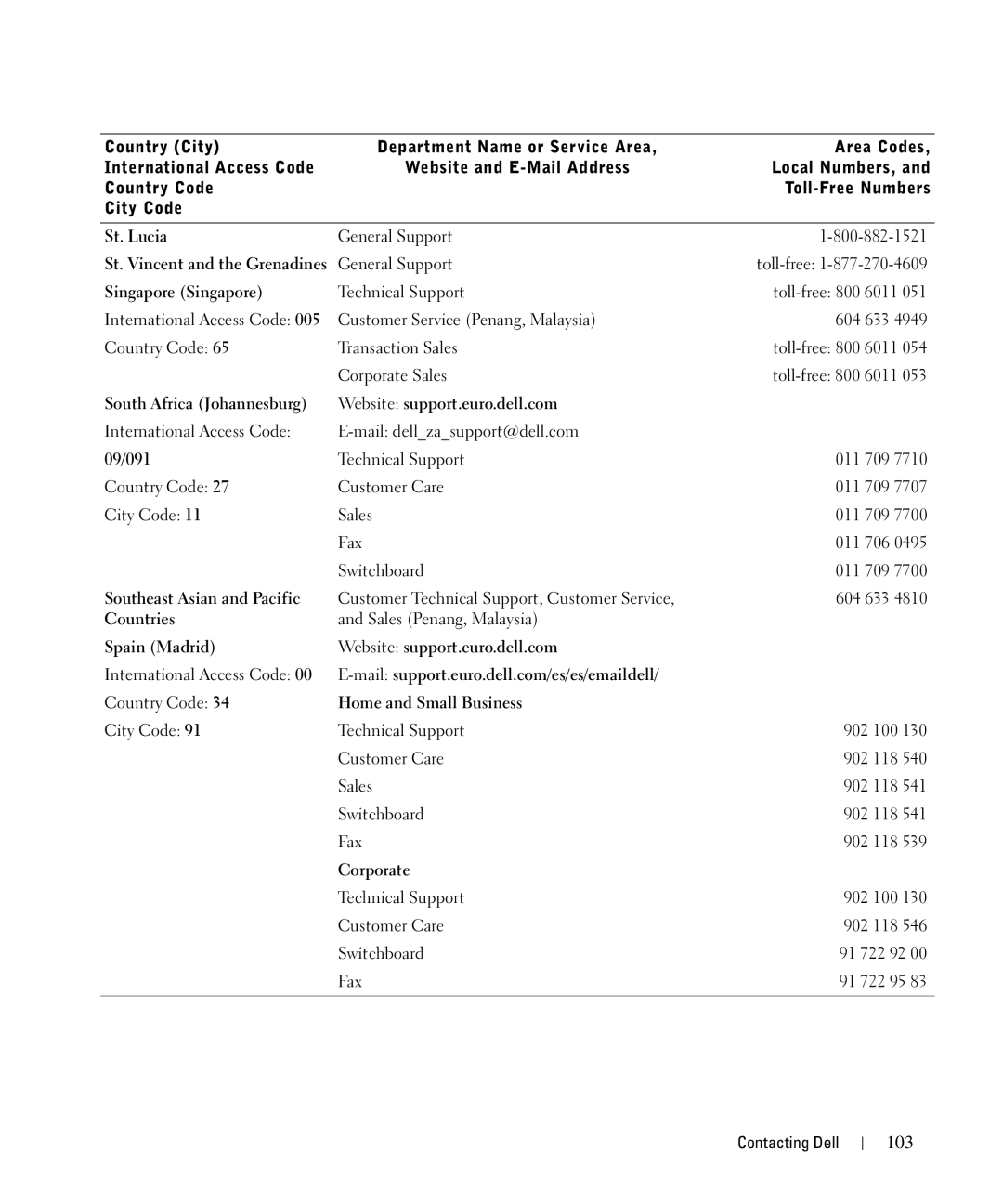
Contacting Dell
Contacting Dell
Automated Order-Status Service
Antigua and Barbuda
A. Austin, Texas
Business
Anguilla
Austria Vienna Website support.euro.dell.com
Argentina Buenos Aires
Aruba
Australia Sydney
Brazil
Belgium Brussels Website support.euro.dell.com
Bermuda
Bolivia
Costa Rica
Chile Santiago
China Xiamen
Colombia
Dominican Republic
Czech Republic Prague Website support.euro.dell.com
Denmark Copenhagen Website support.euro.dell.com
Dominica
Corporate
Finland Helsinki Website support.euro.dell.com
France Paris Montpellier Website support.euro.dell.com
Home and Small Business
Guatemala
Germany Langen Website support.euro.dell.com
Greece Website support.euro.dell.com
Grenada
Jamaica
India
Ireland Cherrywood Website support.euro.dell.com
Italy Milan Website support.euro.dell.com
Luxembourg Website support.euro.dell.com
Japan Kawasaki Website support.jp.dell.com
Korea Seoul
Latin America
Montserrat
100
Malaysia Penang
Mexico
Nicaragua
101
Netherlands Amsterdam Website support.euro.dell.com
New Zealand
102
103
104
105
W . d e l l . c o m s u p p o r t . d e l l . c o m
107
Terms and Conditions of Sale
Software
108
Headings
109
110
What is covered by this limited warranty?
What is not covered by this limited warranty?
Limited Warranties and Return Policy
What do I do if I need warranty service?
How long does this limited warranty last?
111
How will you fix my product?
What if I purchased a service contract?
May I transfer the limited warranty?
What will Dell do?
113
Total Satisfaction Return Policy U.S. Only
Dell Software License Agreement
Dell Inc. Ink and Toner Cartridges Limited Warranties
114
115
Limited Warranty
116
Regulatory Notices
Government Restricted Rights
General
Fax Branding
FCC Notices U.S. Only
Class B
FCC Identification Information
Appendix
119
D ex
Index
121
122