1. Introduction
Top Features
10 | 9 |
|
|
|
|
|
|
|
|
| |
| 8 | 7 | 6 | 1 | 4 5 |
| SELECT |
|
|
|
|
|
|
|
|
| PC CARD |
|
|
|
|
| LAMP |
|
|
|
|
| STATUS |
| 3D REFORM AUTO ADJUST SOURCE | ON/STAND BY POWER | |||
11 | 12 |
|
|
| 3 2 |
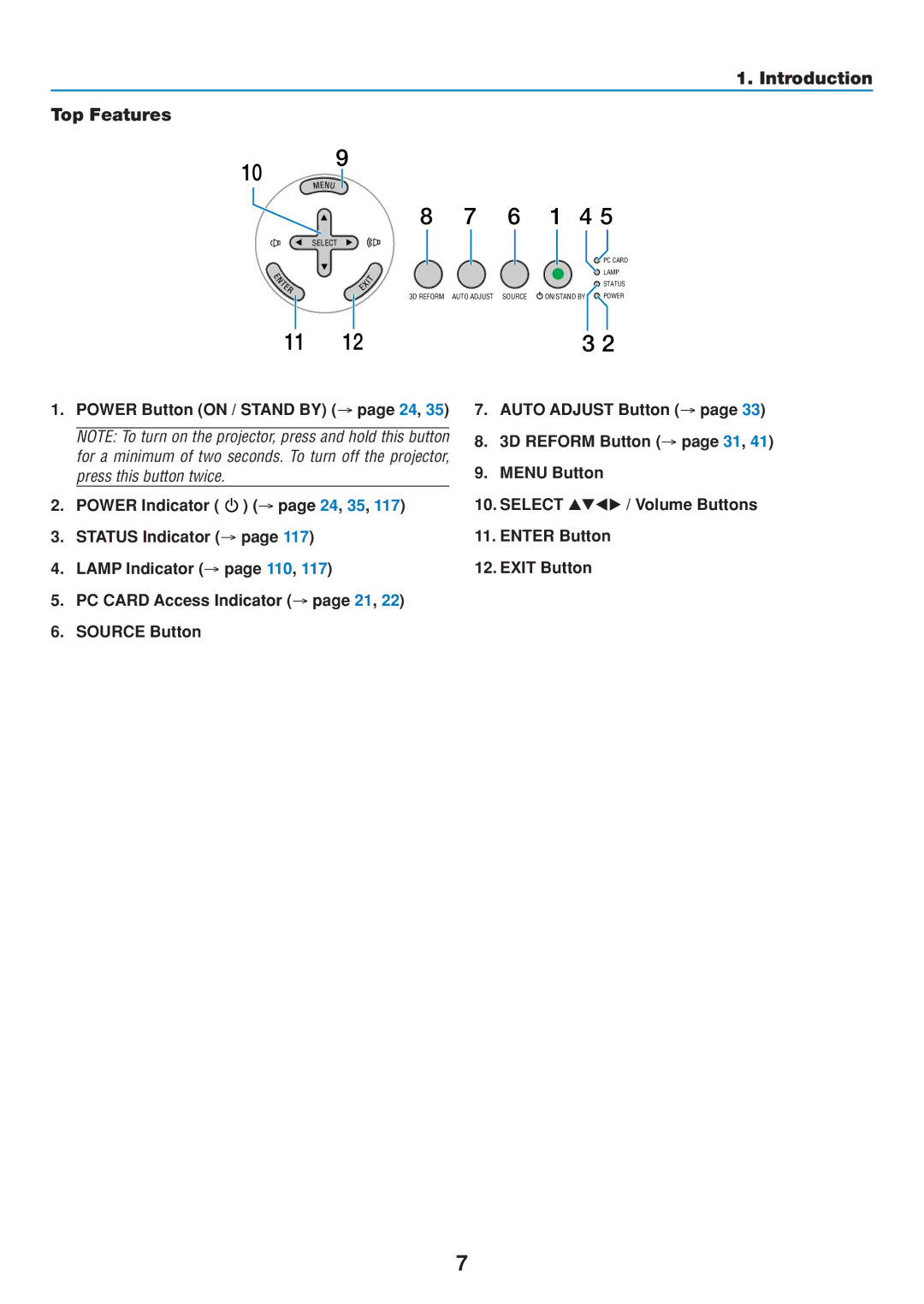
1.POWER Button (ON / STAND BY) (→ page 24, 35)
NOTE: To turn on the projector, press and hold this button for a minimum of two seconds. To turn off the projector, press this button twice.
2.POWER Indicator (  ) (→ page 24, 35, 117)
3.STATUS Indicator (→ page 117)
4.LAMP Indicator (→ page 110, 117)
5.PC CARD Access Indicator (→ page 21, 22)
6.SOURCE Button
7.AUTO ADJUST Button (→ page 33)
8.3D REFORM Button (→ page 31, 41)
9.MENU Button
10. SELECT | / Volume Buttons |
11.ENTER Button
12.EXIT Button
7