Settings for recording
Connections for recording
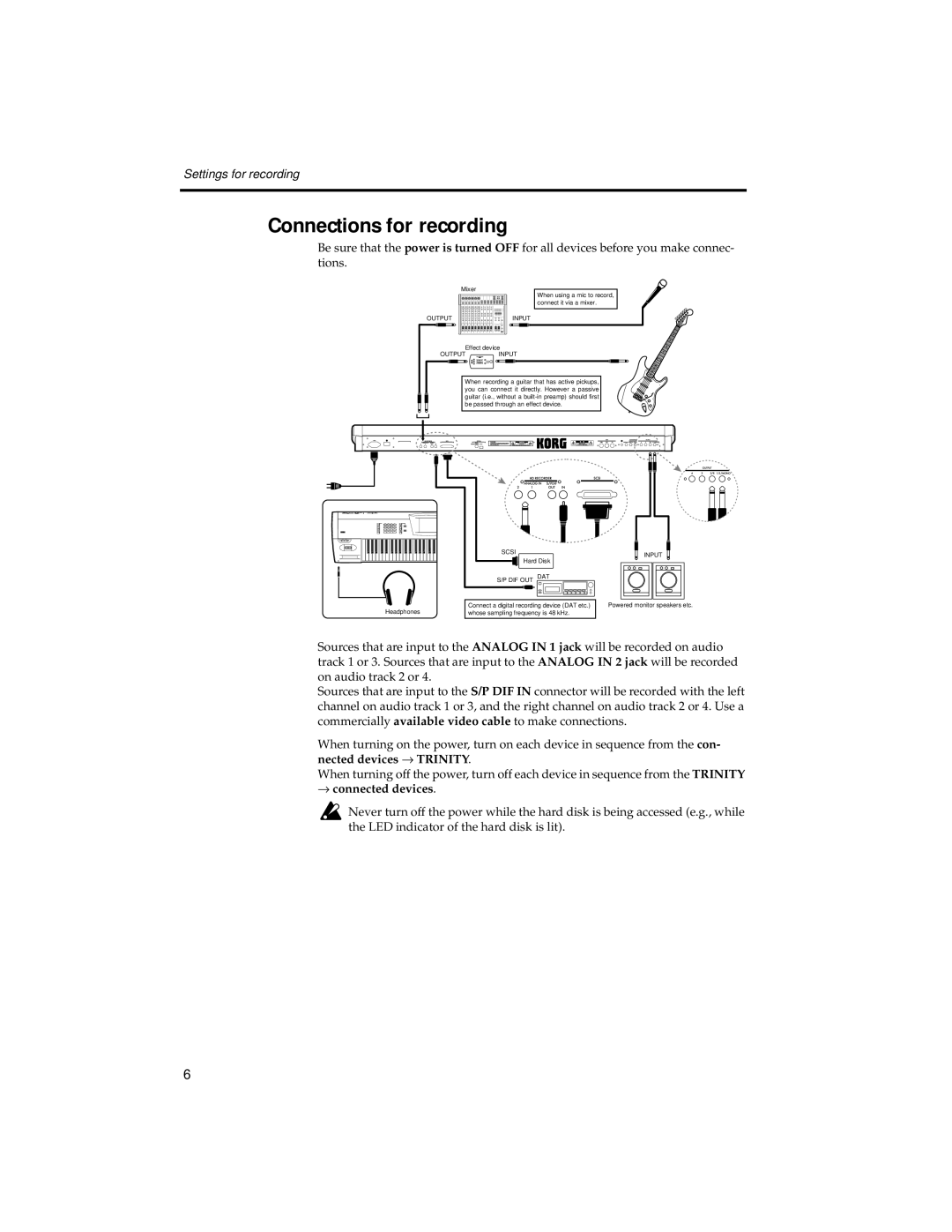
Be sure that the power is turned OFF for all devices before you make connec- tions.
| Mixer |
OUTPUT | INPUT |
Effect device
OUTPUTINPUT
When using a mic to record, connect it via a mixer.
When recording a guitar that has active pickups, you can connect it directly. However a passive guitar (i.e., without a
Headphones
SCSI | INPUT |
Hard Disk |
|
S/P DIF OUT DAT |
|
Connect a digital recording device (DAT etc.) | Powered monitor speakers etc. |
whose sampling frequency is 48 kHz. |
|
Sources that are input to the ANALOG IN 1 jack will be recorded on audio track 1 or 3. Sources that are input to the ANALOG IN 2 jack will be recorded on audio track 2 or 4.
Sources that are input to the S/P DIF IN connector will be recorded with the left channel on audio track 1 or 3, and the right channel on audio track 2 or 4. Use a commercially available video cable to make connections.
When turning on the power, turn on each device in sequence from the con- nected devices → TRINITY.
When turning off the power, turn off each device in sequence from the TRINITY
→connected devices.
 Never turn off the power while the hard disk is being accessed (e.g., while the LED indicator of the hard disk is lit).
6