JW-21MN
JW-21MN
Safety Precautions
Installation
Wiring Compel
Use
Maintenance Prohibit
ME-NET Module JW-21MN
Table of contents
Setting of Switches and Parameter 11-1 to
Errors and Countermeasures 12-1 to
Description for Computer Link Operation 10-1 to
Support Tools 14-1 to Specifications 15-1 to
13-1
Appendix 16-1 to
Features and Functions
Data link function
Computer link function
Wiring
Installation
Connector
Allocation of relay number
Maintenance
Treatment
Static electricity
JW20H JW-21MN JW-21MN JW30H
System Configuration
Front view
Name and Function of Each Part
Installation
Installation procedure
Remarks
Name Model Maker
Processing of Cables
Processing cable end
Fine adjustment of blade cutting depth
Cutting of coating, external conductor, and insulator
Removal of coating, external conductor, and insulator
Processing of cable end
Display of blade setting
Crimping contact
Connector crimping procedure
Connector ME-GP-01 Processing procedure Insert a sleeve
Required tools Hand-held crimping tool
Fixing the connector
Insulation test
Conductivity test
Wiring Method
Cable trunk and branch lines
Relaying of trunk cables
Cable wiring procedure in control panel
Page
Remarks
Waterproof and insulation processing of connectors
Branch connector
Straight connector
Check after wiring
Wiring of cables at outside control panels
Station number of the additional station
Branching method
Reason
Memory Address on the ME-NET
Memory address for data links
Memory address map against JW20/JW20H
JW30H address ME-NET address
Memory address map against JW30H
JW20/20H ME-NET address Capacity
Memory addresses for computer links
JW30H address ME-NET address Capacity Remarks
Relay link
Description for Data Link Operation
Communication method
Data link Standard function
Setting item Set location
Data link Save memory function
Register link
Required transmission time
Required transmission time and communication delay time
Communication delay time
An example of synchronized transfer by OUT instruction
Data transmission between master PC and slave PC
Multiple installation of the JW-21MN
Expansion of network
Case of mounting 4 sets of JW-21MN
Hierarchical link
Computer link function
Basic commands
Optional commands
Description for Computer Link Operation
10-2
Basic commands
Optional commands
10-3
Communication format, basic pattern
10-4
Write mode assignment None Communication format
Read free memory size
Monitor TMR, CNT, and MD
Reading PC mode
Setting PC mode
10-5
Reading system memory
Writing system memory
10-6
10-7
Setting date
Write mode assignment 1 or Communication format
Reading date
Setting time
Reading time
10-8
Correct clock time
Monitor step status JW20/JW20H only
10-9
10-10
Write mode assignment
Read the optional parameters
Set the optional parameters
Read the special I/O parameters
Set the special I/O parameters
10-11
Release the secret function, register password JW30H only
Set the secret function JW30H only
10-12
10-13
Check the secret function JW30H only
10-14
Response on error
Setting of Switches and Parameter
Operation procedure
11-1
11-2
Switch setting of master station and slave station
Mode switch Mode
Module No. switch Unit no
Reference Need for the termination resistance
Station number switch STA no
Termination resistance switch LT
11-3
11-4
Shield ground switch LG
Setting contents of master station parameters
Value H
11-6
11-7
Parameter for setting in master station
Parameter for setting in slave station
Communication area map
11-8
11-9
+ h
Example for setting
11-10
Maser station Slave station Standard Save memory
11-11
When master station PC is JW20/JW20H
11-12
When master station PC is JW30H
11-13
Setting procedure
11-14
Example Stop operation of data link HEX hexadecimal, byte
Stop operation of data link HEX hexadecimal, byte
Data link function setting HEX hexadecimal, byte
Set number of connecting stations DCM decimal, byte
11-15
Set top address of register link area on the master station
11-16
Set in parameter addresses 005000 to
11-17
11-18
Set connection status of slave station Bit pattern, byte
11-19
11-20
PC operation
11-21
Setting item
Contents
11-22
11-23
Setting range of flag area
When PC is JW20/JW20H
When PC is JW30H
11-24
11-25
Turn on the power of slave station PC Connect support tools
11-26
11-27
11-28
Details Measure
Errors and Countermeasures
Indication lamps
12-1
Remark
Flag
Operation condition monitor flag
Case of a master station
12-3
Communication monitor flag
12-4
Case of slave station 01 to
12-5
Monitor operation condition by each station PC
12-6
Storage of error code
12-7
System memory #170 to 177 option module error code
System memory #160 to 167 self diagnosis error code
System memory #150 monitor error switch number
12-8
Error history
13-1
Replacement of the JW-21MN
Support Tools
Record and load by ladder software JW-92SP, JW-50SP Record
14-1
Stop operation of the JW-21MN
Load
14-2
Load to the personal computer
Specification
Specifications
General specifications
Communication specifications
15-2
Data link specifications
Standard function Specifications
Save memory function Specifications
Computer link specifications
Outside dimensional drawings
15-3
Maintenance and check
Appendix
16-1
Recovery method at communication errors
Check flow chart
16-2
16-3
Check cable/connector
Cause Countermeasure
16-4
007764 to
16-5
Other cases
Switches required check in the JW-21MN
Check items of cables and connectors
16-6
16-7
Check the errors timing
Identify the error station
When identification of the cause is difficult
Table of parameter memory
16-8
Master station
16-9
Set contents Setting method value, example
16-10
16-11
Slave station 01 to
16-12
Support tool Opposite module Connection module
Special functions unique to the JW-21MN
16-13
Remote programming and remote monitor
Operation example
16-14
Function Standard network connection
Expansion network connection
16-15
Network setting
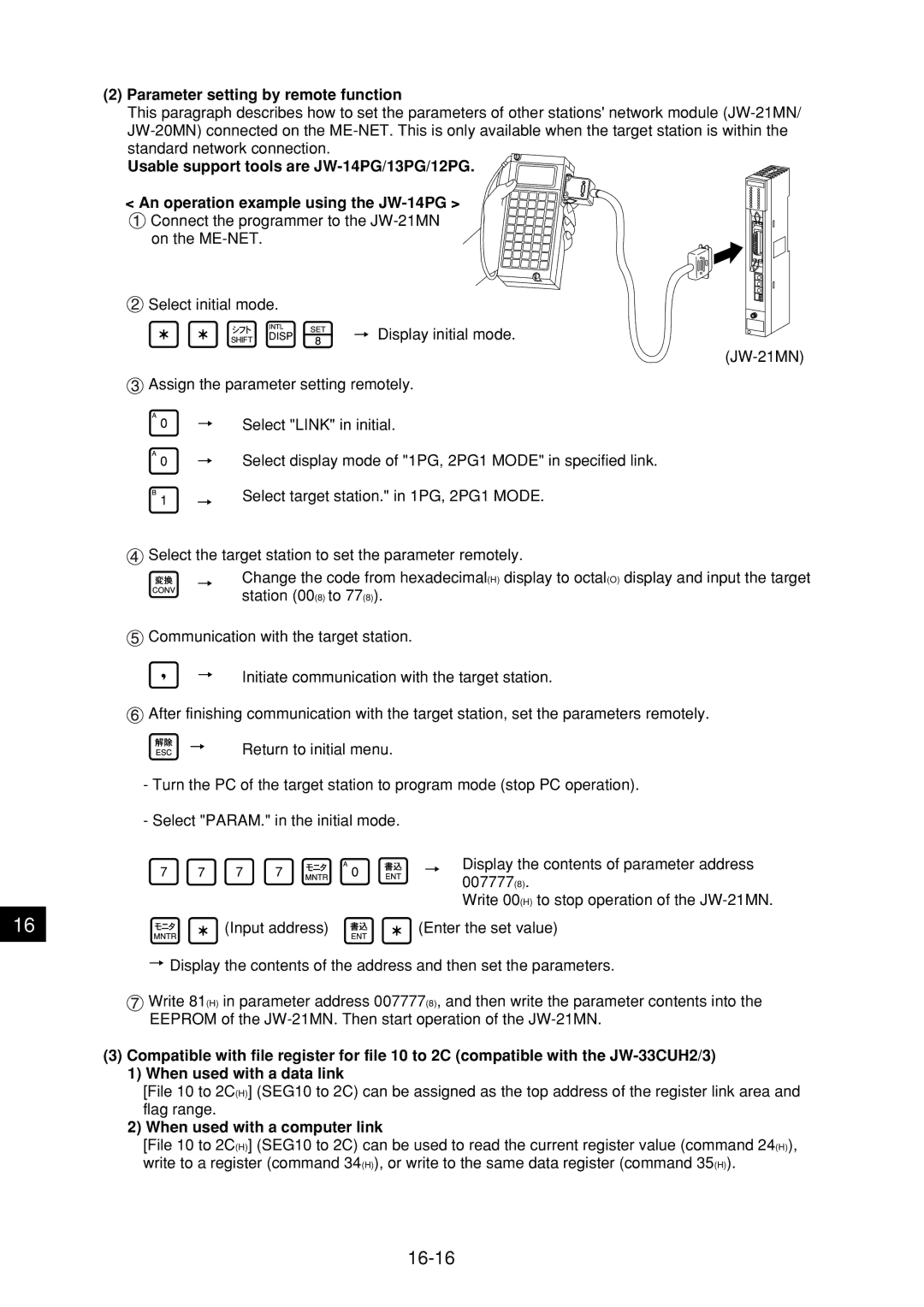
Parameter setting by remote function
When used with a computer link
16-16
Alphabetical Index
Operation procedure
Waterproof and insulation processing of connectors

 Connect the programmer to the
  Select initial mode.
 Assign the parameter setting remotely.
 Select the target station to set the parameter remotely.
 Communication with the target station.
 After finishing communication with the target station, set the parameters remotely.
 Write 81(H) in parameter address 007777(8), and then write the parameter contents into the EEPROM of the