Telephone settings
Ringer melody
In this menu, you can listen to the ringer melodies and set different ringer melodies for the incoming Home and VoIP calls.
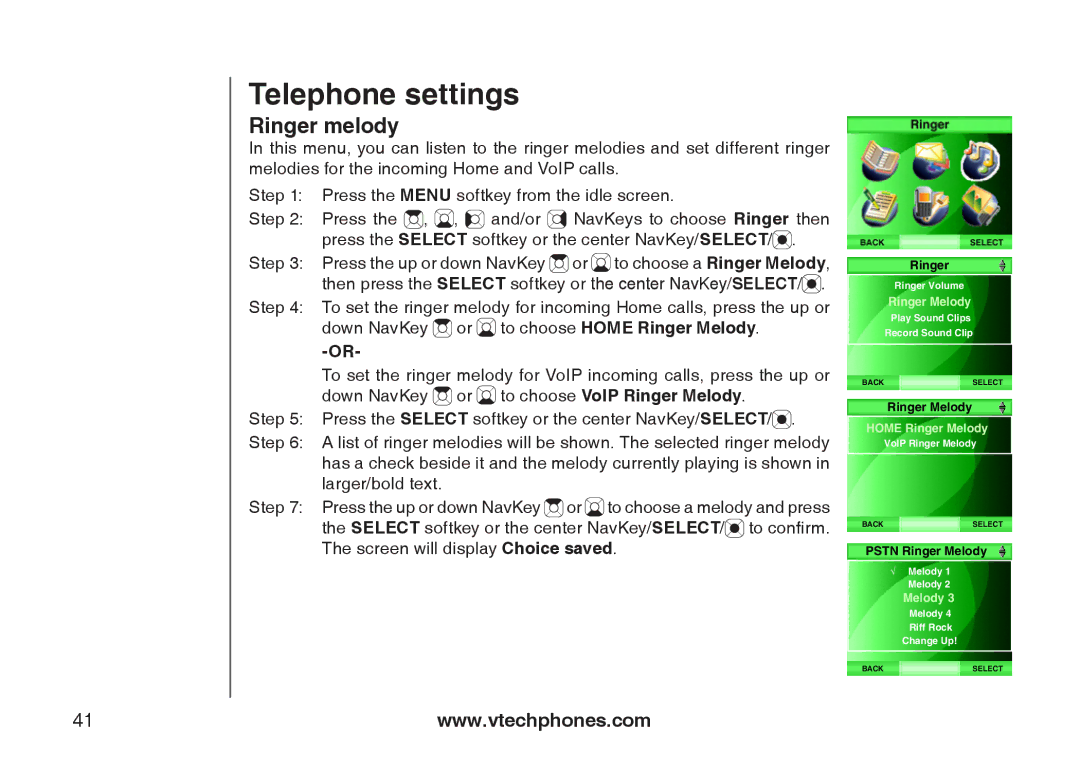
Step 1: Press the MENU softkey from the idle screen.
Step 2: Press the  ,
,  ,
, 
 and/or
  NavKeys to choose Ringer then press the SELECT softkey or the center NavKey/SELECT/
 .
.
Step 3: Press the up or down NavKey  or
or  to choose a Ringer Melody, then press the SELECT softkey or the center NavKey/SELECT/
 .
.
Step 4: To set the ringer melody for incoming Home calls, press the up or
down NavKey  or
or  to choose HOME Ringer Melody.
To set the ringer melody for VoIP incoming calls, press the up or down NavKey  or
or  to choose VoIP Ringer Melody.
Step 5: Press the SELECT softkey or the center NavKey/SELECT/ .
.
Step 6: A list of ringer melodies will be shown. The selected ringer melody has a check beside it and the melody currently playing is shown in larger/bold text.
Step 7: Press the up or down NavKey  or
or  to choose a melody and press the SELECT softkey or the center NavKey/SELECT/
 to confirm. The screen will display Choice saved.
Ringer
Ringer Volume
Ringer Melody
Play Sound Clips
Record Sound Clip
BACKSELECT
Ringer Melody
HOME Ringer Melody
VoIP Ringer Melody
BACKSELECT
PSTN Ringer Melody
√Melody 1 Melody 2
Melody 3
Melody 4
Riff Rock
Change Up!
BACKSELECT
41 | www.vtechphones.com |