Step 3: Exploring Adaptec Storage Manager
●
40
Navigating the Main Window
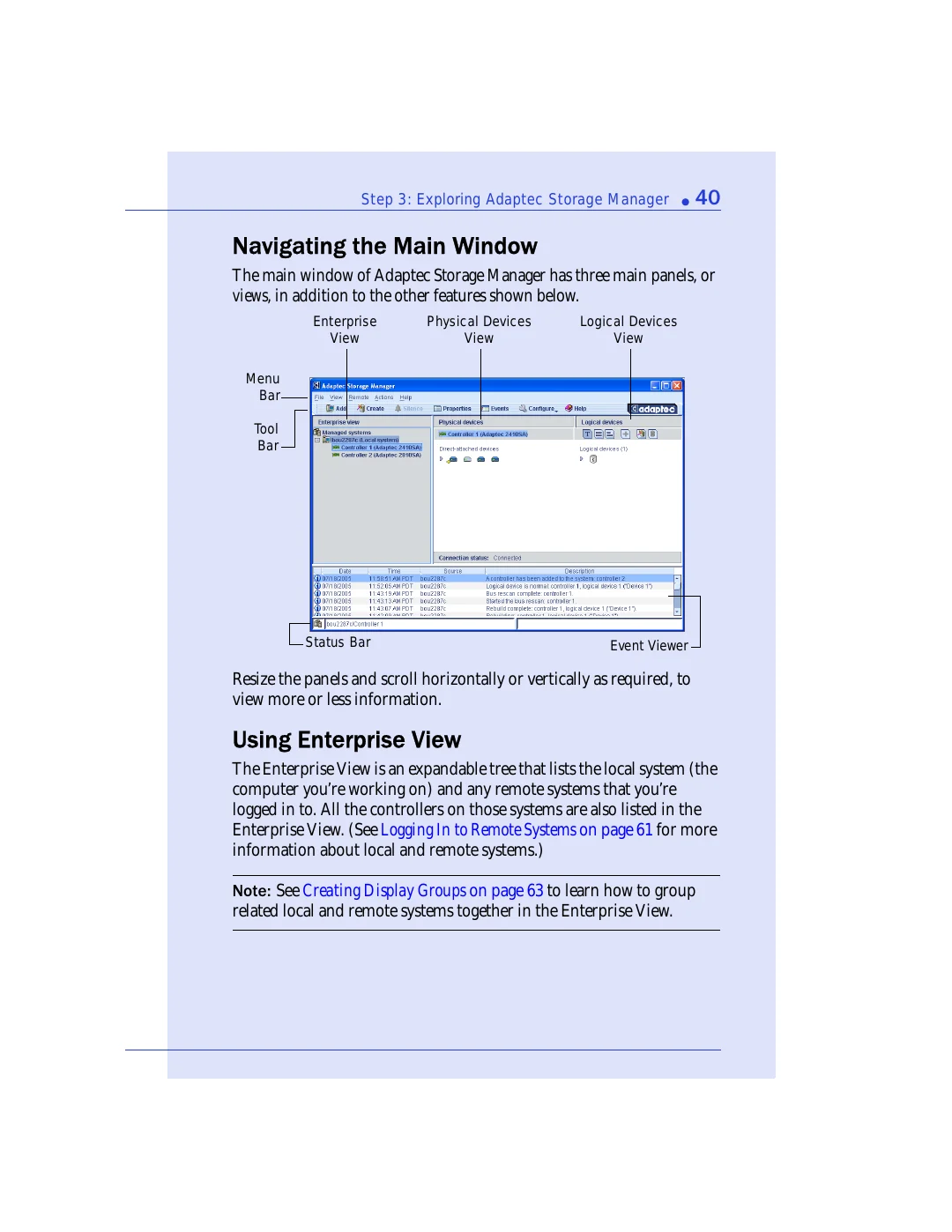
The main window of Adaptec Storage Manager has three main panels, or
views, in addition to the other features shown below.
Resize the panels and scroll horizontally or vertically as required, to
view more or less information.
Using Enterprise View
The Enterprise View is an expandable tree that lists the local system (the
computer you’re working on) and any remote systems that you’re
logged in to. All the controllers on those systems are also listed in the
Enterprise View. (See
Logging In to Remote Systems on page 61
for more
information about local and remote systems.)
Note:
See
Creating Display Groups on page 63
to learn how to group
related local and remote systems together in the Enterprise View.
Tool
Bar
Menu
Bar
Physical Devices
View
Logical Devices
View
Enterprise
View
Event Viewer
Status Bar