Getting Started
Acceptable Types Of Documents
Set documents after all ink and correcting fluid has completely dried. If the doc-
1 ument is not completely dry, the scanner glass will be marked causing black lines to appear on copies and sent faxes.
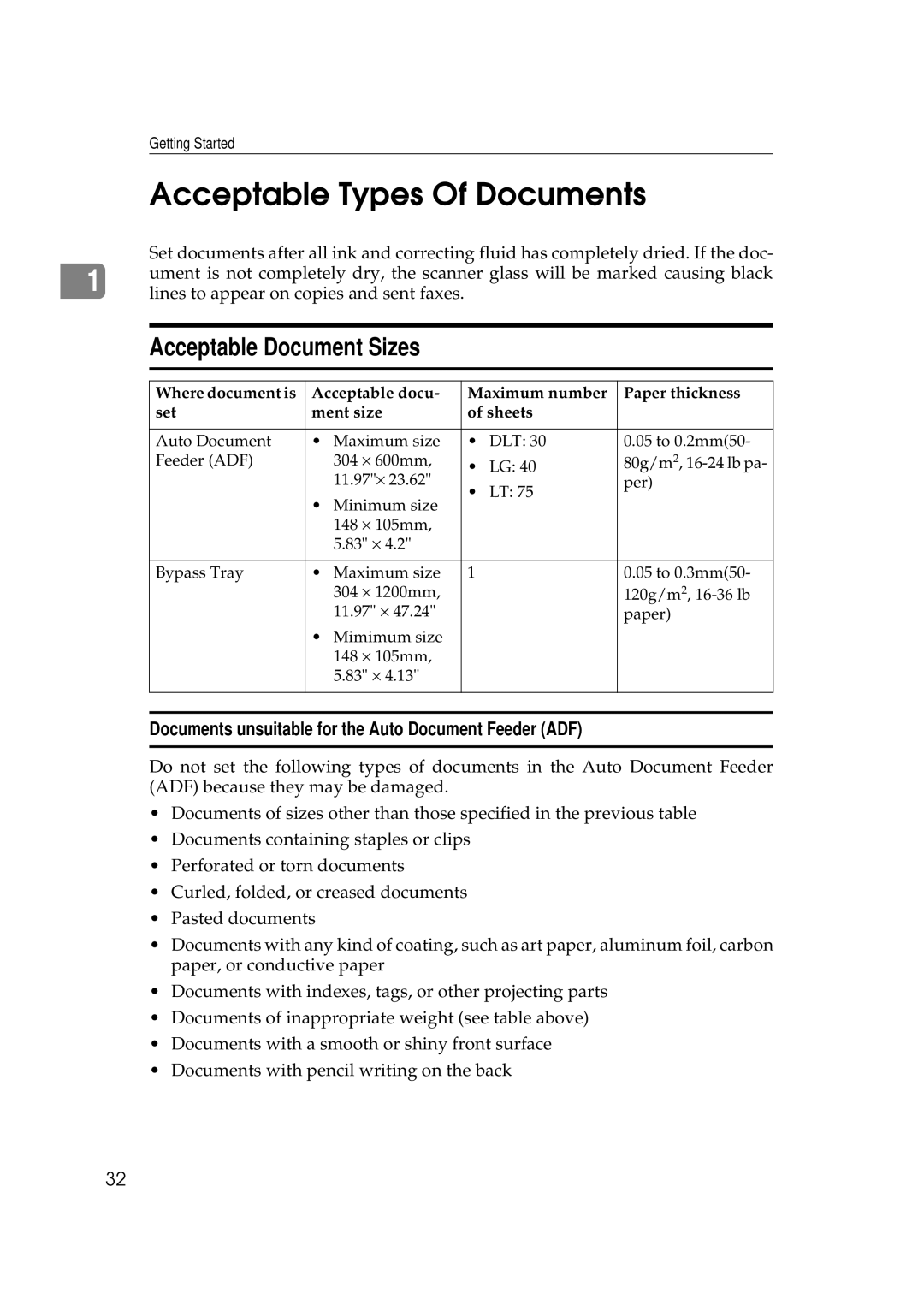
Acceptable Document Sizes
Where document is | Acceptable docu- | Maximum number | Paper thickness | ||
set | ment size | of sheets |
| ||
|
|
|
|
|
|
Auto Document | • | Maximum size | • | DLT: 30 | 0.05 to 0.2mm(50- |
Feeder (ADF) |
| 304 × 600mm, | • | LG: 40 | 80g/m2, |
|
| 11.97"× 23.62" | • | LT: 75 | per) |
| • | Minimum size |
| ||
|
|
|
| ||
|
| 148 × 105mm, |
|
|
|
|
| 5.83" × 4.2" |
|
|
|
|
|
|
|
|
|
Bypass Tray | • | Maximum size | 1 |
| 0.05 to 0.3mm(50- |
|
| 304 × 1200mm, |
|
| 120g/m2, |
|
| 11.97" × 47.24" |
|
| paper) |
| • | Mimimum size |
|
|
|
|
| 148 × 105mm, |
|
|
|
|
| 5.83" × 4.13" |
|
|
|
|
|
|
|
|
|
|
|
|
|
|
|
Documents unsuitable for the Auto Document Feeder (ADF)
Do not set the following types of documents in the Auto Document Feeder (ADF) because they may be damaged.
•Documents of sizes other than those specified in the previous table
•Documents containing staples or clips
•Perforated or torn documents
•Curled, folded, or creased documents
•Pasted documents
•Documents with any kind of coating, such as art paper, aluminum foil, carbon paper, or conductive paper
•Documents with indexes, tags, or other projecting parts
•Documents of inappropriate weight (see table above)
•Documents with a smooth or shiny front surface
•Documents with pencil writing on the back
32