Dialing
You can also use SEP Code Polling Transmission to retrieve documents stored in information Boxes regis- tered in other fax machines.
 Preparation
You need to assign the Dial Op- tions feature to a User Function key beforehand.
 Limitation
❒The ID can be up to 20 digits long and consist of digits, spaces, * and #.

 Note
Note
❒Messages you send using this fea- ture are marked “SEP” on the re- ports below:
•File Reserve Report (Memory Transmission)
•File Reserve Report (Polling Re- ception)
•Communication Result Report
•Communication Failure Report
•Transmission Result Report
❒Make sure that the ID you enter conforms with the specification of the other party's fax machine.
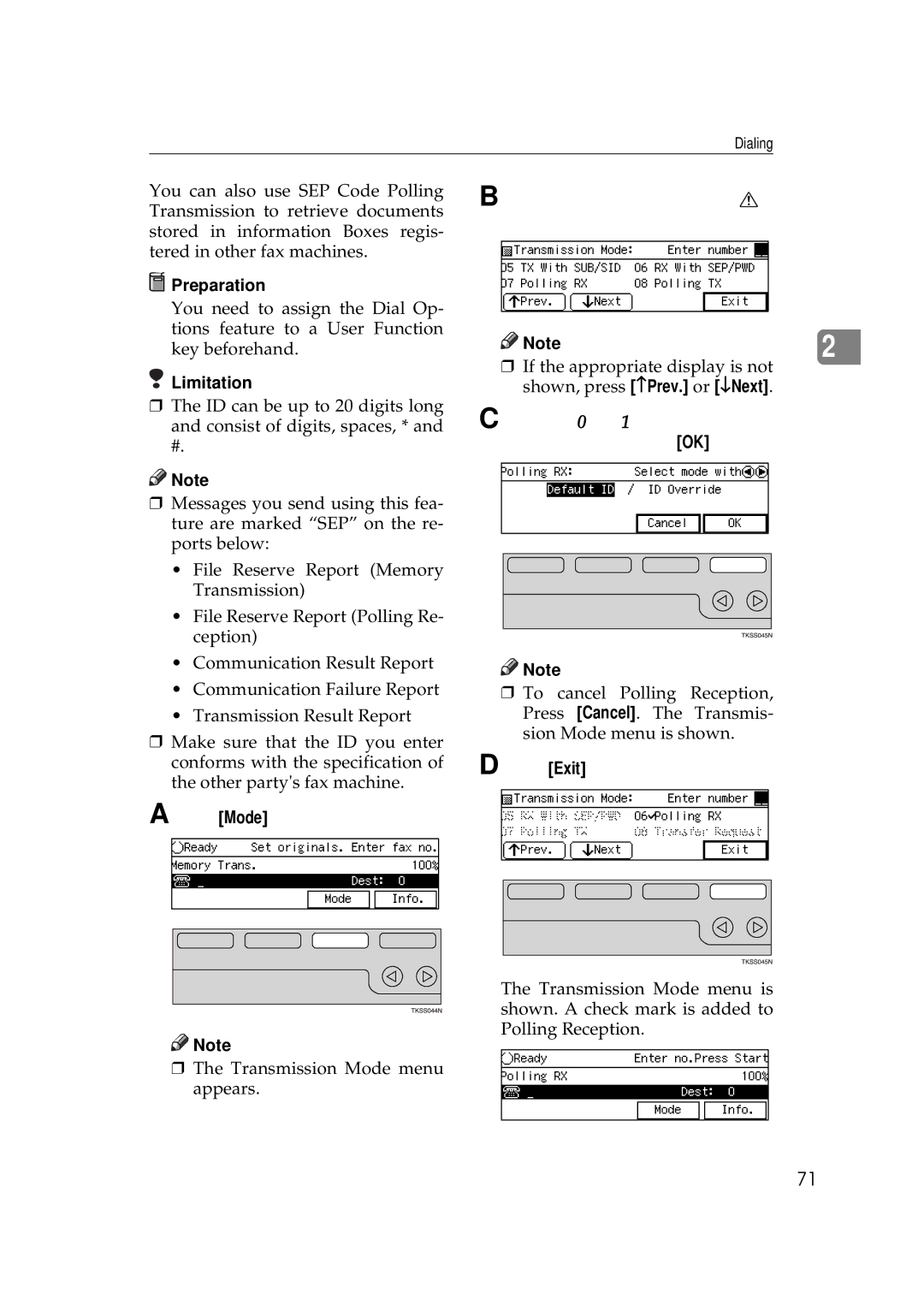
APress [Mode].

 Note
Note
❒The Transmission Mode menu appears.
BEnter the code for “Polling RX” with the number keys.
Note | 2 |
|
❒If the appropriate display is not shown, press [−Prev.] or [↓Next].
CPress the 0 or 1 key to select the Default ID and press [OK].

 Note
Note
❒To cancel Polling Reception, Press [Cancel]. The Transmis- sion Mode menu is shown.
DPress [Exit].
The Transmission Mode menu is shown. A check mark is added to Polling Reception.
71