AR-287 AR-337 AR-407
For Your Records
Contents
Using this Manual
Introduction
Chapter
Installation Requirements
Getting Started Cautions
Safety Precautions
Power on and OFF
Power save modes
Power on and OFF
Auto power shut-off mode
Preheat mode
Press the Information key in the standby mode
Information Function
Using the Touch Panel
How to use the touch panel
Selection of function
If multiple special functions are selected, up to six icons
Function setting icons
Can be easily called by pressing its icon
Will be displayed
Page
Making Copies
Special Papers manual feed
For setting the auditing mode
Auditing Accounts
Using the Radf
Stream feeding mode
Use the 10-key pad to enter the desired number Copies
Using the Radf
Sided copies of 1-sided originals
Press the Start key
Sided copies from 1-sided originals
Press the 2-SIDED Copy key
Press the key on the touch panel
Sided copies from 2-sided originals
Sided Copy
Ready to COPY.DOCUMENT Feeder Mode
Close the document feeder cover
Making Copies Copying from
Copying from the Document Glass
Remove the first original with the next original after
Auto
REDUCTION/ENLARGEMENT/ZOOM
Automatic selection
REDUCTION/ENLARGEMENT/ZOOM
Manual selection
129 %
Set the number of copies
Insert the copy paper all the way into the bypass tray
Then select the bypass tray
Press the Paper Select key on the touch panel
Close the document cover
Two-sided copying with bypass tray
Make a copy
Replace the first original with the second original
Exposure Adjustments
Automatic
Text, text/photo, and photo
SORT/GROUP
Sort mode
Group mode
Tray
Press the Program key
JOB Memory
Storing a job program
Press the STORE/DELETE key on the touch panel
JOB Memory
Deleting a stored job program
Recalling a job program
Interrupting a Copy RUN
Press the Interrupt key
Special Functions
XY Zoom
Elect
Use the reduction, enlargement, and Zoom
XY Zoom
Press the Y key
Keys to change the copy ratio in the vertical Y direction
Margin Shift
Press the Special Modes key
Place the original in the document feeder tray or on
Press the Margin Shift key on the touch panel
Select the desired shift amounts using the and 5 keys
Margin Shift
Select the shift direction
Erase
Press the Erase key on the touch panel
Erase
Select the desired erase mode
Adjust the amount of edge erase and/or center erase if
Needed
Dual page Copying
Dual Copy
Dual page Copying
Ensure that the desired tray is selected
Multi Shot
Multi Shot
Press the upper OK key
Enter the desired number of copies
Covers
Place the originals in the document feeder tray
Press the Covers key on the touch panel
Press the upper OK key
Select cover placement
Covers
Enter the desired number of copies and press the Start key
Transparency Film with Insert Sheets
Press the Transparency Inserts key on the touch panel
Transparency Film with Insert Sheets
Make all other selections and press the Start key
Ensure that the desired tray is selected for insert sheets
Pamphlet Copy
Place the originals in the document feeder tray or on
Select the type of originals
Pamphlet Copy
Press the Pamphlet Copy key on the touch panel
Select the binding position
URE
Check the copy paper selection
Image Editing Functions
JOB Build
Press the Image Edit key
Make all other desired copy mode selections and enter
Image Editing Functions
Press the JOB Build key
Centering
After the first section of original pages has been fed
Press the Centering key
Press the Image Edit key on the touch panel
Repeat Copy
Select the desired copy paper size
Sheet of copy paper
Press the Repeat Copy key on the touch panel
Cancel OK Border Line
Press the Image Edit key on the touch panel
Press the B/W Reverse key on the touch panel
Centering
E F
Press the Binding Change key on the touch panel
Desired number of copies
Text Stamp
Date
Select the desired date format on the touch panel
Text Stamp
Press the Text Stamp key on the touch panel
Select the pages to be stamped
Select the print direction
Press the Select Stamp key on the touch panel
Adjust the darkness of the background of the stamp
Select the stamp position
Select the desired stamp to be printed
Cancel OK Position
Draft
Press the Watermark key on the touch panel
To adjust the exposure, press the Option key
Adjust the darkness of the watermark
Select the desired watermark to be printed
Cancel OK
11Press the upper OK key
Number
Press the page Number key on the touch panel
Select the desired page number format
Select the starting page number
OK 9 Press the upper OK key
Replace the finished original with the next original after
Tandem Copy
Press the Tandem Copy key on the touch panel
Copier is installed in the sub copier
Tandem Copy
On the main copier, press the Start key
Example
Setting Review
Press the Review key
To exit the review screen, press the Exit key
Supplies
Paper
Types and sizes of copy paper
Loading copy paper
Paper
Loading paper in paper trays 1
Push the paper tray firmly back into the copier
Changing the copy paper size in the tray
Load copy paper into the tray
Adding Toner
Adding Toner
Place the new toner cartridge with the tabs Notches as shown
Used Toner Disposal
Open the toner collecting container cover
Disengage and remove the container from the copier
Store the supplies in a location that is
Storage of Supplies
Proper storage
Store copy paper in the wrapper and lying flat
Chapter
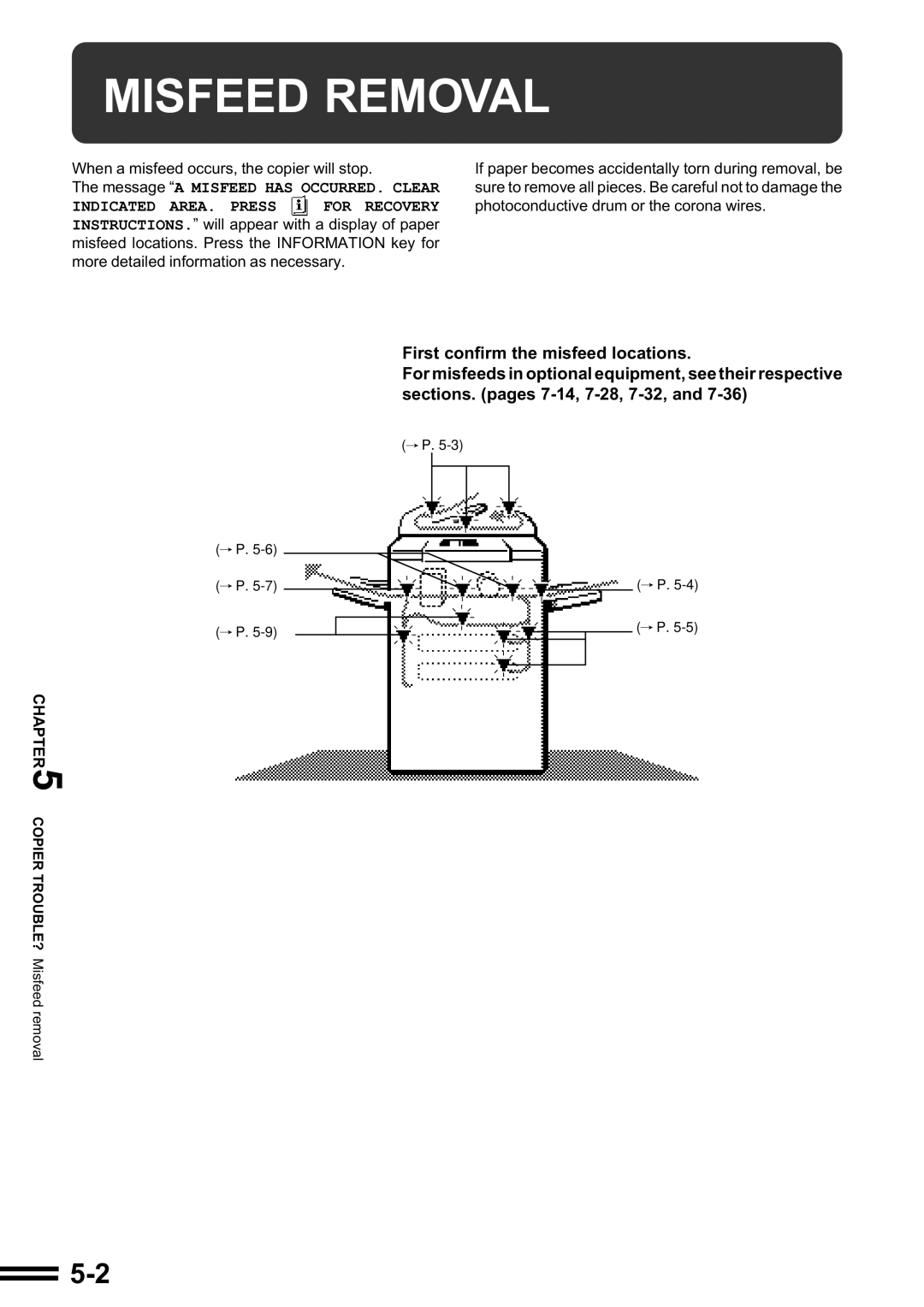
Misfeed Removal
Misfeed Removal
Misfeed in the bypass tray
Misfeed in paper trays 1
Misfeed in the transport area
Misfeed around the fusing unit and exit area
Close the exit area cover
Misfeed in the duplex module
Remove the misfed paper from the section below the exit area
Maintenance Required
Troubleshooting
Troubleshooting
Self-diagnostic function
Page
General Information
Part Names and Functions
Part Names and Functions
Function setting icons p.1-9
Interrupt key and indicator p
Start key and indicator
LCD touch panel
Sided Copy key
Custom Settings key
Initial settings
Output key
User Maintenance
Document glass and document cover
Touch Panel Contrast Adjustment
Press the Custom Settings key
Specifications
Copier
Specifications
Document Feeder
Page
Optional Equipment
System Configuration
Specifications
Finisher AR-FN1N
Part Names
Finisher AR-FN1N
Offset mode
NON-OFFSET mode
Offset stack
Staple Sort mode
Sort and group
Using the Radf
Staple sort
Staple Sort Sort Group
Select the desired stapling position
Using the document glass
Remove the finished original with the next original after
Start key indicator lights up, and then press
Scanned
Start key. Repeat this step until all originals have been
Staple cartridge replacement
Remove the rear paper and tape from the cartridge
10Push the finisher toward the copier and latch it in place
Staple jam removal
Push the finisher toward the copier and latch it in place
Misfeed removal
Misfeed in the upper transport area
Close the top cover
Cover of the paper feed area and open the top cover
Misfeed in the lower transport area
Confirm that the misfeed display is cleared
Close the transport
Close the paper transport area cover
Finisher AR-FN2
Finisher AR-FN2
See next page for details
Set the originals in the document feeder tray
Press the OK key
Using the document glass
Exposure Paper Select Copy Ratio
Close the stapler cover
Push the new staple cartridge in until it clicks in place
Stapler will strike three times without stapling and feed
Cartridge
Check that the first staple of the cartridge is at the tip
Misfeed removal
Push the finisher toward the copier and latch it 10place
Large Capacity Tray AR-LC1N
Fan the copy paper
When the button lamp goes out, pull the paper tray out
Large Capacity Tray AR-LC1N
Load the paper onto the feed table
Release lever
Gently push the tray back into place
STAND/500-SHEET Paper Drawer AR-DE1N
STAND/500-SHEET Paper Drawer AR-DE1N
Open the lower right side cover and remove any misfed paper
Dual Tray Output Unit AR-TR1
Dual Tray Output Unit AR-TR1
Page
Sharp Corporation

 FOR RECOVERY INSTRUCTIONS.” will appear with a display of paper misfeed locations. Press the INFORMATION key for more detailed information as necessary.
 P.
P.  P.
P.  P.
P.  P.
P.  P.
P.  P.
P.