e_hd250.book Page 39 Tuesday, October 24, 2006 3:11 PM
PREPARATIONS FOR OPERATION
Turning the Power ON
Turning the Power ON
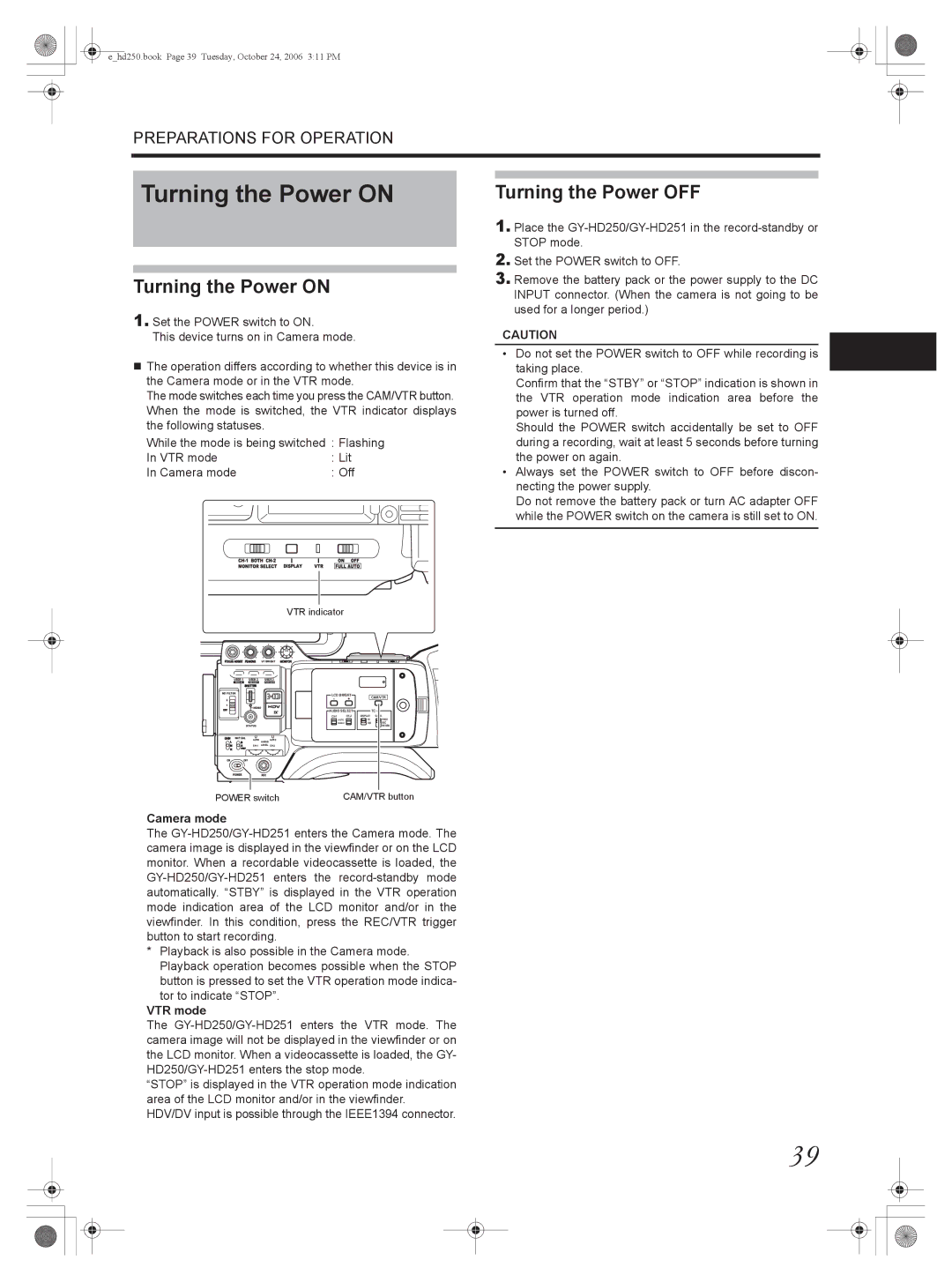
1.Set the POWER switch to ON.
This device turns on in Camera mode.
The operation differs according to whether this device is in the Camera mode or in the VTR mode.
The mode switches each time you press the CAM/VTR button. When the mode is switched, the VTR indicator displays the following statuses.
While the mode is being switched : Flashing
In VTR mode |
|
|
|
|
|
| : Lit |
|
| ||||||||
In Camera mode |
|
|
|
|
|
| : Off |
|
| ||||||||
|
|
|
|
|
|
|
|
|
|
|
|
|
|
|
|
|
|
|
|
|
|
|
|
|
|
|
|
|
|
|
|
|
|
|
|
|
|
|
|
|
|
|
|
|
|
|
|
|
|
|
|
|
|
|
|
|
|
|
|
|
|
|
|
|
|
|
|
|
|
|
|
VTR indicator
Turning the Power OFF
1.Place the
2.Set the POWER switch to OFF.
3.Remove the battery pack or the power supply to the DC INPUT connector. (When the camera is not going to be used for a longer period.)
CAUTION
•Do not set the POWER switch to OFF while recording is taking place.
Confirm that the “STBY” or “STOP” indication is shown in the VTR operation mode indication area before the power is turned off.
Should the POWER switch accidentally be set to OFF during a recording, wait at least 5 seconds before turning the power on again.
•Always set the POWER switch to OFF before discon- necting the power supply.
Do not remove the battery pack or turn AC adapter OFF while the POWER switch on the camera is still set to ON.
VF BRIGHT
USER 1 | USER 2 | USER 3 |
ND FILTER
2
1
MENU
STATUS
WHT.BAL
AUTO AUTO
AUDIO
ON OFF
POWER REC
LCD BRIGHT |
| CAM/VTR | |
- | + |
| |
|
| ||
AUDIO SELECT |
| TC | |
DISPLAY | GENE. | ||
| AUTO | TC | FREE |
| MANU | UB | REC |
|
|
| REGEN |
POWER switch | CAM/VTR button |
Camera mode
The
*Playback is also possible in the Camera mode. Playback operation becomes possible when the STOP button is pressed to set the VTR operation mode indica-
tor to indicate “STOP”.
VTR mode
The
“STOP” is displayed in the VTR operation mode indication area of the LCD monitor and/or in the viewfinder. HDV/DV input is possible through the IEEE1394 connector.
39