COMSPHERE 3000 Series Carrier
Power Transformer Unit Installation
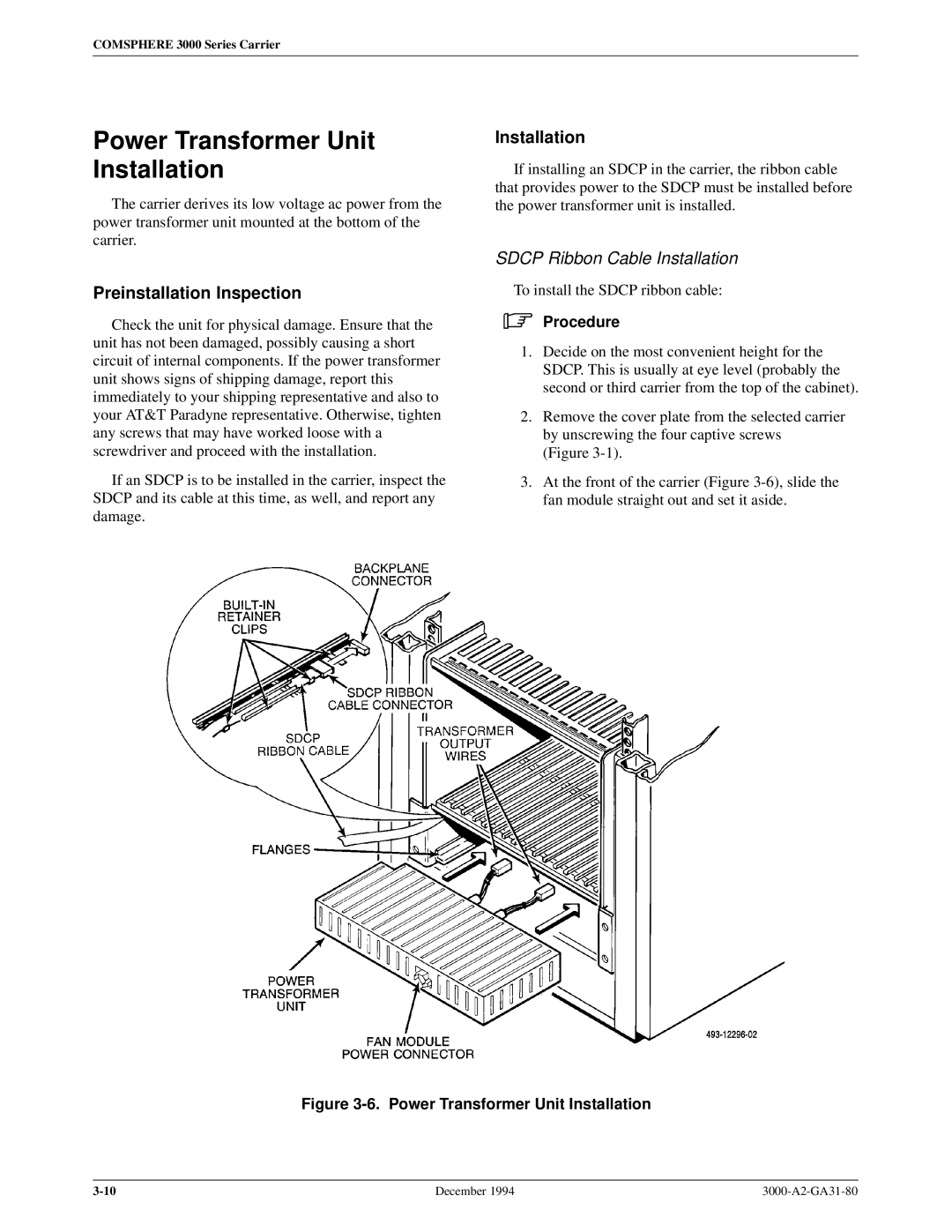
The carrier derives its low voltage ac power from the power transformer unit mounted at the bottom of the carrier.
Preinstallation Inspection
Check the unit for physical damage. Ensure that the unit has not been damaged, possibly causing a short circuit of internal components. If the power transformer unit shows signs of shipping damage, report this immediately to your shipping representative and also to your AT&T Paradyne representative. Otherwise, tighten any screws that may have worked loose with a screwdriver and proceed with the installation.
If an SDCP is to be installed in the carrier, inspect the SDCP and its cable at this time, as well, and report any damage.
Installation
If installing an SDCP in the carrier, the ribbon cable that provides power to the SDCP must be installed before the power transformer unit is installed.
SDCP Ribbon Cable Installation
To install the SDCP ribbon cable:
.Procedure
1.Decide on the most convenient height for the SDCP. This is usually at eye level (probably the second or third carrier from the top of the cabinet).
2.Remove the cover plate from the selected carrier by unscrewing the four captive screws (Figure
3.At the front of the carrier (Figure
Figure 3-6. Power Transformer Unit Installation
December 1994 |