User’s Manual
Software License Agreement
User’s Manual
Page
Trademark Acknowledgements
Page
Table of Contents
NIC Web Server
Unix Configuration
OS Configuration, Ipds Printer
Addtcpifc
AS/400 Configuration, Ipds Printer
Snmp
MIB
Extra Features
Glossary
Overview
What Is The NIC?
Introduction
What Special Features Are Available?
Logical Printer Architecture
Logical Printer Architecture
Phase
Destinations/Queues
Destinations/Queues
Models
Logical Printer Architecture
NET
Interfaces
Integrated NIC Card LED
Speed Setting for 10/100Base-T
Ping ftp.CompanyWebsite.com
Conventions Used In This Manual
Page
Connecting To The Network
Installation Configuration
Installation
Configuration Tools
Printing a NIC Test
Configuration Tools
Printing a NIC Test
Configuration Using The Control Panel
Network Interfaces TCP/IP Routing Table
NIC Verification
NIC Verification
IP Address Configuration
Wireless NIC Configuration Using Control Panel
Gateway Address
Wireless NIC Configuration Using The Control Panel
IP Address
Subnet Mask
Ssid Name
Wireless Parameter Configuration
Signal Strength
Operation Mode
Internat. Mode
Wireless NIC Configuration Using The Control Panel Channel
Power Mgmt
Transmit Power
Encryption Key Configuration
Leap Username
WPA Parameters
Leap Parameters
Kerb. Pwd
Leap Password
Kerberos Enable
Kerberos Parameters
Clock Skew SEC
KDC Port Number
Clock Skew Units
Renew Life Units
Configuration Tools Tckt Life Units
Tckt Life SEC
Page
Html Forms
NIC Html Structure
Html Forms
Printer Status Screen
Printer Status Screen
Remote Shell
Configuration Alternatives
Configuration Alternatives
Telnet
FTP
NIC Web Server
Configuration
Configuration
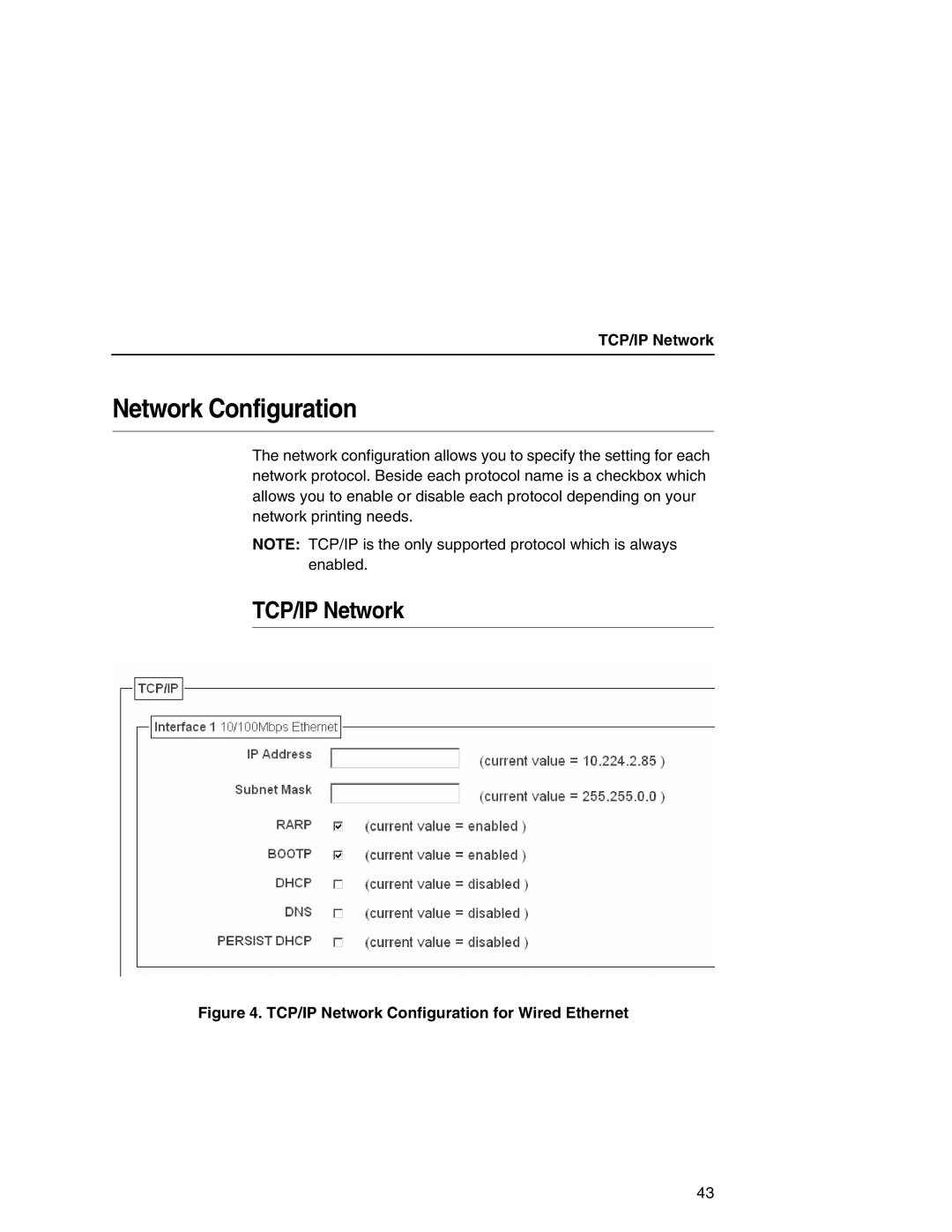
TCP/IP Network
Network Configuration
TCP/IP Network
Interface
Network Configuration
Defining a Gateway Address for Wireless Ethernet Routing
Routing
Wireless
Wireless
Wireless Network Configuration, 802.11b
Speed
Network Name
Mode
Speed Type
Antenna
Power Mgmt Mode
Transmit Power
International Mode
WPA Passphrase
WPA Mode
Profile
WPA Cipher
Key Value Hex
Default Key
Authentication Method
Password
Workgroup Name
Windows Network NetBIOS TCP/IP
Windows Network NetBIOS TCP/IP
Print Path Configuration
Print Path Configuration
Destination Settings
Selected Model
Services
Name
Back Channel
Model Type
Current Model Settings
Filter
Current Model Settings
Banner
Selected Log Path
Printer Configuration
Header String
Trailer String
Print Model Configuration
Print Model Configuration
Banner
Trailer String
Logpath Type
Log Path Configuration
Log Path Configuration
Logpath Port
LogPath Configuration
TN5250/3270 Configuration
TN5250/3270 Configuration
Port
Host IP
Message Queue Library
Resource Name
Device Description
Message Queue Name
Auto Connect
Device Type
Wscst Name
Wscst Library
Snmp Configuration
Snmp Configuration
Snmp Manager Alert Posting Settings
Mail Alert Posting Settings
Syslog Alert Posting Settings
Default Disabled
Alert Groups
Snmp Alert Groups Configuration
Alert Groups and Printer Events
Snmp Configuration Alert Groups and Printer Events
Snmp Configuration Alert Groups and Printer Events
Rfid
System Information
Administration Configuration
Administration Configuration
Printer Serial Number
Description
Location
Contact
DNS Server
Smtp Server
Passwords
Passwords
System Configuration
System Configuration
Security Configuration
Kerberos Configuration
Kerberos Configuration
Print Server Settings
Key Distribution Center KDC Settings
Credentials Information
Status
Status I/O Port
Status Network
Status Network
Status Network
Windows Environment Description
Windows Configuration
Mandatory
Windows NIC Configuration
Configuration Using ARP
Windows NIC Configuration
Configuration Using ARP
Communicating Across Routers
Changing Workgroup Names
Changing Workgroup Names
PRN
NIC Default Destinations Mapped I/O Port
Changing Destination Names
Changing Destination Names
Windows Host Configuration
Windows Host Configuration
Windows Vista Setup
Choosing a Printer Port
Selecting a Printer Driver to Install
Naming a Printer
Sharing the Printer on the Network
Completion of the Printer Driver Installation
Specifying Port Settings
Windows XP/2000/2003 Server Host Setup
Windows XP/2000/2003 Server Host Setup
Windows Host Configuration
Windows XP/2000/2003 Server Host Setup
Windows Host Configuration
Existing driver
Windows Host Configuration
Windows XP/2000/2003 Server Host Setup
Windows Host Configuration
Windows XP/2000/2003 Server Host Setup
Click Finish to send the wizard settings to the printer 108
Unix Environment Description
Unix Configuration
Unix NIC Configuration
Unix NIC Configuration
Using ARP
Using ARP
Using Rarp
Using Bootp
Using Bootp
Communicating Across Routers
Manual System V Host Setup
Unix Host Configuration
Manual System V Host Setup
Explanation of command line
NIC Installation on HP-UX
NIC Installation on HP-UX
Solaris 2.6 7 NIC Setup
Solaris 2.6 7 NIC Setup
Troubleshooting
Printername
Manual LPR/LPD Host Setup
Manual LPR/LPD Host Setup
Select Printer/Plotter Select Print Spooling
NIC Configuration for AIX
Standard Processing
Enter smitty mkvirprt
NIC Configuration for AIX
Local Filtering
Printing From AIX
AIX Remote Queue Time-Out Setting
Solaris 2.6 7 NIC Setup Troubleshooting
Printing With FTP
Printing With FTP
Direct Socket Printing
Requirements
OS Configuration Ipds Printer
Configuration Checklist
Configuration Procedure
Configuring PSF for z/OS to Print Ipds Files
Configuration Procedure
Mvscp
Configuring PSF for z/OS to Print Ipds Files
Define the Communications Control Unit to z/OS
Modify the TCP/IP Profile in z/OS
Modifying TCP/IP Profile
Keepaliveoptions
Databufferpoolsize
Smalldatabufferpoolsize
Tinydatabufferpoolsize
Gateway
Verify the Printer Connection
JES3 Printer Definitions
Define the Printer to JES
JES2 Printer Definitions
Define the Printer to PSF
134
135
Ipaddr
Sample Psfproc procedure
Verifying a TCP/IP-Attached Printer on z/OS
Verifying a TCP/IP-Attached Printer on z/OS
Starting a TCP/IP-attached Printer
Stopping a TCP/IP-attached Printer
Sharing Line Matrix Printers on z/OS
Resolving Ipds Printing Problems
Sharing Line Matrix Printers on z/OS
JES Spool Printer Sharing
Failure
Timeout
JES Spool Printer Sharing
Mgmtmode
Ping is Not Successful
Handling z/OS Connectivity Problems
Port Switching Printer Sharing
Handling z/OS Connectivity Problems
Ping is Successful
Ping is Successful
142
Developing Line Descriptions With Crtlineth
AS/400 Configuration Ascii Printer
Example NIC Line Description
Ssap
Configuring AS/400 For Ascii Using TCP/IP
Configuring With Addtcpifc
Internet Address
Configuring AS/400 For Ascii Using TCP/IP
Ethlan
Configuring a Router Definition With Addtcprte
Configuring a Router Definition With
Configuring a Local Domain And Hostname
Configuring a TCP/IP Host Table Entry
IP Address
Configuring The AS/400 For Printing
Setting Up Printing For Ascii Files
Remote Printer Queue name
Splnmbr Only
Rmtsys Intnetadr
Prtq
JOB
= *WSCSTCONT132
Transform Transform
Manufacturer Type and Model Mfrtypmdl
= *NONE
Internet Address Intnetadr
Setting Up Printing For Ascii Files
To Create An Automatic Remote Output Queue
Remote System Rmtsys
See Note on
‘9.99.57.173’
Output Queue Outq
Manufacturer Type Mfrtypmdl
Configuring The AS/400 For Printing Connection Type Cnntype
Verify Printing On AS/400
Verify Printing On AS/400
AS/400 Ascii Troubleshooting
AS/400 Ascii Troubleshooting
Printing AFP, IPDS, And SCS Files
AS/400 Configuration Ipds Printer
Configuring On AS/400 As An Ipds Printer
Port
Configuring On AS/400 As An Ipds Printer
Control Panel Settings Menu
Setup
Configuration Checklist
Normal
Configuring An AS/400 TCP/IP Interface With
Configuring An Interface For Ethernet
Elan
Configuring a TCP/IP Host Table Entry
Configuring PSF With Crtdevprt On V3R2
Configuring PSF/400 For Ipds On V3R2
Model
Devd
Devcls RMT
Type Ipds
Device Description Devd
Remote location
Rmtlocname Tcpip
Immed
Configuring AFP With Crtpsfcfg On V3R2
Joblibl
Nordyf
Library Specify Qgpl Ipds pass through Ipdspasthr
PSF Configuration Psfcfg
Text description Printertype Network Printer
DFT
Release timer Rlstmr
Configuring AFP With Crtpsfcfg On V3R7 Or V4R1 Optional
Configuring PSF/400 For Ipds On V3R7 And Above
Remote location Name or address
Configuring PSF/400 For Ipds On V3R7 And Above
TCP/IP activation timer 170
Configuring PSF With Crtdevprt On V3R7 And Above
Devcls LAN
BLDRB1
Option ALL
PRT
Usrdfnopt
Activation timer
Acttmr
Rmtlocname
User-Defined Object Usrdfnobj
Configuring PSF for Ipds On V4R2 And Above
Form Feed Formfeed Specify *CONT Activation Timer Acttmr
Remote Location Rmtlocname
Blank
Configuring AFP with Crtpsfcfg on V4R3 and Above Optional
NO, *YES
Nomax
Libcrtaut
Configuring AFP with Crtpsfcfg on V4R3 and Above Optional
Search
None NONE, *CHKFIRST, *CHKALL
Remote Location name or address Rmtlocname
Configuring PSF with Crtdevprt On V4R2 and Above
Size control Pagsizctl
Ipds
Configuring PSF with Crtdevprt On V4R2 and Above
LAN attachment Lanattach
Device Class Devcls
Device Type Type
Device Model Model
Form Feed Formfeed
Configuring PSF with Crtdevprt On V4R2 and Above Font Font
Verifying The Ipds Configuration On AS/400
Verifying The Ipds Configuration On AS/400
Sharing The AS/400 Printer On The Network
Sharing The AS/400 Printer On The Network
Crtpsfcfg Actrlstmr
Printer Sharing Parameters
Crtpsfcfg Rlstmr Nordyf
Chgpsfcfg
Crtpsfcfg Actrlstmr Nordyf
Printer Sharing AS/400 Where Set Parameter
Printer Sharing Parameters
Crtpsfcfg Acttmr Nomax
Chgdevprt
Crtpsfcfg Rlstmr
Crtdevprt Acttmr Nomax
Cannot Ping The Printer
AS/400 Troubleshooting
PSF/400 Terminates When Initialized
Cannot Ping The Printer
Data Is Being Clipped
AS/400 Troubleshooting
Spooled Print File Remains In PND Status
Spooled Files Disappear Without Printing
HPRT100
OS Configuration TN3270E
OS Configuration For a TN3270E Printer
Coax Printer Support Fmid
Sysabend DD SYSOUT= Sysudump DD SYSOUT=
Program Materials
Program Materials
Courwtr Proc
JES2 TN3270E Vtam Major Node
Vtam Definitions For SCS and DSE TN3270E
Vtam Definitions For SCS and DSE TN3270E
Printer with SNA Character SET LU1
Tcpip Configuration With TN3270E
Tcpip Configuration With TN3270E
TN3270E
FSS
Printer Inventory Manager As Defined With TN3270E
FSA
Program Materials
VTAMSCS2 Ippw
Dest
VTAMDSE1
VTAMSCS1
Program Materials
Set all user settings back to factory defaults
Wlan
List Commands
= comms-quality
List Commands
For Wireless NIC with Symbol RF cards only 250
List the license details and license key number
List the status of output tests on the I/O ports
Miscellaneous Commands
Miscellaneous Commands
Loopb
Fox
Tts
Echo string or redirect string to an I/O port using
Keycode
NIC Security
Extra Features
Users And Passwords
NIC Security
Http//NICIPaddress/adminConf.html
Reset The NIC Password
Reset The NIC Password
TCP Access Lists
List the current access list. Syntax
Key Printer Logging Terms
Printer Monitoring And Logging
Printer And Print Job Monitoring
Printer And Print Job Monitoring
Type
Printer Logging Through Logpaths
Printer Monitoring And Logging
Online + page Eject
Downloading Software Through The Network Interface Card NIC
Printer Series/Models Key Combination
Online + Paper Advance
This is the file you will download into the NIC
Put filename.prgEnter
NIC Naming Schemes
NIC Naming Schemes
Periodic Ping
Periodic Ping
268
Technical Support
Troubleshooting Tips
Windows Troubleshooting Tips
NIC Cannot Be Found On The Network
Html Configuration Forms Will Not Display
Appendix a Windows Troubleshooting Tips
Cannot Browse The NIC On The Network
Errors Occur When Defining An LPR Printer
Errors Occur When Defining An LPR Printer
TCP/IP Access Problem
Printer Errors When Printing Or No Output
Web Browser/HTTP Problem
Web Browser/HTTP Problem
Installing Microsoft TCP/IP Printing
Windows NT 4.0 Or 2000 Host Setup Problems
Windows NT 4.0 Or 2000 Host Setup Problems
Appendix a Unix Troubleshooting Tips
Unix Troubleshooting Tips
Nothing Prints
Nothing Prints
Stair-Stepped Output
No Form Feed Or Extra Page Comes Out
No Form Feed Or Extra Page Comes Out
Front Panel Message Dynamically Set Params Read Only
Config http on
TCP/IP Access Problem
Appendix a Web Browser/HTTP Problem
Web Browser/HTTP Problem
Kerberos
Kerberos Enabled Wireless NIC Configuration
Appendix B Kerberos Enabled Wireless NIC Configuration
Configuring the Print Server for Kerberos Authentication
Configuring the Print Server for Kerberos Authentication
286
Printronix Customer Support Center
Customer Support
Appendix C Printronix Supplies Department
Printronix Supplies Department
DNS
Glossary
ARP
Html
Eeprom
FTP
MIB
LED
LPD/LPR
MAC
Rarp
Pserver
RAM
UTP
ROM
Rprinter
TCP/IP
294
AS/400 Ascii
Index
Ascii
Index