Ingenico
Page
Table of Contents
Chapter Supervisor Menu
Diagnostic Menu
Chapter Secure Certificate 100
Revision History
Page
Introduction
Payment Types
Two Terminal Models
About this Manual
Connectivity
Kits
Conventions Used in this Manual
Unicapt 32 Software Development Kit
JavaPOS Software Development Kit
Navigating the Extended Menu
Accessing the Extended Menu
Extended Menu Overview
Overview
Finding Options in the Extended Menu
Finding the Current Setting
COM2
Ibmeft Ncreft
Gems
Dhcp
COM2 COM3
COM1 COM2 COM3
SAM
USB
Extended Menu Overview
YYYY/MM/DD
System Configuration Menu
System Config
Changing the Date and Time
Display Contrast
Enable/Disable Beep Tones
Changing the Display Contrast
Changing the Beep Tones
Changing the Beep Length
Beep Tone Status
Beep Length
Changing the Beep Tones
Tone
Midtone
Turning the Backlight On or Off
Setting Backlight to Off When Idle
System Configuration Updating Backlight
Turning the Backlight On or Off
Idle Timeout
Idle Timeouts
Backlight
Versions
System Info Menu
Finding Version Numbers
System Info
Xxxxxxxxx
Checking the Security Information
Security Info
Security Info
RAM Info
RAM Info
Ingnar
Viewing All Parameter Values
DisplayAction
View Parameter
OFF
Ibmeft
None
ETH Dhcp NONE/AUTO Auto
Ingenico 6500 User’s Guide
Supervisor Menu Password
Changing the Supervisor Menu Password
Supervisor Menu
Application File in Terminal
Reading the Application File
Supervisor Menu
Erase
Erasing the Application File
File Menu
Read
Security
Setting the Key Injection Port
Setting the Key Index
Injecting Keys
Inject Keys
Index SelectX
Setting the Application Number
Finding the Key Check Value Terminal Keys
App SelectAAAA
App Select
Finding the Key Check Value Application Keys
Application Keys
Application Keys
APP1 APP2
Erase App Keys?
Erasing Application Keys
Erase App Keys
Erase App Keys
Injecting a Serial Number
System Parameters
Download Method
Setting the Download Method
System Parameters Menu
Sys Parameters
Port1
Selecting the Download Port
Download Port
Download Port
Setting Up the Port
Selecting the Download Interface Type
PortX
Baud Rate
Setting the Baud Rate
Setup Port
Port
Setting the Data Bits
Data Bits
Data Bits
Stop Bits
Setting the Stop Bits
Set Port
Stop Bits
Setting the Parity
Parity
Parity
Defining the LAN Address
LAN Address
LAN Address
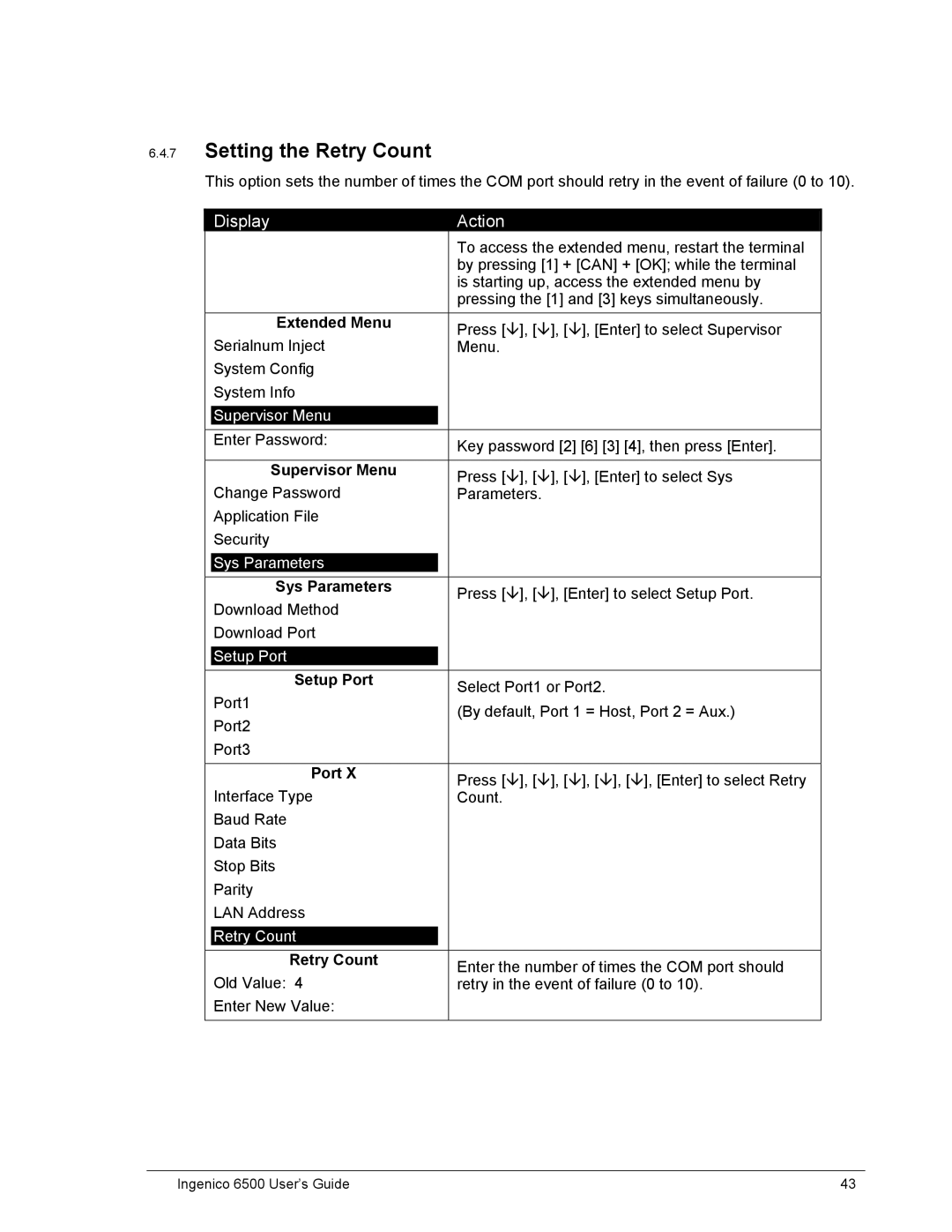
Setting the Retry Count
Retry Count
Retry Count
Setting the Response Timeout
Response TMO
Response TMO
Setting the Poll Timeout
Poll TMO
Poll TMO
Setting the Turnaround Timeout
Turnaround TMO
Turnaround TMO
Defining the Dhcp Address
Port3
Port3
Defining the Local IP Address
Local IP
Local IP
Setting the Local IP Port Number
Local IP Port
Local IP Port
Server IP
Defining the Server IP Address
Server IP Port
Setting the Server IP Port Number
Masking Your IP Address
IP Add Mask
XXX.XXX.XXX.XXX
Updating…
Setting the Gateway
Gateway
Gateway
Setting the Primary DNS
Primary DNS
Primary DNS
Setting the Secondary DNS
Secondary DNS
Secondary DNS
Dial Phone Num
Setting the Domain Name
Setting Up the Phone Number to Dial
Dial
Modem Speed
Setting Up the Modem Speed
Host Port Aux Port
Changing the Position of the Host Port or Aux Port
AD On/Off
Configuring the Host Port Auto Detect Feature
Disabling or Enabling the Auto Detect Feature
Auto Detect
Setting the Auto Detect Timeout
AD Timeout
AD Timeout
Setting the Auto Detect Retry Times
AD Retry Times
AD Retry Times
Parameter Editor
Editing Parameters
Parlcdcontrast
Parameter Name Description Value Data
Pareftllevelnum
Parameter Name
Rescommrecerror
Resbdlcfsdwnerror
PARCOM1BAUDRATE
PARCOM1INTERFACET
PARCOM2PARITY
PARCOM3BAUDRATE
Parethgateway
Parapplcomment
Diagnostic Menu
Diagnostic Menu
Testing the Display Contrast
Diagnostic Menu
Keypad
Testing the Keypad
Testing the Beeper
Keypad
RS232
Testing the RS232 Connection
Beeper
RS232
Tailgate
Testing the RS485 Tailgate Connection
USB Diagnostic
Testing the USB Port
Mag Stripe Reader
Testing the Magnetic Stripe Reader
Smart Card Reader
Testing the Smart Card Reader
Testing the SAMs
Touch Screen
Testing the Touch Screen
Signature Capture
Testing Signature Capture
Extended Menu Press , Enter to select Diagnostic Menu
Diagnostic Menu Press , Enter to select Signature Capture
Pen Calibration
Testing Pen Calibration
Finger Calibration
Testing Finger Calibration
SCV Verification
System Architecture
Architecture
Terminal Architecture
Host Connections
Operating System
System and Security Application
Maintenance Application
Digitizer
Transmitting Data
User Application
Download File Architecture
Key Architecture
Description of Key
Sponsor Key KTK
Terminal Based Keys
Key Name Index Length
Key Name Description of Key
Application Based Keys
Special Keys
Master Keys
Wtpk
Security Options
Session Keys
Dukpt Keys
Possible Values Description
Prompts Authentication Key Options
Change Terminal ID Option
Prompt MACing
Code MACing
Double-Length Key MAC Calculation
Possible Encryption Description Values
Visa PED Mode Option
Atalla Key Block Protection Option
Terminal Startup Verify MAC Option
Financial Key Option
Secure Certificate
Secure Certificate
Securing Process
Ingenico 6500 User’s Guide 101
Secure Certificate MAC Descriptor Section
Secure Certificate Descriptor Sections
Possible Description Values
Visa PED Mode Descriptor Section
SHA1+MAC
Application Descriptor Section
Secure File Descriptor Section
106
Applname filename.ext class existence
Non-Secure File Descriptor Section
Delete Application Code File Descriptor Section
Delete Data File Descriptor Section
Delete Whole Application Descriptor Section
Timing
Ibmeft Download
Prerequisites
Preparation
Feedback
Outline of Download Process Steps
Ingenico 6500 User’s Guide 111
112
Communications port is not working
Download Errors
Error Opening Port
Hardware settings in the Ingenico 6500 have been changed
Received 3 NAKs or Timeout SendVISAPacket
Configuration Default Value
Default Setup Configuration
Error Bad Prog
CRC Error
Not Enough DFS Space
Comm Receive Error
IBM EFT Troubleshooting
Card Read Error1
EFT Device Not Available
EFT Device Not Available During Check Authorization