May
Users Guide
Contents
Maintaining the printer
Understanding the printer menus
Saving money and the environment
Securing the printer
Troubleshooting 110
185
Index 198
Safety information
Safety information
Safety information
What are you looking for? Find it here
Learning about the printer
Finding information about the printer
Learning about the printer
Other countries and regions-See the printed
Selecting a location for the printer
Printer configurations
Front door
Light or button Color Description
Using the printer control panel
Understanding the printer control panel light sequences
Blinking Blinking slowly
Light sequence Message
Learning about the printer
Primary light sequence Supplemental light sequence Message
Using the Local Printer Settings Utility
Using the Embedded Web Server
Windows
Windows 7 or earlier
Click or Start
Additional printer setup
Additional printer setup
Installing hardware options
Installing optional trays
Attaching cables
Setting up the printer software
Installing the printer software
Use
Macintosh
Installing the Local Printer Settings Utility
Windows
Windows 7 or earlier
Updating available options in the printer driver
For Windows users
For Macintosh users
For Windows users
Preparing to set up the printer on an Ethernet network
Installing the printer on an Ethernet network
Networking
Click +
For Macintosh users
Preparing to set up the printer on a wireless network
Using the Wireless Setup Utility Windows only
Installing the Wireless Setup Utility
Installing the Wireless Setup Assistant
Using the Wireless Setup Assistant Macintosh only
Printing a menu settings and network setup
Using the printer settings on the computer
Setting the paper size and type
Configuring Universal paper settings
Using the Embedded Web Server
Using the standard bin and paper stop
Loading trays
Pull out the tray completely
Loading paper and specialty media Busy ‑ Blinking
LGL B5 Exec
Exec
Page
Loading the multipurpose feeder
Page
Page
Using the Embedded Web Server
Linking and unlinking trays
Linking and unlinking trays
Configuring a custom paper type
Using the printer settings on the computer
Assigning a custom paper type
Using the printer settings on the computer
Paper characteristics
Paper and specialty media guide
Paper guidelines
Selecting preprinted forms and letterhead
Fiber content
Unacceptable paper
Selecting paper
Using recycled paper and other office papers
Using specialty media
Tips on using card stock
Unacceptable paper examples
Tips on using labels
Tips on using envelopes
Tips on using letterhead
Tips on using transparencies
Storing paper
Supported paper sizes
Supported paper sizes, types, and weights
Supported paper types and weights
Paper and specialty media guide
Printing a document
Adjusting toner darkness
Printing
Printing documents
Printing from a mobile device Canceling a print job
Canceling a print job from the computer
Adjust the toner darkness setting Click Submit
For Macintosh users
Paper menu
Default Source menu
Understanding the printer m enus
Menus list
Paper Size/Type menu
Tray x Size
Tray x Type
MP Feeder Type
MP Feeder Size
Manual Envelope Type
Manual Paper Size
Manual Paper Type
Manual Envelope Size
Paper Texture menu
Configure MP menu
Paper Weight menu
Bond Weight
Transparency Weight
Recycled Weight
Labels Weight
Paper Loading menu
Network/Ports menu
Custom Types menu
Standard USB menu
USB Buffer
PS SmartSwitch
Eco-Mode
Settings menu
General Settings menu
Display Language
Timeouts
Click Settings General Settings Hibernate Timeout on
Connection Hibernate
Print Recovery
Error Recovery
Press Sleep Button
Press and Hold Sleep Button
Custom Home Message
Print Area
Print Settings
Setup menu
Printer Language
Finishing menu
Quality menu
PCL Emul menu
PostScript menu
Tray Renumber
Set Date and Time menu
Security menu
Conserving supplies
Using recycled paper
Saving money and the environment
Saving paper and toner
Using Sleep and Hibernate modes
Adjusting Sleep mode
Saving energy
Setting Hibernate Timeout
Using Schedule Power Modes
Using the printer settings on the computer Windows only
Recycling
Recycling Lexmark products
Recycling Lexmark packaging
Returning Lexmark cartridges for reuse or recycling
Securing the printer
Using the security lock feature
Securing the printer
Statement of Volatility
Erasing non‑volatile memory
Erasing volatile memory
Lexmark security Web
Finding printer security information
Checking the status of parts and supplies
Cleaning the printer
Cleaning the printer
Maintaining the printer
Ordering supplies
Using genuine Lexmark parts and supplies
Using the printer control panel
Estimated number of remaining pages
Worldwide
Return Program cartridge
For the United States and Canada
For Latin America includes Puerto Rico and Mexico
Lexmark Return Program Regular 500Z 500ZA
Storing supplies
Ordering an imaging unit
Part name
Replacing the toner cartridge
Replacing supplies
Maintaining the printer Close the front door
Replacing the imaging unit
Page
Before moving the printer
Moving the printer
When shipping the printer, use the original packaging
Moving the printer to another location
Shipping the printer
Managing the printer
Finding advanced networking and administrator information
Managing the printer
Viewing reports
Notification Description
Copying printer settings to other printers
Clearing jams
Clearing jams
Avoiding jams
Load paper properly
Accessing jam areas
Open the doors and pull out the trays to access jam areas
Use recommended paper
‑page jam, open front door y.xx
Access area Description
‑ On
Page
Page
Page
‑page jam, open rear door y.xx
Page
‑page jam, clear standard bin y.xx
Clearing jams 102
Light sequence
‑page jam, remove tray 1 to clear duplex y.xx
Supplemental light sequences
Clearing jams 103
Clearing jams 104
Page
Clearing jams 106
‑page jam, remove tray x y.xx
Clearing jams 107
‑page jam, clear manual feeder
Clearing jams 109
Toner cartridge messages
Troubleshooting
Troubleshooting 110
Understanding the printer messages
‑ Slowly blinking
Troubleshooting 111
Cartridge low
Cartridge nearly low 88.xy
Troubleshooting 112
Cartridge very low 88.xy
Non-Lexmark cartridge, see User’s Guide 33.xy
Replace cartridge, 0 estimated pages remain 88.xy
‑ On
Replace cartridge, printer region mismatch 42.xy
Troubleshooting 115
Reinstall missing or unresponsive cartridge 31.xy
Printer and toner cartridge regions
Region number Region y
‑ On
Replace unsupported cartridge 32.xy
Troubleshooting 118
Imaging unit nearly low 84.xy
Troubleshooting 119
Imaging unit messages
Imaging unit low 84.xy
Troubleshooting 120 ‑ Slowly blinking ‑ Blinking
Imaging unit very low 84.xy
Non-Lexmark imaging unit, see User’s Guide 33.xy
Replace imaging unit, 0 estimated pages remain 84.xy
Troubleshooting 122
Reinstall missing or unresponsive imaging unit 31.xy
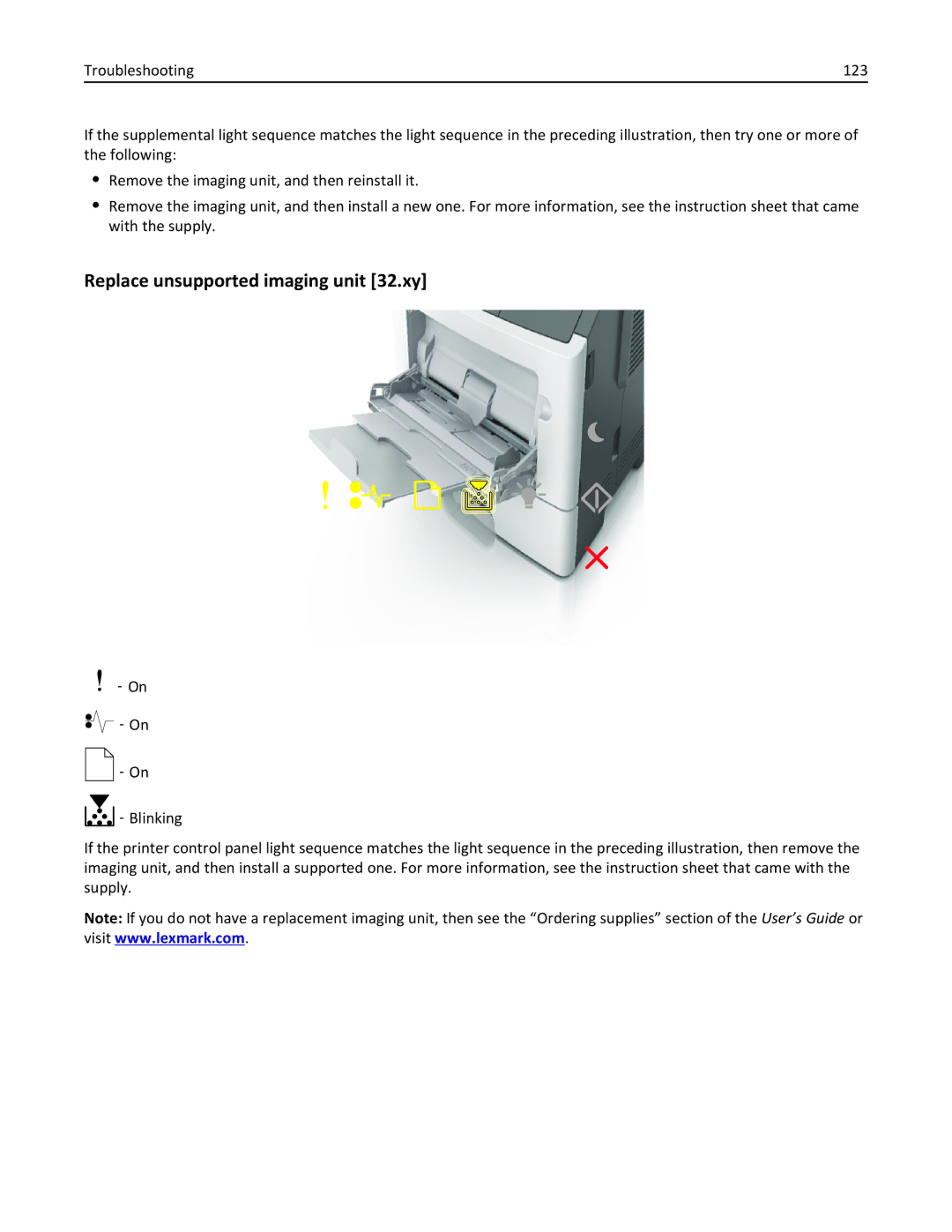
Replace unsupported imaging unit 32.xy
Troubleshooting 124
Paper loading messages
Incorrect paper size, open paper source
Load paper source with custom type name orientation
Troubleshooting 125
Load paper source with custom type string orientation
Troubleshooting 126
Load paper source with paper size orientation
Troubleshooting 127
Load paper source with paper type paper size orientation
Troubleshooting 128
Load Manual Feeder with custom type name orientation
Troubleshooting 129
Load Manual Feeder with custom type string orientation
Troubleshooting 130
Load Manual Feeder with paper size orientation
Troubleshooting 131
Load Manual Feeder with paper type paper size orientation
Troubleshooting 132
Remove paper from standard output bin
Printer communication error messages
Network x software error
Troubleshooting 133
Troubleshooting 134
Troubleshooting 135
Standard parallel port disabled
Troubleshooting 136
Standard network software error
‑ On
Troubleshooting 138
Rear USB port disabled
Insufficient memory error messages
Troubleshooting 139
Insufficient memory to collate job
‑ On
Troubleshooting 141
Insufficient memory to support Resource Save feature
Memory full
Troubleshooting 143
Miscellaneous messages
Close front door
Complex page, some data may not have printed
Troubleshooting 144
Ppds font error
‑ Blinking
Printer had to restart. Last job may be incomplete
Troubleshooting 147
Troubleshooting 148
Service error
Too many trays attached
Troubleshooting 149
Printer is not responding
Solving printer problems
Basic printer problems
Troubleshooting 150
Troubleshooting 151
Cannot detect internal option
Option problems
Troubleshooting 152
Action Yes Step Problem is solved Go to step
Tray problems
Troubleshooting 153
Step Problem is solved. Go to step
Paper frequently jams
Paper feed problems
Troubleshooting 154
Action Yes Step Go to step Problem is solved
Jammed pages are not reprinted
Solving print problems
Printing problems
Troubleshooting 155
Troubleshooting 156
Print job takes longer than expected
Troubleshooting 157
General Settings Print Recovery
Printing slows down
Troubleshooting 158
General Settings Eco ‑Mode
Job prints from the wrong tray or on the wrong paper
Troubleshooting 159
Incorrect characters print
Tray linking does not work
Large jobs do not collate
Troubleshooting 160
Settings Paper Menu
Settings Print Settings Finishing Menu
Printer is printing blank pages
Print quality problems
Troubleshooting 161
Unexpected page breaks occur
Clipped pages or images
Troubleshooting 162
Paper Menu
Troubleshooting 163
Troubleshooting 164
Shadow images appear on prints
Gray background on prints
Incorrect margins on prints
Troubleshooting 165
Paper curl
Troubleshooting 166
Print irregularities
Troubleshooting 167
Troubleshooting 168
Settings Paper Menu Paper Texture
Troubleshooting 169
Troubleshooting 170
Repeating defects appear on prints
Print is too dark
Troubleshooting 171
Troubleshooting 172
Print is too light
Troubleshooting 173
Troubleshooting 174
Skewed print
Troubleshooting 175
Troubleshooting 176
Printer is printing solid black pages
Transparency print quality is poor
Streaked horizontal lines appear on prints
Troubleshooting 177
Streaked vertical lines appear on prints
Troubleshooting 178
Horizontal voids appear on prints
Troubleshooting 179
Vertical voids appear on prints
Troubleshooting 180
Toner specks appear on prints
Troubleshooting 181
Troubleshooting 182
Toner rubs off
Uneven print density
Embedded Web Server does not open
Troubleshooting 183
Mail
Troubleshooting 184
Contacting customer support
Tech Library
May
Product information
Edition notice
185
This product may contain the following modular components
Trademarks
Modular component notice
186
Static sensitivity notice
Licensing notices
Noise emission levels
Product disposal
188
Temperature information
Laser notice
Laser advisory label
189
Power consumption
Product power consumption
Mode Description Power consumption Watts
Avis de conformité aux normes de l’industrie du Canada
Industry Canada compliance statement
Industry Canada Canada
Regulatory notices for wireless products
European Community EC directives conformity
Exposure to radio frequency radiation
192
Industry Canada Canada
ΤΗΣ Οδηγιασ 1999/5/ΕΚ
193
Limited warranty
Lexmark International, Inc., Lexington, KY
194
Limited warranty service
Extent of limited warranty
195
196
Patent acknowledgment
Limitation of liability
Additional rights
197
Index 198
Symbols
Index
Numerics
Page
Page

 ‑
‑  ‑
‑