5622/5627
Page
System Settings
Manuals for This Machine
Copy Reference
Scanner Reference this manual
Manuals for ScanRouter V2 Lite
When working in a WAN environment
When a dial-up router is connected in a network environment
When connected to a computer that uses dial-up access
Names of Major Options
How to Read This Manual
Symbols
Table of Contents
Powering Off the Machine
Specifications
Flow of Operations Scanning Originals
Storing Data
Outline
Network Twain Scanner
This machine
Computer
Delivery server
Network Delivery Scanner
This machine Client computer
Document Server
This machine Computer
Names and Functions of Components
Control Panel
Display Contents
Using as a network delivery scanner
Using the Document Server
Common Key Operations
Key list
Network Scanner
Using as a Network Twain Scanner
Preparation Sequence
Using as a Network Delivery Scanner
⇒System Settings manual
Using the Document Server
Initial Scanner Setup
Default Settings
Scanner settings
Explanation of scanner settings are provided in this manual
Setting Scanner Features
Resolution
Scan Size
Scan Type
Setting Procedure
Press Scanner Features
When all settings have been made, press OK
Key Enter the desired name and press OK
When all settings have been made, press Exit
Selecting a custom size
Press Exit
Enter the scan size area with the number keys
Press Delete
Deleting programmed scan settings
Press the User Tools/Counter/Inquiry
Making Scanner Settings
Function Priority
Delivery/Store Connection Time out
Press Yes
Original Setting
Sadf Auto Reset Timer
Compression Black & White
Compression Gray Scale
Press the item to be set
Press the Scanner Settings tab
Change the setting
Making Scan Data Subject Settings
Press the Subject Settings tab
To delete more subjects, repeat steps E to F Press Exit
Press the Subject Settings tab Press Delete
Select the subject you want to de- lete
Installing Software
Auto Run Program
Installation Sequence
BOK Click Type1027 Twain Driver
Software for using a Network Twain Scanner
Using Windows 95/98/Me, Windows 2000, or Windows NT
Software for using a Network Delivery Scanner
Select a setup language, and then click OK
Click the key of the software to be installed
Select a language used by this component, and then click OK
Click DeskTopBinder V2 Lite
Software Required to Use the Document Server
Select a language, and then click OK
Software Supplied on CD-ROM
List of Files
Type1027 Twain Driver
File storage folder
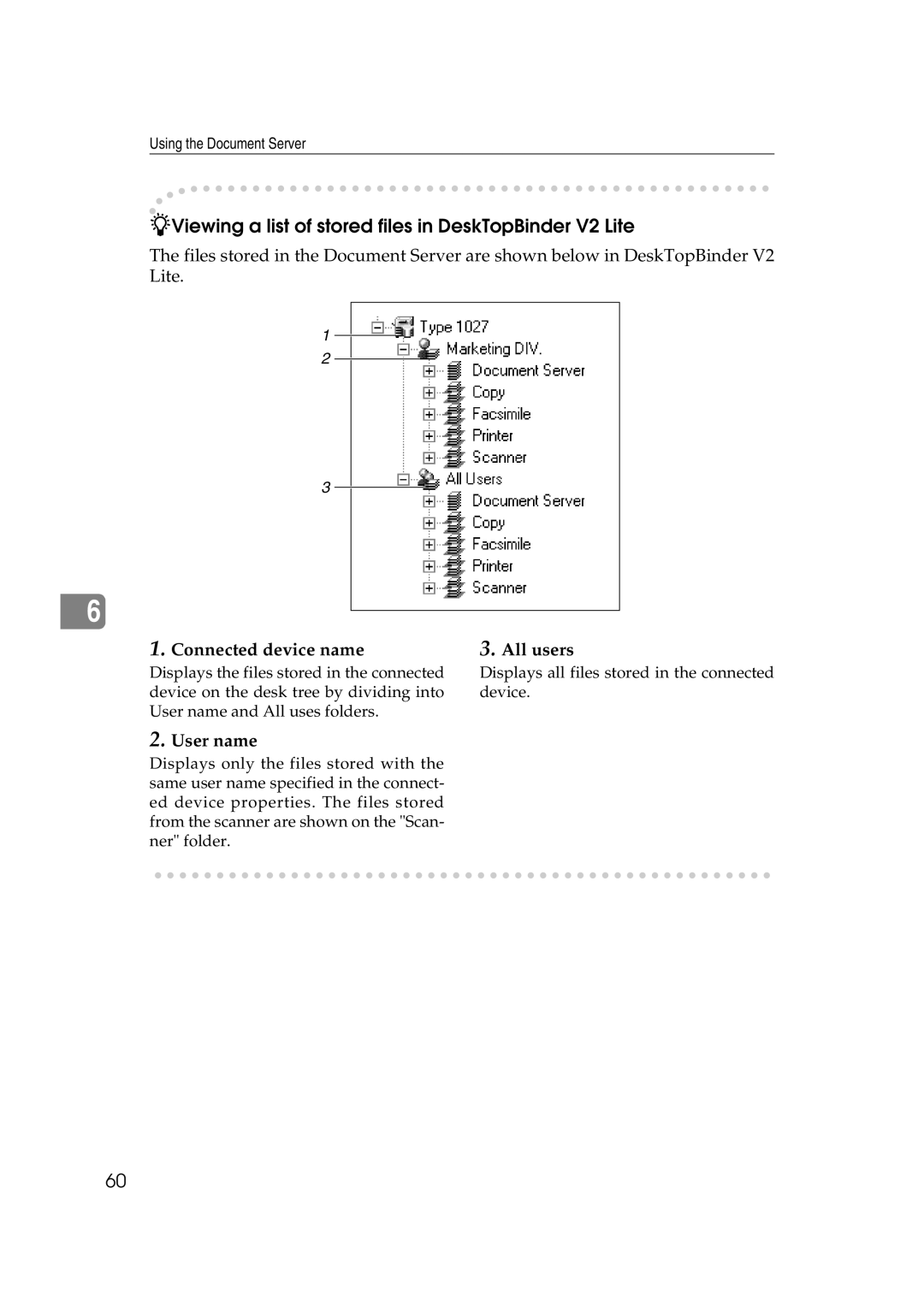
DeskTopBinder V2 Lite
Document Server can be viewed
Software installed with DeskTopBinder V2 Lite
ScanRouter V2 Lite
Software installed with ScanRouter V2 Lite
Preparations for Use as a Network Scanner
Standard 0deg. Right 90deg. Standard 0deg
Placing the Original on the Exposure Glass
Lift the exposure glass cover or the ADF
Place the original so that the top edge is in the ADF tray
Placing the Original in the Automatic Document Feeder ADF
Originals that can and cannot be placed in the ADF
Placing the Divided Original Automatic Document Feeder Sadf
Place the top edge of the origi- nal first
Original Orientation and Scan Area Setting
Sided original/2-sided original selection
Orientation selection
Mixed size selection
Open the Scanner Control dialog box
For a Network Twain Scanner
Press OK
Scanning Originals Using Network Twain Scanner
Flow of Operations
Scanning Originals
File format for scanned images and go to step E
Click Select Scanner Driver
Place the original in the scanner
When you want to configure the scanning area
Document group Reference
Click Preview
Click Close
Scanning Mode Registration
Functions of the Twain Driver
Automatic Tilt Correction
Printing to the Image
Update Address
List Displays of Destinations and Senders
Destination Display
Attach Sender’s Name Attach Sub- ject
Destination List
Delivery Procedure
Calling up stored scan settings
Making the settings individually
Press Scan Settings
When selecting a destination from the list
Press Update Address to update the list of destinations
Select the destination
You can select the destination from
Using the short ID number to select a destination
Checking selected destinations
Press Number Keys
TNext
Select the sender Select a subject
Sender is applied
If required, select a subject
Press Attach Subject
Check the displayed results
Checking the Delivery Result
Items to be checked
Press Store File
Using the Network Delivery Scanner with the Document Server
Simultaneous Delivery Storage
Delivering Stored Files
Display the list of stored files
Select a file to be delivered
To select multiple files, repeat step B
Delivering Stored Scan Data by the Network Delivery Scanner
Using the Document Server
Storing Data
Storage Procedure
Calling up stored scan settings
Making settings individually
Select a user program of scan settings Press OK
Press OK Specify file information
Specifying file information
Press Store Only
Specifying a user name
Press Store File Press File Information
Press User Name
Select the desired user name
Specifying a password
Press Password
Specifying a file name
Press File Name
Viewing a List of Stored Files
When using the network delivery scanner
When using Document Server only
Deliver
Viewing the List
Manage/Delete File
Connected device name All users
User name
Searching by user name
Searching for Files
Searching by file name
Press Delete File
Deleting Stored Files
Select the file to be deleted
Changing File Information
Changing the user name
Change the file information
Press Change User Name
Changing a password
Press Change Password
Changing the file name
Press Change File Name
Relationship between the Resolution and the Data Size
When Gray Scale is selected as the Scan Type
Delivery Function Does Not Work
Troubleshooting
When Scanning Is Not Performed as Expected
When the Error Message Is Displayed on the Control Panel
Message Possible Cause and Action
Message Possible Cause and Action
Message Possible Cause and Action
When the Error Message Is Displayed on the Computer
Cannot save to the default file
Tions
Turning Off the Main Power Switch
Powering Off the Machine
Turning Off the Operation Switch
Appendix
Specifications
When placed in the ADF
Index
User Tools/Counter/Inquiry key
UE USA B453
Means Power ON. c means Stand by