19. Abbreviated Menu Map
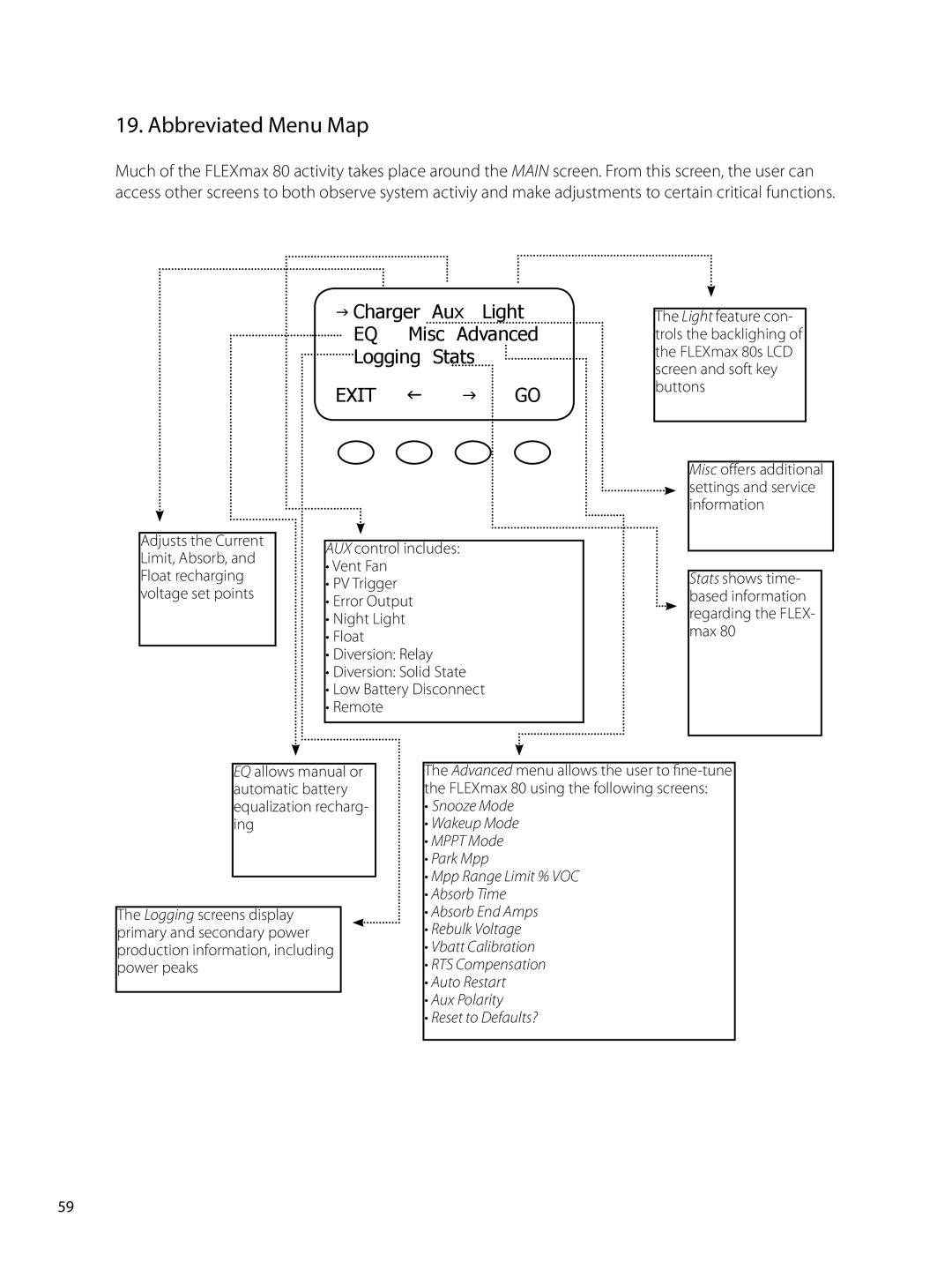
Much of the FLEXmax 80 activity takes place around the MAIN screen. From this screen, the user can access other screens to both observe system activiy and make adjustments to certain critical functions.
Adjusts the Current Limit, Absorb, and Float recharging voltage set points
GCharger Aux Light EQ Misc Advanced
Logging Stats
EXIT F G GO
AUX control includes:
•Vent Fan
•PV Trigger
•Error Output
•Night Light
•Float
•Diversion: Relay
•Diversion: Solid State
•Low Battery Disconnect
•Remote
The Light feature con- trols the backlighing of the FLEXmax 80s LCD screen and soft key buttons
Misc offers additional settings and service information
Stats shows time- based information regarding the FLEX- max 80
EQ allows manual or automatic battery equalization recharg- ing
The Logging screens display primary and secondary power production information, including power peaks
The Advanced menu allows the user to
•Snooze Mode
•Wakeup Mode
•MPPT Mode
•Park Mpp
•Mpp Range Limit % VOC
•Absorb Time
•Absorb End Amps
•Rebulk Voltage
•Vbatt Calibration
•RTS Compensation
•Auto Restart
•Aux Polarity
•Reset to Defaults?
59