Configuration
Configuring PVC Connections
The
Main Menu → Configuration → PVC Connections
From this screen, you can go directly to the Management PVC screen by selecting the MgmtPVCs function key for easy movement between screens.
Quick removal of unused DLCIs included in an existing PVC Connection, except for HQ_Site, is also available when the Del ete function key is selected and you respond Yes to the Remove otherwise unused components associated
with the deleted PVC? prompt.
To configure these options, Service Type on the Easy Install screen must be set to Frame Relay.
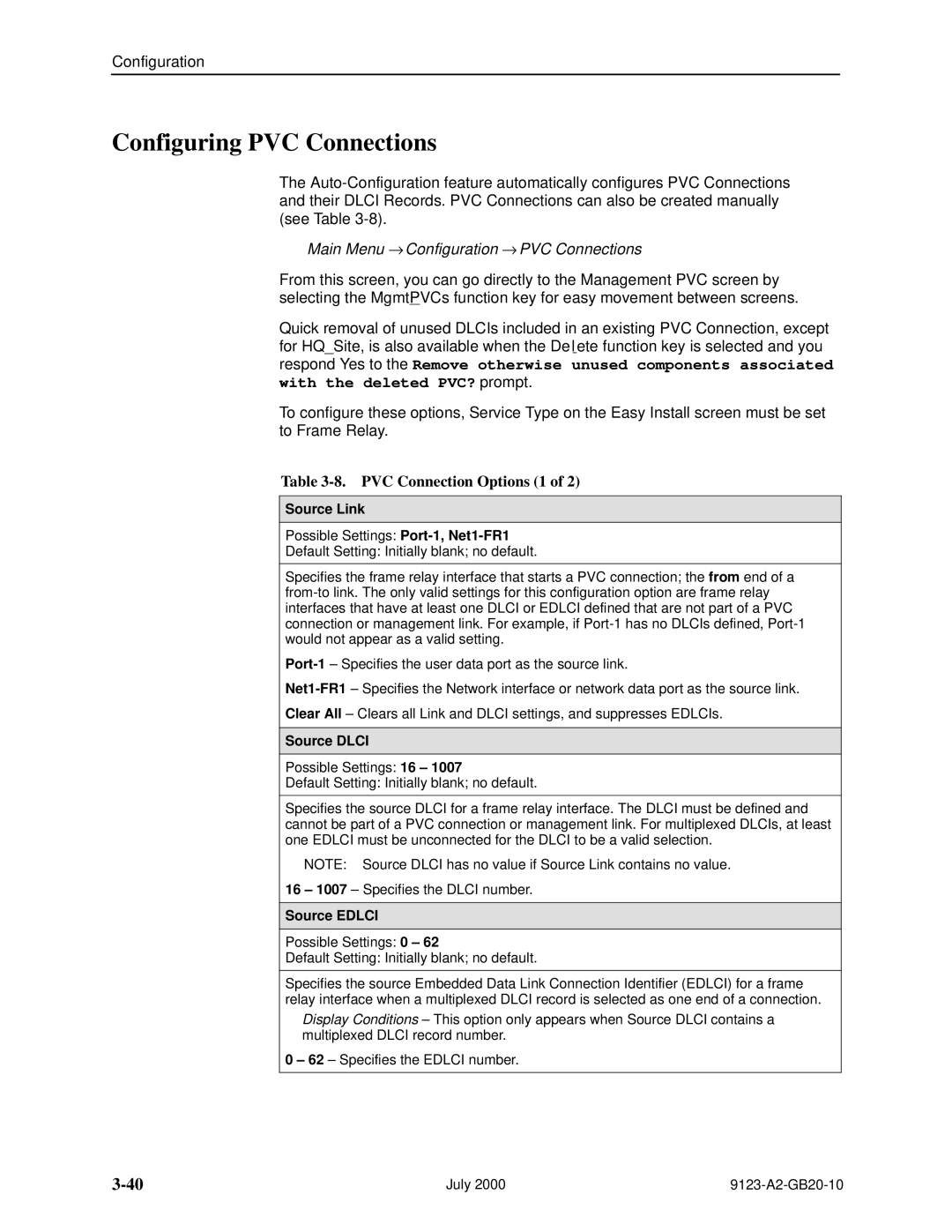
Table 3-8. PVC Connection Options (1 of 2)
Source Link
Possible Settings:
Default Setting: Initially blank; no default.
Specifies the frame relay interface that starts a PVC connection; the from end of a
Clear All ± Clears all Link and DLCI settings, and suppresses EDLCIs.
Source DLCI
Possible Settings: 16 ± 1007
Default Setting: Initially blank; no default.
Specifies the source DLCI for a frame relay interface. The DLCI must be defined and cannot be part of a PVC connection or management link. For multiplexed DLCIs, at least one EDLCI must be unconnected for the DLCI to be a valid selection.
NOTE: Source DLCI has no value if Source Link contains no value.
16 ± 1007 ± Specifies the DLCI number.
Source EDLCI
Possible Settings: 0 ± 62
Default Setting: Initially blank; no default.
Specifies the source Embedded Data Link Connection Identifier (EDLCI) for a frame relay interface when a multiplexed DLCI record is selected as one end of a connection.
Display Conditions ± This option only appears when Source DLCI contains a multiplexed DLCI record number.
0 ± 62 ± Specifies the EDLCI number.
July 2000 |