Edit Menu
Save Articulation…Alt + F + T
Page
Export all sample folders Alt + E + a
Import sample directory Alt + E + Y
Convert wave pool format Alt + E + F
HD1 dither adds 1.5 bits eff. resolution
Convert wave pool format to
Instrument wizard Alt + E + W
Convert stereo to mono
Combine instruments Alt + E + B
Crossfade editor Alt + E + O
Page
Page
Wav file contains a different unity note
Page
Midi Menu
View Menu
Page
Help Menu
Window Menu
Tall Velocity Window Alt + V +
Bank/Instrument Window
Bank and Instrument Facts
Creating a New Bank
Deleting a Bank
Cut or Copy Bank
Copy and Paste Banks Drag and Drop
Paste Bank
Changing the Bank Number
Cut/Copy Instruments
Creating a New Instrument
Paste Instruments
Renaming an Instrument
Copying and Pasting Instruments using Drag/Drop
Deleting an Instrument
Cancels out any 6 dB boost settings on individual regions
Instrument Properties
Page
Sample Window
Sample Icons
Sample Window Menu Commands
Audition sample only
Properties sample only
Edit audio sample only
Find instance Ctrl + F sample only
Replace sample sample only
Import directory
Replace all samples in folder folder only
Export as folder folder only
Replace all samples in all folders
Export samples
Export all sample folders
Cut, Copy, Paste, Delete, Rename
Batch rename
Wave pool statistics
Move samples to folder sample only
New sample folder
Convert Wave Pool Format
Page
Zoom In + Zoom Out
Region Window
Region Zoom Buttons
Middle C
Midi Select Button
Keyswitch Region
Midi Note Ons Parameter Editing
Selecting Regions
Stretching and Moving Regions
Region Context Menu
Cut regions
Properties
New region
Copy regions
Apply macro
Paste regions here
Delete regions
Transpose
Waveform Window
Envelopes View
LFO View
Dimension Windows
Loop and Start Offset markers
Velocity Window
Page
Velocity Split Points
Assigning Samples
Action Result
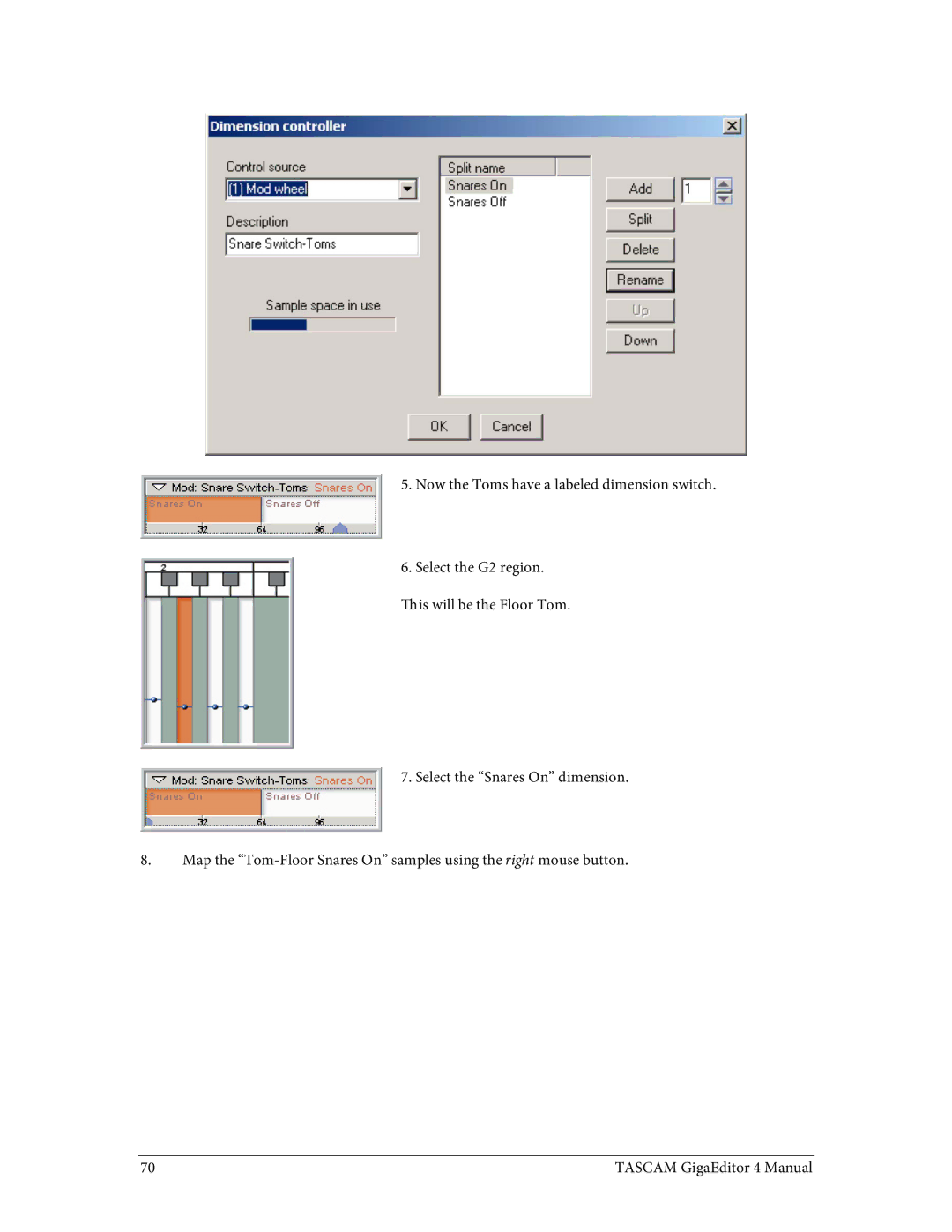
Dimension Controller dialog
Paste articulation
Velocity Context Menu
Copy articulation
Save articulation as macro
Force to mono stereo
Additional Dimension Windows
Dimension Controller dialog again
Delete split
Dimension Controllers
Dimension Split Examples
Dimension Context Menu
Selection lock buttons
Articulation Window
Amplitude and Filter Envelope Settings
Articulation Parameters Reference
Decay 1 Time sec
Pre-attack level %
Attack time sec
Hold
Envelope Modulation Settings
Amplitude LFO Filter LFO Pitch LFO
Amplitude/Filter/Pitch Low Frequency Oscillators LFOs
LFO frequency Hz
Control depth
Internal depth
Control source
Flip phase
Synch
Filter type
Filter Settings
Turbo LPF
Control invert
Cutoff frequency
Cutoff controller
Minimum cutoff
Resonance controller
Resonance
Dynamic resonance
Key tracking
Filter velocity response curve
Velocity scale
Filter velocity response dynamic range
Page
Response Settings
Velocity split point
Velocity curve scaling
Velocity response curve
Velocity dynamic range
Release response curve
Release trigger decay
Mix/Layer Settings
Release curve range
Attenuation
Attenuation control invert
DB boost
Attenuation controller
Attenuation control threshold
Decode
Dimension bypass
Crossfade settings
Self mask
Channel offset
Sample start offset
Unity note
Sample Settings
Fine tuning cents
Loop start, end, length
Enable Dynamic Expression Filter
Dynamic Expression Filter DEF
Velocity Spectral Interpolate Velocity
Modulator
Modulator CC
Velocity + CC
DEF Filter Coeffi cients
DEF morphing capability
Page
Editing Parameters in the Region Window
Editing in the Region Window
Drag Modes
Drag all selected regions
Drag with linear scaling
Drag with proportional scaling
Changing the Vertical Resolution
Lower resolution Higher resolution
Page
Macros
Saving Macros
Page
Applying Macros
Copying Macros to other machines
Editing Macros
Intelligent Midi iMIDI Rules
IMIDI Rules in GigaStudio
IMIDI Rules in the Instrument Editor
Using the iMIDI Rule Manager
Transpose Rule
Pattern Alternator Initialization window
Legato Mode Rule
Midi Filter Rule
Legato Rule settings
Mapping and creating a Legato Mode instrument
Pattern Alternator Rule
Repetition Mode Rule
Sample layout
Page
Editing a pattern
Multiple Patterns
Controller Trigger Rule
Saving a Pattern Alternation rule
Release Trigger With Tracking Rule
Rule Builder
Incoming Midi Data-1
Designing a custom filter
Incoming Midi Event
Incoming Midi Data-2
Filtered Midi Data-1
Filtered Midi Event
Use Data 1 from incoming
Use Data 2 from incoming
Mando-Tremolo Rule
Mono Mode Rule with Portamento Reshaping Filter PRF
Functionality
Override Mono rule on a Null split
Auto detect polyphonic mode
Playzone
Overview
Default Legato Portamento Mode
PRF Custom Legato Portamento Mode
How it works
Loading a factory PRF profile
Portamento Extended Controls
Default Portamento time
Portamento Reshaping Filter Tab Customizing Profiles
Continuous Control
Velocity Time
Upward tuning reference
Downward tuning reference
Velocity Response
Designing Filter Profiles
Use of Body Models and Room Models
Fretted vs. Open Strings
Region mapping plus PRF
Calibrating Decaying Instruments
Instrument Behavior Normal Mode
Poly Mode
Mono Mode
Region Layout
Tascam GigaEditor 4 Manual 207
Instrument Behavior Target Tracking mode
Continuing on with the above example
Appendix
PerfUtility
Additional info