Upgrading SIP Application
Supporting SoundPoint IP and SoundStation IP Phones
Supporting SoundPoint IP 300 and 500 Phones
To upgrade your SIP application
Administrator’s Guide SoundPoint IP / SoundStation IP
Configuring SoundPoint IP / SoundStation IP Phones Locally
Setting Up Basic Features
This chapter also provides instructions on
Administrator’s Guide SoundPoint IP / SoundStation IP
Call Log
Call Timer
Call Waiting
Calling Party Identification
Called Party Identification
Missed Call Notification
Connected Party Identification
Context Sensitive Volume Control
Central boot server
Customizable Audio Sound Effects
Messages and voice messages are waiting
Message Waiting Indication
Distinctive Incoming Call Treatment
Saf/ on page A-30 or Sound Effects se/ on page A-31
Address-directory
Distinctive Ringing
Distinctive Call Waiting
Xml Local
Handset, Headset, and Speakerphone
Do Not Disturb
116
Local Contact Directory
Userpreferences/on page A-107
Xml
Direct
Ory.xml
?xml version=1.0 encoding=UTF-8 standalone=yes ? directory
UTF-8’s variable length encoding
Directory
Element Permitted Values Interpretation
Space is added between first and last names
7000, the maximum speed-dial index is
Local Digit Map
Auto-reject
Soft Key Activated User Interface
Microphone Mute
Speed Dial
Boot server Ethernet
Time and Date Display
Ethernet Switch
Idle Display Animation
Their phone
Graphic Display Backgrounds
Your choice
For images, select a filename. For example
Automatic Off-Hook Call Placement
Call Hold
AutoOffHook/ on page A-112
Call Transfer
Hold/localReminder/ on page A-67
Local / Centralized Conferencing
Manage Conferences
Call Forward
Directed Call Pick-Up
Call Park/Retrieve
Setting Up Advanced Features
Group Call Pick-Up
Last Call Return
Configuring Your System
Configurable Feature Keys
Feature Key Layouts on page C-12
Multiple Line Keys per Registration
Multiple Call Appearances
Shared Call Appearances
Bridged Line Appearance
Busy Lamp Field
Live Communications Server 2005 Integration on
Customizable Fonts and Indicators
EchnicalBulletinspub.html
Attendant.uri
Multilingual User Interface
Central boot
Instant Messaging
Server Sip.cfg
Swedish
Fonts, refer to Fonts font/ on page A-72
Saf/ on page A-30
Synthesized Call Progress Tones
Microbrowser
Call Progress Patterns on page A-33
Real-Time Transport Protocol Ports
Corporate Directory
Network Address Translation
Nat/ on page A-120
Settings Basic Preferences Corporate Directory View
This section contains the following information
670 have a functioning USB port
Recording and Playback of Audio Calls
Display
Daisy-Chaining Phones
Provisioning Phones Over CLink
Enhanced Feature Keys
Efk Efklist Efkprompt Version Special Characters
Efklist
This element describes behavior of enhanced feature key
Efk
This element contains the following parameters
Efkprompt
This element describes the behavior of the user prompts
Special Characters
Version
Version efk.version=2
Macro Action Prompt Macro Substitution Expanded Macros
Macro Action
Call. The use of refer method is call server
Using Invite if no active call or Dtmf if an active
Prompt Macro Substitution
Dependentand may require the addition of star codes
Expanded Macros
Collected. The macros are case sensitive
Prompt is not required for every macro
Contact Directory File Format on
Examples
Action String Example
Configuration File Changes
Enhanced Feature Key XML Files
Action string
Contact Directory Changes
Using Call Park Key
Well as others mapped to Park Return and Call Pickup
Configurable Soft Keys
New Call End Call Split Join Forward
MyStatus and Buddies Hold, Transfer, and Conference
Softkey.feature.newcall =
Update the sip.cfg configuration as follows
103
Update sip.cfg as follows
Voice Mail Integration
Multiple Registrations
Server server/ on page A-7
Server Redundancy
Automatic Call Distribution
Server/ on page A-7, and Registration reg/ on page A-107
DNS SIP Server Name Resolution
For Outgoing Calls Invite Fallback
Configured
Phone Configuration
Phone Operation for Registration
Presence
Immediately with business contacts
Boot server Address-directory
Microsoft Live Communications Server 2005 Integration
Examples on
Roamingbuddies/ on page A-122
Roamingprivacy/ on page A-123
Refer to Roaming Buddies roamingbuddies/ on page A-122
Refer to Roaming Privacy roamingprivacy/ on page A-123
Set the reg.x.server.y.address to the LCS server name
Set reg.x.auth.password to the LCS password
Locate the roamingprivacy attribute
Access URL in SIP Message
Web Content Examples User Interface Signaling Changes
Web Content Status Indication
Settings Menu
Static DNS Cache
Example
Dns.cache.A.1 , dns.cache.A.2 , and so on
Set to null to force SRV lookups
Display of Warnings from SIP Headers
Setting Up Audio Features
Voice Activity Detection
Low-Delay Audio Packet Transmission
Jitter Buffer and Packet Error Concealment
Dynamic Noise Reduction Treble/Bass Controls
Dtmf Event RTP Payload
Acoustic Echo Cancellation
Dtmf Tone Generation
DTMF/ on page A-28
Following table summarizes the phone’s audio codec support
Audio Codecs
Effective
Comfort Noise Fill
Background Noise Suppression
On page A-38 and Codec Profiles audioProfile/ on page A-41
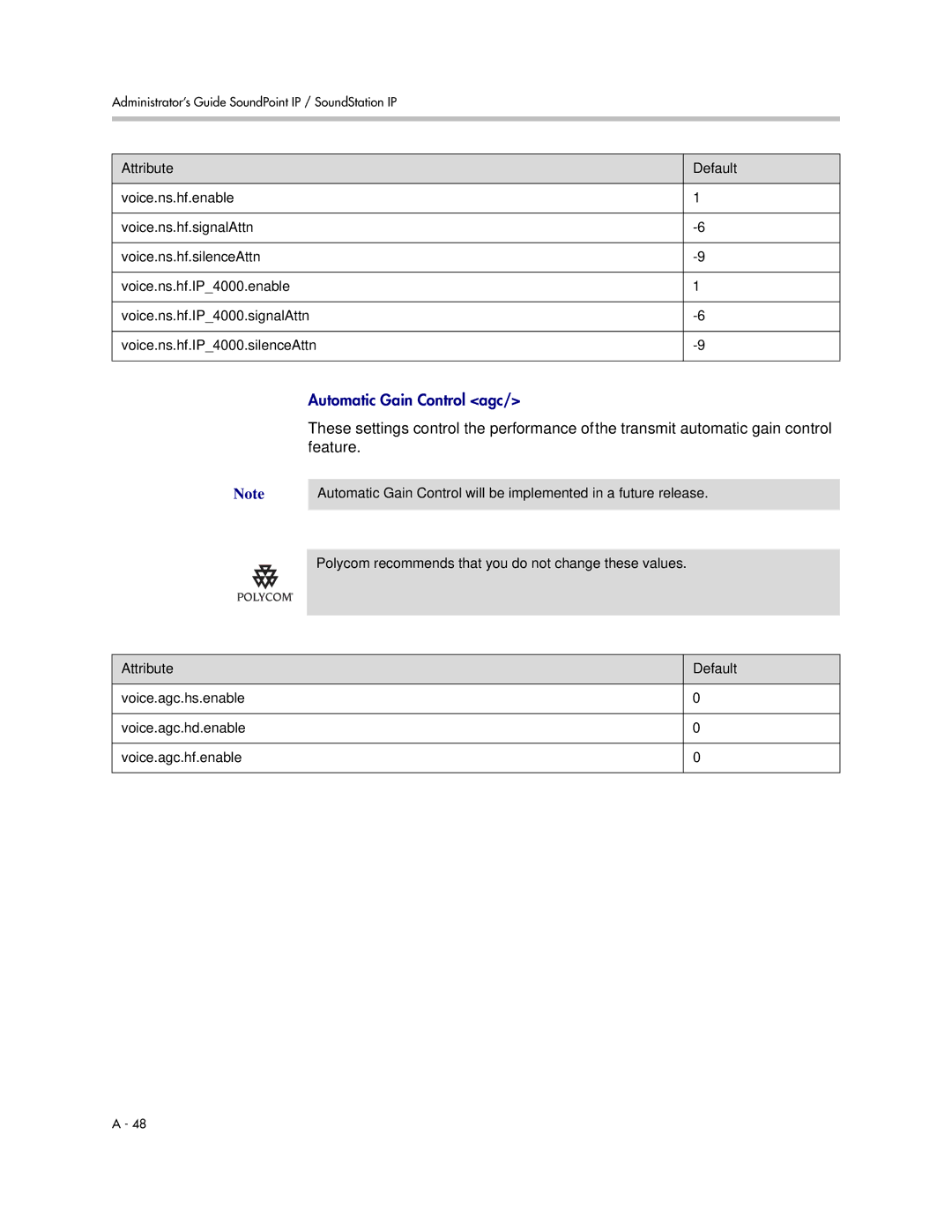
Automatic Gain Control
IP Type-of-Service
Ieee 802.1p/Q
Voice Quality Monitoring
Three types of quality reports can be enabled
Periodic-Generated during a call at a configurable period
Threshold
Treble/Bass Controls
Setting Up Security Features
Dynamic Noise Reduction
Monitoring/ on page A-52
Pwd/length/ on page A-89
Local User and Administrator Privilege Levels
Custom Certificates
Tinspub.html
Configuration changes can performed locally
Incoming Signaling Validation
Configuration File Encryption
Secure Real-Time Transport Protocol
Configuration on page A-124
Configuring SoundPoint IP / SoundStation IP Phones Locally
Device.cfg
Passwords
Troubleshooting Your SoundPoint IP / SoundStation IP Phones
Error Messages
BootROM Error Messages
Application Error Messages
Status Menu
Log Files
Scheduled Logging
Manual Log Upload
Reading a Boot Log
Following figure shows a portion of a boot log file
Reading an Application Log
Testing Phone Hardware
Following figure shows a portion of an application log file
Power and Startup
Symptom Problem Corrective Action
Controls
Access to Screens and Systems
To Rebooting the Phone on
Calling
Displays
Phone on page C-10
Oice/soundpointip/VoIPTechnicalBullet
Audio
Upgrading
Inspub.html
Administrator’s Guide SoundPoint IP / SoundStation IP
Configuration Files
Master Configuration Files
One will cause a reboot loop
Application Configuration
CONFIGFILES=phone1MACADDRESS.cfg, sip.cfg MISCFILES=
Configuration Files
Protocol voIpProt
This configuration attribute is defined as follows
Attribute Permitted Default Interpretation Values
This attribute includes
VoIpProt.server.x.transport is set to
Permitted Attribute Values Default Interpretation
If voIpProt.server.x.address is a
If voIpProt.server.x.transport is set to
VoIpProt.server.x.address is an IP
VoIpProt.SIP.lcs
Parameter if set to 1 when the parameter
To 1 default is
Permitted Attribute Values Default Interpretation
Reg.x.auth.optimizedInFailover takes
Ept = 325,326,327,328,329,330
This attribute also includes
Lcl.ml.lang.tags.x in Multilingual ml
Outbound Proxy outboundProxy
Request Validation requestValidation
Due to the additional signaling required
Alert Information alertInfo
May have a negative performance impact
Conference Setup conference
Special Events specialEvent
UDP, TCP, or TLS
Supported when configured with the values
Dial Plan dialplan
Dialplan.applyToCallListDial
This attributes also includes
Digit Map digitmap Routing routing
Configuration Files
Attribute Permitted Values Default Interpretation
Server server Emergency emergency
Emergency emergency
Localization lcl
Server server
Multilingual ml Date and Time datetime
Lcl.ml.lang.menu.2
Attribute Permitted Values Interpretation
Lcl.ml.lang.menu.1
Lcl.ml.lang.menu.3
Lcl.ml.lang.tags.1 =
Lcl.datetime.date.longFormat
Lcl.datetime.date.dateTop
Zh-cn,zhq=0.9,enq=0.8
Optional Set lcl.ml.lang to be the new languageregion string
User Preferences up
Permitted Attribute Values Interpretation
OnIntensity, it will be replaced with
OnIntensity value
Tones tones
Dual Tone Multi-Frequency Dtmf Chord-Sets chord
Only be enabled when tone.dtmf.viaRtp is
Disabled
Be enabled when tone.dtmf.viaRtp is
Sampled Audio for Sound Effects saf
Following table, x is the sampled audio file number
Sound Effects se
To SoundPointIPWelcome.wav
Patterns pat Ring type rt
Instruction Meaning Example
Call Progress Patterns
Miscellaneous Patterns
Call progress Use within phone Pattern number
Ringer Patterns
Ringer pattern number Default description
Call progress Pattern number Use within phone
Miscellaneous Patterns
Miscellaneous Pattern number Use within phone
Patterns on page A-34
Sequential
Defined in Call Progress Patterns on page A-33
Voice Settings voice
Codec Preferences codecPref Codec Profiles audioProfile
Following voice codecs are supported
These codecs include
Codec Preferences codecPref
Permitted Attribute Values Default Interpretation
Voice.codecPref.IP7000.G722
Codec Profiles audioProfile
Attribute Default
Attribute Default
Attribute Default
Acoustic Echo Cancellation aec
Acoustic Echo Suppression aes
Background Noise Suppression ns
Feature
Receive Equalization rxEq
Transmit Equalization txEq
Attribute Default
If voice.vadEnable is set to 0, add attribute line
Voice.vadEnable parameter
Central Report Collector collector Alert Reports alert
Central Report Collector collector
Server server RTCP-XR rtcpxr
Nable.periodic is set 1, since
Alert Reports alert
RTCP-XR rtcpxr
Quality of Service QOS
Following settings control the 802.1p/Q userpriority field
Ethernet Ieee 802.1p/Q ethernet IP TOS IP
Other other
These parameters apply to RTP packets
Call Control callControl
RTP rtp Call Control callControl
RTP rtp
Basic TCP/IP Tcpip
Qos.ip.callControl…
Attribute Permitted Default Values
Permitted Attribute Values Default Interpretation
Start.date is ignored
If fixedDayEnable is set to
Start.dayOfWeek
Stop.dayOfWeek
TcpIpApp.port.rtp.filterByIp
Must be enabled for this to work
RTP rtp
TcpIpApp.port.rtp.filterByPort
Web Server httpd
Default value is used
Value that is out of range,
Call Handling Configuration call
Configuration cfg
Reg.x.callsPerLineKey. Refer to Registration
If call.stickyAutoLineSeize is set to 1, this
BroadWorks calls server only. You must change
Shared Calls shared Hold, Local Reminder hold/localReminder
SoundPoint IP 330/320 only
Value if your organization uses a different call
Phones a quick press and release of the line
Servers
IP 4000, 6000, and 7000 phones. For other
Key will resume a call whereas pressing
Dir.local.volatile.4meg
Directory dir
Local Directory local Corporate Directory corp
Dir.local.volatile.8meg, this
Enter the speed dial index followed
SoundPoint IP 320/330 is disabled
Read only, speed dial entry on
By #
Used for display purposes only
Leg tagged parameter. This
Dir.corp.viewPersistence
600, and 601 legacy phones, use
Prevents slow behavior after exiting
Presence pres
Fonts font
SoundPoint IP 320, 330, 430, 500
SoundPoint IP 550, 560, 600, 601, 650,
IP330 font IP330
This configuration attribute is defined as follows
Keys key
Following table lists the functions that are available
Functions
Built-in default solid pattern is displayed
Backgrounds bg
Same to display correctly on grayscale
Individual phone when the user lightens or
Darkens the graphic during preview
Following indicators are used by the phone
Indicators ind
Bitmaps bitmap
IP500/, IP600/, IP4000/,
Platform IP300/, IP 330/, IP400
IP7000/ on page A-80
IP300/, IP330/, IP400/, IP500/, IP600
Attribute Permitted Interpretation Values
IP4000/, and IP7000/ tag above
LEDs led
Following table, x is the LED number
Event Logging log
Level Interpretation
Two types of logging are supported
Three formats are available for the event timestamp
Type Example
Syslog Menu on
Log.render.level maps to
You do not change this value
Server is set up for this
Set starting with log.sched.x where x identifies the task
Support append mode unless
Uploaded if no new events have
Encryption encryption Password Lengths pwd/length
Security sec
License license
Provisioning prov
RAM Disk ramdisk
Request request
Delay delay
Value
Feature feature
Resource res
Finder finder Quotas quotas
Value. For the SoundStation IP 6000
Phones, this value is internally replaced by 2X
Phones, this value is internally replaced by 4X
This value is internally replaced by 2X the value. For
Microbrowser mb
SoundStation IP 4000, 6000, and 7000 phones
Replaced by 4X the value
650, and 670 and SoundStation IP 4000
Miscellaneous XML errors can occur on
SoundPoint IP 430, 501, 550, 560, 600
7000 phones
Function is selected
If mb.main.idleTimeout
Used. Refer to User Preferences up/ on
Applications apps
Detrimental effect on performance of the phone
Non-Null values
Apps.push.password must be set to non-Null
Values
DNS Cache dns
Peer Networking pnet
Naptr NAPTR/ attribute SRV SRV
Http//tools.ietf.org/html/rfc2915
Http//tools.ietf.org/html/rfc2782
Soft Keys softkey
Macro Definition on
Permitted Attribute Values Default Interpretation
New Call and Callers soft keys
For this soft key to be displayed
Per-Phone Configuration
Parameters include
Registration reg
User Preferences userpreferences
Specified in sip.cfg in Server server/ on
Is non-Null, all of the reg.x.server.y.xxx
Parameters will override the parameters
A-7
Shared line counts as a call for every phone
Refer to Call Handling Configuration call
Sharing that registration
If reg.x.serverFeatureControl.cf is not
Calls call
VoIpProt.SIP.strictLineSeize is
More information, refer to SIP SIP/ on
Set to 1 enabled, this parameter is ignored. For
Sylantro call server only
If call.missedCallTracking.x.enabled is
Parameter is enabled
Forwarding is enabled, this
Diversion divert
Calls can be automatically diverted when the phone is busy
Divert.x.contact will be
Dialplan.x.digitmap is not
Enabled, this parameter is
Server-base call forwarding is
Plan dialplan/ on page A-17
Dialplan.x.applyToUserDial When present, and if
Digit Map digitmap/ on
Server/ on page A-118
Message Waiting Indicator mwi
Messaging msg
Chosen. Refer to Voice Mail Integration on
Network Address Translation nat
VoIpProt.local.signalPort in sip.cfg
Attendant attendant
Value 0 if the call server is Microsoft Live
Roaming Buddies roamingbuddies
Communications Server
VoIpProt.SIP.strictLineSeize
Roaming Privacy roamingprivacy
User Preferences userpreferences
VoIPProt.SIP.lineSeize.retries,
Flash Parameter Configuration
This flash attributes are defined as follows
Enabled
Setup on
For example, if device.net.ipAddress.set =
Server address is preserved
Render/ on page A-86
Refer to Basic Logging level/change/
Menu on
Administrator’s Guide SoundPoint IP / SoundStation IP
Session Initiation Protocol SIP
RFC and Internet Draft Support
Following SIP request messages are supported
Request Support
Method Supported
Following SIP request headers are supported
Header Support
Header Supported
Header Supported
Following SIP responses are supported
Response Support
Response Supported
3xx Responses Redirection
5xx Responses Server Failure
Transfer
Hold Implementation
Reliability of Provisional Responses
Third Party Call Control
Shared Call Appearance Signaling
Bridged Line Appearance Signaling
Miscellaneous Administrative Tasks
Trusted Certificate Authority List
Administrator’s Guide SoundPoint IP / SoundStation IP
Miscellaneous Administrative Tasks
Encrypting Configuration Files
Encrypted and unencrypted file are the same
Changing the Key on the Phone
Option. This shows the digest field
Encryption/ on page A-89
Adding a Background Logo
Model Width Height Color Depth
Color RGB Values Decimal Hexadecimal
RGB Values
Model Associate Parameter
IP330 IP400
Bitmaps
IP300 IP300 IP330
IP500 IP500