Chapter 2 Ethernet Switching Modules
10 and 10/100
Table | |||||
|
|
|
|
| |
Feature |
| Description | |||
|
|
|
| ||
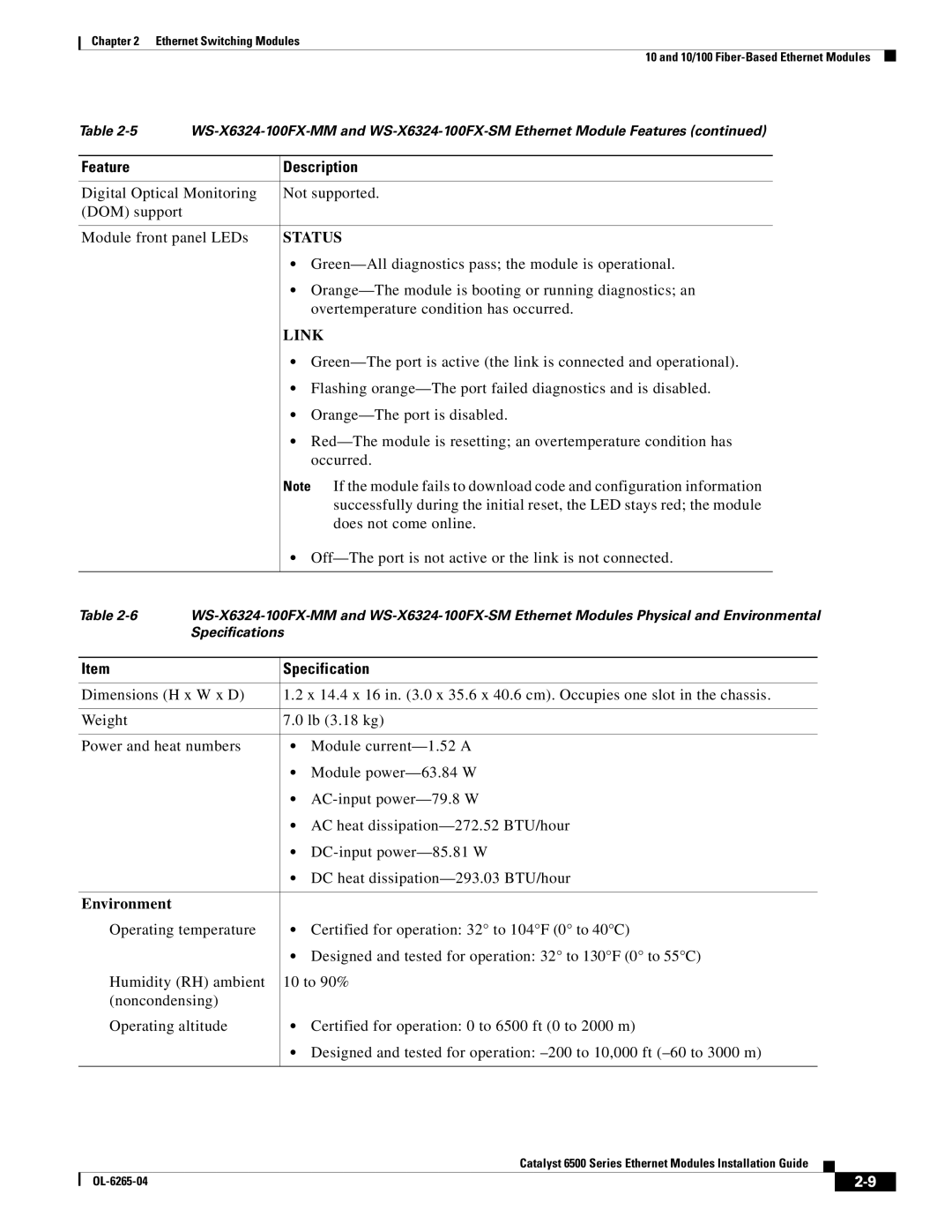
Digital Optical Monitoring | Not supported. | ||||
(DOM) support |
|
|
|
|
|
|
|
|
| ||
Module front panel LEDs | STATUS | ||||
|
| • | |||
|
| • | |||
|
|
| overtemperature condition has occurred. | ||
|
| LINK | |||
|
| • | |||
|
| • Flashing | |||
|
| • | |||
|
| • | |||
|
|
| occurred. | ||
|
| Note If the module fails to download code and configuration information | |||
|
|
| successfully during the initial reset, the LED stays red; the module | ||
|
|
| does not come online. | ||
|
| • | |||
|
|
|
|
| |
Table | |||||
| Specifications |
|
|
| |
|
|
|
| ||
Item |
| Specification | |||
|
|
| |||
Dimensions (H x W x D) | 1.2 x 14.4 x 16 in. (3.0 x 35.6 x 40.6 cm). Occupies one slot in the chassis. | ||||
|
|
|
| ||
Weight |
| 7.0 lb (3.18 kg) | |||
|
|
|
| ||
Power and heat numbers | • | Module | |||
|
| • | Module | ||
|
| • | |||
|
| • AC heat | |||
|
| • | |||
|
| • DC heat | |||
|
|
|
|
|
|
Environment |
|
|
|
|
|
Operating temperature | • Certified for operation: 32° to 104°F (0° to 40°C) | ||||
|
| • Designed and tested for operation: 32° to 130°F (0° to 55°C) | |||
Humidity (RH) ambient | 10 to 90% | ||||
(noncondensing) |
|
|
|
| |
Operating altitude | • Certified for operation: 0 to 6500 ft (0 to 2000 m) | ||||
|
| • Designed and tested for operation: | |||
|
|
|
|
|
|
Catalyst 6500 Series Ethernet Modules Installation Guide
|
| ||
|
|