DHC-9.9
Important Safety Instructions
Preventing Hearing Loss Caution
Precautions
Power
Batteries and Heat Exposure Warning
Supplied Accessories
Make sure you have the following accessories
Contents
Connections
Features
Processing
Miscellaneous
Features
THX Ultra2 Plus
Zone 2 Room Zone 3 Room
Multiroom Capability
Main Room
Left and right Stereo speakers
3 4 8 9 bk bl bm bn bo Bq br bs bt Cmcn
Front & Rear Panels
Front Panel
Front & Rear Panels
Display
Crcs
Rear Panel
3 4 5 6 Bk bl bo bp bq
Cp cq
Phono
Remote Control
RS232
Component Video in 1, 2,
AUX 1
Balance L/R Input
Tape IN/OUT
GAME/TV
Aiming the Remote Controller
Remote Controller
Installing the Batteries
Receiver/Tape Mode
Remote Controller
About the Remote Controller Modes
Tape mode
Listening Mode buttons
Remote Mode buttons
Standby button
DVD Mode
CD/CDR/MD Modes
Album +/- button
Dock Mode
Arrow q/w and Enter buttons
Previous 7 button
Surround back left and right speakers
About Home Theater
Enjoying Home Theater
Speaker Configuration
Connecting the AV Controller
Connecting Your Speakers
Using Dipole Speakers
Connecting a Powered Subwoofer
Connecting the AV Controller
Connecting a Power Amplifier with RCA Inputs
AV controller Multichannel
Connecting a Power Amplifier with XLR Inputs
Speaker Impedance
Bi-amping the Front Speakers
AV controller
Connecting the AM Loop Antenna
Connecting Antenna
Connecting the Indoor FM Antenna
Using a TV/FM Antenna Splitter
Connecting an Outdoor AM Antenna
Connecting an Outdoor FM Antenna
AV Connection Color Coding
About AV Connections
Optical Digital Jacks
AV Cables and Jacks
Monitor Out Setting Set to Hdmi Main or Hdmi Sub
Connecting Both Audio & Video
119, and the Resolution setting to Through see pages 49
Which Connections Should I Use?
Audio Signal Flow Chart DVD player, etc
Monitor Out Setting Set to Analog
Video Signal Flow and the Resolution Setting
Audio Connection Formats
Audio Connection
Connecting a TV or Projector
Video Connection
Hint
Connecting a DVD player
DVD player
Hooking Up the Multichannel Input
Connecting a VCR or DVD Recorder for Playback
DVD recorder
Connecting a VCR or DVD Recorder for Recording
Digital Optical in 2 CD
Satellite, cable, set-top box, etc
Supported Audio Formats
Connecting Components with Hdmi
About Hdmi
About Copyright Protection
Making Hdmi Connections
Video Signals
Audio Signals
Step
Connecting a Game Console
Game Console
Connecting a Camcorder or Other Device
Camcorder, etc
Turntable MM with no Phono Preamp Built-in
Connecting a CD Player or Turntable
CD Player or Turntable MM with Built-in Phono Preamp Step
Stereo audio source with Balanced XLR output
Connecting a Cassette, CDR, MiniDisc, or DAT Recorder
Connecting a Balanced Audio Source
If Your iPod Doesn’t Support Video
Connecting an RI Dock
If Your iPod Supports Video
If you have an Onkyo DS-A1 RI Dock
Connecting Integra/Onkyo u Components
Connecting the Power Cord
Up and Running in a Few Easy Steps
Turning On the AV Controller
Turning On and Standby
Press the Hdmi Out button
First Time Setup
Monitor Setup
Press the Hdmi Out button repeatedly to select
First Time Setup
Selecting the Language used for the onscreen setup menus
Press the Receiver button fol- lowed by the Setup button
Using the Onscreen Setup Menus
Menus for First Time Setup
Submenus
Monitor Out Setup
Tons to select Component
Video Input Setup
Hdmi Input Setup
Out2, and use the Left and Right
Hdmi Input menu appears
HDMI1, HDMI2, HDMI3, HDMI4
Component Video Setup
Digital Audio Input Setup
Analog Audio Input Setup
Tons to select 1. Speaker Set
Speaker Settings
Speaker Settings menu appears
Tings, and then press Enter
TV Format Setup Not North American models
AM Frequency Step Setup on some models
Changing the Input Display
1st measurement position
Automatic Speaker Setup Audyssey MultEQ XT
Measurement Positions
2nd-8th measurement positions
Using Audyssey MultEQ XT
Press Enter
Place the setup microphone at
When prompted, place the setup
Appear
Disconnect the setup Mic
When the measurements are
When the calculations are com
Complete, the following screen
Writing Error
Error Messages
Speaker Detect Error
Ambient noise is too high
Reviewing the Results
Changing the Speaker Settings Manually
Using a Powered Subwoofer
You want to review, and then
Basic Operations
Select a listening mode and enjoy
See Using the Listening Modes on
Selecting the Input Source
Basic Operations
Adjusting Speaker Levels
Setting the Display Brightness
Muting the AV Controller
Using Headphones
Using the Sleep Timer
Adjusting the Bass & Treble
Displaying Source Information
Listening to the Radio
Tuning into AM/FM Radio Stations
Tuning into Weak FM Stereo Stations
Listening to AM/FM Stations
Displaying AM/FM Radio Information
Tuning into Stations by Frequency
Listening to the Radio
Band Frequency
Deleting Presets
Presetting AM, FM, XM, and Sirius Stations
Selecting Presets
Audio Selector Display Enter
Listening to HD Radio Stations North American model only
About HD Radio Stations
Displaying HD Radio Information
Selecting the Audio Format Blend Mode
Selecting Multicast Channels
Use the Audio Sel button to
RDS Program Types PTY
Using RDS
What is RDS?
This allows you to search RDS radio stations by type see
Listening to Traffic News TP
Displaying Radio Text RT
Finding Stations by Type PTY
About XM Radio XM Ready Legal
Connecting the XM Mini-Tuner and Home Dock
Listening to XM Satellite Radio North American Model Only
XM Ready Subscription
When you’ve finished, press the Setup button
Setting the Satellite Radio Mode
Press the Receiver Remote Mode button, followed by
Selecting XM Satellite Radio
Signing Up for XM Satellite Radio
Selecting XM Radio Channels
Search mode or Category Search
Category Search Mode
Press the Tuning Mode button
Direct Tuning
Positioning the XM Mini-Tuner System
Source Setup menu appears
Displaying XM Radio Information
Following information can be displayed
XM Radio Messages
Important Sirius Satellite Radio Information
Setting Up the SiriusConnect Home Tuner
What is Sirius Satellite Radio?
SiriusConnect Receiver
Tuner screen appears
Tons to select 7. Hardware Setup, and then press Enter
Positioning the Antenna
West, or southwest, either through a window or outside
Signing Up for Sirius Satellite Radio
Selecting Sirius Satellite Radio
Selecting Sirius Satellite Radio Channels
AV controller To listen to the previously
Then use the number buttons to
Parental Lock
Press the D.TUN button,
Enter the 4-digit PIN number
Changing the PIN Number
Displaying Sirius Satellite Radio Information
Digits in the new PIN number
Positioning the SiriusConnect Home Antenna
Sirius Satellite Radio Messages
Displayed if you select an unavailable channel
Recording from Different AV Sources
Recording
Recording the Input Source
Selecting the Listening Modes
Using the Listening Modes
Selecting with the Remote Controller
Selecting on the AV Controller
Analog and PCM Sources
Using the Listening Modes
Listening Modes Available for Each Source Format
Requires 6.1/7.1 speakers. Requires 7.1 speakers
Dolby Digital, and Dolby Digital Plus Sources
DTS Sources
DTS-ES
TrueHD Sources
DTS-HD Sources
DTS Express and DSD Sources
DSD
About the Listening Modes
Channel source + Dolby PLIIx Music
DTS-HD High Resolution Audio
Dolby TrueHD
Channel source + Dolby PLIIx Movie
THX Games
THX Cinema
THX Music
THX Ultra2 Cinema
100
Onkyo Original DSP Modes
Menu Map
Advanced Setup
101
Submenu Pages
Tons to select an item, and then
Advanced Setup
102
Tons to select an item, and use
103
Monitor Out
See Speaker Settings on
Speaker Setup
Speaker Settings
Speaker Config screen appears
105
Double Bass
106
Low-Pass Filter for the LFE Channel
Tons to select DoubleBass,
Distance from each speaker to
107
Speaker Distance
Listening position
Speaker Level Calibration
This procedure can also be performed on the AV control
108
Repeat for each speaker
109
110
Equalizer Settings
Mode button, followed by Setup button
Buttons to set the Equalizer
111
Tons to select THX Subwoofer
THX Audio Setup
112
113
Audio Adjust
Tons to select the settings,
Tings, and use the Left and Right
Multiplex/Mono Settings
Tone Control Settings
DSD Setting
PLIIx/Neo6 Settings
LFE Level Settings
Dolby EX Settings
Theater-Dimensional T-D Setting
115
116
Using the Re-EQ Function
Using the Music Optimizer
Mode button, and then use
Using the Late Night Function
Source Setup
117
Name Edit
IntelliVolume
118
Sync
Zoom Mode
Picture Adjust
Game Mode
ISF Mode
120
Sirius Parental Lock
121
Satellite Radio
122
Listening Mode Presets
Listening Mode Preset menu appears
Audio formats supported by that input selector appear
123
Miscellaneous Setup
Volume Setup
124
OSD Setup
12V Trigger A/B/C Setup
125
Hardware Setup
Remote Control
Zone2/Zone3
Analog Multich
126
Tuner
Network Settings
127
Lock Setup
128
Selecting Audio Inputs
Specifying the Digital Signal Format
129
Zone 2 and Zone
Connecting Zone
Connecting Your Zone 2 Speakers
130
Zone 2 and Zone
Connecting Your Zone 3 Speakers
131
Zone 3 speakers must be connected to an amp in Zone
132
Zone 2/Zone 3 Out Settings
Using Zone 2 and Zone
Tons to select 2. Zone2/Zone3
Selecting an Input Source for Zones Turning Off Zones
On the remote controller, press
133
On the AV controller, press
134
Muting Zones
Using the 12V Triggers
135
Using a Multiroom Kit with Other Components
Using a Multiroom Kit with a Cabinet
Using a Multiroom Kit with Zone 2/3
136
137
Entering Remote Control Codes
Controlling Other Components
138
Resetting the Remote Controller
Resetting the Remote Mode Buttons
Controlling Other Components
139
Learning Commands
140
Making Macros
Using Macros
141
Running Macros
Troubleshooting
142
Troubleshooting
143
144
145
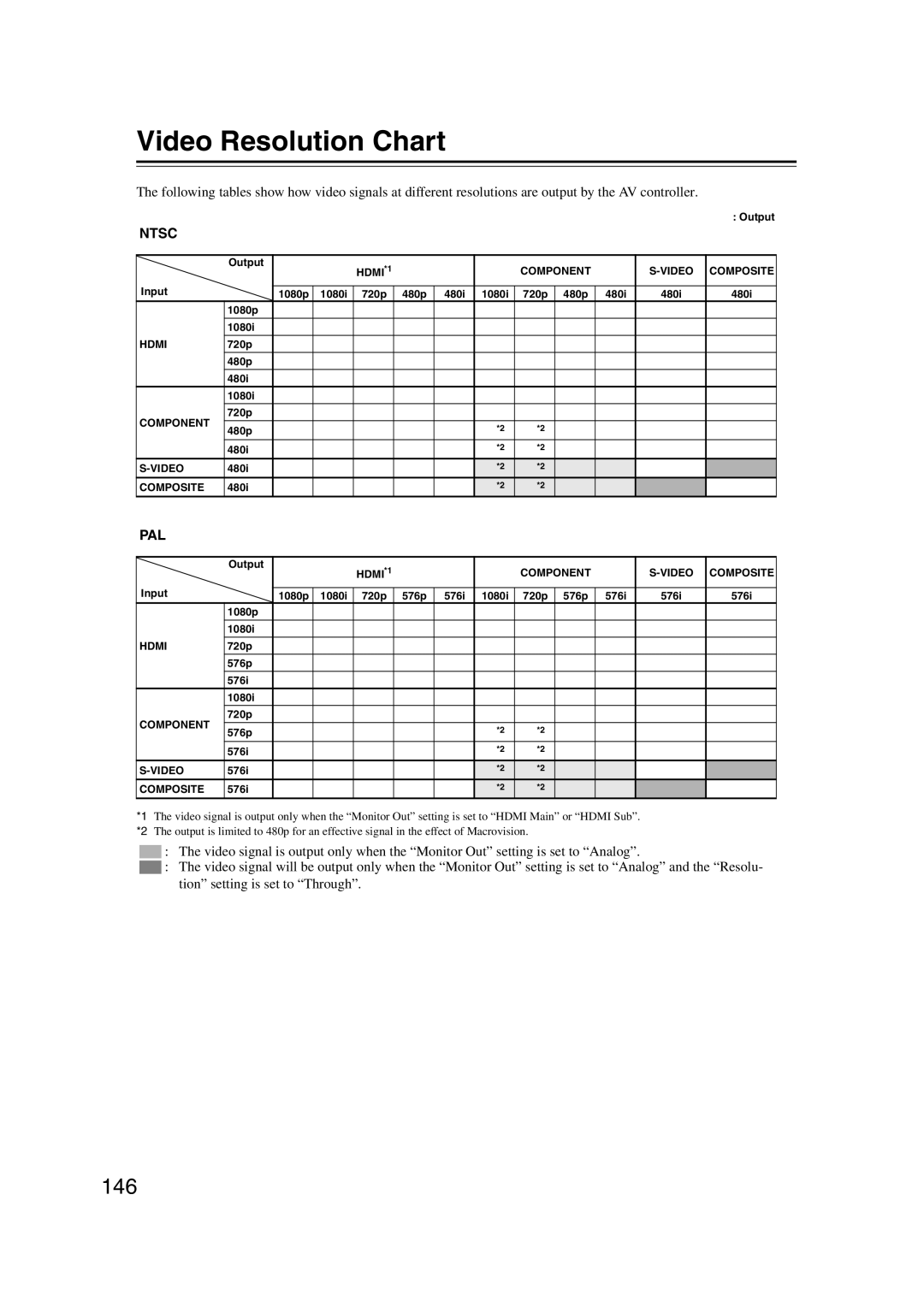
Video Resolution Chart
146
Specifications
147
3 4 4 7 6 5 a

 : The video signal is output only when the “Monitor Out” setting is set to “Analog”.
 : The video signal will be output only when the “Monitor Out” setting is set to “Analog” and the “Resolu- tion” setting is set to “Through”.