FAX Option Type
GB GB B547-8650
Introduction
Copyright
Manuals for This Machine
Manuals for DeskTopBinder V2 Lite
Manuals for ScanRouter V2 Lite
Other manuals
Table of Contents
More Transmission Functions
Advanced Features
Information Boxes
Handy Dialing Functions
Printing Options
Printed Report
Reception
Reception Functions
Programs 113
Viewing Fax Information Using a Web Browser 109
Using the Document Server 117
111
Key Operator Tools List 135 Using Key Operator Settings 137
Facsimile Features
178
Specifications 180
Reading Reports 175
Replacing the Stamp Cartridge 177
Limitation
How to Read This Manual
Symbols
Preparation
Page
Sending at a Specific Time Send Later
Press Transmission Mode Select Send Later
Transmission Mode
Press OK
Dial and press the Start key
Specify a destination, and then press the Start key
Place the original, and then select desired scan settings
Press Transmission Mode Press User TX
User Transmission
Dial, and then press the Start key
Press Transmission Mode
Priority Transmission
Select Priority TX, and then press OK
Ceiver the ID that must be entered
Default ID
Confidential Transmission
ID Override
Press ID Override
Default ID
Check that Default ID has been selected, and then press OK
Override ID
Default ID Transmission ID Override Transmission
Polling Transmission
Free Polling Transmission
Default ID Transmission
Free Polling Transmission
ID Override Transmission
Press the Start key
Polling Transmission Clear Report
Default ID/Free Polling Reception
Polling Reception
ID Override Polling Reception
ID Override Polling Reception
Default ID/Free Polling Reception
Polling Reserve Report
Polling Result Report
Transmission Mode
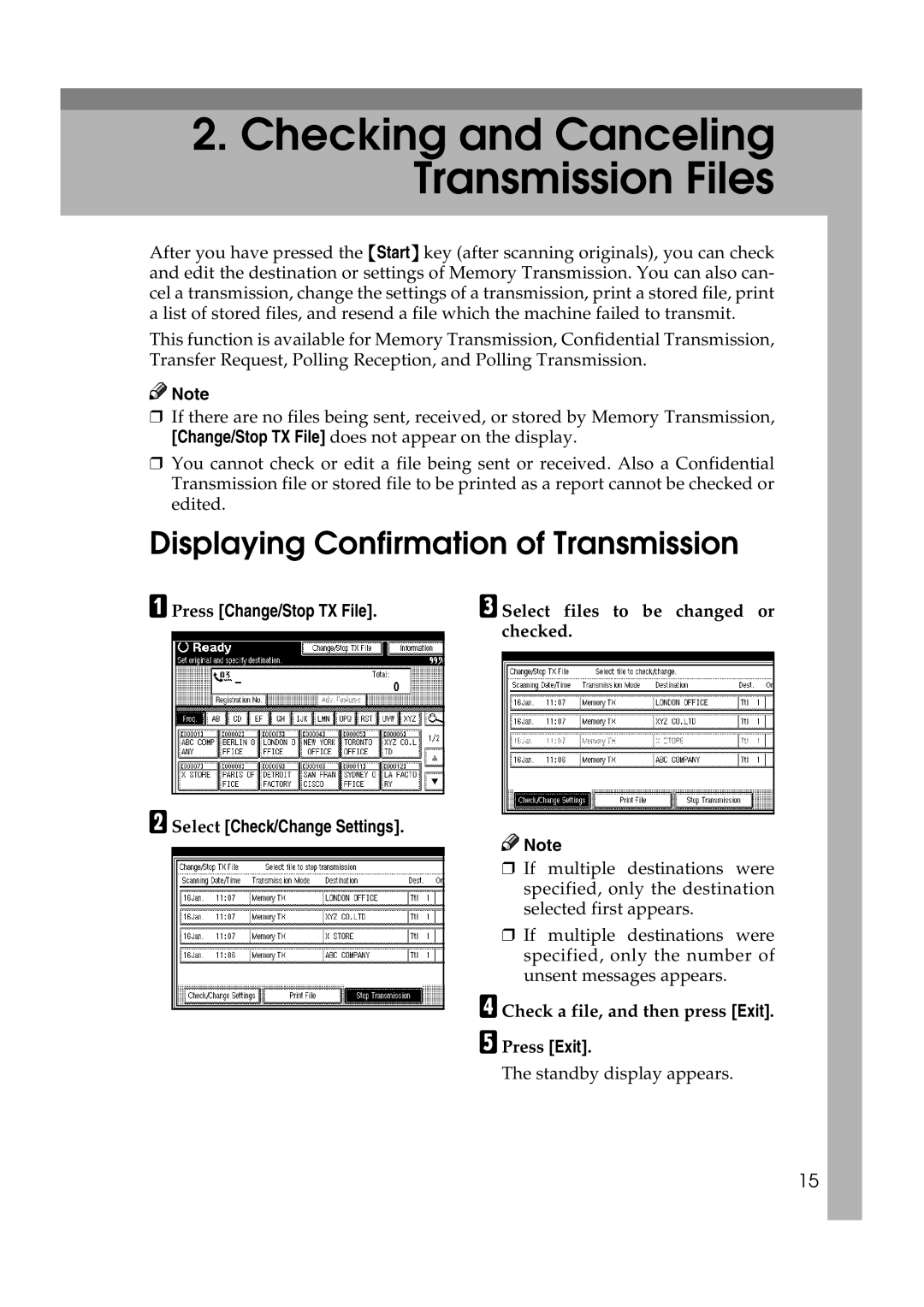
Select Check/Change Settings
Displaying Confirmation of Transmission
Press Change/Stop TX File
Canceling a Transmission
Select the files whose transmis- sion you want to cancel
Press Stop Transmission
Deleting a Destination
Press Change/Stop TX File Press Check/Change Settings
Press Add
Adding a Destination
Specify the destination
Select the file to which you want to add a destination
Press Change TX time
Changing the Transmission Time
Printing a File
Press Change/Stop TX File Press Print File
Select the file you want to print
Resending a File
Press Change/Stop TX File Press Transmit Failed File
Select the file you want to resend
Press Change/Stop TX File Press Print List
Printing a List of Files in Memory Print TX File List
Print per User Code
Printing the Journal
All
Print per File No
Press Print per User Code
Selecting Print per User Code
Selecting All
Selecting Print per File No
Journal
User name
Communication time
Number of pages
Communication result
Checking the Transmission Result TX File Status
Select TX File Status
Check the transmission results
Checking the Reception Result RX File Status
Select RX File Status
Check the reception results
Displaying the Memory Status
Press Information Press Memory Status
Check the memory status
Printing Received and Stored Documents
Press Information Press Print Stored RX File
Select the document to be printed, and then press Print
Deleting Received and Stored Documents
Select the printing mode, and then press the Start key
Press Information.3 Press Print Stored RX File
Confirm that the Confidential File indicator is lit
Printing a Confidential Message
Press Information Select Print Confidential RX File
Confidential File Report
Confirm that the Confidential File indicator is blinking
Printing a File Received with Memory Lock
Press Information Select Print Memory Lock
Printing a File Received with Memory Lock
Personal Boxes
Personal Boxes
Printing Personal Box Messages
Select the box with the message you want to print
When a password is required
Enter the password, and then press OK
Press Information Select Print Personal Box File
Information Boxes
Information Boxes
Storing Messages Information Boxes
Information Boxes
Printing Information Box Messages
Press Delete
Deleting Information Box Messages
Communication Information
Example
Handy Dialing Functions
Chain Dial
Redial
Other Transmission Features
Enter a SUB code, and then press OK
Advanced Features
Press Adv. Features Select SUB Code Press TX SUB Code
SUB Code
Press Exit Press the Start key
Press Adv. Features
SEP Code
SID Code
Then press OK
PWD Code
Select SEP Code Press RX SEP Code
Enter a SEP code, and then press OK
End Receiver
Transfer Request
Requesting Party
Transfer Station
Destination List
Speed Dial
Group Dial
Press the key programmed with Transfer Request
With Transfer Requests set in the System Settings
On Hook Dial
Press the On Hook Dial key
Dial
Manual Dial
Pick up the external telephone
Replace the handset of the exter- nal telephone
Multi-port
Changing the Line Port
Select the line you want to use
Press Select Line
Select the size of the original
Sub Transmission Mode
Book Fax
Select Book Fax
Press OK Dial, and then press the Start key
Two-Sided Transmission Double-Sided Transmission
Press Sub TX Mode Select 2 Sided Original
Specify the original position
Ed for 1st Page, and then press
Standard Message Stamp
Press Sub TX Mode Select Std. Message
Press Sub TX Mode Select Auto Document
Sending an Auto Document
Select an Auto Document file, and then press OK
Printing documents stored as Auto Documents
Press Cancel
Sending stored documents
Sending a Stored File
Specifying documents from the User Name
Specifying documents from the file name
Specifying documents from the file list
Press OK twice
File List
Printing stored documents
Selecting a document from file list
Select the document to be printed
Specifying a document from the User Name
Specifying a document from the file name
Enter the file name to be print Ed, and then press OK
Press Print File or Print 1st
Stamp
Select Stamp, and then press OK
Press Sub TX Mode
Transmission Options
Fax Header Print
Auto Reduce
Label Insertion
Sender Stamp
Reduced Image Transmission
Selecting transmission options for a single transmission
Default ID Transmission
Programming the Fax Header Print
Select Options
Programming the Reduced Image Transmission
Programming the Default ID Transmission
Programming the Label Insertion
Programming the Stamp Sender Name
If Memory Runs Out While Storing an Original
More Transmission Functions
Batch Transmission
ECM Error Correction Mode
Checking the Transmission Result
Automatic Redial
Simultaneous Broadcast
Dual Access
Broadcasting Sequence
Transmission with Image Rotation
Jbig Transmission
Optional fax function upgrade unit is Required
Printed Report
Memory Storage Report
Communication Failure Report
Transmission Result Report Immediate Transmission
Reception
Immediate Reception
Memory Reception
Reception Features
Receiving messages unconditionally
Substitute Reception
Polling ID match
When Own Name or Own Fax Number is received
Disable
Free
Reception Functions
Transfer Station
Transfer Station this machine
Jbig Reception
Transfer result report
Transfer Stations Quick Dial
Auto Fax Reception Power-up
Checkered Mark
Printing Options
Print Completion Beep
Center Mark
Two-Sided Printing
Reception Time
Degree Rotation Printing
Multi-copy Reception
Combine Two Originals
Image Rotation
Reverse Order Printing
Separation and Length Reduction
Reduction
When There Is No Paper of the Correct Size
Just Size Printing
Priority Table
Having Incoming Messages Printed on Paper from Bypass Tray
Setting Priority Trays
Print area is determined by
Where Incoming Message are Delivered Output Tray
Specifying Tray for Lines
Tray Shift
Reception Features


 Note
Note
 Note
Note