Pioneer CDJ-1000MK3 manual Handling discs, Maniement des disques

Page 12

Discs Usable with This Unit (Handling discs)/Disques utilisables sur cet appareil (Maniement des disques)

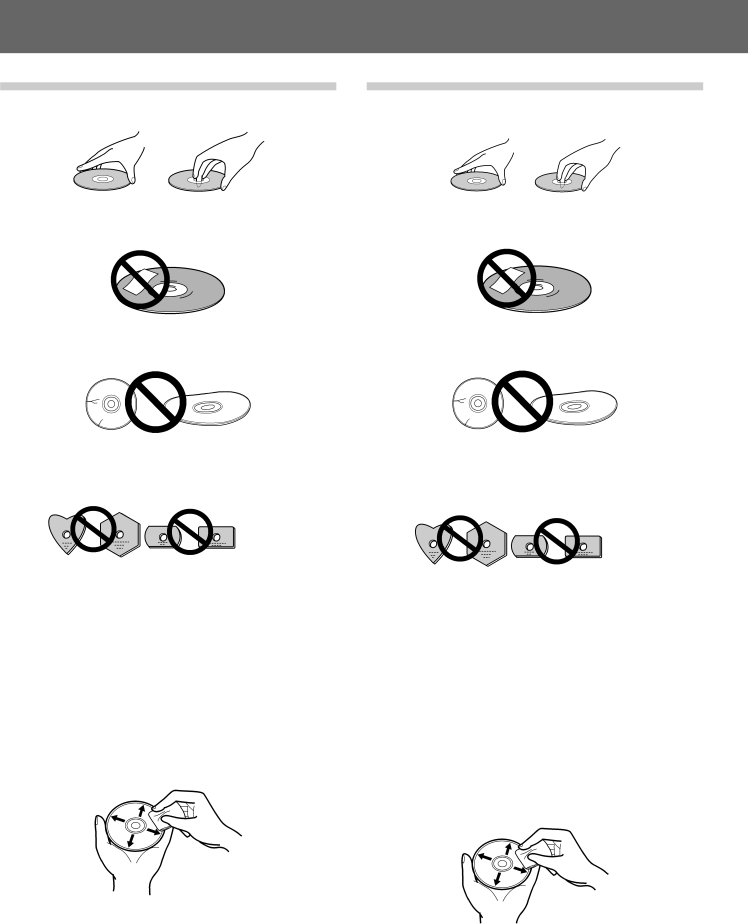
Handling discs

When holding discs, do not touch their signal surfaces. Hold by the edges, or by one edge and the center hole.

Do not affix gummed labels or tape to the disc surface. Also, do not scratch or damage the label.

Discs rotate at high speeds inside the player. Do not use dam- aged, cracked or warped discs.

Do not play a disc with a special shape

Do not play a disc having other shape than a circular disc, such as heart shaped disc. Otherwise malfunction may occur.

Storing discs

Discs are made of the same kinds of plastic used for conven- tional analog audio records. Be careful not to allow discs to warp. Always store discs in their cases vertically, avoiding locations with high heat, humidity, or extremely low temperatures. Avoid leaving discs in cars; the interior of a car in direct sunlight can become extremely hot.

Always read and abide by the precautionary notes listed on disc labels.

Cleaning discs

Always keep your discs clean by wiping them gently with a soft cloth from the inner edge toward the outer edge.

When cleaning discs, the use of a commercial CD cleaning kit is recommended.

If a disc becomes very dirty, dampen a soft cloth with water, (be sure to wring it out well) and wipe the away dirt gently. Remove any water drops with another soft, dry cloth.

Do not use record cleaning sprays or anti-static agents on discs. Never clean discs with benzene, thinner, or other volatile sol- vents or damage to the disc surface may result.

12

Maniement des disques

Lorsque vous tenez les disques, ne pas toucher leur surface de signal (le côté reflétant une forme “arc-en-ciel”, au verso de la face étiquetée). Les tenir par un bord et le trou central.

Ne pas coller d’étiquettes ou de ruban adhésif sur l’étiquette d’origine. Eviter également de rayer ou d’endommager cette étiquette.

Les disques tournent à grande vitesse à l’intérieur du lecteur. Ne pas utiliser de disques endommagés (craquelés ou déformés).

Ne reproduisez pas de disque de forme spéciale

Sous peine de provoquer des défaillances, ne reproduisez pas de disque ayant une forme autre que circulaire, telle que des disques en forme de coeur.

Rangement des disques

Les disques sont fabriqués dans les mêmes types de plastiques que ceux utilis és pour les disques audio analogiques habituels. Prendre soin à ce qu’ils ne se déforment pas. Pour cela, les ranger toujours verticalement dans leur boîtier en évitant les endroits très chauds, très humides ou extrêmement froids. Eviter de laisser des disques par exemple sur le siège d’une voiture stationnée en plein soleil car ces endroits peuvent devenir extrêmement chauds.

Lire et respecter les précautions inscrites sur l’étiquette des disques.

Nettoyage des disques

Gardez toujours les disques en parfait état de propreté en les frottant délicatement avec un linge doux, du centre vers la périphérie.

Pour le nettoyage des disques, il est conseillé d’employer un kit de nettoyage pour CD, vendu dans le commerce.

Si un disque est très sale, tremper un chiffon doux dans de l’eau. Après l’avoir bien essoré, essuyer doucement le disque puis enlever toute trace d’humidité avec un autre chiffon doux et sec.

Ne pas utiliser de produits de nettoyage anti-statiques en aérosol analogique sur les disques compacts. Ne jamais, non plus, nettoyer des disques avec de la benzine, un diluant ou autres solvants volatiles qui peuvent endommager la surface du disque.

En/Fr <DRB1396>

Image 12
Contents CDJ-1000MK3 POWER-CORD Caution Ventilation CautionOperating Environment Milieu de fonctionnement AvertissementPrécaution DE Ventilation Contents SpecificationsTable des matières Fiche techniqueFeatures ¶ JOG Adjust Jog Sensitivity AdjustmentAllows you to replay a loop any number of times Particularités Bague JogHandling Precautions Précautions relatives au maniement Discs Usable with This Unit Types of discs playable on this unitPlaying MP3 files Disques utilisables sur cet appareil Types de disques utilisables sur cet appareilLecture de fichiers MP3 Handling discs Maniement des disquesBranchement à un mixeur DJ de Pioneer Commande ConnectionsBranchements Connecteur de sortie audio et deBranchement du cordon de commande pour la lecture à relais Connecting other componentsConnecting the power cord Control cord connections for relay playRear panel/Panneau arrière Front panel/Panneau avantTime MODE/AUTO CUE button Bouton Time MODE/AUTO CUEEject UNLOCK/LOCK switch JOG Adjust dialVinyl Speed Adjust TOUCH/BRAKE dial Vinyl Speed Adjust RELEASE/START dialRear Panel Front PanelPanneau arrière Panneau avantDisplay Section Section d’affichageJog dial display Affichage de la bague JogLoading and Removing Discs Insertion et retrait des disquesRemarque Precautions when playing 8 cm CD singles Forced eject functionFonction d’éjection forcée Précautions à la lecture de CD Singles de 8 cmDJ Player Operation Utilisation du Lecteur DJTo stop playback To pause playbackFast forward/Fast reverse Pause de la lectureTrack search Folder search MP3 onlyRecherche de plage Recherche de dossier MP3 uniquementCue point settings Réglage d’un point de repèreTo change the playing speed Changement de la vitesse de lectureApplication du tempo principal Applying master tempo Jog dial functionsFonctions de la bague Jog Jog sensitivity adjustment Mixing different tracksRéglage de la sensibilité de la bague Jog Mixage de plages différentesAbout the Wave display About Text displayPropos de l’affichage Wave Propos de l’affichage TextAdvanced Operations Démarches évoluéesSpin play BrakingLoop playback Lecture à boucleTo perform hot cue Reverse playPour effectuer un Repérage instantané Hot Cue Relay play using two players About fader start playLecture inversée Propos de la lecture à départ en fonduOperations Using Memory Cards Opérations utilisant des cartes mémoireRecording to memory cards Enregistrement sur cartes mémoireTo call up recorded data To delete information recorded on memory cardsRappel des données enregistrées To copy memory card data Display during Recording of cue and loop pointsCopie des données d’une carte mémoire Troubleshooting Symptom Probable Diagnosis Remedy¶ Hold down the Time MODE/AUTO CUE ¶ Press Time MODE/AUTO CUE button forGuide de dépannage Symptôme Cause probable CorrectionLock Error message display Error code Error type Error content Cause and remedyAffichage de messages d’erreur Guide de dépannage Affichage de messages d’erreurWarnung Vorsichtshinweis ZUR BelüftungBetriebsumgebung Vorsicht MIT DEM NetzkabelAttenzione Avvertenza PER LA VentilazioneCondizioni ambientali di funzionamento Avvertimento Riguardante IL Filo DI AlimentazioneInhalt Technische DatenIndice Dati tecniciMerkmale Caratteristiche Vorsichtshinweise zum Betrieb Precauzioni di uso Mit diesem Player abspielbare Discs Geeignete Disc-TypenAbspielen von MP3-Dateien Dischi utilizzabili con quest’unità Tipo di dischi utilizzabili con quest’unitàRiproduzione di file MP3 Handhabung von Discs Uso dei dischiAnschlüsseCollegamenti Anschlussbeispiel DJM-800Esempio di collegamenti DJM-800 Questo può produrre distorsioni o errori di riproduzione Anschluss des Steuerkabels für RelaiswiedergabeAnschluss des Netzkabels Collegamento del cavo di alimentazioneText-/Wellenform-Anzeigewahltaste Text Mode Tasto selettore del display Text ModePannello posteriore Frontplatte/Pannello anterioreJogmodus-Wahltaste JOG Mode Select Manopola di regolazione della velocità JOG AdjustDisplay S 51 bis Ordnersprungtasten Folder Search , \ S Cue-Punkt/Schleifenpunkt-Abruftasten CUE/LOOP Call 2, 3 SRückwand Pannello posterioreFrontplatte Pannello anterioreDisplay Sezione del displayJogscheiben-Display Visualizzazioni della manopolaLaden und Entfernen von Discs Caricamento e rimozione di dischiHinweis NotaNotauswurf einer Disc Funzione di espulsione forzataVorsichtshinweise zum Abspielen von CD-Singles Precauzioni per la riproduzione di CD singoli da 8 cmEinsatz als DJ-Player Funzionamento del lettore per DJPausieren der Wiedergabe Suchlauf vorwärts/rückwärtsArresto della riproduzione Per impostare la pausa della riproduzioneTitelsprung Ricerca di braniRicerca di cartelle solo brani MP3 Cue-Punkt-Einstellungen Predisposizione di punti di avvioÄndern der Wiedergabegeschwindigkeit Master-Tempo-FunktionPer cambiare la velocità di riproduzione Funktionen der Jogscheibe Utilizzazione del tempo principaleFunzioni della manopola di ricerca Feldsuchlauf Drehen der Jogscheibe in der Pause-BetriebsartEinstellen der Jogscheiben Ansprechempfindlichkeit Regolazione della Sensibilità della manopola di ricercaMischen von zwei Titeln Spleißen Missaggio di brani differentiHinweis zur Wellenform-Anzeige Informazioni sulla visualizzazione WaveHinweis zur Textanzeige Informazioni sulla visualizzazione TextWeiterführende Funktionen Operazioni avanzateSchleifenwiedergabe Riproduzione con accelerazioneVelocità di arresto della riproduzione Riproduzione a cicloSofort-Cue-Funktion Esecuzione di un avvio immediatoWiedergabe in Rückwärtsrichtung Hinweis zum Wiedergabestart über FaderhebelRelaiswiedergabe mit zwei Playern Riproduzione a ritrosoSpeicherkarten-Funktionen Operazioni con schede di memoriaAufzeichnung von Daten auf eine Speicherkarte Memorizzazione di dati su schede di memoriaCancellazione di dati Da una scheda di memoria Abrufen von Daten von einer SpeicherkarteLöschen der auf einer Speicherkarte aufgezeichneten Daten Richiamo dei dati in memoriaCancellazione di tutti i dati di una scheda di memoria Kopieren der Daten einer SpeicherkarteCopia dei dati di una scheda di memoria Löschen aller Daten von einer SpeicherkarteCannot Memorize onThis Card CardStörungsbeseitigung Störung Wahrscheinliche Ursache AbhilfemaßnahmeDiagnostica Problema Causa probabile RimedioAnzeige von Fehlermeldungen Fehlercode Fehlertyp Bedeutung Ursache und AbhilfemaßnahmeMessaggi di errore Tipo di errore Contenuto dell’errore Causa e rimedioWaarschuwing Belangrijke Informatie Betreffende DE VentilatieGebruiksomgeving Waarschuwing NetsnoerAdvertencia Entorno de funcionamientoPrecaución Para LA Ventilación Inhoudsopgave Technische gegevensÍndice EspecificacionesKenmerken Características Voorzorgsmaatregelen betreffende de behandeling Precauciones de manejo Discs die met dit apparaat gebruikt kunnen worden Afspeelbare discsAfspelen van MP3 bestanden Discos utilizables con esta unidad Tipos de discos reproducibles en esta unidadReproducción de archivos MP3 Behandeling van discs Manejo de los discosAansluitingenConexiones Conector de salida de audio y de controlAansluitvoorbeeld DJM-800 Ejemplo de conexión del DJM-800 Aansluiten van andere apparatuur Conexión de otros componentesAansluiten van het netsnoer Conexión del cable de alimentaciónAchterpaneel/Panel posterior Voorpaneel/Panel frontalJOG Adjust regelaar Vinyl Speed Adjust TOUCH/BRAKE regelaarVinyl Speed Adjust RELEASE/START regelaar JOG Mode Select toetsAchterpaneel Panel posteriorVoorpaneel Panel frontalSección del visualizador 100Display op de jog-draaischijf Visualización del mando de lanzadera101 Plaatsen en Uitnemen van de discs Carga y extracción de discos102 OpmerkingGeforceerd uitwerpen Función de expulsión forzada103 Bediening van de DJ-speler Operación del reproductor para DJStoppen met afspelen Tijdelijk onderbreken van de weergaveSnel voorwaarts/achterwaarts Para pausar la reproducciónOpzoeken van een bepaald muziekstuk Opzoeken van een bepaalde map alleen MP3Búsqueda de pistas Búsqueda de carpetas sólo MP3Instellen van cue-punten 107Wijzigen van de afspeelsnelheid Para cambiar la velocidad de reproducciónAplicación del tempo principal Funciones del mando de lanzaderaGebruik van de hoofdtemporegeling Functies van de jog-draaischijf109 Druk tijdens afspelen op de Master Tempo toetsGevoeligheid van de jog-draaischijf Ajuste de la sensibilidad del mando de lanzaderaMengen van twee muziekstukken Mezcla de pistas distintasBetreffende het Wave display Betreffende het Text displayAcerca de la visualización de ondas Wave Acerca de la visualización de texto TextGeavanceerde bediening Operaciones avanzadasScratch-weergave Reproducción rascadaSpin-weergave RemfunctieLoop-weergave FrenadoHot-cue functie Para realizar la localización rápida114 Achterwaartse weergave Betreffende faderstart-weergaveRelaisweergave met twee spelers Reproducción en inversiónInformatie betreffende geheugenkaarten Operaciones utilizando tarjetas de memoria116 Opnemen van gegevens op geheugenkaarten Grabación en tarjetas de memoriaPara llamar datos grabados 117Oproepen van opgenomen gegevens Para borrar la información grabada en tarjetas de memoriaPara copiar datos de una tarjeta de memoria 118Meldingen tijdens het Opnemen van cue- en loop-punten 119Herhaal de stappen 3 en 4 naar vereist Repita los pasos 3 y 4 cuantas veces haga faltaVerhelpen van storingen 120Storing Mogelijke oorzaak Oplossing ¶ Houd de Time MODE/AUTO CUE toetsSolución de problemas 121Síntoma Causa probable Solución Foutmeldingen op het display 122Foutcode Type fout Betekenis Oorzaak en maatregel Visualización de mensajes de error Tipo de error Contenido del error Causa y solución123 05L00000 Printed Imprimé au DRB1396-A
Related manuals
Manual 24 pages 37.92 Kb

CDJ-1000MK3 specifications

The Pioneer CDJ-1000MK3 is a legendary piece of equipment that has significantly influenced the way DJs perform and interact with music. As a flagship model in the CDJ series, it showcases advanced technology and features that cater to the needs of professional DJs. This compact disc player is renowned for its reliability, functionality, and versatility, making it a staple in clubs, festivals, and studios.

One of the standout features of the CDJ-1000MK3 is its precise jog wheel. The large 7-inch jog wheel allows for precise playback control, enabling DJs to scrub through tracks accurately. The revised platter design features a high-resolution display that provides real-time visual feedback of track position, helping DJs maintain seamless transitions between tracks. The touch-sensitive jog wheel allows for both pitch bending and scratching capabilities, which are essential for live performances.

The CDJ-1000MK3 also includes an advanced digital cueing system. With a quick access cue point feature, DJs can set and recall up to three cue points per track, allowing for exceptional flexibility during a performance. This model also supports various formats, including CD and MP3, ensuring compatibility with a wide range of music sources.

Another significant enhancement in the MK3 version is the improved sound quality. This player uses high-quality components, including a 24-bit DAC, to deliver pristine audio playback. The enhanced digital signal processing ensures that even the subtleties of the sound are preserved, making it an ideal choice for discerning audiophiles.

The CDJ-1000MK3 is equipped with a USB port, allowing DJs to access and play back music from USB devices. This feature adds a layer of convenience, enabling easy track selection without the need for CDs. The unit also supports MP3, WAV, and AIFF file formats.

Additionally, connectivity options abound with the CDJ-1000MK3, featuring RCA outputs, digital optical outputs, and MIDI functionality. This connectivity makes it easy to integrate the player into any DJ setup and to sync with other devices.

In summary, the Pioneer CDJ-1000MK3 is a highly regarded compact disc player that combines innovative technology, user-friendly features, and exceptional audio quality. Its legacy in the DJ world is firmly established, providing a benchmark for future models and inspiring countless DJ performances around the globe.