2 IN 1 OR 4 IN 1
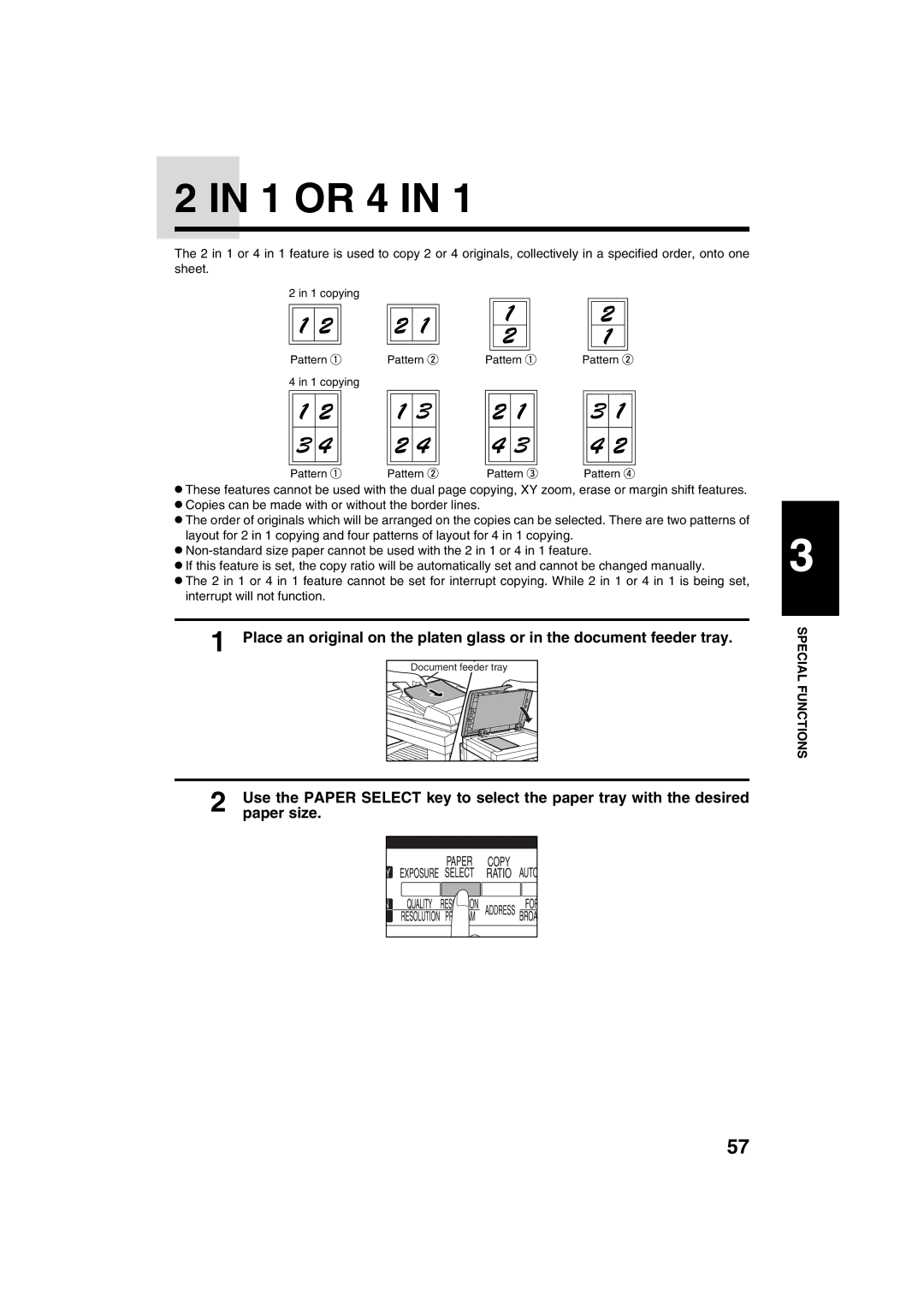
The 2 in 1 or 4 in 1 feature is used to copy 2 or 4 originals, collectively in a specified order, onto one sheet.
2 in 1 copying |
|
|
|
Pattern | Pattern | Pattern | Pattern |
4 in 1 copying |
|
|
|
Pattern | Pattern | Pattern | Pattern |
●These features cannot be used with the dual page copying, XY zoom, erase or margin shift features.
●Copies can be made with or without the border lines.
●The order of originals which will be arranged on the copies can be selected. There are two patterns of layout for 2 in 1 copying and four patterns of layout for 4 in 1 copying.
●
●If this feature is set, the copy ratio will be automatically set and cannot be changed manually.
●The 2 in 1 or 4 in 1 feature cannot be set for interrupt copying. While 2 in 1 or 4 in 1 is being set, interrupt will not function.
1 Place an original on the platen glass or in the document feeder tray.
Document feeder tray
2 | Use the PAPER SELECT key to select the paper tray with the desired |
paper size. |
3
SPECIAL FUNCTIONS
57