User’s Reference Guide
Legal notices
Trademarks
Contents
Problem is with the scanner
Problem is a software system error
Problem is what is printed
Tell me about my scanner
Tell me about media
Tell me about copy and layout features and options
Tell me about hp designjet support
Hp designjet 815mfp & scanner
Problem is…
Welcome to the hp designjet 815mfp/scanner
How do I…?
Tell me about…
To make copies…
How do I make copies?
Quick copying
How do I set the printer media width?
See also
How do I select an original template?
How do I set the input size?
Hp designjet 815mfp & scanner
How do I set the output size?
How do I copy thick media?
To copy thick media…
How do I change the insertion slot height?
How do I select a media profile?
To change the insertion slot height…
How do I set the output quality?
How do I scale copies?
To scale copies…
How do I scan to a file?
Tip
Page
How do I use copy options and tools?
How do I use the previewing tools?
To move the image
To position the paper frame
How do I set the number of copies?
To align the image
How do I collate copies-create copy sets?
Collate copy-copy sets
How do I use nesting?
How do I set up a print list?
How do I use paneling?
Setting up the print list
How do I print from files?
To print from files
How do I maintain the print list?
Page
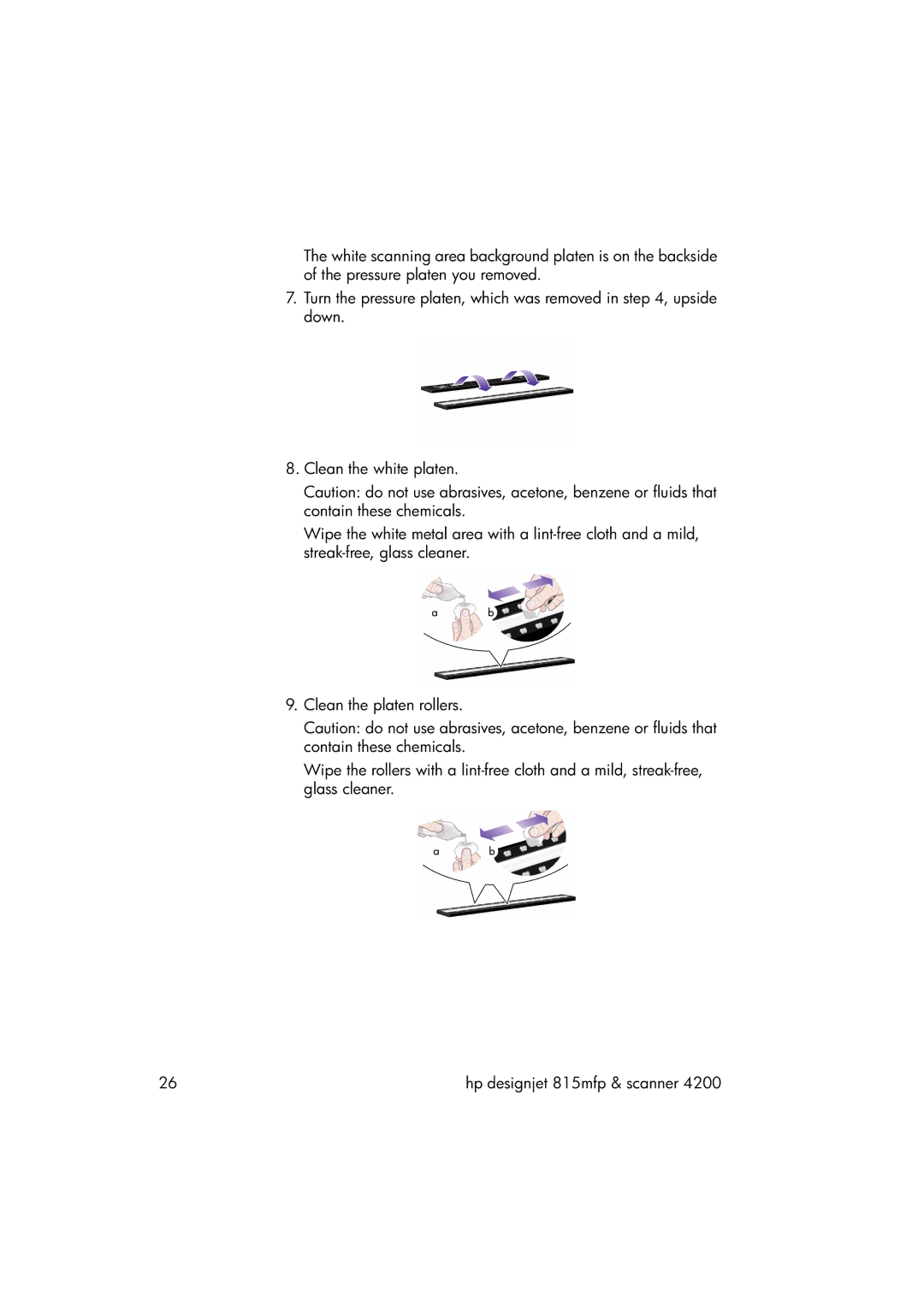
Cleaning the scan area
How do I maintain/recover my system?
Maintenance procedures
Page
Page
Camera alignment and calibration
Page
To recover your scanner system…
How do I upgrade the scanner firmware?
How do I recover the system?
How do I calibrate my touch screen?
How do I shut down my system?
How do I customize my copy tools?
How do I define an original template?
How do I create a custom scale size?
How do I create a new media profile?
To create a new media profile…
Page
How do I set up the system?
How do I configure TCP/IP settings?
To check your TCP/IP settings…
How do I connect to a network?
Page
How do I create a workgroup?
To create a workgroup…
To log in automatically…
How do I automatically log in in network configuration?
How do I set the scanner system power up/down timer?
To access the scanner setup options…
How do I define scanner setup options?
To set the scanner system power up/down timer…
Paper load
Media offset
To create a new account…
How do I create/delete/disable an account?
Extended thickness settings
To disable an account…
To delete an account…
How do I select/activate an existing account?
To activate/select an existing account…
How do I set preferences?
Units of measurement
Loading preferences
Scan and user interface options
How do I change the scanner system interface language?
How do I set up my printer in my scanner system software?
To set up your printer…
Page
Problem is the wait light is flashing
Problem is with the scanner
Problem is the diagnostics light is flashing
Problem is the wait and diagnostics lights are flashing
Problem is an error message and error code
Problem is a software system error
Problem is no scanner was found
Message Code Recommendation
Press the button
Problem is a printing error message
Problem is a system failure
Touch screen stops responding
If your system does not work
Problem is with the interface language
Problem is with the touch screen
If you have problems pressing buttons on your screen
If the user interface is not in the correct language
Problem is white space with nesting
Problem is what is printed
Problem is a cropped image
Power button and indicator light
Diagnostics light
Tell me about my scanner
Tell me about my scanner operator panel and lights
Paper forward and paper reverse keys
Paper control area
Wait light
Paper ready light
Tell me about scanner maintenance
About
Why?
When?
Tell me about the scanner insertion slot
Rgb mode
Graytone mode
Tell me about scanner operating modes
Modes
2d-sharpening, 2d-softening, and 2d-blur
Usage
Tell me about the hp designjet scanner software
Main features of the scanner software are…
Tell me about my scanner software
Image control section provides the following tabs…
Tell me about the scanner software user interface
Image viewing section consists of…
Entering numbers and names
Tell me about the scan options
Preview dpi
Scan speed
Rewind paper
Tell me about the user interface options
Load
Auto-size method
Limit auto-detect scan length
Use quick select lists
Color balance
Paper lists show
Use account password
Print settings
Enable reprint
Tell me about accounting
Paper series
Active account
Total account
Accounting criteria
Accounting log files
Tell me about WIDEsystem
Page
Tell me about copy and layout features and options
Tell me about the copy size
Overview
Size options-relationships
Tell me about original templates
Input size/output size settings
Using size presets
Tell me about original template settings
Templates for color copying
Templates for black and white copying
Method
Black enhance and background clean
Lightness
Saturation
Red, green, and blue
Sharpen/blur
Tell me about copy quality settings
Scanning and printing quality settings
Setting the output margins
Tell me about output margins
Tell me about unprintable areas
‘account for unprintable area’ option
Examples
Tell me about scanner setup options
Extended thickness paper handling
Delay factor
Paper loading
Correction factor in scanning
Manual/automatic
Tell me about paneling and tiling options
Options
Assembling the panels
Cut line
Glue mark arrows
Tell me about nesting
Tell me about previewing and the paper frame
Previewing
Paper frame
Hp designjet 815mfp & scanner
Tell me about lists
Creating and printing lists
What to do before you call
Tell me about hp designjet support
Tell me about hp customer care
Page
Communication from HP to users includes
Finally…
Tell me about media
Tell me about copying thick media
Media thickness positions
Modifying stitching parameters
Supporting thick originals