Qvwuxphqw
Fluke Industrial B.V
III
Reference Manual
Reference Manual also contains
Main Features
Page
Following parts should be included in the shipment
Or model number
VII
Contents
HOW to USE More Advanced Functions
Screen Controls Auto Setup
Getting Started -1 3.1 FRONT-PANEL Layout
More Advanced Trigger Functions
Contents
Contents
XII
Xiii
CH1
CH2
CH3
XIV
MOD
Line
CH1 Y-OUT
Main TB Gate
DTB Gate
Ieee 488.2 BUS Option
Safety Precautions
Operators Safety
Introduction
Symbols
Impaired Safety Protection
Measuring Earth
Safety Instructions
Installation Instructions
Protective earthing
Mains voltage cord, mains voltage range and fuses
Rear View
Installation of batteries
Memory BACK-UP Batteries
Front Cover
General information
Handle Adjustment and Operating Positions of the Instrument
Ieee 488.2/IEC 625 BUS Interface Option
RS-232-C Serial Interface
Rack Mounting
Versions
FRONT-PANEL Layout
Getting Started
Switching on the Instrument
Screen Controls
Screen control area
Auto Setup
Connect the probe as shown in figure
ST5952
Mode Switching Between Analog and Digital Operating Modes
Signal Criteria Analog Mode Digital Mode
Other Criteria
Getting Started Signal Criteria Analog Mode Digital Mode
Signal with an ampli
Tude of 2 to 6.4 divi
Sions
Vertical Setup
Reconnect the probe to the Probe Adjust signal for display
AC Input Coupling
Getting Started
Timebase Setup
Timebase setup
Magnify Expand
Direct Trigger Setup
Direct trigger setup
Summary
PRE-TRIGGER View
More Advanced Features
Menu keys and softkeys
Cursor Operation
Vertical cursors ’’ or the horizontal cursors ’=’
10 More advanced trigger setup
More Advanced Trigger Functions
More Signal Detail with the Delayed Timebase
Standard Setup
Press the Status key and Text OFF key at the same time for
MTB1.00ms Ch1
Trace Storage
Select Clear & Protect Select Clear ALL
Here is how traces are stored in memory
Press the Recall key
HOW to USE the Instrument
PM3394B 200 MHz Full Four Channel Oscilloscope
PM3390B 200 MHz 2 Channel Oscilloscope
PM3384B 100 MHz Full Four-Channel Oscilloscope
PM3380B 100 MHz 2 Channel Oscilloscope
PM3370B 60 MHz 2 Channel Oscilloscope
Front Panel Layout
HOW to USE the Instrument
Display and Probe Adjustments
Recall Standard Setting
Display Adjustment
Simultaneously press the Status and Text OFF keys
Display Layout
Menus Text OFF
Off T
Press the Text OFF key three times
CAL Signal and Probe Adjustment
Repeat this adjustment for the second probe
Analog and Digital Modes
Autorange attenuator Not available Results in a
An amplitude of 2 to
Divisions
Standard Setting
Analog to Digital Mode Switching
Press the Autoset key for optimum signal display
Press the Analog key again
12HOW to USE the Instrument
Trace Storage RUN/STOP
Press the RUN/STOP key
Vertical Deflection
14HOW to USE the Instrument
Vertical Coupling AC, DC, GND
Press the AC DC GND key once for DC input coupling
Press the AC DC GND key to obtain ground coupling
Vertical Position
Press the AC DC GND key again to obtain ac input coupling
16HOW to USE the Instrument
Adjust Ampl to 100 mV
Vertical Amplitude
Press the upper key of the Ampl keys
Verticalauto Range
Vertical Variable Amplitude
Press the Auto Range key
Press the upper Ampl key once
18HOW to USE the Instrument
Press the Analog key to switch to the Digital mode
Press the Analog key to return to the analog mode
Vertical CH1+CH2
Vertical Invert
20HOW to USE the Instrument
Vertical Menu Bandwidth Limiter
Press the ’BW LIMIT’ softkey to turn it on
Press the ’BW LIMIT’ softkey to turn it off again
Vertical Probe Range Indicator
Remove the input signal from CH1
Vertical Menu
Connect the probe again
Signal is displayed with four periods on the screen
Horizontal Deflection and Triggering
Timebase TIME/DIV
Set the timebase to 200 μs
Timebaseauto Range
Timebase Main TB VAR
Display of 2 to 6 waveform periods
Press one of the TIME/DIV keys
24HOW to USE the Instrument
Timebase Magnify
Visible by turning the X POS control
Press the right Magnify key
Timebasex POS
Triggering
Turn the X POS control clockwise
26HOW to USE the Instrument
Trigger Source
Triggerslope
Trigger Trigger Level
Turn the Trigger Level control
Press the Analog key to select the digital mode
Set the delay to 0 with Trigger Position
Trigger Trigger Position
Turn the Trigger Position control counterclockwise
Trigger Single Shot
Digital Acquisition and Storage
Advanced Vertical Functions
32HOW to USE the Instrument
Acquire Average
Acquire Envelope
Acquire Peak Detection
Trigger Mode
Press the first softkey to select ’tv’ trigger mode
Advanced Horizontal and Trigger Functions
Press the Trigger key
Press the ’level-pp’ softkey to turn it off
Trigger Mode Triggered
36HOW to USE the Instrument
Press the TB Mode key
Move the indicator T- in and out of the signal range
Trigger Mode Roll
Press the ’STOP on TRIGGER’ softkey to select ’yes’
38HOW to USE the Instrument
Slowly vary the frequency of the sine-wave input signal
Trigger Line
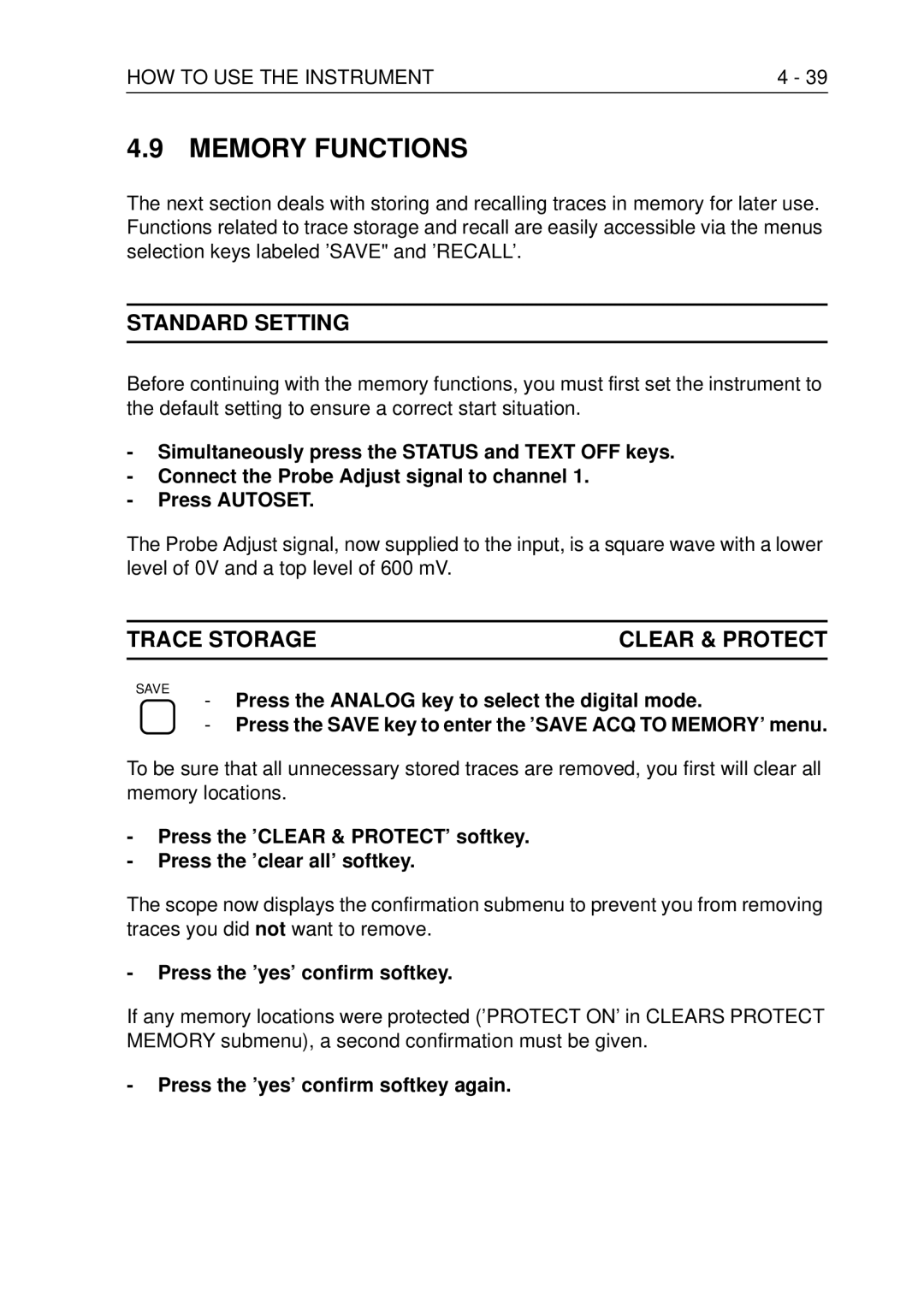
Memory Functions
Trace Storageclear & Protect
Press the ’yes’ confirm softkey
Press the ’yes’ confirm softkey again
40HOW to USE the Instrument
Trace Storage Save
Trace Storage Clear
Select memory location ’m1’ Press the ’save’ softkey
Trace Storage Copy
Trace can be copied from one memory location to another
Press the ’COPY’ softkey
42HOW to USE the Instrument
Trace Storage Recall
Turn the POSition control
Live trace shifts
Trace Storage Saving Multiple Traces
Trace Storage Recalling Multiple Traces
Press the softkey next to ’yes’
Press the Recall menu key
44HOW to USE the Instrument
Cursors Functions
Time measurements. These can be done in digital
Cursors ON/OFF
Cursors Time
46HOW to USE the Instrument
Cursors Volt
Cursors Amplitude & Time
Cursors Readout
Press the softkey next to ’READOUT’
ΔV, V1, V2, ΔV-ratio for voltage measurements
Cursors Readout ΔT-RATIO/PHASE
48HOW to USE the Instrument
Adjust the cursors to a distance of half a signal period
Start with the standard setting.This ensures a correct start
Measurement Functions
50HOW to USE the Instrument
MEASUREMEAS1-PKPK
Measure MEAS1-RMS
Press the second softkey to turn MEAS1 to ’on’
Measure Delay
Remove the Probe Adjust signal from channel
Press the first softkey to select ’delay’
Measure Meas 2-FREQ
52HOW to USE the Instrument
Measure Cursor Limit
Procedure to set up for TOUCH, Hold and Measure is
Measure TOUCH, Hold & Measure
Processing Functions
Mathematics Filter
Press the softkey next to Math 1 to enter the Math 1 submenu
56HOW to USE the Instrument
Switch Math 2 off again
Mathematics Multiply
Display Functions
Analog Display Defl
50Hz
Remove the signal from channel
Digital Display
60HOW to USE the Instrument
Scope ’runs’ once and a signal appears on the screen
Use the Track control to adjust Vert Magnify to
Digital Display Vert Magnify
Digital Display Interpolation
Press the bottom softkey to select ’dots’
Press the bottom softkey to select ’sine’
62HOW to USE the Instrument
Connect the Probe Adjust signal to channels 1 Press Autoset
Digital Display Windows
Screen displays two or four traces now
Delayed Timebase
Delayed Timebase
Delayed Timebase DEL’DTB has two basic functions
Press the Text OFF button to turn off the menu
64HOW to USE the Instrument
Press either key of the Del’dTB TIME/DIV keys
Delayed Timebase Trace SEP
Delayed Timebase Trigger
Start with the Standard Setup
Press the softkey to select the TRIG’D mode
Press the Trig 1 key in the CH1 section a few times
Delayed Timebase Trigger Level
Delayed Timebase Coupling
First set the instrument to the standard setting
Hard Copy Facilities
SET Standard
Utility Print Setup
9600, 8, N, 3wire, XON/XOFF=ON
To set up the layout of the printer hard copy
Now you are ready to make the hard copy
Utility Plot Setup
HP7475A, HP7470A, Hpgl = standard HPGL, PM8277 and PM8278
Autoset and Setup Utilities
Autoset Standard
Setups
72HOW to USE the Instrument
Autoset User Programmable
Position the trace in the bottom of the screen
This setup can be saved in memory as follows
To recall a previously stored setting
Setup Text Label
Setup Recall a Sequence
74HOW to USE the Instrument
Autocal
Other Features
Function Reference
Function Reference
Acquisition Length
Description
Memory Expansion
Key sequence
Toggle key to switch the inverted display of CH2 CH4 on/off
ADD Invert Subtract
INV
ADD Mathematics
Mathematical description
Result = S1 + S2
Remote commands
CPL QW Command to query a waveform Refer to for full details
ALT/CHOP
Analog Mode
Toggle softkey to select ALTernate or CHOPped mode
Alternate and chopped modes are shown in the figures below
Toggle key to switch between analog mode and digital mode
Auto Range
Analog
Auto Range
CPL AS Command for Auto Setup Refer to for full details
Autoset
Autoset
Key to start the autoset
Autoset Sequence
Autoset Userprog
Utilityautoset
Vert
Trig
CPL AS Command for an Auto Setup Refer to for full details
Autoset
Key to switch the Average function on or off
Control to select the Average factor
Effect of bandwidth limiter
CPL CL Command for Calibrate Refer to for full details
Calibration Autocal
CAL
CHANNEL/TRACE Selection
Power on OFF
Confidence Check
Cursors
Cursors
Volt cursors are used for
Voltage measurements. When
More than one channel is on, Desired channel for voltage
Function Reference Cursors Both
Track
Cursors Readout Time
Measured
Function Reference Cursors Readout Volt
Delay
Full description is given under Delayed Timebase
Event delay
Trigger position
CH1 Slope
Delay Measurement
Delayed Timebase DEL’D TB
Function of ’mtb+dtb’, Delay and Trace SEP
Delay
Digital Mode
Toggle switch to switch between analog mode and digital mode
Display Menu
Interpolation
Lines are drawn between sample points
Display Text
Display of signal with
Amplitude variation AM Variation FM or jitter
External Trigger 2 Channels Models only
Trig View
Ampl
Filter
Glitch Trigger
Hold OFF
Using Hold OFF to suppress double triggering
Control to adjust Main TB hold off time
Hold OFF
Input Attenuator Manual + Automatic
Function of key pair AMPL/VAR
Toggle key to switch the Auto Range function on/off
Input Coupling
Auto
Range
Toggle key to switch a channel on/off
Input Impedance 200 MHZ Models only
AC/DC/GND
AC/DC
Logic Trigger 4 Channels Models only
State
Pattern
To adjust t2
Ift2
Glitch
Refer to Glitch Trigger function
Magnify Horizontal
Function of the timebase magnifier and X POS control
Magnify Vertical
Left side decreases the Magnify factor
Function of vertical magnifier and Y POS control
Control to select the vertical magnification
Main Timebase Manual + Automatic
46FUNCTION Reference
Function of key pair TIME/DIV VAR
VAR ns
Mathematics
Measure Menu
Following measurements are available
Volt
Positive and negative, preshoot positive and negative
Multiply Mathematics
Result = S1 x S2
Peak Detection
Toggle key to switch the peak detection on/off
POS
Power Supply
Toggle key to switch the oscilloscope on/off
Printing and Plotting
Interface
Printer or plotter
Layout
Real-time clock
Toggle softkey to plot trace information
Probe Utilities
Remote Control Ieee
Key to switch from remote to local
Control to select the Ieee device address
Status
Remote Control RS-232
Parity
Odd Even
LL Inhibits front key Status Local Refer to for full details
RUN/STOP
Rise time measurement using the graticule
Screen Controls and Graticule
Screen controls and function
Trace Rotation
Auto Setting
Screen Messages
Always Parity if 7 Bits
Autocal Necessary
Auto Setting Userprogram
Calibration Error
KEY Inactive When Stopped
No Average in Roll Mode
No DTB in Roll Mode
No Envelope in Roll Mode
No Event DELAY, Dual Slope
No Event Delay in TV Mode
Setup Empty
Setup Protected
STD Setup = Recall only
TIME/DIV Adjusted
Setups Track
Setups Sequence
Standard Setup / Front Panel Reset
Softkey to recall ’std’ settings
Std memory selection
Status Screen
Subtract mode is available in the digital mode of operation
Subtract Mathematics
Result = S1 S2
Control to select the Subtract process
Timebase Modes
Text OFF
Flows ‘through’ the screen from left to right. When Roll is
Selected, the TB Mode menu provides a ‘STOP on TRIGGER’
TRIGGER’ is set to ‘on’, the trace stops when the scope is
Acquired waveform is stored in a different memory location
Time Measurements
Function Reference
Time
TOUCH, Hold & Measure Mode
Trigger Coupling
Ac dc lf-rej Trigger hf-rej
Delay
Trigger DEL’D TB
Toggle softkey to switch DEL’D TB ’on’
Trigger Level control ranges in level-pp on and off
Trigger Main TB
Function of Trigger Level and slope
Trig Toggle key to select CH1, CH.. or Exttrig as Main TB
Slope to change between positive and negative trigger
Edge
TV Trigger
Key sequence
Usertext
Utility Maintenance
Util Menu
Utility Screen & Sound
Volt Measurements
Sn = nth sample j=n=k
× S n
Oversh Overshoot
100%
Falling presh =
Limit
Deflection X-DEFL, X vs Y
Toggle softkey to switch X vs Y on
Commands
CPL Protocol
Acknowledge
Responses
Data Separators
Program data separator
Example Program Frame
Program frame
Commands in Functional Order
4THE CPL Protocol
Commands in Alphabetical Order
Command Reference
Name
Command Response
Acknowledge
ARM Trigger
8THE CPL Protocol
Calibrate
Default Setup
10THE CPL Protocol
GO to Local
GO to Remote
12THE CPL Protocol
Identification
Identity string
Example response
Local Lockout
Program Communication
16THE CPL Protocol
Xonxoff
HWL
Approx .5 sec after an acknowledge = 0 is received,
Program Setup
18THE CPL Protocol
Count Node
Pds Count Node
Program Text
Pds
Char
Char Character Description
Examples of user text
Sample checksum Admin Pds Count
Program Waveform
22THE CPL Protocol
Pds Wavenr
Action by Parameter Type Example Oscilloscope Notes
Example
Example program
LSB = Sample and &HFF
Results is returned cancelling is possible by sending Ascii
Query Measurement
26THE CPL Protocol
Numerical values of an infinite number of measurement
T2-trg
Value Parameter specified Value,value
Measvalue
Point notation, e.g E-09
Or Hz
Example of a single measurement
Query Print
Null
30THE CPL Protocol
Example Written in Quick Basic
Query Setup
Count Number of strings to follow Node
Oscilloscope, e.g =10 hex
Complete setup query
Example response PM3394
Query Text
User text is returned
Printed, e.g
Admin Count Sample Checksum
Query Waveform
Wavenr The oscilloscope waveform source
Parameter Type Example
Input #1,NM$
Settings
Symbol Parameter Value Type
Interpretation of waveform data
Display
Definitions
Formula’s
Sn = Yz + Yn * Yr * Yu
Sensitivity
Time base
Time base = 50 * Xr * Xu/div
Reset Instrument
Recall Setup
Pds Setup reg
42THE CPL Protocol
Save Setup
Represents the setup register number, ranging from 1
Status
44THE CPL Protocol
Example status
Trigger Acquisition
46THE CPL Protocol
Ok, normal situation Syntax error
Execution error
Synchronization error
Acknowledge
Status
Example program to investigate status
Setup
Common vertical settings
Common horizontal settings
Main Timebase settings
Hex Dec Meaning Events Trigger Delay settings
Cursor settings
Cursor autosearch settings
Measurement 1 settings Measurement 2 settings
Nnllxxxxxx.......xx
Appendix a Acquire menu structure
Acquire Menu Structure
Appendix B Cursors menu structure
Digital
Cursors menu structure
Appendix C Display menu structured
Display Menu Structure
Appendix D Mathematics menu structure
Mathematics Menu Structure
Measure Menu Structure
Appendix F DTB DEL’D TB menu structure
SAVE/RECALL Menu Structure
Appendix H Setups menu structure
Setups Menu Structure
Appendix J TB Mode menu structure
TB Mode Menu Structure
Appendix K Trigger menu structure
Div T
Trigger menu structure
Appendix L Utility menu structure
Utility menu structure
Vertical Menu Structure
Vert Menu Vertical BW Limit
On off 50Ω CH1 50Ω CH2 50Ω CH3 50Ω CH4
RS-232 Cable Configurations
RTS
CTS
DTR
Cable to printer/plotter with hardware handshake
Cable to controller with hardware handshake
Appendix P
Channels Simultaneously Sampled AT 100 MS/s
Channel Acquisitions
Expansion and Interpolation
Function Index see Chapter
Function Index
Function Index
Index
TOUCH, Hold & Measure Mode
Delayed Timebase Trigger DEL’D TB
Display and Probe Adjustment Display Functions Display Menu
Measure Menu Time Measuremens Volt Measurements
Printing and Plotting Remote Control Ieee
Installation Instructions Appendix N
Util Maintenance
Glitch Trigger GND Input Coupling
CHANNEL/TRACE Selection Setups
Printing and Plotting Remote Control RS-232
Memory Functions
Memory BACK-UP Batteries
Autoset and Setup Utilities Setups Setups Sequence
Timebase Modes Delayed Timebase
Screen Messages Utility Screen & Sound
Timebase Modes
8FUNCTION Index
Advanced Vertical Functions
Cursors Readout Measure Menu Volt Measurements
Display Menu Deflection