HP Compaq Business PC Maintenance and Service Guide
Page
Iii
About This Book
Iv About This Book
Table of contents
Page
Removal and Replacement Procedures Microtower MT Chassis
Troubleshooting Without Diagnostics 140
Contacting Customer Support 181
Post Error Messages 182
MT Specifications 223 SFF Specifications 225
Appendix D Power Cord Set Requirements 221
Standard Configuration Features
Product Features
1Front Panel Components
Product Features
Microtower MT Front Panel Components
2Front Panel Components
Small Form Factor SFF Front Panel Components
Small Form Factor SFF Front Panel Components
Rear Panel Components
Microtower MT Rear Panel Components
Small Form Factor SFF Rear Panel Components
Small Form Factor SFF Rear Panel Components
6Microtower Serial Number and Product ID Location
Serial Number Location
Activating the Windows operating system
Activating and Customizing the Software
Activating and customizing the software in Windows
Customizing the monitor display
Downloading Windows 7 updates
Installing or upgrading device drivers
Click Settings Change PC Settings
Downloading Windows 8 updates
Computer Setup F10 Utilities
Computer Setup F10 Utility
Computer Setup F10 Utilities
Using Computer Setup F10 Utilities
2Computer Setup-File
Computer Setup-File
Computer Setup F10 Utility
3Computer Setup-Storage
Computer Setup-Storage
Configuration
Exit
Boot Order
Removable Media Boot
Shortcut to Temporarily Override Boot Order
Storage Options Sata Emulation
4Computer Setup-Security
Computer Setup-Security
Device Security
Network Boot
USB Security
Slot Security
Security
Virtualization Technology Directed I/O
System Security
DriveLock Security
Secure Boot
5Computer Setup-Power
Computer Setup-Power
Option Description OS Power
Management
6Computer Setup-Advanced for advanced users
Computer Setup-Advanced
Hardware Power
Thermal
Bus Options
Bios Power-On
Onboard Devices
Device Options
AMT Configuration
Recovering the Configuration Settings
VGA Configuration
Computer major components
Illustrated parts catalog
Microtower MT chassis spare parts
Illustrated parts catalog
Intel Celeron processors
Item Description Spare part number
Cables
Misc parts
Drives
Optical drive
Misc boards
Spare part Description Number
Sequential part number listing
Microtower MT chassis spare parts
Illustrated parts catalog
Microtower MT chassis spare parts
Description Spare part number Front bezel
Small Form Factor SFF chassis spare parts
Small Form Factor SFF chassis spare parts
Cables
Misc parts
Printer port, PCI card
Description Spare part number Speaker
Rubber feet
Chassis stand
Refer to Helpful Hints on page 141 in this guide
Helpful Hints
Page
1Solving General Problems
Solving General Problems
Computer date and time display is incorrect Cause Solution
Select Control Panel
There is no sound or sound volume is too low Cause Solution
144 Troubleshooting Without Diagnostics
Cannot remove computer cover or access panel Cause Solution
Poor performance Cause Solution
Run
Go to Start All Programs Accessories
All apps icon
Under Windows System, click Run
146 Troubleshooting Without Diagnostics
Power supply shuts down intermittently Cause Solution
Solving Power Problems
2Solving Power Problems
148 Troubleshooting Without Diagnostics
3Solving Hard Drive Problems
Solving Hard Drive Problems
150 Troubleshooting Without Diagnostics
Computer seems to be locked up Cause Solution
Storage Boot Order
Device Configuration
152 Troubleshooting Without Diagnostics
Solving Media Card Reader Problems
4Solving Media Card Reader Problems
Can not write to the media card Cause Solution
Solving Media Card Reader Problems 153
5Solving Display Problems
Solving Display Problems
154 Troubleshooting Without Diagnostics
Solving Display Problems
Dim characters Cause Solution
156 Troubleshooting Without Diagnostics
Image is not centered Cause Solution
Select ImageControl/ Horizontal Position or Vertical
Out of Range displays on screen Cause Solution
Certain typed symbols do not appear correct Cause Solution
158 Troubleshooting Without Diagnostics
6Solving Audio Problems
Solving Audio Problems
Sound cuts in and out Cause Solution
Device Security System Audio
Control Panel, and then select Device Manager
160 Troubleshooting Without Diagnostics
Line-in jack is not functioning properly Cause Solution
Control Panel , and then select Device Manager
Solving Printer Problems
7Solving Printer Problems
Printer will not turn on Cause Solution
162 Troubleshooting Without Diagnostics
Printer prints garbled information Cause Solution
Printer will not print Cause Solution
8Solving Keyboard Problems
Solving Keyboard and Mouse Problems
Solving Keyboard and Mouse Problems 163
9Solving Mouse Problems
164 Troubleshooting Without Diagnostics
Solving Hardware Installation Problems 165
Solving Hardware Installation Problems
10Solving Hardware Installation Problems
Security USB Security
Computer will not start Cause Solution
166 Troubleshooting Without Diagnostics
Wake-on-LAN feature is not functioning Cause Solution
Solving Network Problems
11Solving Network Problems
168 Troubleshooting Without Diagnostics
Manager
Network status link light never flashes Cause Solution
Diagnostics reports a failure Cause Solution
170 Troubleshooting Without Diagnostics
New network card will not boot Cause Solution
Solving Memory Problems
12Solving Memory Problems
172 Troubleshooting Without Diagnostics
Out of memory error Cause Solution
Memory count during Post is wrong Cause Solution
13Solving Processor Problems
Solving Processor Problems
Poor performance is experienced Cause Solution
Cause Solution
174 Troubleshooting Without Diagnostics
Solving CD-ROM and DVD Problems
14Solving CD-ROM and DVD Problems
Security Network Boot
Cannot eject compact disc tray-load unit Cause Solution
Movie will not play in the DVD drive Cause Solution
176 Troubleshooting Without Diagnostics
Solving USB Flash Drive Problems
15Solving USB Flash Drive Problems
USB flash drive not found identified Cause Solution
Solving Internet Access Problems
Solving Front Panel Component Problems
Solving Front Panel Component Problems 177
Unable to connect to the Internet Cause Solution
Click Internet Options
178 Troubleshooting Without Diagnostics
Select Start Control Panel
ROM issue Post error has occurred
Solving Software Problems
System files may be damaged
180 Troubleshooting Without Diagnostics
Contacting Customer Support
Post Error Messages
Post Numeric Codes and Text Messages
Post Numeric Codes and Text Messages
1Numeric Codes and Text Messages
Control panel message Description Recommended action
Control panel message Description
Verify monitor is attached and turned
Reseat CPU or chassis fan
Reconfigure card resources and/or run
Post Error Messages
Bios
General error during MEBx execution


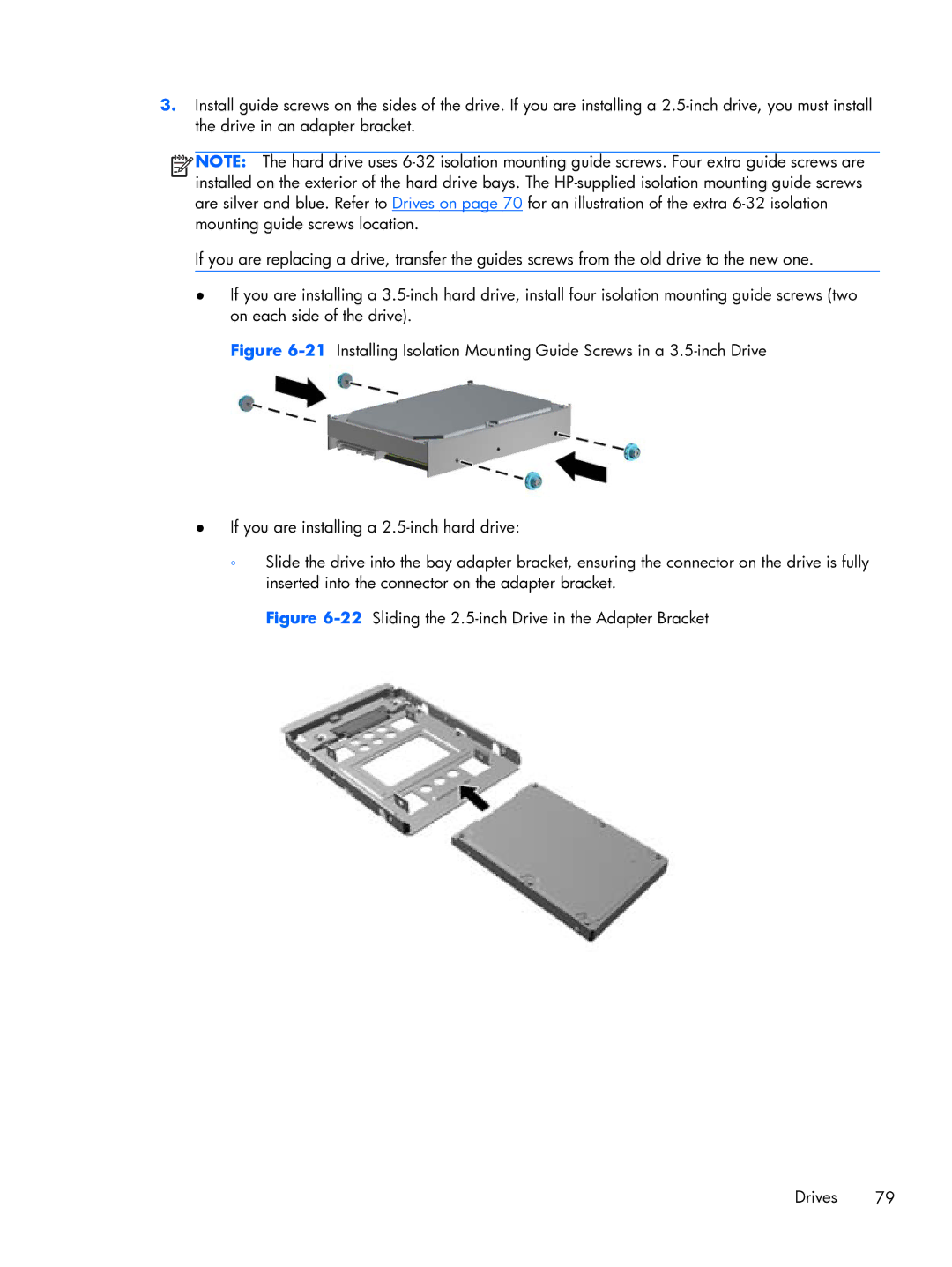
 NOTE: The hard drive uses