May
Users Guide
Page
Contents
Copying
Printing
Scanning
Sending a fax
Faxing
Clearing jams
122
173
148
160
170
191
205
193
Safety info rm ation
Learn in g about the printer
Checking the box contents
Basic model
Printer configurations
Page
Fully configured model
Description
Understanding the printer control panel
Back
Printer control panel item Description
Control panel item Description
Choosing a fax connection
Getting the printer ready to fax
Country/region United Kingdom Italy Ireland Sweden Finland
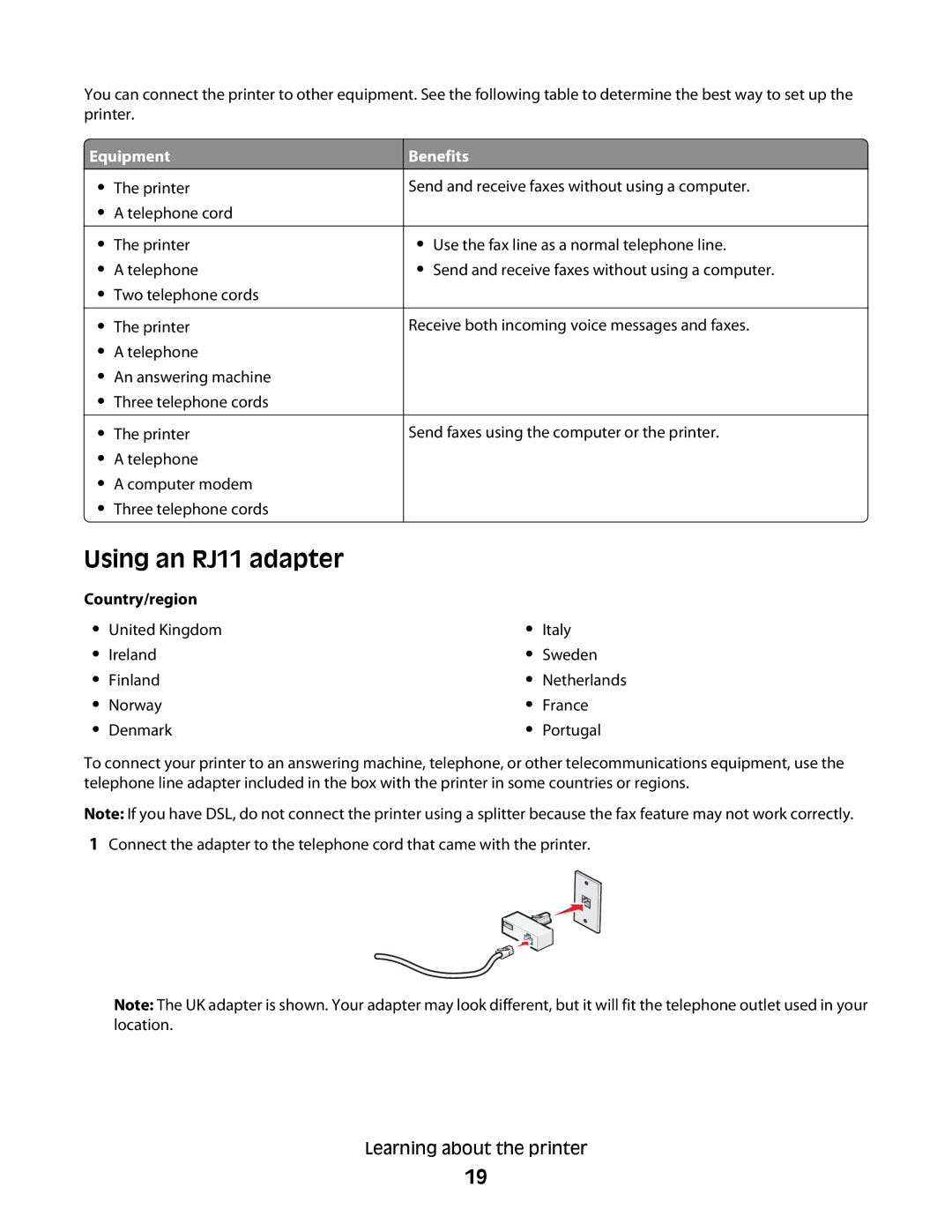
Using an RJ11 adapter
Equipment
Benefits
FAX
Australia Spain South Africa Turkey
Country/region Saudi Arabia Israel United Arab Emirates
Egypt Poland Bulgaria
Czech Republic Russia Belgium
Country/region
Connecting to a telephone
Connecting directly to a telephone wall jack
Remove the protective plug from the EXT port of the printer
Connecting to an answering machine
Connecting to a computer with a modem
Setting the outgoing fax name and number
If you live
Setting the country code
Select
France United States Brazil Learning about the printer
Setting the time
Setting the date
Understanding Address Book Editor
Understanding the fax and scan software
Understanding Express Scan Manager
Installing a 550-sheet drawer
Installing o ption s
Securing the 550-sheet drawer to the printer
Align the tray, and insert it Installing options
Installing a multi-protocol network card
Page
Installing a memory card
Page
Page
Attaching cables
Ethernet port USB symbol USB port Installing options
Loading Tray 1 MPT
Load in g pape r a nd s p ecialty med ia
Page
Loading Tray 2 and Tray
Page
Linking trays
Setting the Paper Type
Page
Pap er and specialty m edia g uide
Paper characteristics
Paper guidelines
Selecting preprinted forms and letterhead
Using recycled paper
Using letterhead
Top
Using envelopes
Using labels
Storing paper
Using card stock
Supported paper sizes
Supported paper sizes, types, and weights
Multipurpose feeder
Supported paper types
Paper type
Paper Card stock Transparencies Paper labels Envelopes
Multipurpose feeder Tray 1 MPT
Supported paper weights
Paper capacities
Tray
Envelopes
Paper type Multipurpose feeder Tray
Printing a document from Windows
Installing printer software
Printing the configuration
Prin ting
Printing Secure Print jobs from the printer control panel
Using Secure printing
Printing the demo
Understanding Secure Print
Understanding Proof Print
Using Proof printing
Canceling a print job
Canceling a print job from the printer control panel
Canceling a print job from the Windows desktop
Canceling a print job from the Windows taskbar
Canceling a print job from Mac OS
Scanner glass
Cop ying
Making a copy
Automatic Document Feeder ADF
Collated
Customizing copy settings
Selecting a paper tray for copies
Collating copies
Selecting the type of document being copied
Reducing or enlarging copies
Adjusting the sharpness of a copy
Adjusting copy quality
Making a copy lighter or darker
Adjusting the auto exposure of copies
Adjusting the color saturation of a copy
Centering an image on a
Up setting
Copying multiple pages onto a single sheet
Printing a poster
Poster setting Description
Repeating images on a sheet
Setting the copy margins
Canceling a copy job
Scan ning
Scanning a document using the computer
Scanning documents directly to other applications
Customizing scan settings using the computer
Scanning text for editing
Channels
General tab
Options
Advanced tab Options
Sharing a folder in Windows
Canceling a scan job
Scanning clear images from magazines or newspapers
Scanning to a computer
Click Computer SMB Click Computer Settings Wizard
Creating a computer address using Address Book Editor
Setting up scanning to a computer Macintosh
Creating a computer address using the Embedded Web Server
Click Address Book
Click Ethernet
Select Share files and folders using SMB
Select Enable Accounts
Mac OS X version
Click Server FTP
Creating an FTP address using Address Book Editor
Scanning to an FTP server
Scanning to a computer over the network
Scanning to an FTP address
Creating an FTP address using the Embedded Web Server
Scanning to e-mail
Setting up the Smtp server
Creating an e-mail address using Address Book Editor
Mail setting Description
Creating an e-mail group using the Embedded Web Server
Creating an e-mail address using the Embedded Web Server
Scanning to an e-mail address
Adjusting the auto exposure of scanned images
Adjusting the sharpness of a scanned image
Adjusting the color saturation of a scanned image
Adjusting the image compression of a scanned image
Adjusting the scan resolution
Changing the Tiff format for a scanned image
Selecting the size of the document being scanned
Changing the maximum e-mail size of a scanned image
Changing the scan destination
Selecting the type of document being scanned
Setting the scan color mode
Making a scanned image lighter or darker
Customizing the scan settings when scanning to a computer
Customizing the scan settings for an individual scan job
Setting the scanned image file type
Customizing the scan settings when scanning to e-mail
Sending a fax
Sending a fax using the ADF
Sending a fax using the scanner glass
Faxing
Inserting a pause in a fax number
Sending a broadcast fax
Click Group Membership
Setting up the Address Book for faxing
Creating a fax number entry using Address Book Editor
Creating a fax number entry using the Embedded Web Server
Creating a fax group using Address Book Editor
Creating a fax number entry using the printer control panel
Creating a fax group using the printer control panel
Creating a fax group using the Embedded Web Server
Receiving a fax
Canceling a fax job
Setting the fax receive mode
Fax receive mode
Enabling secure faxes
Adjusting fax activity report settings
Printing secure faxes
Sending a fax at a specified time
Printing fax reports
Enabling Color Fax
Limiting who can send faxes to the printer
Limiting access to fax and scan operations
Setting up to fax while behind a PBX
Customizing dial settings
Setting the dialing mode
Adjusting the volume
Adjusting the fax resolution
Setting the time delay before receiving a fax automatically
Selecting the type of document being faxed
Setting the delayed start time
Customizing the fax settings for an individual fax job
Making a fax lighter or darker
Avoiding jams
Clearing jams
Understanding jam messages and locations
Area name
Jam message
100
Clearing Tray 1 MPT jams
101
102
103
104
Clearing Tray 2 jams
105
106
107
108
109
Clearing Tray 3 jams
110
111
112
113
Clearing jams in the fuser
114
115
116
Clearing jams in the duplex unit
117
118
119
Clearing jams in the ADF
120
121
Menus list
Default Settings Menu
Copy Defaults menu
Und ersta ndin g print e r men us
Menu item
123
124
125
Scan Defaults menu
126
Image Compression
Fax Defaults menu
Delayed Start
127
Tray 1 MPT menu
Tray Settings menu
128
Display Popup
Tray 2 menu
Tray 3 menu
129
130
Information Pages menu
131
Admin Menu
Billing Meters menu
Address Book menu
132
Print Language menu
PCL
133
PostScript
134
Network Settings menu
Ethernet
Initialize NVM
135
Protocol
IP Filter
136
Parallel Settings menu
USB Settings menu
Fax Settings menu
137
138
139
140
System Settings menu
Alert Tone
141
Time-Out
142
143
144
Maintenance menu
145
Secure Settings menu
Scan to Email menu
Admin Reports menu
146
147
Panel Language Menu
Und ersta ndin g print e r message s
List of status and error messages
Email Error, Invalid POP3 Server
Crum Error
Disabled Func
Duplexer Error
Fuser Crum Error, Reseat Fuser
Email Login Error, POP3 Login Failed
Email Login Error, Smtp Login Failed
Fan Motor Error
Insert Transfer Unit
Hard Drive Full
Insert color
Insert Fuser, Restart Printer
Jam at Reg. Roll, Open Door a
Invalid User
Jam at Duplexer
Jam at Exit, Open Door a
Network Scan Error, Connection Timeout
Login Error
MCU Firmware Error
MCU Nvram Error
Network Scan Error, Invalid SMB/FTP Server
Network Scan Error, Directory Not Found
Network Scan Error, Email Server Full
Network Scan Error, File Name Exists
PCL Error
Network Scan Error, Smtp Connection Failed
Non-Genuine Toner Installed
NV RAM Error
Replace color Print Cartridge Soon
RAM Error
Remove Tape, color Cartridge
Replace color Print Cartridge
Restart Printer
Scan Error
Scanner Lamp Error
Replace Transfer Unit Soon
158
Wrong Paper Type
Smtp Server Error
Select Function
Tray x is Missing
Storing supplies
Cleaning the printer
Cleaning the exterior of the printer
Main taining th e prin t er
161
Cleaning the scanner glass
Ordering supplies
Ordering print cartridges
Before moving the printer
Moving the printer
Ordering a fuser
Ordering a transfer belt
163
Locking the scanner
164
Removing the printer from the 550-sheet drawer
165
166
Moving the printer to another location
Setting the printer up in a new location
167
168
Adjusting the color registration
Adjusting the color registration automatically
Adjusting the color registration manually
169
170
Locking the administrator menus
Adjusting Power Saver
Adm inistra tiv e support
Using the Embedded Web Server
Setting the Auto Reset
171
172
Creating e-mail alerts
Click Properties Click Mail Alerts
Printer control panel display is blank
Solving printing problems
Troublesho oting
Online customer support Checking an unresponsive printer
174
Jobs do not print
Job takes longer than expected to print
Tray linking does not work
Scanner unit does not close
Solving copy problems
Unexpected page breaks occur
Copier does not respond
Is the Toner LOW?
176
Scan was not successful
Solving scan problems
Partial document or photo copies
Scanner does not respond
Poor scanned image quality
Scanning takes too long or freezes the computer
178
Cannot send or receive a fax
Solving fax problems
Partial document or photo scans
Cannot scan from a computer
Check the Telephone Wall Jack
180
Can receive but not send faxes
Can send but not receive faxes
181
Received fax has poor print quality
Solving option problems
182
Paper jam message remains after jam is cleared
Solving paper feed problems
Drawers
Paper frequently jams
184
Solving print quality problems
Repeating defects
Color misregistration
185
Light colored line, white line, or incorrectly colored line
Print is too light
Streaked vertical lines
186
Print is too dark
Print irregularities
187
Skewed print
Transparency print quality is poor
Uneven print density
Incorrect margins
Clipped images
Blank pages
189
190
Solid color pages
Paper curl
Toner specks
191
FAQ about color printing
What is RGB color?
Toner rubs off
192
Contacting Customer Support
193
Edition notice
Lexmark International, Inc. All rights reserved
Industry Canada compliance statement
Trademarks
194
European Community EC directives conformity
Avis de conformité aux normes de l’industrie du Canada
195
196
Noise emission levels
Meter average sound pressure, dBA
197
198
199
New Zealand Telecom equipment notice
Verwendung dieses Produkts in der Schweiz
Using this product in Switzerland
South Africa telecommunications notice
Utilisation de ce produit en Suisse
201
Power consumption
Laser notice
Laser advisory label
202
Statement of Limited Warranty
203
Limited warranty service
Limitation of liability
204
205
Symbols
Index
Numerics
206
Number 27 setting the time
207
208
Partial document or photo scans
209
210
Tray 3 129 troubleshooting

 Equipment