Using printer menus
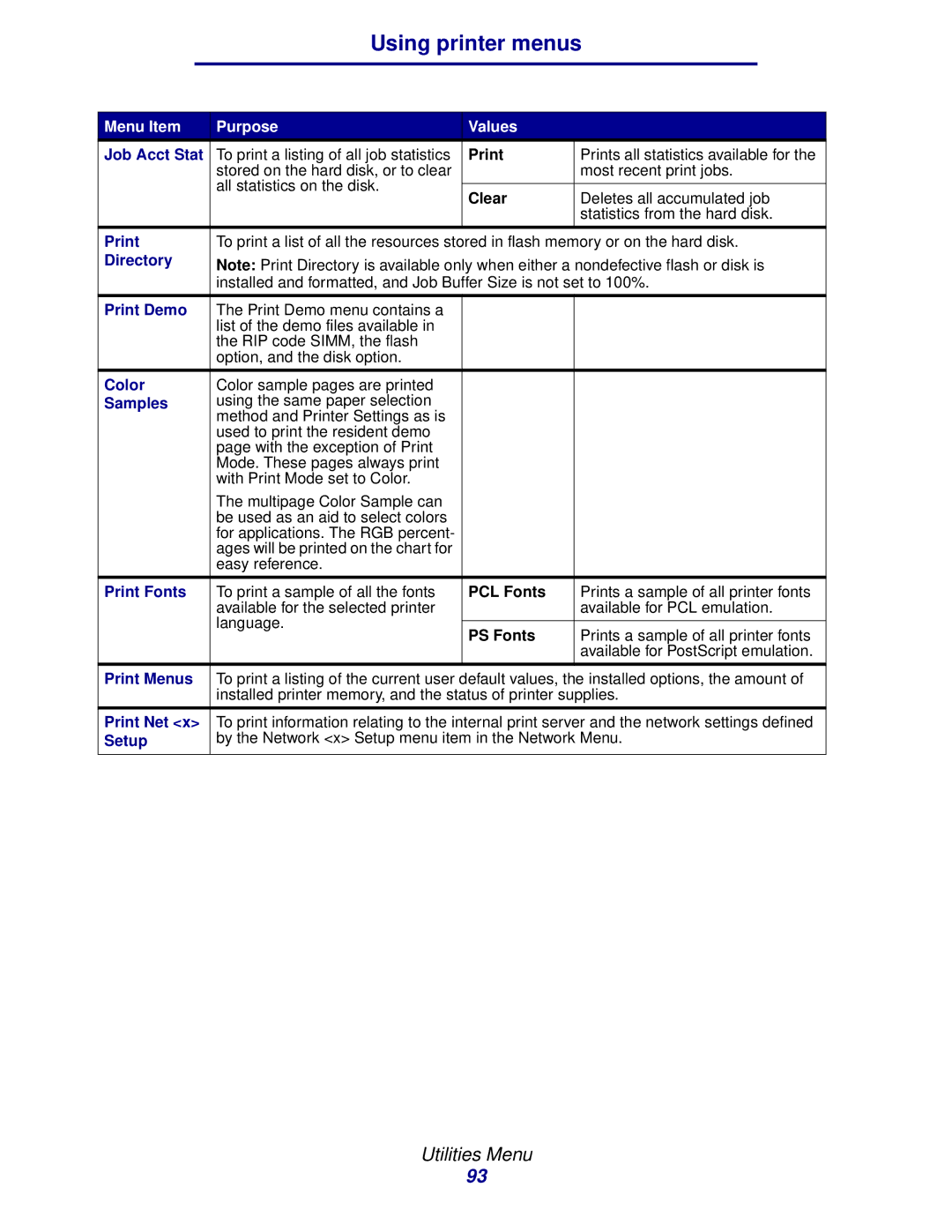
Menu Item | Purpose | Values |
|
Job Acct Stat | To print a listing of all job statistics | Prints all statistics available for the | |
| stored on the hard disk, or to clear |
| most recent print jobs. |
| all statistics on the disk. |
|
|
| Clear | Deletes all accumulated job | |
|
| ||
|
|
| statistics from the hard disk. |
|
|
|
|
To print a list of all the resources stored in flash memory or on the hard disk. | |||
Directory | Note: Print Directory is available only when either a nondefective flash or disk is | ||
| installed and formatted, and Job Buffer Size is not set to 100%. | ||
|
|
|
|
Print Demo | The Print Demo menu contains a |
|
|
| list of the demo files available in |
|
|
| the RIP code SIMM, the flash |
|
|
| option, and the disk option. |
|
|
|
|
|
|
Color | Color sample pages are printed |
|
|
Samples | using the same paper selection |
|
|
| method and Printer Settings as is |
|
|
| used to print the resident demo |
|
|
| page with the exception of Print |
|
|
| Mode. These pages always print |
|
|
| with Print Mode set to Color. |
|
|
| The multipage Color Sample can |
|
|
| be used as an aid to select colors |
|
|
| for applications. The RGB percent- |
|
|
| ages will be printed on the chart for |
|
|
| easy reference. |
|
|
|
|
|
|
Print Fonts | To print a sample of all the fonts | PCL Fonts | Prints a sample of all printer fonts |
| available for the selected printer |
| available for PCL emulation. |
| language. |
|
|
| PS Fonts | Prints a sample of all printer fonts | |
|
| ||
|
|
| available for PostScript emulation. |
|
|
|
|
Print Menus | To print a listing of the current user default values, the installed options, the amount of | ||
| installed printer memory, and the status of printer supplies. | ||
|
| ||
Print Net <x> | To print information relating to the internal print server and the network settings defined | ||
Setup | by the Network <x> Setup menu item in the Network Menu. | ||
|
|
|
|
Utilities Menu
93