Printer/Scanner Unit Type
Page
Table of Contents
Setting Up the Printer Driver
Iii
Printer Features
165
Appendix
Manuals for This Machine
Other manuals
Manuals for DeskTopBinder Lite
Symbols
How to Read This Manual
Page
User Tools/Counter key
Control Panel
Energy Saver key
Clear/Stop key
FOnline / Offline
Display Panel
Error Log
Job Reset
Paper Tray Status indicators
Form Feed
Login Using the Control Panel
User Authentication
Press Enter for Login User Name
Press Enter for Login Password
Login Using a Printer Driver
Logoff Using the Control Panel
Press the User Tools/Counter key Press ο Logout
Press Yes
Requirements
Connecting the Machine
Connect the USB 2.0 interface ca- ble to the USB port
Connect the other end to the USB port on the host computer
Ieee 1394 Scsi print Connection
Parallel Connection
Turn on the computer Turn off the main power switch
Connecting to the Ethernet Interface
Turn on the main power switch
Indicator green
For details about setting paper
Setting Paper on the Bypass Tray
Adjust the paper guides to the pa- per size
Open the bypass tray
Select the paper size
Setting Custom Size Paper
Press Horizontal
Setting Thick Paper or OHP Transparencies
Press Paper Type Bypass tray
Select OHP or Thick Paper
Click Quick Install
Quick Install
Click Install
Click Finish
Preparing the Machine
Confirming the Connection Method
Using This Machine as the Windows Printing port
Network Connection
Windows 95
Windows XP
Windows
Windows Server
Windows NT
Using as a network printer
Local Connection
Using the SmartDeviceMonitor for Client Port
Installing SmartDeviceMonitor for Client
Click SmartDeviceMonitor for Client/Admin
Click PCL/RPCS Printer Drivers
Installing the PCL or Rpcs Printer Driver TCP/IP
Click Next
Select the machine model you want to use
Click Finish in the installation completion dialog box
Select the printer you want to use, and then click OK
Click Continue
Installing the PCL or Rpcs Printer Driver IPP
Click Detailed Settings to make necessary settings
Windows 2000 / Windows NT
Click Cancel to close the Port Configuration dialog box
Installing the PCL or Rpcs Printer Driver
Using the Standard TCP/IP Port
Click Port, and then click Add
Click Standard TCP/IP Port, and then click OK
Installation start dialog box reappears
Using the LPR Port
Port is added
Using as a Windows Network Printer
Browse for Printer window
Using as a NetWare Print Server / Remote Printer
Click OK to close the printer properties dialog box
Printers window, open the printer properties
Printing after Resetting the Printer
Form Feed
Banner
\DRIVERS\USBPRINT\WIN98ME
Rpcs
Click Next
Page
Windows XP, Windows Server 2003 USB
Turn on the power of the computer
Check the printer driver location, and then click OK
Click Next Click Finish
Click Continue Click Finish
Check the printer driver location, and then click Next
Troubleshooting for Using USB
Printing with Parallel Connection
Printing with Parallel Connection
Installing the Printer Driver Using Ieee 1394 Scsi print
Windows
Click Next in the Found New Hardware Wizard dialog box
Click Browse
Select the printer driver you want to use
Click Open Click OK Follow the on-screen instructions
Windows XP, Windows Server
Follow the on-screen instructions
Printing with Bluetooth Connection
Printing with Bluetooth Connection
Supported Profiles
Click Connect
Printing in the Security Mode
Configuring Security Mode Settings
If a Message Appears during Installation
Making Option Settings for the Printer
When connected with parallel cables
Conditions for Bidirectional Communication
When connected with the network
When connected with Ieee
When connected with USB
If Bidirectional Communication Is Disabled
Installing Font Manager
Click Font Manager
Follow the instructions on the screen
For PageMaker 7.0 default installation
Using Adobe PageMaker Version 6.0, 6.5, or
Windows 95 / 98 / Me Accessing the Printer Properties
PCL Accessing the Printer Properties
Making Printer Default Settings
Making Printer Settings from an Application
Windows 2000 Accessing the Printer Properties
Making Printer Default Settings The Printer Properties
Click OK to start printing
On the File menu, click Printing Preferences
Making Printer Default Settings Printing Preferences
Making Printer Default Settings The Printer Properties
Making Printer Default Settings Printing Preferences
Making Printer Default Settings Default
Windows NT 4.0 Accessing the Printer Properties
Making Printer Settings from an Application
Rpcs Accessing the Printer Properties
Custom Setting
Multi-tab
Rpcs Accessing the Printer Properties
Windows 2000 Accessing the Printer Properties
Making Printer Default Settings Printing Preferences
Making Printer Default Settings The Printer Properties
Making Printer Default Settings Printing Preferences
Windows NT 4.0 Accessing the Printer Properties
On the File menu, click Document Defaults
Setting Up the Printer Driver
Using DeskTopBinder Lite
Using commands
Printing Method
Using Data security for copying
Setting Data security for copying in the printer driver
Unauthorized Copy Control
Printing a document using Data security for copying
Using Mask type
Setting Mask type in the printer driver
Printing a document using Mask type
Important Notice
Using the Print Job List
Press Printer Features
Selecting the Initial Print Job List
Displaying a Print Job List
Press the Printer key
Press Print Jobs
Complete List
Per User ID Details
Locked Print Job List
Sample Print Job List
User ID
Clear Complete List
Job List Per User ID
Print All Jobs
Configure Sample Print in the printer drivers properties
Sample Print
Printing a Sample Print File
Press Sample Print Job List
Start printing from the applica- tions Print dialog box
Select the file you want to print by pressing it
Press UPrev. or TNext. to scroll through the list
Press Delete
Deleting Sample Print Files
Locked Print
Configure the Locked Print in the printer drivers properties
Press Locked Print Job List
Enter the password using the number keys, and then press OK
Deleting Locked Print Files
Hold Print
Configure Hold Print in the printer driver’s properties
Printing a Hold Print File
Click Details…, and then enter a User ID in the User ID box
Press Hold Print Job List
Start printing from the applica- tion’s Print dialog box
Deleting Hold Print Files
Configure Stored Print in the printer driver’s properties
Stored Print
Printing a Stored Print File
Press Stored Print Job List
Deleting Stored Print Files
On the Printer screen, press Print Jobs
Printing from List Per User ID
Press the user ID whose file you want to print
Press Job List Per User ID
Printing All Print Jobs
Press Print All Jobs
Select the desired print job type, and then press Yes
Press Yes
Spool Printing
Setting Spool Printing
Viewing a list of spool jobs on the display panel
Viewing/Deleting spool jobs in Web Image Monitor
Form Feed
Print Using a Selected Tray
Press Continue
100
Press Reset
Canceling Form Feed
Press Yes to cancel the print job
101
Windows Canceling a Print Job
Canceling a Print Job
Press Reset Current Job or Reset All Jobs
Double-click the printer icon on the Windows task tray
103
Press Error Log
Checking the Error Log
Press the desired job list
104
105
Press Details
Covers
Cover Sheet
106
107
Front and Back Covers
108
Inserting a slip sheet between each
Slip Sheet
Inserting a slip sheet between OHP transparencies
109
110
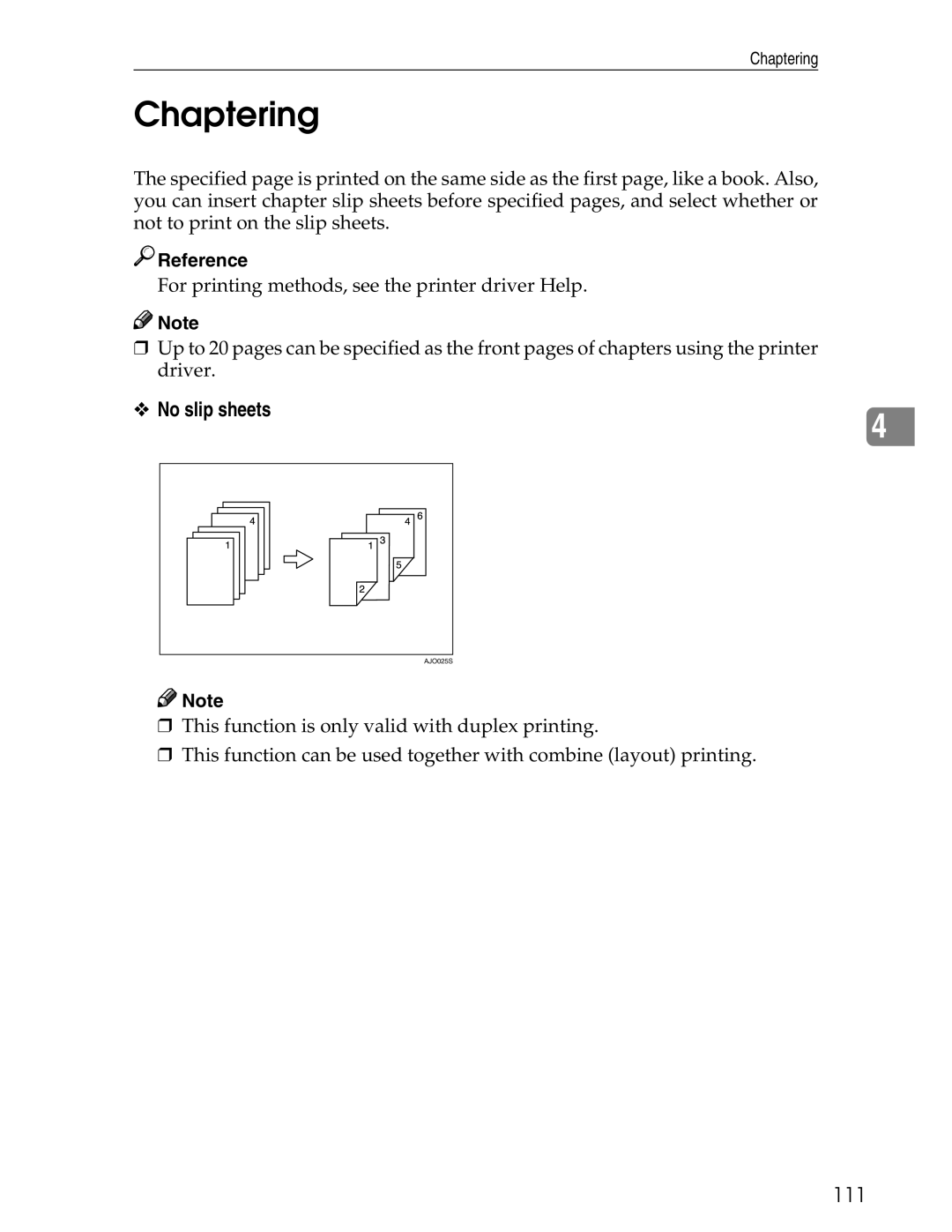
Chaptering
No slip sheets
111
112
Inserting chapter slip sheets
113
User Defined Pages
Collate
Collate
Rotating Collate
Shift Collate
115
116
Printing with the Finisher
Staple
Staple Position
117
118
Stapling Precautions
119
Punch
Punch Position
120
121
Punching Precautions
122
123
Printer Features Menu
124
Adjusting Printer Features
Press the User Tools/Counter key on the control panel
125
List / Test Print
Printer Features Parameters
Paper Input System
Interpreting the configuration System Reference
PCL Menu
PS Menu
System
Maintenance
Auto Delete Temporary Print Jobs
Job Separation
Memory Usage
Duplex
Printer Language
Blank Page Print
Sub Paper Size
Edge Smoothing
Bypass Tray Setting Priority
Letterhead Setting
Default Printer Language
Tray Switching
Host Interface PCL Menu
Resolution
Symbol Set
Point Size
Font Pitch
PS Menu
Data Format
134
135
Accessing the Document Server
136
Mainframe
Functions
137
List of the Setting Items
Web Image Monitor
138
139
List of the Setting Items
140
Telnet
141
Unix
142
Settings that can be used with PostScript
Software and Utilities Included on the CD
Click Browse This CD-ROM
Printer Drivers for This Printer
Rpcs printer driver
PCL printer drivers
Adobe PostScript Printer Drivers and PPD files
PPD files
File path
SmartDeviceMonitor for Admin
Available functions
146
147
SmartDeviceMonitor for Client
148
Error & Status Messages on the Display Panel
Troubleshooting
Status messages
Alert messages
150
151
Machine Does Not Print
ROM
152
Interface cable
Network connection
153
154
Other Printing Problems
155
156
PCL 5e
PostScript
157
158
System Settings Parallel Connection
Precautions when using Windows Server
Precautions When Using the Terminal Server Mode
160
161
Specifications
Options
Transmission mode
Power supply
Connectable number of devices on a bus
Allowed cable hops on a bus
Bluetooth Interface Unit Type
PostScript 3 Unit Type
164
165
Index
166
167
EN USA
168
Page
EN USA B783-7512


 Reference

 Note

 Note