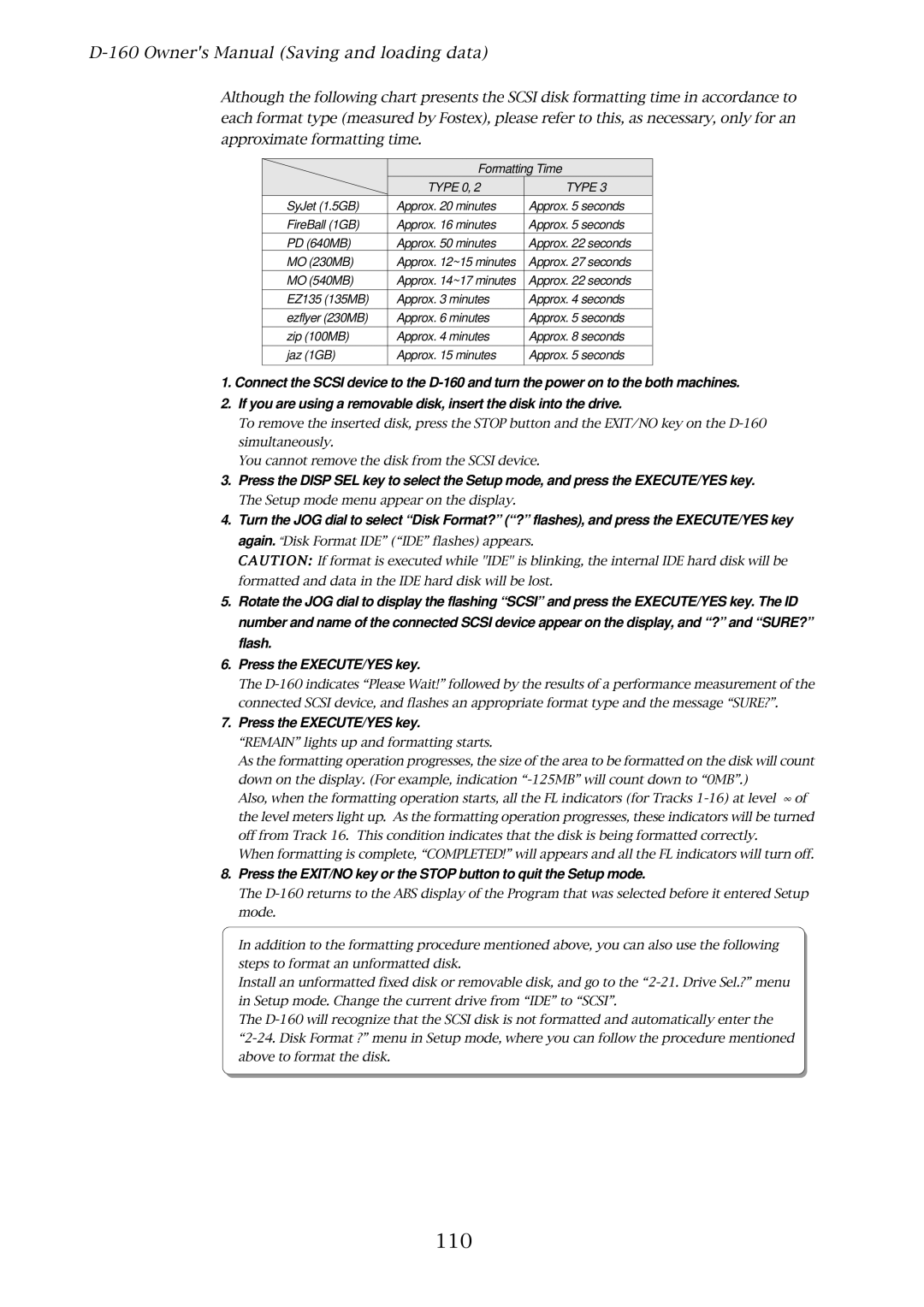
Although the following chart presents the SCSI disk formatting time in accordance to each format type (measured by Fostex), please refer to this, as necessary, only for an approximate formatting time.
| Formatting Time | |
| TYPE 0, 2 | TYPE 3 |
SyJet (1.5GB) | Approx. 20 minutes | Approx. 5 seconds |
FireBall (1GB) | Approx. 16 minutes | Approx. 5 seconds |
PD (640MB) | Approx. 50 minutes | Approx. 22 seconds |
MO (230MB) | Approx. 12~15 minutes | Approx. 27 seconds |
MO (540MB) | Approx. 14~17 minutes | Approx. 22 seconds |
EZ135 (135MB) | Approx. 3 minutes | Approx. 4 seconds |
ezflyer (230MB) | Approx. 6 minutes | Approx. 5 seconds |
zip (100MB) | Approx. 4 minutes | Approx. 8 seconds |
jaz (1GB) | Approx. 15 minutes | Approx. 5 seconds |
|
|
|
1.Connect the SCSI device to the
2.If you are using a removable disk, insert the disk into the drive.
To remove the inserted disk, press the STOP button and the EXIT/NO key on the
You cannot remove the disk from the SCSI device.
3.Press the DISP SEL key to select the Setup mode, and press the EXECUTE/YES key.
The Setup mode menu appear on the display.
4.Turn the JOG dial to select “Disk Format?” (“?” flashes), and press the EXECUTE/YES key again. “Disk Format IDE” (“IDE” flashes) appears.
CAUTION: If format is executed while "IDE" is blinking, the internal IDE hard disk will be formatted and data in the IDE hard disk will be lost.
5.Rotate the JOG dial to display the flashing “SCSI” and press the EXECUTE/YES key. The ID number and name of the connected SCSI device appear on the display, and “?” and “SURE?” flash.
6.Press the EXECUTE/YES key.
The
7.Press the EXECUTE/YES key.
“REMAIN” lights up and formatting starts.
As the formatting operation progresses, the size of the area to be formatted on the disk will count down on the display. (For example, indication
Also, when the formatting operation starts, all the FL indicators (for Tracks
When formatting is complete, “COMPLETED!” will appears and all the FL indicators will turn off.
8.Press the EXIT/NO key or the STOP button to quit the Setup mode.
The
In addition to the formatting procedure mentioned above, you can also use the following steps to format an unformatted disk.
Install an unformatted fixed disk or removable disk, and go to the
The