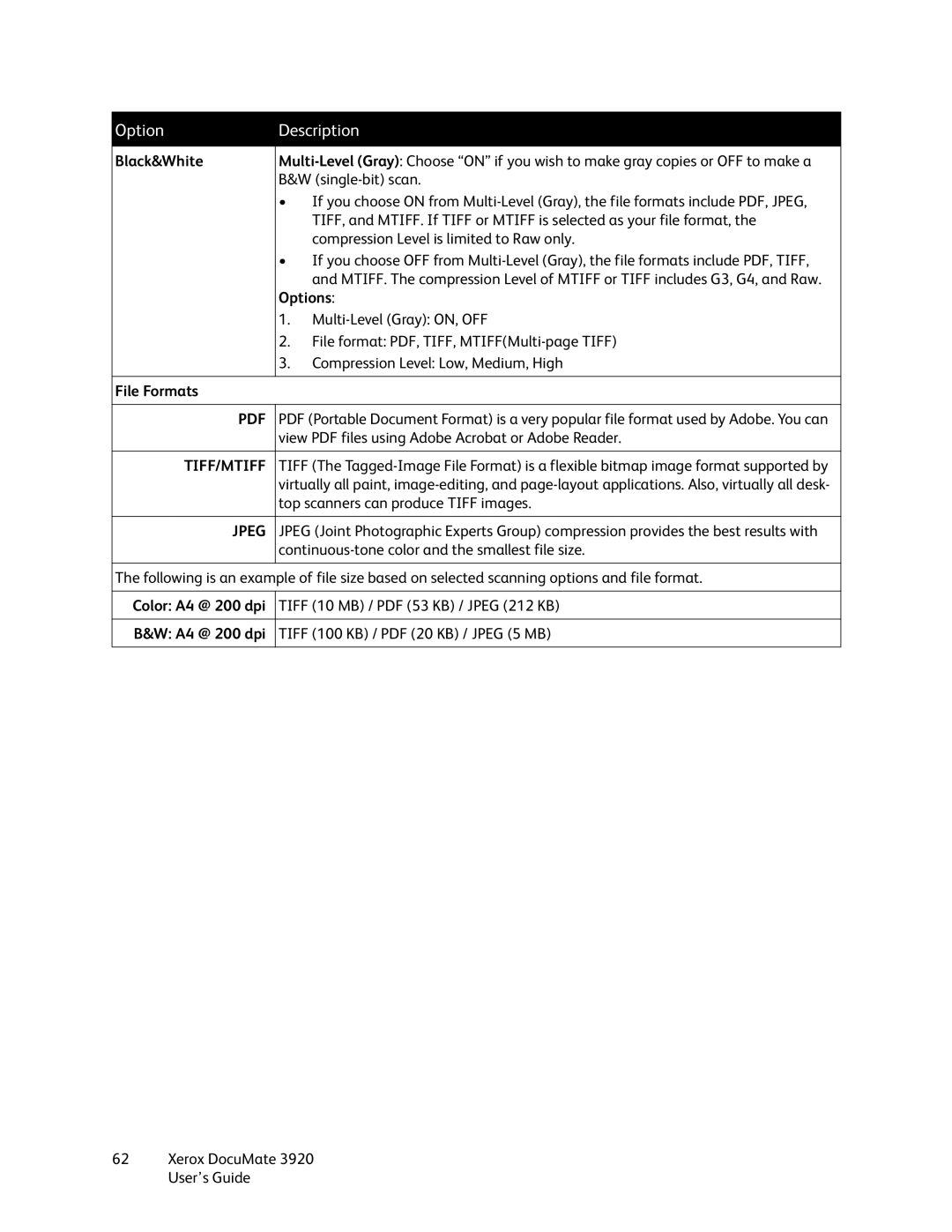
Option | Description | ||
|
| ||
Black&White | |||
| B&W | ||
| • | If you choose ON from | |
|
| TIFF, and MTIFF. If TIFF or MTIFF is selected as your file format, the | |
|
| compression Level is limited to Raw only. | |
| • | If you choose OFF from | |
|
| and MTIFF. The compression Level of MTIFF or TIFF includes G3, G4, and Raw. | |
| Options: | ||
| 1. | ||
| 2. | File format: PDF, TIFF, | |
| 3. | Compression Level: Low, Medium, High | |
|
|
| |
File Formats |
|
| |
|
| ||
PDF (Portable Document Format) is a very popular file format used by Adobe. You can | |||
| view PDF files using Adobe Acrobat or Adobe Reader. | ||
|
| ||
TIFF/MTIFF | TIFF (The | ||
| virtually all paint, | ||
| top scanners can produce TIFF images. | ||
|
| ||
JPEG | JPEG (Joint Photographic Experts Group) compression provides the best results with | ||
| |||
|
|
| |
The following is an example of file size based on selected scanning options and file format.
Color: A4 | @ 200 dpi | TIFF (10 MB) / PDF (53 KB) / JPEG (212 KB) |
|
|
|
B&W: A4 | @ 200 dpi | TIFF (100 KB) / PDF (20 KB) / JPEG (5 MB) |
|
|
|