Inactivity Page Flip
Display/Panel Timeout
Timeout
Connection Status
Project Information Page Elements
Project Information
Panel Information Page Elements
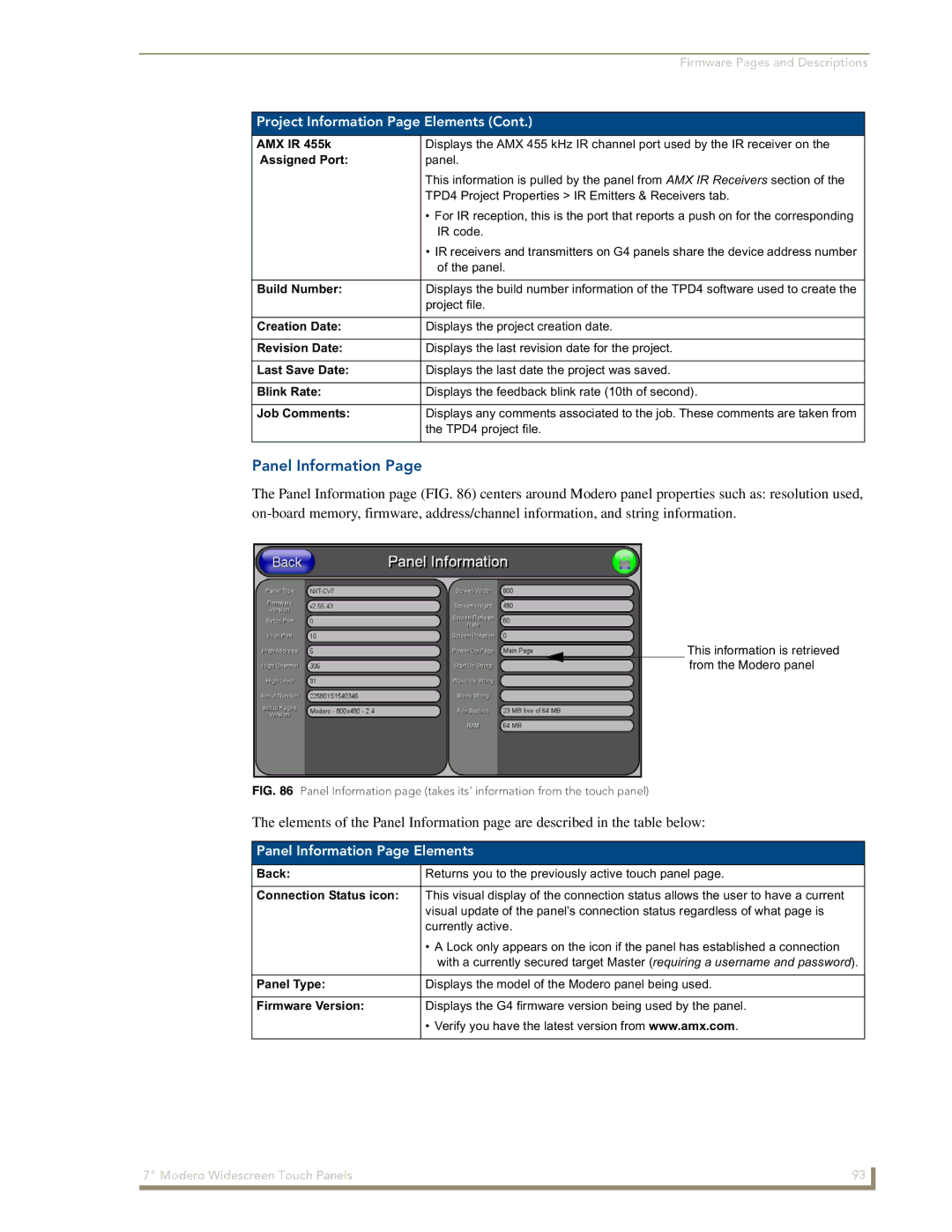
Panel Information
Time & Date Setup
Date Display fields
Time & Date Setup Page Elements
Time Date Refresh/Set
Time Display fields
Default Panel Sounds
Volume
Volume Page Elements
Master Volume
Supported WAV Sampling Rates
Protected Setup
Video Adjustment
Supported sampling rates for WAV
Video Setup Page Elements
Battery Base
Charge Status
Battery Base Page Elements
Low Battery Warning
This value can never exceed the Low Battery Warning value
Limit
Protected Setup Navigation Buttons
Battery Status fields
Set on the Setup page. This extends the battery usage time
Protected Setup Navigation Button Elements
Protected Setup
Device Number
Protected Setup Page Elements
Reboot Panel
System Recovery
G4 Web Control
Protected Setup page-System Recovery confirmation dialog
G4 Web Control Page Elements
G4 Web Control Settings
Remaining fields are configured
G4 Web Control Timeout
Sensor Setup Page Elements
Sensor Setup
Motion Sensor
Dim Mode Minimum
Light Sensor
Light Level field
Wake Panel On Motion Sense
Change
Password Setup
Password Setup Page Elements
Panel Password
Calibration
Wireless Settings
802.11g Wi-Fi CF card
Wireless Security Support
Wireless Settings Page Elements
802.11b Wi-Fi CF card
Access Point MAC
IP Settings
Address
Following fields are required Ssid and Password/Pass Phrase
Wireless Security
EAP-PEAP EAP-TTLS EAP-TLS EAP-LEAP
Following fields are required SSID, Identity, and Password
Communication quality
Password
Site Survey
RF Link Info
Save/Cancel
Wireless Settings Page Security Options Overview
Wireless Settings Page Security Options Open Clear Text
Wireless Security Open Clear Text Settings
Bit Key Size
Wireless Settings Page Security Options Static WEP
Wireless Security Static WEP Settings
WEP 64 / WEP
Default Key
Wireless Security Static WEP
WEP Keys
Authentication
Wireless Settings Page Security Options WPA-PSK
Current Key
Wireless Security WPA-PSK Settings
Wireless Settings Page Security Options EAP-LEAP
Password/Pass Phrase
Password
Wireless Security EAP-LEAP Settings
Identity
EAP-LEAP sample Cisco System Security
Wireless Settings Page Security Options EAP-FAST
Anonymous Identity
Wireless Security EAP-FAST Settings
Been Disabled
Disabled manual
PAC File Location
Wireless Settings Page Security Options EAP-PEAP
EAP Security’s Using Server Certificates Overview
Ssid Service Set Identifier
Wireless Security EAP-PEAP Settings
Wireless Security EAP-PEAP
Wireless Settings Page Security Options EAP-TTLS
Wireless Settings page EAP-TTLS security method
Wireless Security EAP-TTLS Settings
This field is optional and can be left blank
MSCHAPv2 default because its the most common
Wireless Security EAP-TLS Settings
Wireless Settings Page Security Options EAP-TLS
Client Certificate
Private Key password
Private Key
Certificate Type Possible File Extensions
Client certificate configuration
Client Certificate Configuration
Certificates and their Extensions
System Settings Page Elements
System Settings
Certificate Types Supported by the Modero Firmware
Master Connection
Full Duplex
134 Modero Widescreen Touch Panels
@APG
Commands
Commands
Button Assignments
@PHP
@DPG
@PDR
@PHE
Deactivates the popup page ’Popup1’ on the current
Close all popups on Page1
Deactivate a
Deactivates the popup page ’Popup1’ on the Main Example
@PPX
@PPM
@PPN
@PPT
@PSP
@PSE
@PST
Ppog
Ppof
Ppon
Index No Name Red Green Blue
Programming Numbers
RGB triplets and names for basic 88 colors
RGB Values for all 88 Basic Colors
142 Modero Widescreen Touch Panels
Font styles and ID numbers
Default Font Styles and ID Numbers
Font ID # Font type Size
TPD4 Border Styles by Name
Border styles
Border styles
Modero Widescreen Touch Panels 145
APF
Button Commands
Button Commands
ANI
BAT-vt addr range,button states range,new text
Sendcommand Panel,BAT-520,1,Enter City
Sendcommand Panel,BAU-520,1,00770062
BAT
BCF
BCB
BDO
BCT
BFB
Entry is required
BIM
BLN
BMC
Sendcommand Panel,BMC-150,1,1,315,1,%BR%FT%TX%BM%IC%CF%CT
BMF-vt addr range,button states range,data
BMF
BMF
BNC
BMI
BML
BMP
BNT
BNN
BOP
BOS
BOR
BPP
BSO
BRD
BSF
BSM
BVT
BVL
BVN
BVP
FON
CPF
DPF
ENA
GLL
GDI
GIV
GLH
GSN
GRD
GRU
GSC
JSB
ICO
JSI
MDC
JST
MBT
Pass data
TXT
TEC
TEF
Effect names
UNI-vt addr range,button states range,unicode text
Sendcommand Panel,UNI-500,1,0041
Sendcommand TP,UNI-1,0,0041
UNI
Text Effects
Text Effect Names
Defineevent
Button Query Commands
?BCB
Button Query Commands
Custom Event Fields
Field Description
?BCT
?BCF
?BOP
?BMP
?BWW
?BRD
?ICO
?FON
?JSI
?JSB
?TEC
?JST
?TEF-vt addr range,button states range
Send Command Panel,?TEF-529,1
Send Command Panel,?TXT-529,1
?TEF
Panel Runtime Operations
Panel Runtime Operation Commands
Brit
@AKP
@AKR
Beep
@PKP
Setup
@EKP
Pkeyp
Tpageoff
@SOU
@TKP
Tpageon
KPS
Input Commands
Input Commands
CAL
Embedded Codes
Embedded codes
Decimal numbers Hexidecimal values Virtual keystroke
Panel Setup Commands
Panel Setup Commands
Dynamic Image Commands
Dynamic Image Commands
RAF-resource name,data
Troubleshooting Information
Life indicator
Symptom Solution Updated my panel firmware but
My Battery Base page doesn’t
My NXT-BP battery pack is
When I connected my
Symptom Solution
Connecting
Was using the power from PSN
My WEP doesn’t seem to be
My battery from within an
NXA-BASE/1 connected to a pow
Ered panel
Behaves strangely
Connected to my System Master
Only one shows up
After downloading a panel file or
Troubleshooting 190 Modero Widescreen Touch Panels
Example
Text Formatting Codes for Bargraphs/Joysticks
Bargraph Text Code Inputs
Formatting Code Operations
Character Masking Rule
Text Area Input Masking
Input mask character types
Character Types
Input mask literals
Input mask ranges
Input mask next field characters
Input mask operations
Output Examples
Input mask output examples
Common Name Input Mask
Sequence Panel Information
URL Resources
Special escape sequences
Escape Sequences
Appendix a 196 Modero Widescreen Touch Panels
Overview of Wireless Technology
Appendix B Wireless Technology
802.1x
Terminology
Tkip
WPA2
Method Credential Type Authentication Pros Cons
EAP Authentication
EAP characteristics
EAP Method Characteristics
EAP security method in process
EAP communication overview
AMX Certificate Upload Utility
Configuring your G4 Touch Panel for USB Communication
204 Modero Touch Panels
How to Upload a Certificate File
206 Modero Touch Panels
Appendix B Wireless Technology Modero Touch Panels 207
Appendix B Wireless Technology 208 Modero Touch Panels
Appendix Modero Widescreen Touch Panels 209
It’s Your World Take Control