Manuals
/
Sierra Wireless
/
Computer Equipment
/
Network Router
Sierra Wireless
EV-DO
manual
Minutes 100k / month 50k / month
Models:
EV-DO
1
76
182
182
Download
182 pages
16.08 Kb
73
74
75
76
77
78
79
80
Page 76
Image 76
Data Communication and Host Modes
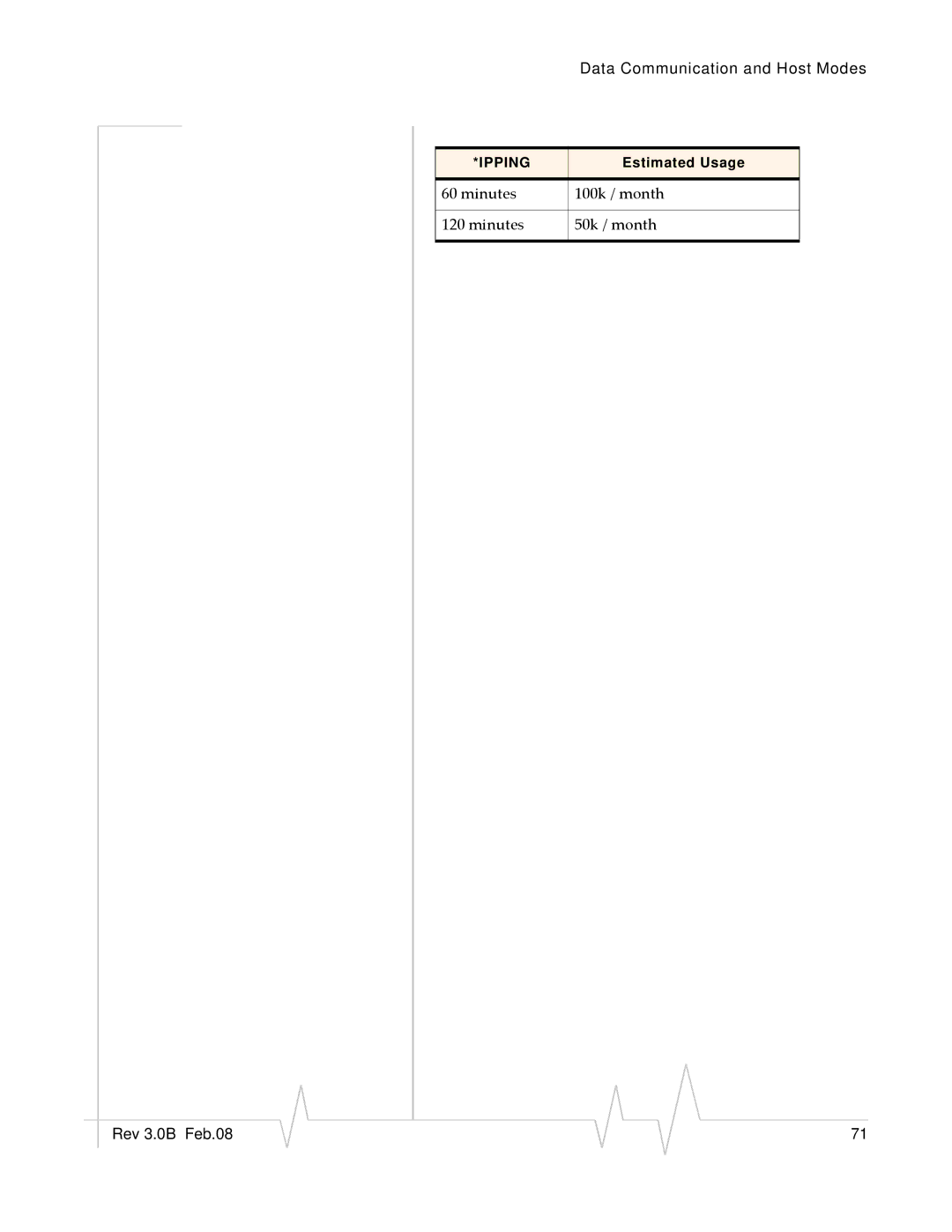
*IPPING
Estimated Usage
60 minutes
100k / month
120 minutes
50k / month
Rev 3.0B Feb.08
71
Page 75
Page 77
Page 76
Image 76
Page 75
Page 77
Contents
User Guide
Important Notice Safety and Hazards Limitation Liability
Patents Copyright Trademarks
Qualcomm 3G
Support@sierrawireless.com
Contact Information
Revision History
Revision Release Changes Number Date
Contents
Configuring your PinPoint-E
IP Manager
Snmp Simple Network Management Protocol
117
Contents
Contents
Windows Dial-up Networking DUN
Introduction to the PinPoint-E
AceWare
AceManager
Simplified Deployment
Monitor and Control
AceView
AceNet
Network Monitoring
Setup Wizard
Modem Doctor
Modem Doctor USB
Modem Doctor
Connecting to the Verizon Network
Steps of a connection
Connecting to the Internet
Dynamic vs. Static IP Addresses
EV-DO Communication
Security
Introduction to the PinPoint-E
Features and Benefits
Power Consumption @12V DC
Technology
Bands
Interface Port Pin-Outs
Power Connector
Serial Port Diagram Female DB-9 DCE not to scale
Activating your PinPoint-E on 3 the Verizon Network
Automatic Activation
Setup Wizard
Wizard Starting the Setup Wizard
Wizard Connecting to the Modem
Setup Wizard Ethernet Connection
Setup Wizard Serial Connection
Wizard Selecting Tasks
Optional Wizard Update Aleos
Setup Wizard Task Menu
Aleos Update
Wizard Activate Modem
Wizard Test Modem Setup
Setup Wizard Otasp screen
Setup Private Networking C3x10
Activating Using AT Commands
11 Setup Wizard Primary and Secondardy HA
Set telnet timeout in to 20 minutes
Hardware Installation PinPoint-E
GPS
Connecting to Power
Connecting to a Computer or other Device
Indicator Lights
Serial
Rssi LED Ranges RSSI/Signal LED Status Ranges of Rssi dBm
Light Patterns
Mounting
Optional Mounting Bracket
Mounting Bracket for PinPoint-E
Using AceManager
Start AceManager
Connect to your PinPoint-E
AceManager Connect to Modem
Enter the configuration options
AceManager Connected
Write the changes to the modem
Using Templates
Creating the Template with AceManager
· Cellular Technology specific settings the CDMA/EV‐DO group
Reset the modem
Applying a Template to one modem with AceManager
Configuring your PinPoint-E
10 AceNet Selected modems
Using a Terminal Application with AT Commands
Choose a name and icon for your connection
Port Settings serial only
Connect To
15 Port Settings
AT Commands
Connected
Configuring your PinPoint-E
Capturing External Events using Inputs
Configuring the DTR and/or RTS Monitoring
Connecting your device to the Serial Port
Power Modes and Information
AceManager Low Power
Wiring the PinPoint-E for DTR Event Trigger
Power Effect on Modem State
Basic Modes
Serial Modes
Basic Modes
Start up Mode
Data Communication
AT Mode
PassThru Mode
AceManager PassThru
Telnet Mode
Serial Modes
AT\APPP
UDP and UDP Pad
UDP Auto Answer
Reliable UDP
UDP Multicast Mode
TCP and TCP Pad
Hybrid Modes
TCP Auto Answer
Udplast
Public and Private Mode
Data Communication
Internal Dhcp Server
Configuring Keepalive
Keepalive
Data usage using Keepalive
AceManager Other
Minutes 100k / month 50k / month
IP Manager
Reasons to contact the modem and/or the connected device
Understanding Domain Names
Car54.mydomain.com
Dynamic Names
Car54.mydomain.com.ca
Using IP Manager with your PinPoint-E
AceManager Dynamic IP
Eairlink.com
Data Usage for IP Manager Server Updates
Restrictions for Modem Name
Configuring DNS
Understanding DNS
PPP-Peer Domain Name
AceManager DNS
GPS
GPS Overview
Remote Access Protocol RAP
PinPoint-E Supported Protocols
National Marine Electronics Association Nmea
Datum
Trimble Ascii Interface Protocol Taip
Configuring the PinPoint-E for
Before you Configure GPS
Configuring the Datum
Real-Time Clock Synchronization
Over-The-Air Remote Host
Local Host
TCP GPS Report Polling
Report Types
Sending Reports Automatically
Remote
Store and Forward
Report Delay on Power-Up
Local
Store and Forward Reliable Mode
Sending Reports Based on an Interval
RAP Configuration
Flush on Event
RAP Reports Over-The-Air Remote
RAP Reports over a Local Connection
Configuring Additional RAP Features
16 AceManager Misc S53
Odometer Data in Reports
Device ID
Serial Input Event Reports
COM 1000 support
Flush on Event
Nmea Configuration
Messages Over-The-Air Remote
Streaming Messages Local
26 AceManager Misc S53 Port
Persistent Streaming
29 HyperTerminal Nmea Streaming
Taip Command Emulation
Taip Emulation Configuration
Supported Taip Commands
34 AceManager PinPoint *PPIP/*PPPORT
Local Connection
35 AceManager PinPoint *PPGPRSR
Rev 3.0B Feb.08 100
Sending Unsolicited Taip Messages over the Local Connection
‐ *PGPS
Rev 3.0B Feb.08 102
Management Information Base MIB
Snmp Traps
Listening Port
Snmp Configuration
Security Level
User Name and Password
AceManager Change Password menu option
Trap Destination
Snmp MIB Definition Sample
Community String
Rev 3.0B Feb.08 107
Rev 3.0B Feb.08 108
Rev 3.0B Feb.08 109
Display Responses
Product ID
Configuration Commands
Info information
DEVICEID?
AUTOPRL=n
Status
=1‐255 days
NETERR?
POWERMODE?
Any other value Failure
AT Commands Requiring PassThru mode
GPS Status and Map Link
Misc Miscellaneous
Common
+++
Dmethodd.d.d.d/ppppp or Dmethod@name/ ppppp
DS=n
OPRG=n
S53=methodd.d.d.d/ppppp
Method= P UDP Method=T TCP Method=N Telnet
DPORT=n
=1‐65535
HOSTPAP=n
NETALLOWZEROIP=n
D.d=IP address
Serial
STATUSCHK=n
=2‐10 seconds
=0‐255
Parity=O Odd Parity=E Even Parity=N None Parity=M Mark
=1‐2545
=tenths of a second
Rev 3.0B Feb.08 126
\Qn
CTSE=n
NUMTOIP=n
PPPNOCARRIER=n
S0=n
S7=n
=seconds
S60=n
=0 ‐
=interval
AIP=n
HOR=n
MDhh
Hh=01 Slip Hh=02 PPP Hh=03 UDP Hh=04 TCP
Hh=33 Bsap
S82=n
S83=n
DU=n
DNSUPDATE=n
UDPLAST=n
USD=n
D.d=IP address of domain server
DNSUSER=d.d.d.d
Dynamic IP
DOMAIN=name
IPMGRUPDATEn=m
Name=domain name
IPMGRKEYn=key
MODEMNAME=name
PPP/Ethernet
DHCPSERVER=n
D.d=local or peer IP address of the modem
String=password
PassThru
HOSTPW=string
HOSTUID=string
=1‐255 minutes
String=AT commands
=1‐255 hours
Pw= password
NETSMS2EMAIL=n
=SMS/E‐mail server number
SMTPFROM=email
SMTPSEND=emailbody
Email=email address Body=message body
SMTPSUBJ=subject
Subject=message subject
Other
DAE=n
DATZ=n
IPPING=n
Name=domain name Port=port
D.d=IP address Name=domain name
=1‐255 seconds
Host=IP address Port=TCP port
=1 On
Low Power
=minutes
TPORT=n
DTRP=n
=0‐255 minutes
Friends
VLTG=n
FM=n
Logging
D.d = IP address
DBGCOMMLVL=n
DBGDHCPLVL=n
DBGETHLVL=n
DBGIPLVL=n
DTRI=n
PinPoint GPS
GPSn
RTSI=n
#IG=n
PGPS=n
PPCOM1000=n
=0‐65535 hex
PPINPUTEVT=n
PPLATS=n
PPLATSEXTRA=n
PPLATSR=n
=1‐65535 seconds
=meters
PPSNFM=n
PPSNFR=n
PPTAIPID=nnnn
PPTCPPOLL=n
PPTSV=n
1x/EV-DO
UDPRGPS=n
+CTA=n
$QCMIP=n
~NAMLCK=nnnnnn
Nnnnnn=6 digit unlock code
Nam=0 Min=phone number Msid=second number
Nam=0 Min=phone number
157 20070914
Install the driver
Installing a modem driver for PinPoint-E
Connect the PinPoint-E
Select the Modems tab
Check Don’t detect my modem I will select it from a list
Check Selected Ports
Configure the driver
Modem Properties
Creating a Dial-Up Networking PPP Connection
Modem Properties Modem
Create a new network connection
10 Windows Start menu
Select Connect to the Internet
Select Set up my connection manually
Rev 3.0B Feb.08 167
Rev 3.0B Feb.08 168
Configure the DUN connection
21 New Connection Finish
Check Show icon...when connected
Rev 3.0B Feb.08 171
Select Advanced
Connecting to the Internet Using DUN
Start AceView
Enable the Connection
Windows DUN
Start the DUN session
Select Dial to connect to the modem and the cellular network
Windows Dial-up Networking DUN Rev 3.0B Feb.08 176
Top
Page
Image
Contents