Remote Maintenance by telnet
ifconfig
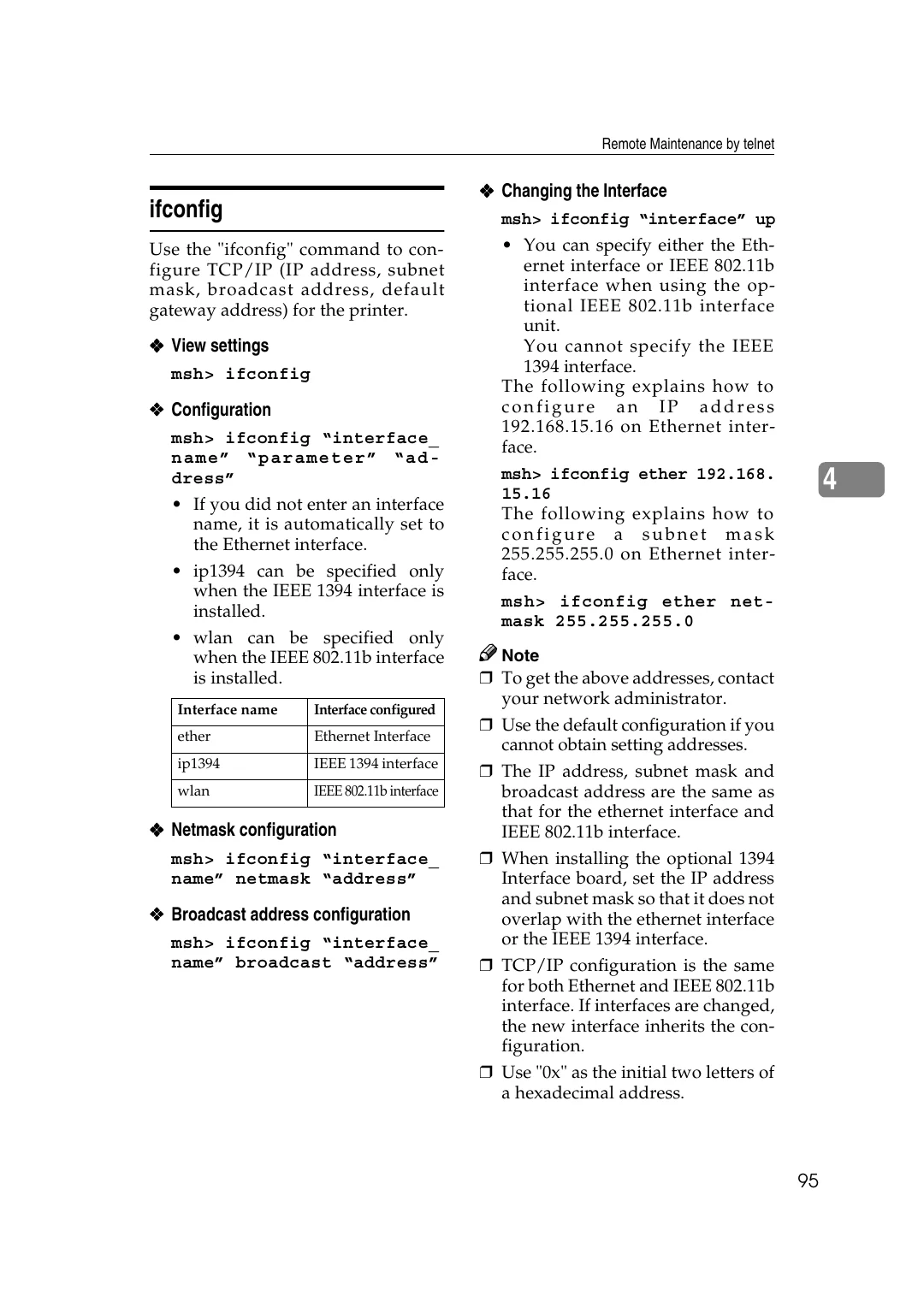
Use the "ifconfig" command to con-
figure TCP/IP (IP address, subnet
mask, broadcast address, default
gateway address) for the printer.
❖ View settings
msh> ifconfig
❖ Configuration
msh> ifconfig “interface_
name” “parameter” “ad-
dress”
• If you did not enter an interface
name, it is automatically set to
the Ethernet interface.
• ip1394 can be specified only
when the IEEE 1394 interface is
installed.
• wlan can be specified only
when the IEEE 802.11b interface
is installed.
Interface name
Interface configured
ether
Ethernet Interface
ip1394
IEEE 1394 interface
wlan
IEEE 802.11b interface
❖ Netmask configuration
msh> ifconfig “interface_
name” netmask “address”
❖ Broadcast address configuration
msh> ifconfig “interface_
name” broadcast “address”
❖ Changing the Interface
msh> ifconfig “interface” up
• You can specify either the Eth-
ernet interface or IEEE 802.11b
interface when using the op-
tional IEEE 802.11b interface
unit.
You cannot specify the IEEE
1394 interface.
The following explains how to
configure an IP address
192.168.15.16 on Ethernet inter-
face.
msh> ifconfig ether 192.168.
15.16
The following explains how to
configure a subnet mask
255.255.255.0 on Ethernet inter-
face.
msh> ifconfig ether net-
mask 255.255.255.0
4
Note
❒ To get the above addresses, contact
your network administrator.
❒ Use the default configuration if you
cannot obtain setting addresses.
❒ The IP address, subnet mask and
broadcast address are the same as
that for the ethernet interface and
IEEE 802.11b interface.
❒ When installing the optional 1394
Interface board, set the IP address
and subnet mask so that it does not
overlap with the ethernet interface
or the IEEE 1394 interface.
❒ TCP/IP configuration is the same
for both Ethernet and IEEE 802.11b
interface. If interfaces are changed,
the new interface inherits the con-
figuration.
❒ Use "0x" as the initial two letters of
a hexadecimal address.
95