Command Reference Guide
3Com Corporation 5400 Bayfront Plaza Santa Clara, California
Contents
System serialPort terminalSpeed
System console security access
System console timeout timeOut
System serialPort serialPortMode
System sntp remove
System nvData reset
System sntp display
Module baseline display
Management ip rip statistics
Management ip advancedPing
Ethernet paceAccess
Part IV Physical Port Parameters
Part V Bridging Parameters
Bridge cos summary
Virtual Lans Vlans
Bridge packetFilter unassign
Ip interface icmpRouterDiscovery
Ip arp display
Ip multicast igmp interface summary
Ip vrrp statistics
Ip multicast dvmrp tunnels summary
Ip multicast cache
Ip ospf linkStateData summary
Ip ospf virtualLinks statistics
Ipx server static
Ipx rip policy summary
Appletalk interface summary
Ipx statistics summary
Ipx statistics sap
Appletalk sourceSocket
Qos rsvp enable
Qos classifier summary
Qos classifier detail
3Com Knowledgebase Web Services
Analyzer display
Page
CoreBuilder SuperStack II Switch
Platforms Covered in This Document
Platform Release
Material about why or when to use a particular command. For
About command syntax, field descriptions, default values,
Help you to understand the commands
Information about troubleshooting and networking tasks, see
Finding Specific Information in This Guide
Platforms on which this command is valid
Command description begins at the top of a page. a command
Full command name
Short description of the purpose of the command
Recommendations For Entering Commands
Throughout this guide
Icon Description
Convention Description
Please send e-mail comments about this guide to
Include the following information when commenting
Documentation more useful to you
Document title
About this Guide
Administration Overview Command Summary
Page
Configuration Tasks
Administration Console Overview
CoreBuilder 9000 Management Features
Accessing the Administration Console
Administration Console
Management Controller EMC functions, such as login table
Management features
Use the Administration Console to manage the CoreBuilder
See the Web Management User Guide for the CoreBuilder
PSU
Intelligent Power Management Manages power use
EME Overview
Chassis Management Architecture Provides a cost-efficient
Type Command Top-Level Menus Tasks
Password Access
Levels
All modules use subslot
System displays a prompt similar to the following
Administer Access Example
Write Access Example
Read Access Example
Structure diagrams at the beginning of most chapters show
Your system supports the command
Layer 2 switching module is installed
Entering a Command String
Menu options are not case sensitive
Entering Abbreviated Commands
To accept the default or current value, press Enter
Entering Values in Command Strings
Enter q
Gives an overview of all the commands in this book
Command Summary
Part II System-Level Functions System Environment
Command Summary
Ch 4 Module Environment
Module redundancy reset NonRedundant module name
Script logout
Module display
Management summary management detail management ip
Ch 6 Snmp
Part IV Physical Port Parameters Ch 7 Ethernet Ports
Ethernet summary Ethernet detail Ethernet autoNegotiation
Ch 8 Fddi
Fddi station display
Fddi mac path fddi port display
Part V Bridging Parameters Ch 9 Bridge-wide Parameters
Bridge display
Bridge multicast igmp summary
Ch 10 Bridge Ports
Ch 11 Trunks
Ch 12 MultiPoint Link Aggregation
Ch 13 Resilient Links
Ch 14 Virtual LANs VLANs
Ch 15 Packet Filters
Part VI Routing Protocols Ch 16 IP
Command Summary
Ip rip password Ip rip addAdvertisement
Ch 17 Vrrp
Ch 18 IP Multicast
Ip multicast traceRoute
Ch 19 Ospf
Ip ospf areas display
Command Summary
Ch 20 IPX
Ipx server secondary
Ipx forwarding ipx rip mode ipx rip triggered
Ipx sap triggered
Ipx secondary
Ch 21 AppleTalk
Part VII Traffic Policy Ch 22 Quality of Service and Rsvp
Log display Log devices Log services
Part Viii Monitoring Ch 23 Event Log
Ch 24 Roving Analysis
Command Summary
System Environment Module Environment
Page
System Environment
System Environment
Important Consideration
System display
Valid Minimum Abbreviation
Fields in the System Display
Options
Prompt Description Possible Values Default
System fileTransfer
File transfer File transfer protocol for
Enter Web URL where the Web Help
Installation Are located
Sy co w Options
System console consoleAccess
System console ctlKeys
Important Considerations
Access level
Password
Logging on to the system
Most terminal screens are 24 lines high
Not a trusted client
Displays a summary of trusted IP client information
Fields in the System Console Security Display
Trusted IP address IP address of the trusted IP client Mask
System console security define
IP address IP address of the interface
Chosen from the range
Specified IP
To remove
Trusted IP
Client index
All Client ? for a list of selectable indexes
System console security access
Current deny message
Network
System console timeout timeOut
Telnet Timeout interval Minutes Interval
System snapshot summary
System snapshot detail
Tftp Procedure
3900 9300
FTP Procedure 3500 Only
Loads a new revision of system software
Host IP
Sy b d
Resets the baseline counters to zero
System baseline set
System baseline Enables or disables a baseline
RequestedState Valid Minimum Abbreviation
Procedure Local Connection
Terminal
Procedure IP Interface
Enter the terminal speed setting for the terminal port
System serialPort modemSpeed
Sets the baud rate of your system serial port
New value
System serialPort baudRate
Procedures
Procedure
Sy se e
System name
User specified option for start and end dates
Mean Time
Dst If you enter y to the prompt, a sub-menu appears that
If you enter n, you are returned to the Time menu
System time datetime Sets the system’s date and time
Format Description
Index That you want to configure
System time timezone
Time zone
System Time Timezone Example
14 GMT+100 CET/FWT/MET/MEWT/SWT
System time dst Sets daylight savings time
Format for option 5 is ccyy-mm-ssThhmmss
Enter a daylight saving time option
System nvData save
Important Considerations Tftp
Important Consideration FTP and Tftp
Optionally, enter a label for the file Example
Previous IP
System nvData save
Reset
You may not want to reboot
System reboots after each
Continue?
For example
If you enter y, the system displays the following messages
Sy nv e
Continue? To reboot because resetting
System nvData reset
Do you wish Confirmation of the reset
So the system reboots after
System clearDiagBlock
System diagErrLog
Displays Simple Network Time Protocol Sntp information
Field Description Configuration Information
System sntp display
Fields in the System Sntp Display
System sntp define
Server’s IP
Valid IP address Address Sntp database Except
System sntp modify
System sntp remove
Sntp state Whether you want to Disabled
System sntp state
Request poll Seconds, the poll interval
3600
System sntp tolerance
Time Time threshold value, Seconds 900 Tolerance
Local system time
System reboot
Reboots the system
Reboot Confirmation that you want to System? Yes
Valid Minimum Abbreviation Important Considerations
Example Script
Press Escape to return to the top level before you log out
Module Environment
Module Environment
Fields in the Module Display
Switching Fabric This module 3C number
Module display
Port Gigabit
Summary
You use the snapshot feature
Module snapshot
Detail display images
Module snapshot detail
Displays when the current baseline was last set
Module baseline set
Enables or disables a baseline
Possible Prompt Description Values Default
Module redundancy
Mo nam
Module Time Example
Most terminal screens are 24 lines
Prompts
Module nvData reset
Necessary after each reset
Do you wish Confirmation prompt
Performs an emergency download
Displays emergency download information for your module
Module nvData staging
3500 9000 9400
Module diagErrLog
Module reboot
Reboots the specified module
Enterprise Management Engine EME module
You from a Telnet session
Establishing Management III Access
Page
OUT-OF-BAND Management
OUT-OF-BAND Management
Fields in the Management Summary Display
ReqPortMode
That sets the port mode on Ethernet ports that have port
Mode options. If autonegotiation is enabled, port mode
Values are ignored
Management detail
Fields in the Management Detail Display
LateCollisions
Default is enabled
Port was disabled
MacAddress MAC address of this port MultiCollisions
To a higher-level protocol or application
Periods are 1 second long not configurable
RxUnicasts
Port during the most recent sampling period. Sampling
Fields in the Management IP Interface Summary Display
IP address IP address of the out-of-band
Interface, chosen from Range of addresses that
Command
Removes an IP management interface if you no longer need it
Management ip route display
Fields in the Management IP Route Display
Status for Routes
Value Description
Defines a static route
Deletes an existing route
Destination IP
Ip ro fl
Adds a default route to the routing table immediately
Deletes the default route
Searches for a route in the routing table
IP address or IP address that is
Fields in the Management IP ARP Display
Defines a static ARP cache entry on the system
You can define up to 128 static ARP entries
Management IP ARP Static Example
Management ip arp remove
Deletes all entries from the ARP cache
Ip ar flushD
RIP-2 mode
Index Index number of the interface RIP-1 mode
Default, advertise, and enabled
Fields in the Management IP RIP Display
IP interfaces
RIP mode
Learn Current Value Advertise Enabled
Which you want to set the RIP
Management IP RIP Mode Example
Displays general RIP statistics
Fields in the Management IP RIP Statistics Display
To interrupt the command, press Enter
Management ip ping
Management IP Ping Example
Management ip advancedPing
Disabled disabled Enabled Time between
Enabled, the system displays
Disabled, the system displays
Period . upon receiving an Icmp
Management IP Advanced Ping Example
Ip t
Management IP Trace Route Example
Ip traceRoute
Wait Wait interval in seconds that
Management IP Advanced Trace Route Example TTL value
Fields in the Management IP Statistics Display
Fields in the Management UDP Statistics Display
Fields in the Management Icmp Statistics Display
Number of Icmp time stamp reply packets that were sent
OutAddrMasks
Sent
OutTimeStamps
Snmp
Simple Network Management Protocol Snmp
Snmp display
Fields in the Snmp Display
Snmp community
Sets two Snmp community strings read-only and read-write
Snmp Community Example
Snmp trap display
Fields in the Snmp Trap Display
Snmp trap addModify
Snmp Trap addModify Example
Snmp trap remove
Snmp trap flush
Removes all Snmp trap reporting destinations
Snmp trap
SmtProxyTraps
Fddi station statistics
TransmitAndReceive Setting
Snmp writeDisable
Allows or disallows Snmp write requests
Ethernet Ports Fiber Distributed Data Interface Fddi
Page
Configure Ethernet ports in your system
This chapter shows whether your system supports the command
Ethernet summary
Fields in the Ethernet Summary Display
To display summary information about Ethernet ports, enter
VendorName
3500
Ethernet detail
Fields in the Ethernet Detail Display
Control value
AlignmentErrs
Is both enabled and connected to a cable. The value
3900 Bytes Layer 2, 9300 9400 PaceAccess
Config-error.The value on-lineappears when the port
Partitioned appears when the port has been disabled by
Station was last initialized
Error during reception
RxInternalErrs
This port to a higher-level protocol or application
Error during transmission
From this port by a higher-level protocol or application
Frames not transmitted successfully
Want to enable or disable
Disable
Autonegotiation
Ethernet portMode
Selected Earlier in this 100half Section 100BASE-FX
Setting Each of the ports that you Selected
Ethernet flowControl
Off RxOn TxOn
Flow Control Settings
Setting Description Port Type
Available on
Ethernet paceAccess
That you selected
Ethernet paceInteractiveAccess
Ethernet label
Ethernet portState
Valid Minimum Abbreviation Important Consideration
Ethernet monitoring mode
Fiber Distributed Data Interface Fddi
Fddi station display
Fields in the Fddi Station Display
Bit to Set for Rejecting a Station Connection
With defaults for connecting to a Port M
Port B has precedence with defaults for
Connecting to a Port M
Management CFM. In a single MAC node
Fddi station tNotify
All Enabled
Fddi path display
Displays Fddi path information
Fields in the Fddi Path Display
Fddi path tvxLowerBound
Fddi path tmaxLowerBound
Fddi path maxTreq
Microseconds Ring’s operational token Rotation time, TOpr
Fddi mac summary
Fields in the Fddi MAC Summary Display
Fddi mac detail
Fields in the Fddi MAC Detail Display
Or application. Does not include frames that were not
Received into receive buffers, such as missed frames
Higher-level protocol or application
Has expired
Enabled or the Fddi ring was not operational
This MAC can support
TvxValue
Modules All
Fddi mac notCopiedThreshold
Fddi mac llcService
Fddi mac path
Sets the path assignment for MACs
Fields in the Fddi Port Display
Error estimate
Fddi port display
LctFailCount
Fddi port lerAlarm
Fddi port lerCutoff
Fddi port label
Identification
Fddi port path
StationMode
Fields in the Fddi Station Mode Display
Fddi port numbers change, depending on
To a specific port
You want the stationMode
Changes to take effect
Fiber Distributed Data Interface Fddi
Bridging Parameters
Bridge-Wide Parameters Bridge Port Parameters
Page
BRIDGE-WIDE Parameters
Bridge display
Valid Minimum Abbreviation Fields in the Bridge Display
To discard the stored configuration message when it is
Configuration messages when the bridge is the root
Assigned to it by the root bridge. The default value is
Seconds. To configure the bridge maximum age, see
By the root bridge. Compare with the bridgeMaxAge
StpState Whether the Spanning Tree Protocol is enabled or
Later in this chapter. STP is also configured on a
Field
Enabled enabled Disabled
Bridged to Ethernet
SnapTranslation Snap Translation when
Versa from Fddi to Ethernet Options
Ipx
Ethernet and Fddi links
Bridge addressThreshold
Aging time Maximum period
To disable 300 10 1,000,000 seconds
Bridge agingTime
Dynamically learned
Removed
Disabled Default, or Current value Enabled
Disabled Default, or Current value
StpState
Bridge spanningTree stpPriority
Bridge spanningTree stpMaxAge
Bridge spanningTree stpHelloTime
Bridge spanningTree stpForwardDelay
Bridge spanningTree stpGroupAddress
Enable Disabled For the entire bridge
Bridge gvrpState
Gvrp state
Bridge cos enable
Bridge cos summary
Fields in the Bridge CoS Summary Display
Bridge cos modify
Igmp query source IP
Fields in the Bridge Multicast Igmp Summary Display
Function to operate
Address Messages if it is elected as the Igmp querier
Bridge multicast igmp snoopMode
Bridge multicast igmp queryMode
Bridge multicast igmp queryIpAddress
3500 9000
Fields in the Bridge Multicast Igmp Groups Display
Valid Vlan ID 1 Default Vlan VID
For which you are
ID number of the Vlan
Ports that lead to IP
Multicast routers
Bridge multicast igmp qPort
Bridge Port Parameters
Bridge port summary
Fields in the Bridge Port Summary Display
Disabled for the bridge
Port number depending on your system configuration
For example, when you define a trunk, only the anchor
Disabled Management has disabled the port or
Topology characteristics. This is the default
Enabled, the port STP configuration options are
Enabled STP sets the operating state of the port
Configuration for all ports
Bridge port detail
Fields in the Bridge Port Detail Display
RxErrorDiscs
To configure port priority values, see bridge port
Designated port when more than one bridge port is
StpCost in this chapter
Port multicastLimit in this chapter
Option, see bridge port multicastLimit in this chapter
RxMcastLimitType
RxNoDestDiscs
Learning Similar to listening, but the bridge
If bridge-wide STP is disabled, this port STP setting is
Forwards all frames. To configure STP on a port, see
Meaningless as long as its link state is up, the port
Processing includes bridge management frames
TxFrames Number of frames that this port transmitted to its
For a protocol that the local bridging function is
TxMcastFilters
BcastOnly
Broadcasts only McastBcast Multicasts
STP state
Enabled Enabled factory Disabled
Bridge port stpState
Specified ports
Bridge port stpCost
Po stpp
Bridge port gvrpState
Vlan
Valid bridge Port numbers All ? to display a Port summary
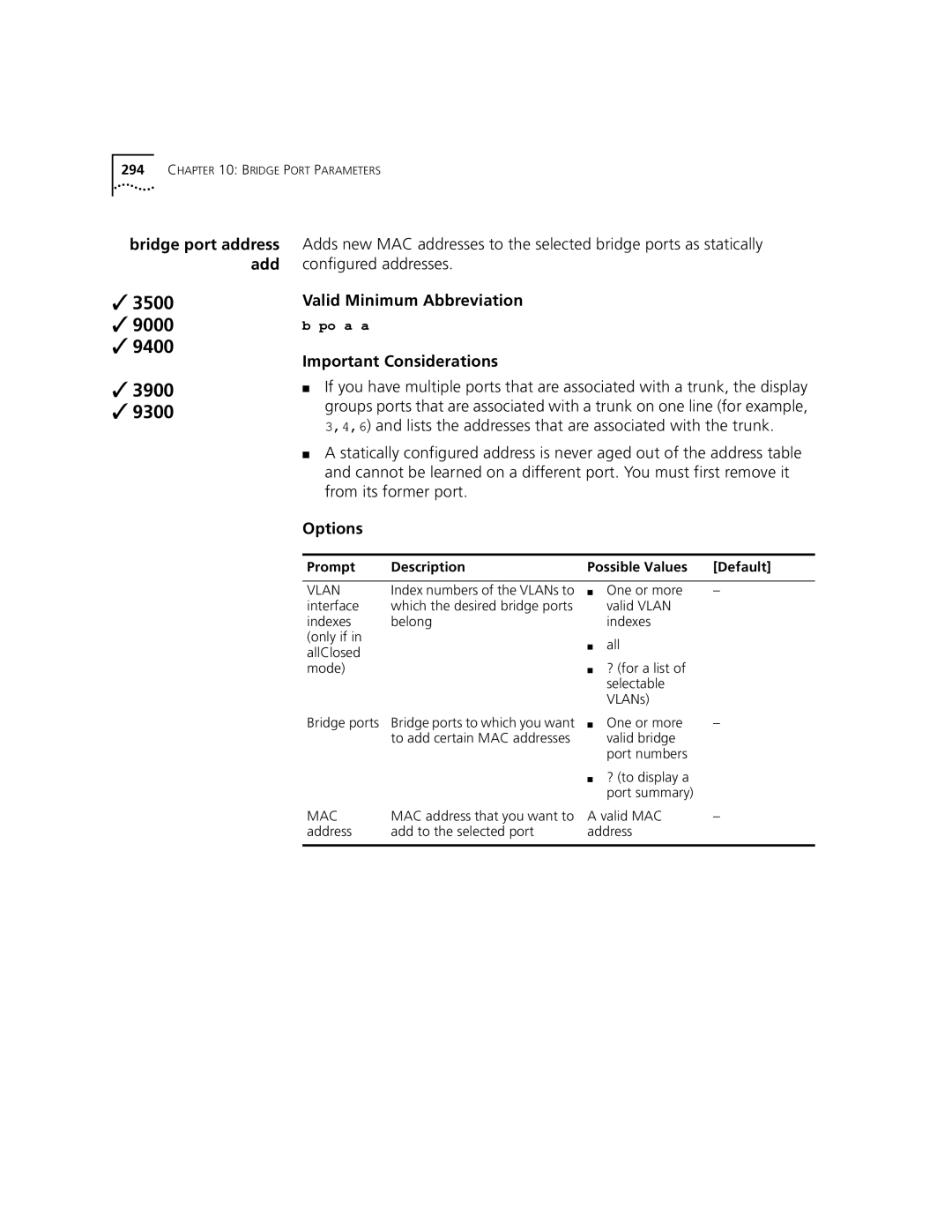
Bridge port address add
Removes individual MAC addresses from the address table
MAC address that you want to Valid MAC Address Remove
Bridge port address find
Bridge port address flushAll
Bridge port address flushDynamic
Trunks
Trunks
Fields in the Bridge Trunk autoMap Summary Display
Bridge trunk autoMap enable/disable
Bridge trunk autoMap test
You can select all or one trunk
Bridge trunk detail
Fields in the Bridge Trunk Detail Display
Whether Tcmp is enabled or disabled for the trunk
Bridge trunk define
Than one FastEthernet GigabitEthernet 10/100BASE-TX
1000BASE-SX ? for a list of selectable Media types
Ports that you want to be
Part of the trunk
Trunk Control Message
Trunk configuration
Flow
Following functions
Bridge Trunk Define Example
Example shows a define operation that creates two trunks
Bridge trunk modify
Changes a trunk in either of two ways
Bridge trunk modify
Ports
Enabled Disabled Factory Default, or Current
Deactivation of trunk
Fast Ethernet, Gigabit Ethernet, or Fddi
Bridge Trunk Modify Example
Bridge trunk remove
Bridge Trunk Remove Example
Trunks
Mpla
Bridge mpla summary
Peer Switch Interface
State Port on the other peer switch in the Mpla core
Describes the state of the multipoint aggregated link
Bridge mpla detail
Fields in the Bridge Mpla Detail Display
Use only Switch 3900 devices as edge switches
Switch
Use only CoreBuilder 9400 systems as Mpla core switches
Switch, for added bandwidth
Bridge mpla mode
9000
Input format for this MAC address is
Resilient Links
Fields in the Bridge Link Summary Display
Pair
Bridge link detail
Fields in the Bridge Link Detail Display
Bridge link define
Bridge link define
Bridge link linkState
Resilient link
Index Link that you want to modify LinkState
Bridge link activePort
Valid Minimum Abbreviation Options
Bridge link modify
Character string that has Embedded spaces Main port
Defined resilient link
Removing a link requires that you reboot the system
Bridge link remove
Bridge Link Remove Example
Virtual Lans Vlans
Bridge vlan summary
Valid Minimum Abbreviations
Fields in the Bridge Vlan Summary Display
Index System-assigned index number that identifies a Vlan
You specify
Interface using the ip interface define command with
Static The Vlan was created statically user-configured
By using the bridge vlan define command
System in allClosed mode
Bridge vlan detail
Fields in the Bridge Vlan Detail Display
Field Description Ignore STP mode
VLAN. The default Vlan always uses the name
Statistics appear for the Vlan that you specify
Create a router port IP interface using the ip
User-configured by using the bridge vlan
Define command
Interface define command with the interface
Default Vlan requires a VID
AllClosed mode
Nor can you change the VID of the default VLAN.
Compatibility mode for VLANs configured prior to
Bridge vlan define 3500/9000 Layer
Virtual Lans Vlans
Operations
If the default
Used by management
Vlan exists
DECnet
Vines
Yes Layer
None
802.1Q Up to 32 Ascii Characters or Spaces
IP Vlan
Bridge Vlan Define Example 9000 Layer
Bridge Vlan Define Example
3500 9000 9400 3900 9300
Configure the per-port tagging
Bridge Vlan Define Example 9000 Layer
Bridge vlan modify 3500/9000 Layer
Vlan interface index
Selectable Vlan If you have That identifies a Vlan Index
Apple for AppleTalk
Commands
Protocol suite
Unspecified
Bridge Vlan Modify Example 9000 Layer
Bridge Vlan Modify Example
Bridge vlan modify 3900/9300/9400/ 9000 Layer
Are available to Be assigned to Vlan All
Yes Tag type Vlan name
Up to 32 Ascii Current Characters or Name Spaces
Bridge Vlan Modify Example 9000 Layer
Bridge Vlan Remove Example
Bridge vlan remove
Deletes a Vlan definition
Interface Is associated with the Vlan Index Continue
Bridge vlan mode
Select a Vlan mode as follows
Bridge Vlan STP Mode Example
Bridge vlan stpMode
Bridge vlan vlanAwareMode
Bridge Vlan Aware Mode Example
Virtual Lans Vlans
Packet Filters
Packet Filters
Lists the currently defined packet filters
Bridge Packet Filter List Example
Displays the contents of the specified packet filter
Sample Bridge Packet Filter Display
Bridge Packet Filter Create Port Group Example
This example shows the user creating the portGroup filter
Creates a custom packet filter using the built-in editor
Create Custom Bridge Packet Filter Example
Deletes the selected packet filter
Bridge Packet Filter Delete Examples
Modifies an existing packet filter using the built-in editor
Replace Existing Filter Example
Store as New Filter Example
Syntax of the EME download command is
Current IP
Bridge Packet Filter Load Example
Prompt Description
Name last
User next connects to the module and loads the filter
CB9000 connect
Bridge packetFilter assign
TxA
Bridge Packet Filter Assign Examples
Select paths Identifier Path to which you
TxM
Unassigns selected packet filter from one or more ports
Bridge Packet Filter Unassign Examples
Unassignment is from the transmit all txA paths on port
Bridge Packet Filter Port Group List Example
Displays a port group
Sample Bridge Packet Filter Port Group Display
Select port
3500 9000
Bridge Packet Filter Port Group Create Example
PortGroup delete Deletes a selected port group
Bridge Packet Filter Port Group Delete Example
Adds ports to an existing port group
Bridge Packet Filter Port Group Add Port Examples
Removes ports from a port group
Bridge Packet Filter Port Group Remove Port Examples
Displaying port group 2 shows that port 6 is removed
IP Multicast
AppleTalk
Page
Internet Protocol IP
Internet Protocol IP
397
Ip interface summary
Fields in the IP Interface Summary Display
Ip interface detail
Host portion of the address is enabled or
Disabled for the specified interface. a directed
Fields in the IP Interface Detail Display
As the network number, the subnetwork number,
Preference Whether there is a preference being used for
Preference level
To a 0 is in the host part of the IP address
IP Interface Detail Example
Defines an IP interface
Addresses that
IP address IP address of the interface, chosen
From the range of addresses that Range
Index for
IP Interface Define Example Port-based Routing
IP Interface Define Example VLAN-based Routing
Layer
Defines an IP interface
3900/9300/9400
IP Interface Define Example
Ip interface modify
Vlan index Value
Ip interface remove
Removes an IP interface from the system’s routing table
Ip interface arpProxy
IP Interface ARP Proxy Example
IP interfaces Index number Interfaces to which you
More than one interface
IP Interface Directed Broadcast Example
Ip interface icmpRedirect
Not applicable if you have
Disabled Current Value
Frame
Icmp redirect Whether you want to State
Icmp router discovery can be set on a per-interface basis
Hex Bit signed 231to Twos-complement integer that
1800
Holdtime Advertisements are held valid
IP Interface Icmp Router Discovery Example
Ip interface statistics
Displays IP interface statistics on a per-interface basis
Fields in the IP Interface Statistics Display
Than
Or both
Ip route display
Options 3500 only
Fields in the IP Route Display
3500 9000 9400 3900 9300
Ip route r
Ip route flush
Deletes all learned routes from the routing table
Ip route default
Ip route n
Ip route findRoute
Ip arp display
Fields in the IP ARP Display
IP ARP Static Example
Ip arp remove
Ip arp flushAll
Ip arp flushDynamic
Ip ar a
System supports baselining for ARP statistics
Resolution Protocol ARP event occurs
Ip arp statistics
Fields in the IP ARP Statistics Display
ARP request
Resolution
Was down
ARP reply
Ip dns display
Fields in the IP DNS Display
Changes the name of a currently defined domain
Characters long Valid domain name
Or current name
Like the following
Index number to modify or remove this IP address
Name server IP
Ip dns modify
Modifies a currently defined name server IP address
Address that you
Deletes a previously defined name server IP address
Want to remove
Selectable server Index number ? for a list Indexes
Ip dns nslookup
Ip udpHelper display
Fields in the IP udpHelper Display
Ip udpHelper define
Ip udpHelper remove
Deletion
Ip udpHelper hopCountLimit
By default, there is no threshold
Ip udpHelper interface first
Ip udpHelper interface even
Ip udpHelper
Interface sequential
Interfaces sequentially
By default, IP routing is disabled on the system
Ip rip display
Fields in the IP RIP Display
9000 only By default, enabled RIP-1 Mode
State as off. Other modes are learn default
9000 only
Ip rip mode
IP RIP Mode Example
Not Handles RIP 2 packets Updates Disabled Learn Factory
Advertise Current Only Value Enabled 3500 only
Handles RIP-2 updates
Compatibility mode
Compatibility Compatibility mode that Mode
IP interfaces Index number of the interfaces
On a per-interface basis, sets the RIP cost
Ip rip poisonReverse
Enables or disables RIP Poison Reverse mode on the system
Enabled Value
Selected interface
Disabled Enabled Current value
Sent during a RIP Version 2 update
Mode On the selected interface All
Collapse route table entries for all subnets of a directly
Ip rip password
IP RIP Password Example
Adds an advertisement address to an IP RIP interface
Valid IP address Address List of advertisement addresses
Ip rip remove Advertisement
Route policies are classified as follows
Ip rip policy summary
Displays summary information about RIP routing policies
Fields in the IP RIP Policy Summary Display
Fields in the IP RIP Policy Detail Display
Ip rip policy detail
Displays detailed information about RIP routing policies
All interfaces
Ip rip policy define
Defines an import or export route policy for RIP
0.0 All
+ add Subtract
RIP Import Policy Conditions for Specified Interfaces
Source Route Router Address/mask Action Description
Example of Export Policy
RIP Export Policy Conditions for Specified Interfaces
Example of Import Policy
Source Protocol Router Action Description
Protocols Static route for export policies
Ip rip policy modify
Modifies an existing route policy for RIP
Export Only All
Values associated with the route
Ip rip policy remove
Deletes a previously defined route policy
Fields in the IP RIP Statistics Display
Ip ping
IP Ping Example
Ip advancedPing
System displays a period . upon
Enabled Disabled
Enabled Seconds Yes Selectable Interface index Router
Receiving an Icmp echo replay
IP Advanced Ping Example
Ip traceRoute
IP Trace Route Example
From which the probe packets
Defined on the system
4096 Bytes Yes
IP Advanced Trace Route Example TTL value
Numeric mode Whether the system shows hop
Disabled Enabled
Their indexes
Valid Minimum Abbreviation ip sta Options
Fields in the IP Statistics Display
Fields in the UDP Statistics Display
Fields in the Icmp Statistics Display
OutDatagrams Number of UDP packets that the router sent
Number of Icmp time stamp reply packets
Vrrp
Ip vrrp summary
Fields in the IP Vrrp Summary Display
Sample IP Vrrp Summary Display
Master, Backup, or Initialize state
Fields in the IP Vrrp Detail Display
To the Master state
Auth Whether the Vrrp router uses simple password
IpTtlErrors Total number of Vrrp advertisements with IP TTL
Vlan consider the Master down if two advertisement
PriorityZeroTx
Stopped participating in VRRP. Used to trigger backup
Type Type of virtual router primary or backup VersionErrors
That this virtual router has sent. The priority of zero
IpTtlErrors
Sample IP Vrrp Detail Display
Ip vrrp define
Defines a virtual router on the system
Backup Index number of an IP Virtual LAN Vlan that
Define the virtual
IP Vrrp Define Example
Priority master
Ip vrrp modify
Modifies an existing virtual router
Backup Auto-learn
Router Indexes
IP Vrrp Modify Example
Vrid Vidx
Ip vrrp remove
IP Vrrp Remove Example
Virtual router identifier
Enables or disables a configured virtual router
IP Vrrp Mode Example
Identifies the virtual router
Displays a list of neighboring virtual routers
Master or Backup router
Ip vrrp neighbor
Fields in the IP Vrrp Neighbor Display
Fields in the IP Vrrp Statistics Display
Vriderrors
Displays general Vrrp statistics for the virtual router
Number that this virtual router has received
Virtual Router Redundancy Vrrp
IP Multicast
IP Multicast
Fields in the IP Multicast Dvmrp Interface Summary Display
Non-querier The interface is not functioning as
Multicast Routing Protocol
Fields in the IP Multicast Dvmrp Interface Detail Display
Non-leaf The interface is a branch in the IP
Ip multicast dvmrp interface mode
Modify the default
Routing interface for
Ip multicast dvmrp tunnels summary
Fields in the IP Multicast Dvmrp Tunnels Summary Display
Ip multicast dvmrp tunnels define
Address Multicast tunnel end Point. Use standard
Interface Index number Interface on which you
Remote
Valid IP interface on a different system and subnetwork
Deletes a Dvmrp tunnel end point from the system
Ip multicast dvmrp tunnels address
Valid Minimum Configuration
Prompt Definition Possible Values Default
TTL threshold
Modifies the metric or cost of an existing Dvmrp tunnel
Fields in the IP Multicast Dvmrp Route Display
Fields in the IP Multicast Dvmrp Cache Display
Routing interface index number. a T precedes a tunnel
When there are no outgoing interfaces and when
Listed on the left
After the index number indicates that a prune
Function is activated and these values represent the cost
Summarizes key information about Igmp interfaces
Fields in the IP Multicast Igmp Interface Summary Display
As the Igmp querier, this field shows Self
Interface detail
Port information
Fields in the IP Multicast Igmp Interface Detail Display
Ip multicast igmp interface TTL
React to Igmp
Disabled Or current value
Your selection applies to all interfaces in the system
Packets and set
Query mode
Can offer itself as a
Candidate for
Ip multicast cache
Fields in the IP Multicast Cache Display
Multicast group address
Ospf
Open Shortest Path First Ospf
Ip ospf areas display
Displays a list of existing Ospf areas
Fields in the IP Ospf Areas Display
Backbone area 0.0.0.0 is configured by default
Yes Factory Default, or Current value
Area ID must be unique for the autonomous system
Description Possible Values Default
3500 9000 9400 3900 9300
Range class
Variable, based on You want to add to the area
On address
Whether to advertise area Yes Range
IP Ospf Areas Modify Range Example
Variable, based on Current value Mask You want to modify
Ip ospf areas removeRange
Field in the IP Ospf Default Route Metric Display
Default router
By default, the default route metric is not defined
It entails more hops or less bandwidth
Defines the default route metric for the router
Route metric With the default route
3500 9000 9400 3900 9300
Fields in the IP Ospf Interface Summary Display
AreaID Ospf area to which the interface belongs
IP interface of the backup designated router BDR
Fields in the IP Ospf Interface Detail Display
Ospf information is displayed
Designated router
This router is not the designated router or backup
BDR Router is the backup designated router on
Attached network
Fields in the IP Ospf Interface Statistics Display
Interval than this router. This prevents the router from
On the interface are configured with a different dead
MismatchDead
Becoming a neighbor with these other routers
When an Ospf database descriptor packet is received
When an Ospf Hello packet is received and the packet
When an Ospf Hello packet is received that has the same
When processing an LSR packet, if the area is not
Problems
Network whose configuration has not changed could
When an Ospf database descriptor packet is transmitted
When an Ospf Hello, LSU, or LSAck is being sent as a
Enables or disables Ospf on specified IP interfaces
Assigns interface priority to the Ospf router
One or more All factory
Associates an interface with an Ospf area
Assigns a cost to an Ospf interface
Sets the Ospf interface transmit delay
Transmit Delay in seconds that you
Ip ospf interface hello
Sets the interface Hello interval
Ip ospf interface retransmit
They determine that
Ip ospf interface dead
Specifies the dead interval for an interface
Transmitting router is inactive
Sets password security for an Ospf interface
Ascii characters Default, or
All ? for a list Selectable Indexes Up to eight
Ip ospf linkStateData databaseSummary
Fields in the IP Ospf Link State Data Router Display
Lsid
Stub Net Network IP address mask
ID number of the router that originated the LSA
Metric Cost of the link Router ID Originating router ID
Fields in the IP Ospf Link State Data Network Display
Link State ID
For which you want to view
Summary LSA information
For type 3 summary LSAs
Type 4 ASBR’s Ospf router ID
Fields in the IP Ospf Link State Data Summary Display
Type 3 Destination network’s IP address
Metric Cost to reach the network Network mask For
Fields in the IP Ospf Link State Data External Display
IP network number
Two-way Bidirectional communication has been
Data received from neighbor will attempt to contact
Init Have recently seen Hello packet from neighbor
Established
Ip ospf neighbors add
Adds a neighbor static IP address to an existing interface
3500 9000 9400 3900 9300
Sets the Ospf router ID
IP Ospf Router ID Example Interface Type
IP Ospf Router ID Example Address Type
Maximum size of the IP routing table at the next reboot
Partition at the next reboot
Means that Ospf has been set to use the default memory
Specific maximum partition size at the next reboot
Modifies the maximum memory that Ospf can allocate
There are three choices for memory allocation
By default, the stub default metric is not defined
Field in the IP Ospf Stub Default Metric Display
Ip ospf stubDefaultMetric define
Ip ospf stubDefaultMetric remove
Update packet over the virtual link
Fields in the IP Ospf Virtual Links Summary Display
Displays detailed information about a virtual link
Fields in the IP Ospf Virtual Links Detail Display
Fields in the IP Ospf Virtual Links Neighbor Display
Ospf routers are being discarded due to authentication
Fields in the IP Ospf Virtual Links Statistics Display
Is not supported in the current implementation
Down and reestablished
When an Ospf Hello packet is received and the packet
ReceiveLSU
Creates a new virtual link to a destination router
Description Possible Values Default
To reach the target router
3500 9000 9400 3900 9300
Sets the virtual link transmit delay, in seconds
Sets the virtual link Hello interval, in seconds
Ip ospf virtualLinks retransmit
Sets the virtual link dead interval, in seconds
Password Sets password security for a virtual link
Fields in the IP Ospf Policy Summary Display
Type 1 as default. Only applicable to export policies
Ip ospf policy detail
Fields in the IP Ospf Policy Detail Display
Field Description
Ip ospf policy define
Defines import and export Ospf routing policies
Export Direct
Policy type Type of policy Origin
Protocols From which protocol the route Originated Import
Sta static Rip
Ospf Import Policy Conditions
Route Address/mask Action Description
Ospf Export Policy Conditions
Export Policy Conditions for Direct Routes
Protocol Interface Action Description
Example of Export Policy for a Directly Connected Interface
Ip ospf policy modify
Modifies an existing Ospf routing policy
Policy
Sta static rip Value
Policy action Accept or reject the route Valid IP
Without options Value Type
AS external advertisement
ASE, defined as
Type Value
IP Ospf Policy Modify Example
Routers Specified routers
Ip ospf policy remove
Deletes Ospf routing policies
Ip ospf statistics
Displays general Ospf statistics
Fields in the IP Ospf Statistics Display
Open Shortest Path First Ospf
IPX
Display define modify remove SAPadvertising RIPadvertising
Fields in the IPX Interface Display
IPX interface. When the system prompts you
Ipx interface display
For this option, the menu identifies the available
Ipx interface define
Defines an IPX interface
IPX Interface Define Example
Changes the characteristics of an existing IPX interface
Ipx interface modify
EthernetII
Available with 802.2, SNAP,
802.3/SNAP
802.2 Format 802.2 LLC RAW802.3
Ipx i r
Controls whether the system advertises IPX services
Controls whether the system advertises IPX routes
Ipx route display
Start
0x0 0xffffffff Range You want to display routes
Packets to the segment. a node address of all
Fields in the IPX Route Display
Time the router sent a packet
Zeroes 00-00-00-00-00-00 means that
Ipx route secondary
Displays any secondary routes that are available
Fields in the IPX Secondary Route Display
Ipx route static
Node address in the format
IPX Static Route Example
Ipx route remove
Deletes a route from the IPX routing table
IPX network Byte IPX network address 0x1 0xfffffffe Address
Ipx route flush
Ipx server display
Time a server in the table sent a packet
Service type
Fields in the IPX Server Display
Server. The maximum number is
Defines a static IPX server
Interface index Interface index number for
IPX Static Server Example
Service name Service name of the server Service type
Deletes a server from the IPX server table
? for a list of selectable names 0x1 0xffff
Ipx server flush
Ipx server secondary
Displays any secondary servers that are available
Fields in the IPX Secondary Server Display
Ipx forwarding
Controls whether the system forwards or discards IPX packets
Triggered RIP updates
RIP allows the exchange of routing information on a NetWare
Passive The system processes all incoming RIP packets
Ipx rip triggered
3500 9000 9400 3900 9300
Ipx rip policy define
Define a RIP Routing Information Protocol policy
IPX RIP Policy Define Example
Ipx rip policy modify
Modify an existing RIP Routing Information Protocol policy
Static All
Adjust the metric value, This
IPX RIP Policy Modify Example
Subtract\ Multiply Divide
Ipx rip policy remove
Remove an existing RIP Routing Information Protocol policy
If only one policy
Ipx sap mode
Ipx sa t
Name Object name that assigned to the server Type
Or Export apply the policy to advertised services
Fields in an IPX SAP Policy Summary Display
All routes
Fields in an IPX SAP Policy Detail Display
0x0098
Define a SAP Service Advertising Protocol policy
Ipx sap policy define
Parameter is valid only if Policy Type is set to Export All
Match the same service. a
Enter up to 6 hex characters
IPX SAP Policy Define Example
Modify a SAP Service Advertising Protocol policy
Ipx sap policy modify
00-00-00-00-00-00
IPX SAP Policy Modify Example
Remove an existing SAP Service Advertising Protocol policy
Ipx output-delay
Displays IPX summary statistics
Fields in the IPX Statistics Summary Display
Applications that were dropped
Ipx statistics rip
Displays IPX RIP Routing Information Protocol statistics
Fields in the IPX RIP Statistics Display
Fields in the IPX SAP Statistics Display
Displays IPX SAP Service Advertising Protocol statistics
Ipx statistics sap
Been processed
Displays IPX forwarding statistics
Fields in the IPX Forwarding Statistics Display
No Routes
IPX route is unknown
Ipx statistics interface
Displays IPX interface statistics
Fields in the IPX Interface Statistics Display
Field Description
Ipx oddLengthPadding
IPX NetBIOS Example
Valid Minimum Abbreviation ipx n Options
Ipx secondary
IPX Secondary Example
IPX
Appletalk
Appletalk
Displays summary information for all AppleTalk interfaces
Fields in the AppleTalk Interface Summary Display
With the AppleTalk interface
Displays detailed information for all AppleTalk interfaces
Fields in the AppleTalk Interface Detail Display
Defines an AppleTalk interface
Interface. Seed interfaces only
Zone name. Seed interfaces Only
Zone name AppleTalk zone that is
Modifies an existing AppleTalk interface
Interface n
Vlan interface index, it
That you can associate with a
New AppleTalk interface
Removes an existing AppleTalk interface
Fields in the AppleTalk Interface Statistics Display
RtmpRouteDeletes
NbpInLookupReqs
RtmpOutDataPkts
Aged out of the table
Fields in the AppleTalk Route Display
Appletalk route flush
Fields in the AppleTalk Aarp Display
Appletalk aarp remove
9300Important Consideration
Appletalk zone display network
Displays the AppleTalk Zone table indexed by zones
Appletalk forwarding
AppleTalk protocol uses checksums to detect errors in data
Appletalk checksum
Verification checksum from the incoming data and compares
Appletalk sourceSocket
Appletalk ping
Destination AppleTalk node that you want
To test for network connectivity Address
Fields in the AppleTalk DDP Statistics Display
Fields in the AppleTalk Rtmp Statistics Display
Displays AppleTalk Zone Information Protocol ZIP statistics
Fields in the AppleTalk ZIP Statistics Display
Any error
Displays AppleTalk Name Binding Protocol NBP statistics
Fields in the AppleTalk NBP Statistics Display
Quality of Service QoS and Rsvp
VII
Page
Rsvp
Quality of Service QOS and Rsvp
Fields in the QoS Classifier Summary Display
Qos classifier detail
Fields in the QoS Classifier Detail Display
Are predefined
Flow classifiers only Classifier Installed
Protocol UDP port range
Qos classifier define
Defines a flow or nonflow classifier
Classifier can have only one control applied to it
Flow or nonflow
Up to 0.0 Factory Default
Classifier Number of the flow
Classifier
Ethertype Protocol type Classifiers with
Source IP For flow classifiers Up to four portions 0.0
End value
Custom Custom protocol Nonflow Type Classifiers only
Flow Classifier Procedure
Custom Hex values for Protocol
Quality of Service QOS and Rsvp
QoS Classifier Define Example Flow Classifier
Nonflow Classifier Procedure
QoS Classifier Define Example Nonflow Classifier
Qos classifier modify
Modifies a previously defined classifier
Match, or
255.255.255.255 Factory
Procedure Flow Classifier
Quality of Service QOS and Rsvp
QoS Classifier Modify Example Flow Classifier
Removes a previously defined classifier
QoS Classifier Remove Example
Displays summary information about QoS controls
Fields in the QoS Control Summary Display
Packet can be dropped if the transmit queue for which it is
Fields in the QoS Control Detail Display
Limit Rate limit in KBytes/sec or percentage Loss eligible
Destined is over its threshold
So forth
Type Rate limit type, none no rate limit, receivePort, or
Qos control define
Defines a control for one or more existing classifiers
ReceivePort Default Aggregate For rate limit
Default/Best Effort for
Service level Service level for
Control name Name that you assign to
How rate limit
Enabled backplane ports
Control Used so that drop packets Enabled
Is expressed
Specific
Input Time Type Options
Input Time Type Options
Weekdays Starting time hhmm Ending time hhmm Weekends
You can apply aggregate rate limits only to flow classifiers
Quality of Service QOS and Rsvp
Enter the classifiers that are subject to this control
QoS Control Define Example
Qos control modify
Select
Limit without affecting the other defined rate limits
Specified for
Service level Service level for Conforming packets
Service level for excess
That are associated with
None ? for a list of selectable values TCP drop
You want to enable
For flow or nonflow
For a control
Procedure
Quality of Service QOS and Rsvp
QoS Control Modify Example
ReceivePort
Removes a previously defined control
QoS Control Remove Example 9000 Layer
Qos ldap display
Fields in the QoS Ldap Display
Qos ldap enable
Qos ldap disable
Disabled Removes the connection to Ldap server
Performed policing for that flow. Options are edge, always
Qos rsvp summary
Fields in the QoS Rsvp Summary Display
Total resv
Displays detailed Rsvp information when Rsvp is enabled
Qos rsvp detail
Fields in the QoS Rsvp Detail Display
Always Default Never
Qos rsvp enable
Enables Rsvp on the system Rsvp settings that you specify
Maximum total
Qos rsvp enable
Disables Rsvp on the system
Qos bandwidth display
When you enter the command, the system prompts you to enter
Sent only when no high priority packets need to be sent
Link
Qos excessTagging
Display
With a special Ieee 802.1p tag value
Qos excessTagging enable
Ieee 802.1p Tag value to use to tag or retag Excess packets
Qos excessTagging disable
Zero value shows byte or packet counters
Seconds Factory Default, or
Sets a sampling interval for gathering QoS statistics
Interval Interval, in seconds, during
Bridge ports Port numbers whose receive
Displays QoS receive statistics
Fields in the QoS Receive Statistics Display
One or more Port numbers All
Peak count The highest number of conforming nonflow
Displays QoS transmit statistics
Fields in the QoS Transmit Statistics Display
Field Description
Quality of Service QOS and Rsvp
Viii
Roving Analysis
Page
Event LOG
Event LOG
Fields in the Log Display
Log display Displays the current log settings
Supported Event Log Services
Severity Levels
Log Devices Examples
Levels for
? for a list of valid severity levels Yes
To disable the config and info severity levels
Services/levels
Or disabled
Log Services Examples
To enable all severity levels for the AppleTalk service
Event LOG
Roving Analysis
Roving Analysis
Analyzer display
Fields in the Analyzer Display
Analyzer Display Example
3500
Analyzer Add Example 9000 1000BASE-SX module
Analyzer remove
Analyzer Remove Example
Analyzer start
Starts port monitoring activity on the selected bridge port
Analyzer Start Example 9000 1000BASE-SX module
Analyzer stop
Stops port monitoring activity on the selected bridge port
Analyzer Stop Example
Roving Analysis
Appendix a Technical Support
Page
Services
3Com
Hours a day, 7 days a week
Access by Analog Modem
Username anonymous
Country Data Rate Telephone Number
Access by Digital Modem
847 262
408 727
Europe, South Africa, and Middle East
NET 3Com 800 638
Country Telephone Number Fax Number
800 638 Not toll-free
Appendix a Technical Support
Symbols
Numbers
? character 473
Commands 150 system menu
218 Port duplex mode 212 Port flow control 215
Errors Routing interface
203 Pace Access
Protocol Dynamic versus static Vlan origin 345
Fax service 3ComFacts
Fddi MAC
638
264 LER Link Error Rate Alarm value 242 LerCutoff
Switch Log, event 747 Logout
SAP policy Define 642 Detail
Removing 159 management ip rip
Packet size advancedPing 475 advancedTraceRoute
IPX
715
712 SMT Station Management LerAlarm value
Displaying configurations
116 to
Icmp Internet Control Message Protocol 483
570 QoS Quality of Service interval for
101, 135 System reboot 123
418 IPX forwarding
348 Updates RIP triggered 631
Sample definition 311 Setting Ignore STP mode
Access 71
639 Zones 677 URL User configuration information