Mode Selection WOW Weigh on the Way
Select WOW Weigh on the Way
Mode Selection Weigh First Piece
Select Weight First Piece
To use differential weighing
Mode Selection Differential Weighing
Before using differential weighing
Select Manual Weight Entry
Selecting the Postage Mode and Running
Mode Selection Manual Weight Entry
Mail
Mode Selection Attached Scale
Before using this weighing option
Mode Selection Attached Scale AutoTape
Mode Selection Print Permit
Select Attached Scale AutoTape
Mode Selection Seal Only
To select a Print Permit
Deselect an Account
Selecting or Deselecting an Account
Select an Account
Selecting the Class, Carrier, Special Services or Options
Select a Country
Selecting the Class, Carrier, Special Services or
Options
Entering ZIP Codes and Zones
Select Meter Stamp Options
Meter Stamp Options Date
Meter Stamp Options
Urgent
Meter Stamp Options Advertisements
Meter Stamp Options Inscription
Meter Stamp Options Print Position
Meter Stamp Options Multiple Tapes
Discounts for Confirmation Services
Using Electronic Confirmation Services
Overview Postage Calculation for Confirmation Services
Sending Your Records to Pitney Bowes
Adding Services or Making Changes
Overview Tracking Information on the Internet
Using Confirmation Services Before Printing Postage
Adding Confirmation Services After Printing Postage
Editing, Deleting or Sending Confirmation Services Records
Adding More Postage
Adding Postage or Changing Date
Changing the Date
Clearing the Batch Count
Mailing System Setup
Adjusting Display Contrast
Mailing System Setup
Select Option
Overview Mailing System Setup
Adjusting Display Contrast and Volume Control
Select Change Language
Setting the Date and Time of Day
Current Time Date will Advance After Daylight Saving
To password protect an operation
Setting Up a Supervisor Password
To create a supervisor password
Setting Up a Lock Code
Change Lock Code
Scale/Rates
Setting Up the Scale and Selecting Rates
Scale/Rates Setup
Attached Scale
Class if New Piece
Diff Weigh Trip Weight
AutoScale
Select Class if new Piece
ZIP/Zone Prompt
Destination if New Piece
Destination if New Class
Discount Code
BMC Intra ZIP
Add ZIPs to Zone
Confirm Svc Barcode Prompt
Setting Up Postage By Phone Meter Payment System
Phone/Network Set Up
Dialing Prefix
Phone/Network Set Up
PBP Account #
PB Phone #
Dialing Type
Secondary PB #
My Phone #
Select My Phone #
Modem Type
Modem String
Network Settings
1st Low Ink Warning
Setting the Low Funds Warning Value
Setting the High Value Warning for Key In Postage
2nd Low Ink Warming
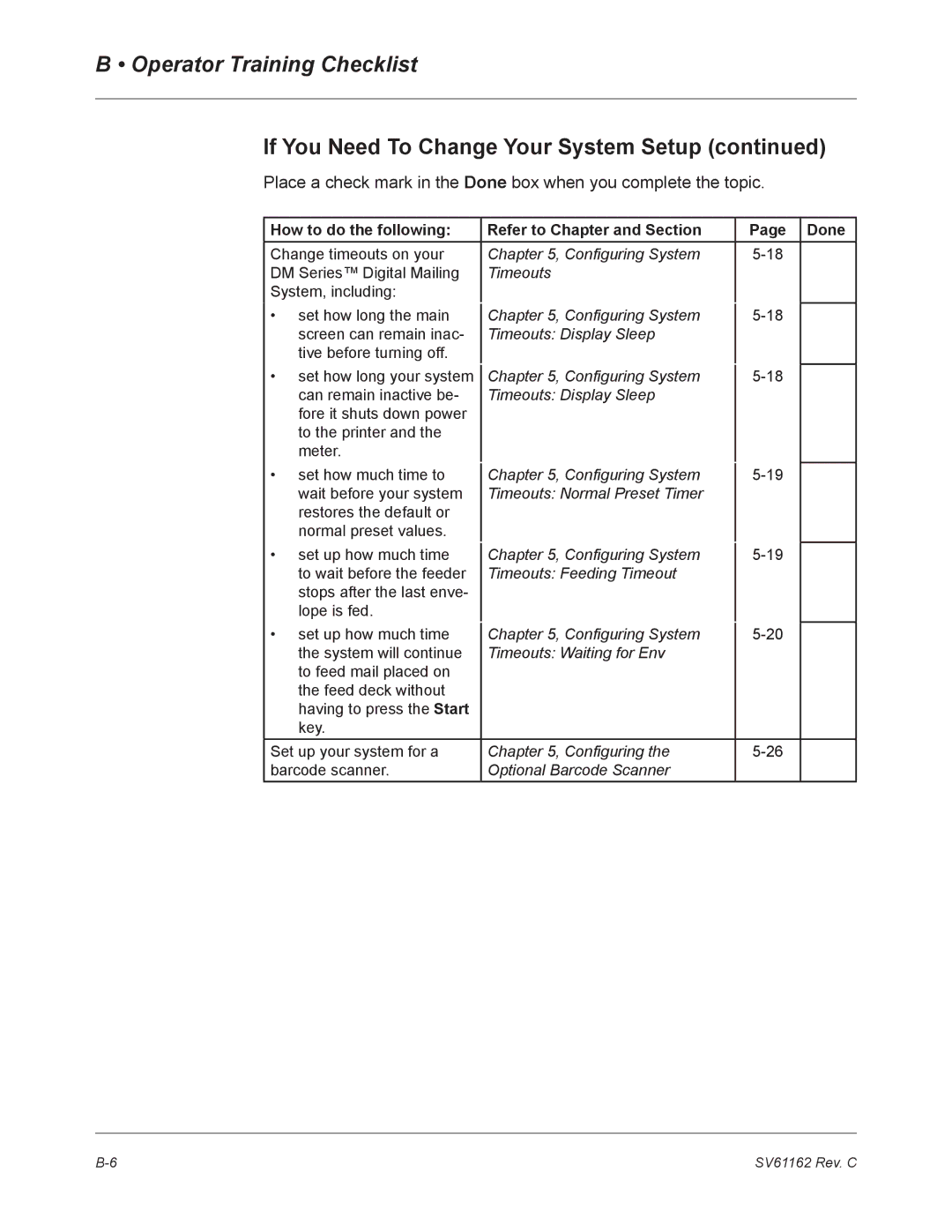
Timeouts
Configuring System Timeouts
Timeouts
Display Sleep
Normal
Preset Timer
Timeout
Feeding
Transaction Timer
Waiting for Env
Press the Custom Presets key
Presets
How to Define Normal Preset Values
Press the screen key for Store Current Setting to Preset
How to Store Advance Date in a Custom Preset
Defining Presets
How to Define Custom Preset Values
Select Store Current Setting to Preset
Example
How to Edit Custom Preset Values
How to View, Rename, or Delete Presets
Taking the Meter Out of Service Adding an Optional Printer
Configuring the Optional Barcode Scanner
Setting Default Scan Type
If your accounting Barcode Select System is Contains
Adding Barcode Prefixes
Combining Barcodes
Setting Auto-Enter
For weight break Use Class
Setting Up the Optional Smart Class Feature
Setting up Smart Class
Mailing System Setup
DM800 Series Digital Mailing System Operating Guide
Page
Adding Postage
Your Postage Meter Usps Rekey Requirements
Adding Postage
Postage By Phone
If you need assistance with Postage By Phone System
Managing Your Postage Funds
Connecting Your Postage Meter Remote Analog Phone Line
Connecting Your Postage Meter to an Analog Phone Line
Connecting Your Postage Meter Local Analog Phone Line
DM800 Series Digital Mailing System Operating Guide
Checking Available Funds in Your Postage Meter
Adding Postage
Select Quick Refill, or Other Refill Amount
Page
Standard Accounting Setup
Contents Navigating Hints
Select Account
Accounting Setup
Set Up Accounts
Overview of Accounting
Using Account Setup Procedures
Before Using Setup Procedures
Select View Accounts
Select Create Account/Sub
Subaccounts
Accounting Messages
Select Edit Account
Editing
Accounts
Select Accounting Period
Setting an Account Period
Turning Standard Accounting On or Off
Turning Account Password Protection On or Off
Deleting Accounts and Subaccounts
Turning Reset Individual Accounts On or Off
Resetting Clearing all Accounts
Transferring
Funds
Setting the Station ID
Selecting an Accounting Type
Your Accounting System Features
Example Account Engineering
Subsubaccount User Friendly Testing
Account Structure Hierarchy
Subsubaccount Graphics and Layout
Hierarchal Reporting Structure
Reports
Single Account Report
Reports
How To View a Report
How to Print a Report
Introduction
Screen Display
Reports
Single Account Report
Printed Report
Printed Report
Multi-Account Summary
Screen Display
Internal printer version
External Printer Version
Last 5 Refills Report
Printed Report Attached Printer
Confirmation Services Report System Printer
Printed Report System Printer
External Printer Required
Permit Mail Report
Account List Report
Funds Report
System Setup Report
Error Report
Job Report
Last Rates Downloaded
Installed/Pending Rates
Data Capture Report
View Download Log
Page
Maintaining and Updating
Maintaining and Updating
Cleaning the Exterior
Tape Maintenance
Items to Keep On Hand
Tape is still on roll
Tape Has Run Out
Seal Sealing Solution Maintenance
Priming the Moistener
Moistener Maintenance
Cleaning or Replacing the Moistener Brush