Operating System |
|
| Supported Memory Limits | |||
|
|
|
|
|
|
|
RedHat | Enterprise | 4.5 - 4.8 | x86 | ≥ 256 MB | ≤ 16 GB |
|
Linux |
|
|
|
|
|
|
|
| 5.0 - 5.6 | x86 x64 | ≥ 512 MB | ≤ 16 GB |
|
|
|
|
|
|
|
|
|
| 6.0 | x86 | ≥512 MB | ≤8 GB |
|
|
|
|
|
|
|
|
|
|
| x64 | ≥512 MB | ≤32 GB |
|
|
|
|
|
|
|
|
Oracle | Enterprise | 5.0 - 5.6 | x86 | ≥ 512 MB | ≤ 64 GB |
|
Linux |
|
|
|
|
|
|
|
|
| x64 | ≥ 512 MB | ≤ 128 GB |
|
|
|
|
|
|
|
|
|
| 6.0 | x86 | ≥512 MB | ≤8 GB |
|
|
|
|
|
|
|
|
|
|
| x64 | ≥512 MB | ≤32 GB |
|
|
|
|
|
|
|
|
SUSE | Enterprise | 9 SP4 | x86 | ≥ 256 MB | ≤ 16 GB |
|
Linux |
|
|
|
|
|
|
|
| 10 | x86 | ≥ 512 MB | ≤ 16 GB |
|
|
| SP1,SP2,SP3,SP4 |
|
|
|
|
|
|
| x64 | ≥ 512 MB | ≤ 128 GB |
|
|
|
|
|
|
|
|
|
| 11 (+SP1) | x86 | ≥ 512 MB | ≤ 16 GB |
|
|
|
|
|
|
|
|
|
|
| x64 | ≥ 512 MB | ≤ 128 GB |
|
|
|
|
|
|
| |
Debian GNU/Linux | Lenny (5.0) | x86 | ≥ 128 MB | ≤ 32 GB |
| |
|
|
|
|
|
|
|
|
| Squeeze (6.0) | x86 x64 | ≥ 128 MB | ≤ 32 GB |
|
|
|
|
|
|
|
|
Ubuntu |
| 10.04 | x86 | ≥ 128 MB | ≤ 512 MB |
|
|
|
|
|
|
|
|
|
|
| x64 | ≥ 128 MB | ≤ 32 GB |
|
|
|
|
|
|
|
|
Warning:
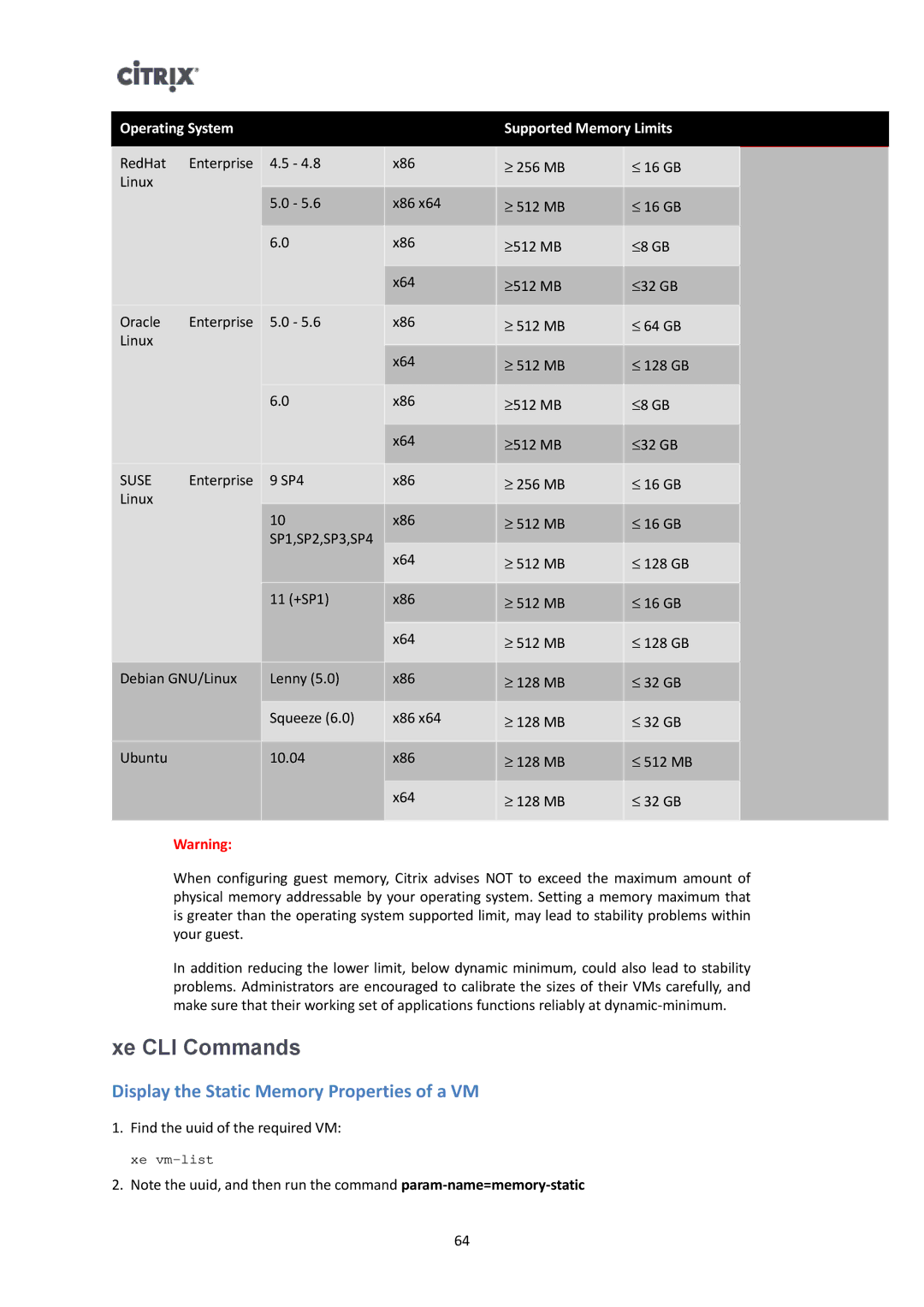
When configuring guest memory, Citrix advises NOT to exceed the maximum amount of physical memory addressable by your operating system. Setting a memory maximum that is greater than the operating system supported limit, may lead to stability problems within your guest.
In addition reducing the lower limit, below dynamic minimum, could also lead to stability problems. Administrators are encouraged to calibrate the sizes of their VMs carefully, and make sure that their working set of applications functions reliably at
xe CLI Commands
Display the Static Memory Properties of a VM
1.Find the uuid of the required VM:
xe
2.Note the uuid, and then run the command
64